HP2-T26 Exam Details
-
Exam Code
:HP2-T26 -
Exam Name
:Servicing HP BladeSystem Solutions -
Certification
:HP Certifications -
Vendor
:HP -
Total Questions
:268 Q&As -
Last Updated
:Jul 14, 2026
HP HP2-T26 Online Questions & Answers
-
Question 141:
Using the Insight Display on a c7000 enclosure, which menu should you select to display the current condition of the enclosure?
A. Health Summary
B. Chat Mode
C. Enclosure Settings
D. Enclosure Info -
Question 142:
A customer has a ProLiant BL680c G5 Server Blade with an Integrated HP Smart Array P400i Controller with 256MB ECC protected cache. An application runs slowly whenever there are large bursts of disk writes. How can this be prevented?
A. by adding more internal disks to distribute the load
B. by creating a larger swap file to handle the extra load
C. by changing the internal disks from RAID 1 to RAID 5
D. by installing an optional 512MB cache with BBWC -
Question 143:
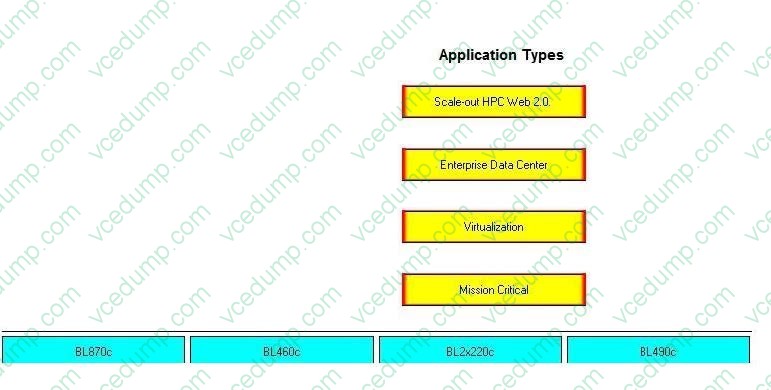
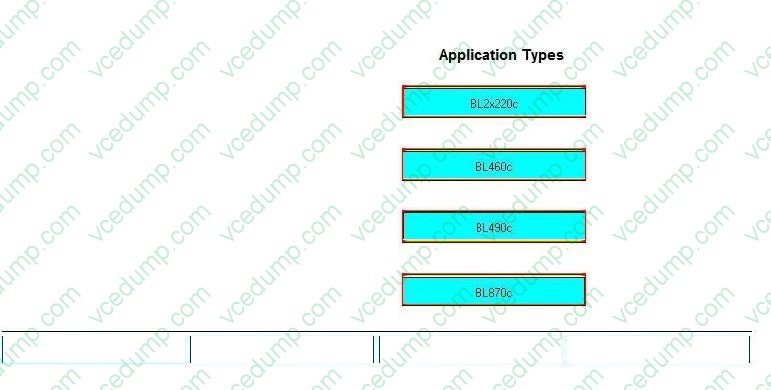
Place each server blade on its recommended application type.
Select and Place:
-
Question 144:
A server blade has a memory error. All the LEDs in all the banks are illuminated. What should you do first to address this issue?
A. Simultaneously replace the memory in all the banks.
B. Replace the system board that the memory is connected to.
C. Replace the processor, which is causing a false memory error.
D. Replace one memory bank at a time. -
Question 145:
While troubleshooting a problem, you need to get a report from a ProLiant BL460c Gen8 Server detailing the firmware and driver revisions. Which report should you obtain?
A. Active Health Logs
B. Array Diagnostics Report
C. ILO Event Logs
D. Integrated Management Log -
Question 146:
A customer has a ProLiant BL680c G5 running a database application that crashes when one of the eight installed memory modules fails. The bad memory is replaced. How can the failure be prevented in the future?
A. by changing the memory configuration to RAID 5 memory
B. by installing Dual Ranked Memories for redundancy
C. by adding eight more DIMMs and using memory mirroring
D. by installing memory in all slots for a total of 256GB -
Question 147:
A customer has a c7000 enclosure that is fully populated with BL680c blades. Two months after the initial installation, the rack initiates a thermal shutdown. When diagnosing the problem, you find there is not enough space to get behind the unit. You pull all the units out but find no problems with the chassis, blades, or their cooling systems.
What is a potential cause for the thermal shutdown?
A. The rack is too close to the cold air outlet. The hot air area is too large, and the cooling system is unable to recirculate the hot air effectively.
B. The blade enclosure's fan system is not strong enough to remove the thermal heat generated in a fully populated enclosure.
C. The cooling system temperature in the data center is set too low This results in the enclosure cooling fan system rotating at a lower RPM and not removing enough of the thermal heat.
D. There is insufficient air circulation causing hot air from the rear of rack to be fed back to the equipment through the front of the rack. -
Question 148:
Your customer used RAID 1+0, lost two drives, and the array failed. What can you recommend to better address the need for any two drive failures at the same time?
A. RAID 1
B. RAID 5
C. RAID 6
D. RAID 10 -
Question 149:
After the replacement of an HP StorageWorks Ultrium Tape Blade, the new unit should be tested. What is the recommended diagnostic and support tool for c-Class tape blades?
A. Backup Exec Tape Diagnostic Support Tool for HP c-class BladeSystems
B. HP c-class BladeSystem Tape Blade Sizer and Diagnostic Tool
C. HP BladeSystem c-Class Tape Blade Diagnostic Tool from the SmartStart CD
D. HP StorageWorks Library and Tape Tools -
Question 150:
What should you do to replace a defective Standby Onboard Administrator (OA) in a c7000 enclosure?
A. Move the Active OA to Standby bay, then replace the OA.
B. Replace the Standby OA after all server blades are powered off.
C. Replace the Standby OA only while the enclosure is powered off.
D. Replace the Standby OA while the enclosure is powered on.
Related Exams:
-
HP0-003
HP OpenView Service Desk 5.x -
HP0-045
Supporting the ESL E-Series Lobraries -
HP0-052
Planning and Design of HP 9000/HP Integrity Server Solutions -
HP0-053
Enterprise Integration and Management of HP ProLiant Servers -
HP0-054
Compaq/Oracle 8i I and P with Windows NT -
HP0-055
Implementing HP ProLiant Servers -
HP0-058
Configuration and Management of HP Integrity Mid-Range Servers -
HP0-063
LF PROFESSIONAL COLOR WORKFLOW MANAGEMENT -
HP0-064
HP BladeSystems C-Class Solutions 1 -
HP0-065
Planning and Designing ProLiant Solutions for the Enterprise
Tips on How to Prepare for the Exams
Nowadays, the certification exams become more and more important and required by more and more enterprises when applying for a job. But how to prepare for the exam effectively? How to prepare for the exam in a short time with less efforts? How to get a ideal result and how to find the most reliable resources? Here on Vcedump.com, you will find all the answers. Vcedump.com provide not only HP exam questions, answers and explanations but also complete assistance on your exam preparation and certification application. If you are confused on your HP2-T26 exam preparations and HP certification application, do not hesitate to visit our Vcedump.com to find your solutions here.