FCP_FGT_AD-7.6 Exam Details
-
Exam Code
:FCP_FGT_AD-7.6 -
Exam Name
:FortiGate 7.6 Administrator FCP_FGT_AD-7.6 -
Certification
:Fortinet Certifications -
Vendor
:Fortinet -
Total Questions
:138 Q&As -
Last Updated
:Jul 11, 2026
Fortinet FCP_FGT_AD-7.6 Online Questions & Answers
-
Question 31:
A FortiGate administrator is required to reduce the attack surface on the SSL VPN portal.
Which SSL timer can you use to mitigate a denial of service (DoS) attack?
A. SSL VPN http-request-header-timeout
B. SSL VPN dtls-hello-timeout
C. SSL VPN login-timeout
D. SSL VPN idle-timeout -
Question 32:
A FortiGate administrator wants to verify whether NP6 offloading is being used for a policy that handles high-volume traffic.
Which CLI command provides this information?
A. diagnose sys session filter
B. diagnose netlink aggregate name
C. diagnose hardware deviceinfo nic
D. diagnose sys session list -
Question 33:
An administrator wants to ensure that session helpers do not interfere with SIP traffic inspection. What must the administrator do?
A. Disable all session helpers globally
B. Change the SIP session helper port to a non-standard value
C. Disable the SIP session helper and enable the SIP ALG under VoIP profile
D. Assign a VoIP profile to the firewall policy and keep session helpers enabled -
Question 34:
Refer to the exhibits.
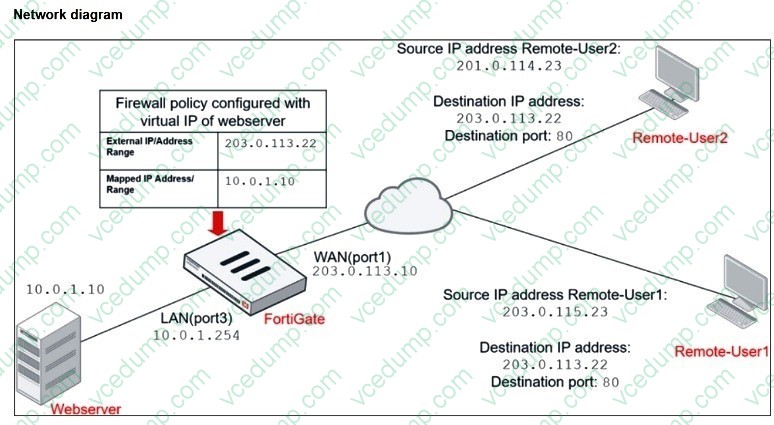
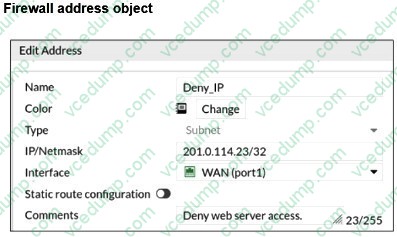
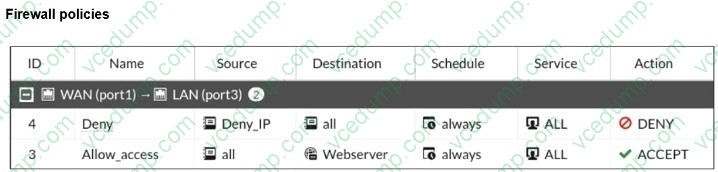
The exhibits show a diagram of a FortiGate device connected to the network, and the firewall configuration.
An administrator created a Deny policy with default settings to deny Webserver access for Remote-User2.
The policy should work such that Remote-User1 must be able to access the Webserver while preventing
Remote-User2 from accessing the Webserver.
Which two configuration changes can the administrator make to the policy to deny Webserver access for Remote- User2? (Choose two.)
A. Set the Destination address as Webserver in the Deny policy.
B. Disable match-vip in the Deny policy.
C. Set the Destination address as Deny_IP in the Allow_access policy.
D. Enable match-vip in the Deny policy. -
Question 35:
Refer to the exhibit.
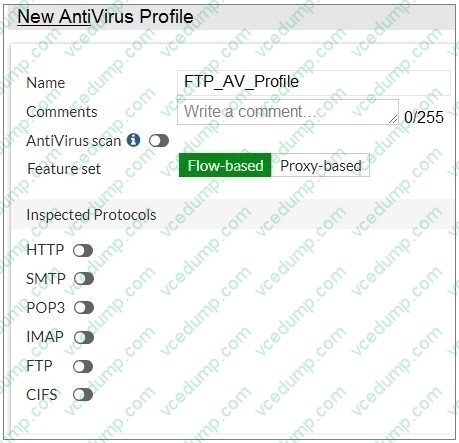
Why is the Antivirus scan switch grayed out when you are creating a new antivirus profile for FTP?
A. None of the inspected protocols are active in this profile.
B. FortiGate, with less than 2 GB RAM, does not support the Antivirus scan feature.
C. Antivirus scan is disabled under System ?gt; Feature visibility.
D. The Feature Set for the profile is Flow-based but it must be Proxy-based. -
Question 36:
Refer to the exhibit.
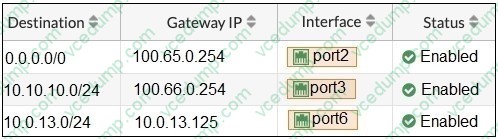
Based on the routing table shown in the exhibit, which two statements are true? (Choose two.)
A. A packet with the source IP address 10.100.110.10 arriving on port3 is allowed if strict RPF is disabled.
B. A packet with the source IP address 10.100.110.10 arriving on port2 is allowed if strict RPF is enabled.
C. A packet with the source IP address 10.0.13.10 arriving on port2 is allowed if strict RPF is disabled.
D. A packet with the source IP address 10.10.10.10 arriving on port2 is allowed if strict RPF is enabled. -
Question 37:
Which two statements are true about an HA cluster? (Choose two.)
A. An HA cluster cannot have both in-band and out-of-band management interfaces at the same time.
B. Link failover triggers a failover if the administrator sets the interface down on the primary device.
C. When sniffing the heartbeat interface, the administrator must see the IP address 169.254.0.2.
D. HA incremental synchronization includes FIB entries and IPsec SAs. -
Question 38:
Refer to the exhibit.
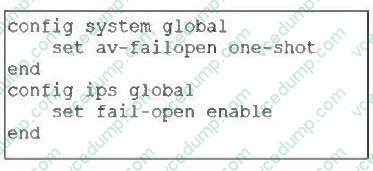
Based on this partial configuration, what are the two possible outcomes when FortiGate enters conserve mode? (Choose two.)
A. Administrators cannot change the configuration.
B. FortiGate skips quarantine actions.
C. Administrators must restart FortiGate to allow new session.
D. FortiGate drops new sessions requiring inspection. -
Question 39:
Refer to the exhibit.
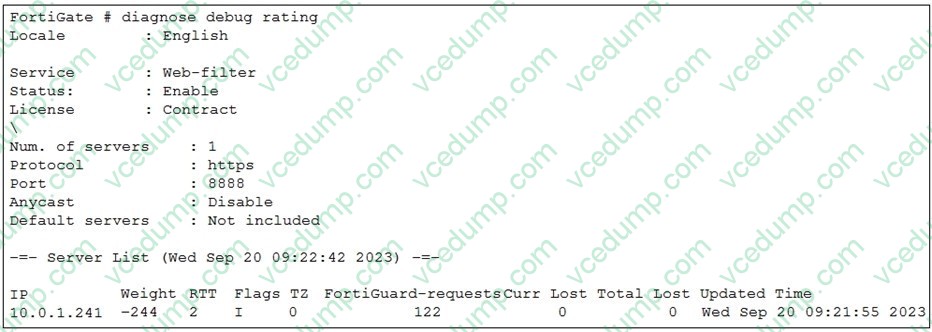
Which two statements about the FortiGuard connection are true? (Choose two.)
A. FortiGate is using the default port for FortiGuard communication.
B. FortiGate identified the FortiGuard Server using DNS lookup.
C. The weight increases as the number of failed packets rises.
D. You can configure unreliable protocols to communicate with FortiGuard Server. -
Question 40:
A remote user reports slow SSL VPN performance and frequent disconnections. The user is located in an area with poor internet connectivity.
What setting should the administrator adjust to improve the user's experience?
A. Enable split tunneling to reduce VPN traffic.
B. Change the SSL VPN port to a non-standard port.
C. Increase the session timeout for inactive sessions.
D. Configure the DTLS timeout to accommodate high-latency connections.
Related Exams:
-
EMEA-ADVANCED-SUPPORT
Fortinet EMEA Advanced Support -
FCP_FAC_AD-6.5
FCP - FortiAuthenticator 6.5 Administrator -
FCP_FAZ_AD-7.4
FCP - FortiAnalyzer 7.4 Administrator -
FCP_FAZ_AN-7.4
FCP - FortiAnalyzer 7.4 Analyst -
FCP_FAZ_AN-7.6
Fortinet NSE 5 - FortiAnalyzer 7.6 Analyst -
FCP_FCT_AD-7.2
FCP - Forti Client EMS 7.2 Administrator -
FCP_FCT_AD-7.4
Fortinet NSE 6 - FortiClient EMS 7.4 Administrator -
FCP_FGT_AD-7.4
FCP - FortiGate 7.4 Administrator -
FCP_FGT_AD-7.6
FortiGate 7.6 Administrator FCP_FGT_AD-7.6 -
FCP_FMG_AD-7.4
FCP - FortiManager 7.4 Administrator
Tips on How to Prepare for the Exams
Nowadays, the certification exams become more and more important and required by more and more enterprises when applying for a job. But how to prepare for the exam effectively? How to prepare for the exam in a short time with less efforts? How to get a ideal result and how to find the most reliable resources? Here on Vcedump.com, you will find all the answers. Vcedump.com provide not only Fortinet exam questions, answers and explanations but also complete assistance on your exam preparation and certification application. If you are confused on your FCP_FGT_AD-7.6 exam preparations and Fortinet certification application, do not hesitate to visit our Vcedump.com to find your solutions here.