CCST-NETWORKING Real Exam Questions

Cisco Certified Support Technician (CCST) Networking

40 questions available · Page 1 of 4

Updated Exam DumpsVerified AnswersPass Guarantee

Get Complete Exam Dumps
Question 1 Hotspot

HOTSPOT

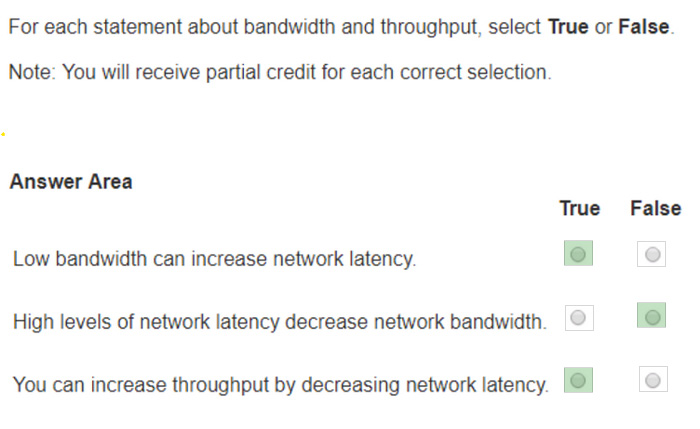
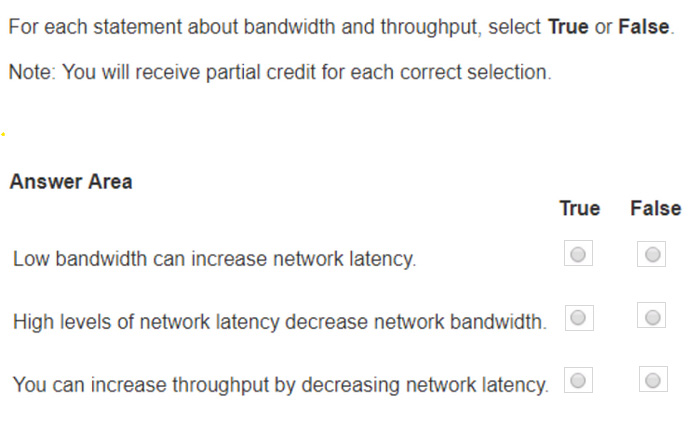
For each statement about bandwidth and throughput, select True or False.

Note: You will receive partial credit for each correct selection.
Question diagram
Show answer and explanation
Correct answer diagram
Explanation

Statement 1: Low bandwidth can increase network latency. Statement 2: High levels of network latency decrease network bandwidth. Statement 3: You can increase throughput by decreasing network latency.

Bandwidth vs. Latency: Bandwidth refers to the maximum rate at which data can be transferred over a network path. Latency is the time it takes for a data packet to travel from the source to the destination.
References:
Network Performance Metrics: Cisco Network Performance Understanding Bandwidth and Latency: Bandwidth vs. Latency
Question 2 Single choice

Which address is included in the 192.168.200.0/24 network?

  1. A

    192.168.199.13

  2. B

    192.168.200.13

  3. C

    192.168.201.13

  4. D

    192.168.1.13

Show answer and explanation

Correct answer: B

Explanation

192.168.200.0/24 Network: This subnet includes all addresses from 192.168.200.0 to 192.168.200.255.

The /24 indicates a subnet mask of 255.255.255.0, which allows for 256 addresses. 192.168.199.13: This address is in the 192.168.199.0/24 subnet, not the 192.168.200.0/24 subnet. 192.168.200.13: This address is within the 192.168.200.0/24 subnet. ?92.168.201.13: This address is in the 192.168.201.0/24 subnet, not the 192.168.200.0/24 subnet.
192.168.1.13: This address is in the 192.168.1.0/24 subnet, not the 192.168.200.0/24 subnet.
References:
Subnetting Guide: Subnetting Basics

Question 3 Hotspot

HOTSPOT

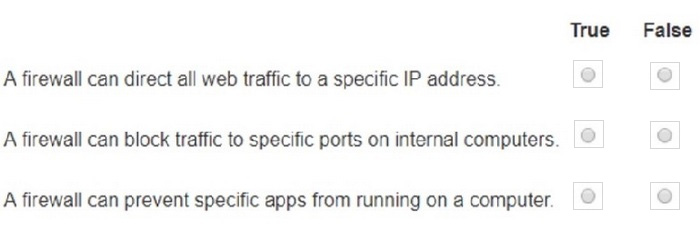
You plan to use a network firewall to protect computers at a small office.

For each statement about firewalls, select True or False.

Note: You will receive partial credit for each correct selection.

Question diagram
Show answer and explanation
Correct answer diagram
Explanation

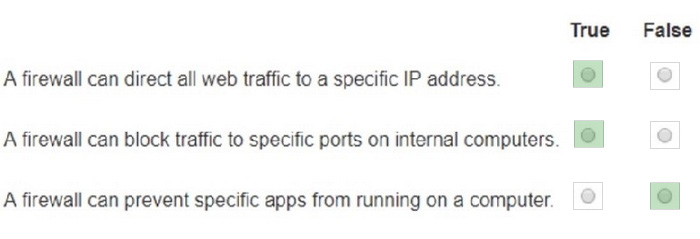
A firewall can direct all web traffic to a specific IP address. A firewall can block traffic to specific ports on internal computers. A firewall can prevent specific apps from running on a computer.

Directing Web Traffic: Firewalls can manage traffic redirection using NAT and port forwarding rules to route web traffic to designated servers or devices within the network.
Blocking Specific Ports: Firewalls can enforce security policies by blocking or allowing traffic based on port numbers, ensuring that only permitted traffic reaches internal systems.
Application Control: While firewalls manage network traffic, preventing applications from running typically requires software specifically designed for endpoint protection and application management.
References:
Understanding Firewalls: Firewall Capabilities
Network Security Best Practices: Network Security Guide

Question 4 Single choice

What is the most compressed valid format of the IPv6 address 2001 :0db8:0000:0016:0000:001b:
2000:0056?

  1. A

    2001:db8: : 16: : 1b:2:56

  2. B

    2001:db8: : 16: : 1b: 2000: 56

  3. C

    2001:db8: 16: :1b:2:56

  4. D

    2001:db8: 0:16: :1b: 2000:56

Show answer and explanation

Correct answer: D

Explanation

IPv6 addresses can be compressed by removing leading zeros and replacing consecutive groups of zeros with a double colon (::). Here's how to compress the address 2001:0db8:0000:0016:0000:001b:2000:0056:
Remove leading zeros from each segment: Replace the longest sequence of consecutive zeros with a double colon (::). In this case, the two consecutive zeros between the 16 and 1b: Thus, the most compressed valid format of the IPv6 address is 2001:db8:0:16::1b:2000:56.
References:
Cisco Learning Network
IPv6 Addressing (Cisco)

Question 5 Drag & drop

DRAG DROP

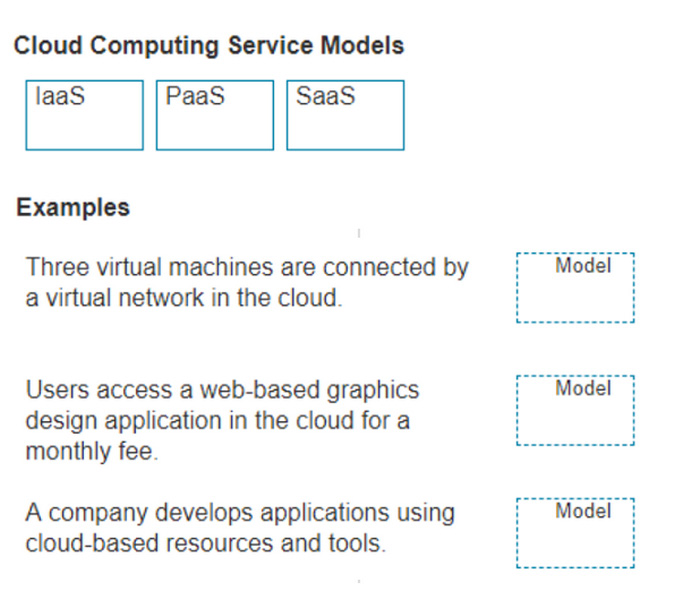
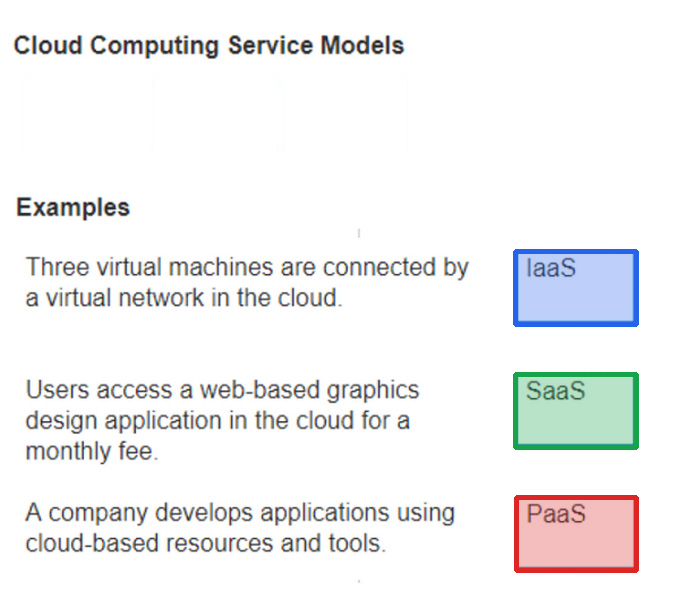
Move each cloud computing service model from the list on the left to the correct example on the right

Note: You will receive partial credit for each correct answer.

Question diagram
Show answer and explanation
Correct answer diagram
Explanation

Three virtual machines are connected by a virtual network in the cloud. Users access a web-based graphics design application in the cloud for a monthly fee.
A company develops applications using cloud-based resources and tools.

IaaS (Infrastructure as a Service): Provides virtualized hardware resources that customers can use to build their own computing environments. PaaS (Platform as a Service): Offers a platform with tools and services to develop, test, and deploy applications.
SaaS (Software as a Service): Delivers fully functional applications over the internet that users can access and use without managing the underlying infrastructure.
References:
Cloud Service Models: Understanding IaaS, PaaS, SaaS NIST Definition of Cloud Computing:NIST Cloud Computing

Question 6 Multiple choice

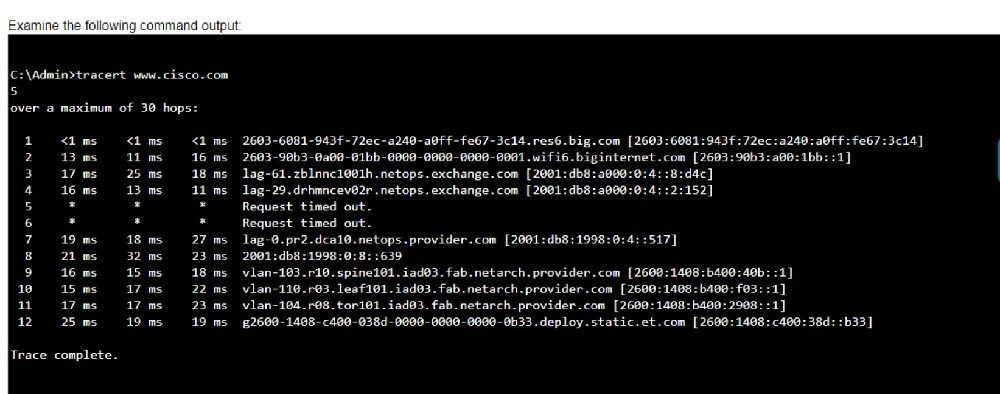
Examine the following output:

Which two conclusions can you make from the output of the tracert command? (Choose 2.)

Note: You will receive partial credit for each correct answer.

  1. A

    The trace successfully reached the www.cisco.com server.

  2. B

    The trace failed after the fourth hop.

  3. C

    The IPv6 address associated with the www.cisco.com server is 2600:1408: c400: 38d: : b33.

  4. D

    The routers at hops 5 and 6 are offline.

  5. E

    The device sending the trace has IPv6 address 2600:1408:c400:38d :: b33.

Show answer and explanation

Correct answers: A, C

Explanation

-Statement A: "The trace successfully reached the www.cisco.com server." This is true as indicated by the "Trace complete" message at the end, showing that the trace has reached its destination. -Statement C:
"The IPv6 address associated with the www.cisco.com server is 2600:1408:c400:38d::b33." This is true because the final hop in the trace, which is the destination, has this IPv6 address.

-Statement B: "The trace failed after the fourth hop." This is incorrect as the trace continues beyond the fourth hop, despite some intermediate timeouts. -Statement D: "The routers at hops 5 and 6 are offline."
This is not necessarily true. The routers might be configured to not respond to traceroute requests.
-Statement E: "The device sending the trace has IPv6 address 2600:1408:c400:38d::b33."
This is incorrect; this address belongs to the destination server, not the sender.

References:
-Understanding Traceroute: Traceroute Guide

Question 7 Hotspot

HOTSPOT

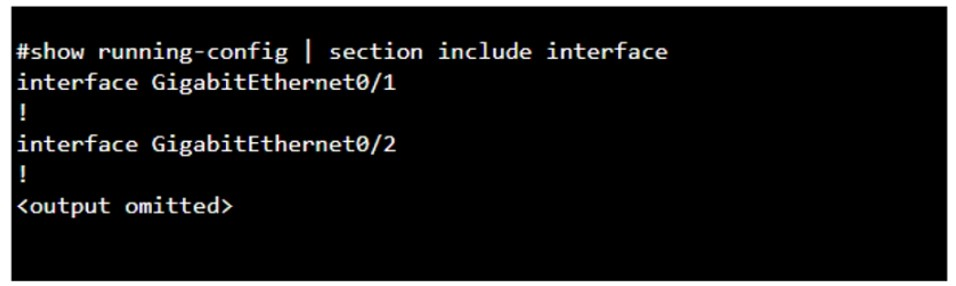
You purchase a new Cisco switch, turn it on, and connect to its console port. You then run the following command:

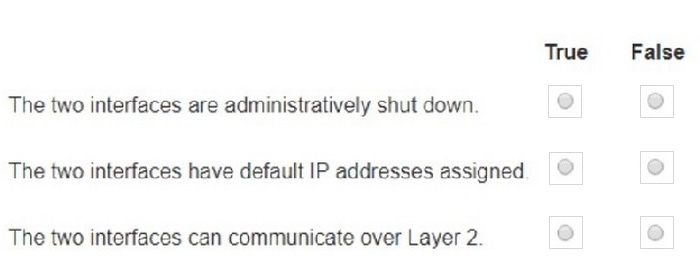
For each statement about the output, select True or False.

Note: You will receive partial credit for each correct selection.

Question diagram
Show answer and explanation
Correct answer diagram
Explanation

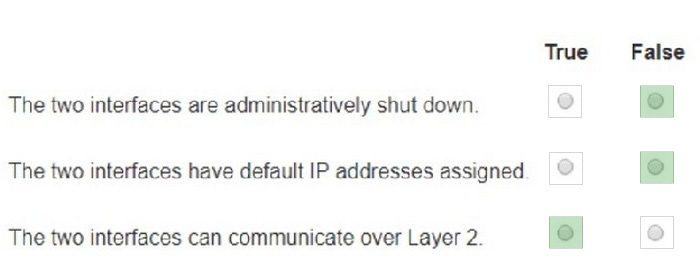
The two interfaces are administratively shut down: The two interfaces have default IP addresses assigned: The two interfaces can communicate over Layer 2:

Interface Status: The absence of the "shutdown" command means the interfaces are not administratively shut down.
IP Address Assignment: There is no evidence in the output that IP addresses have been assigned to the interfaces, which would typically be shown as "ip address" entries.
Layer 2 Communication: Switch interfaces in their default state operate at Layer 2, enabling them to forward Ethernet frames and participate in Layer 2 communication.
References:
Cisco IOS Interface Configuration: Cisco Interface Configuration Understanding Cisco Switch Interfaces:
Cisco Switch Interfaces

Question 8 Multiple choice

Which two statements are true about the IPv4 address of the default gateway configured on a host? (Choose 2.)

Note: You will receive partial credit for each correct selection.

  1. A

    The IPv4 address of the default gateway must be the first host address in the subnet.

  2. B

    The same default gateway IPv4 address is configured on each host on the local network.

  3. C

    The default gateway is the Loopback0 interface IPv4 address of the router connected to the same local network as the host.

  4. D

    The default gateway is the IPv4 address of the router interface connected to the same local network as the host.

  5. E

    Hosts learn the default gateway IPv4 address through router advertisement messages.

Show answer and explanation

Correct answers: B, D

Explanation

-Statement B: "The same default gateway IPv4 address is configured on each host on the local network."
This is true because all hosts on the same local network (subnet) use the same default gateway IP address to send packets destined for other networks.
-Statement D: "The default gateway is the IPv4 address of the router interface connected to the same local network as the host." This is true because the default gateway is the IP address of the router's interface that is directly connected to the local network.
-Statement A: "The IPv4 address of the default gateway must be the first host address in the subnet." This is not necessarily true. The default gateway can be any address within the subnet range. -Statement C: "The default gateway is the Loopback0 interface IPv4 address of the router connected to the same local network as the host." This is not true; the default gateway is the IP address of the router's physical or
logical interface connected to the local network.
-Statement E: "Hosts learn the default gateway IPv4 address through router advertisement messages."
This is generally true for IPv6 with Router Advertisement (RA) messages, but not typically how IPv4 hosts learn the default gateway address.

Question 9 Single choice

A support technician examines the front panel of a Cisco switch and sees 4 Ethernet cables connected in the first four ports. Ports 1, 2, and 3 have a green

LED. Port 4 has a blinking green light.

What is the state of the Port 4?

  1. A

    Link is up with cable malfunctions.

  2. B

    Link is up and not stable.

  3. C

    Link is up and active.

  4. D

    Link is up and there is no activity.

Show answer and explanation

Correct answer: C

Explanation

On a Cisco switch, a port with a blinking green LED typically indicates that the port is up (active) and is currently transmitting or receiving data. This is a normal state indicating active traffic on the port.
-A. Link is up with cable malfunctions: Usually indicated by an amber or blinking amber light.
-B. Link is up and not stable: Not typically indicated by a green blinking light.
-D. Link is up and there is no activity: Would be indicated by a solid green light withoutblinking.
Thus, the correct answer is C. Link is up and active.
References:
-Cisco Switch LED Indicators
-Cisco Ethernet Switch LED Patterns

Question 10 Single choice

Which standard contains the specifications for Wi-Fi networks?

  1. A

    GSM

  2. B

    LTE

  3. C

    IEEE 802.11

  4. D

    IEEE 802.3

  5. E

    EIA/TIA 568A

Show answer and explanation

Correct answer: C

Explanation

The IEEE 802.11 standard contains the specifications for Wi-Fi networks. It is a set of media access control (MAC) and physical layer (PHY) specifications for implementing wireless local area network (WLAN) computer communication in various frequencies, including but not limited to 2.4 GHz, 5 GHz, and 6 GHz1. This standard is maintained by the Institute of Electrical and Electronics Engineers (IEEE) and is commonly referred to as Wi-Fi. The standard has evolved over time to include several amendments that improve speed, range, and reliability of wireless networks.

References:
-The Most Common Wi-Fi Standards and Types, Explained
-802.11 Standards Explained: 802.11ax, 802.11ac, 802.11b/g/n, 802.11a
-Wi-Fi Standards Explained - GeeksforGeeks