AZ-700 Exam Details
-
Exam Code
:AZ-700 -
Exam Name
:Designing and Implementing Microsoft Azure Networking Solutions -
Certification
:Microsoft Certifications -
Vendor
:Microsoft -
Total Questions
:452 Q&As -
Last Updated
:Jul 16, 2026
Microsoft AZ-700 Online Questions & Answers
-
Question 351:
You have an Azure subscription. The subscription contains a locally-redundant storage 1LRS) account named stoiage1 that is deployed to the US East Azure region and has a Microsoft Storage service endpoint.
You set Redundancy for storage 1 to Read-access geo-redundant storage (RA-GRS)
You need to ensure that the contents of storage1 will be accessible by using a service endpoint in a paired region.
The solution must minimize administrative effort What should you do first?
A. Create an object replication rule for storage1.
B. From storage1. select Secure transfer required.
C. Create a service endpoint policy.
D. Delete the existing service endpoint. -
Question 352:
SIMULATION
Username and password
Use the following login credentials as needed:
To enter your username, place your cursor in the Sign in box and click on the username below.
To enter your password, place your cursor in the Enter password box and click on the password below.
Azure Username: [email protected] Azure Password: xxxxxxxxxx
If the Azure portal does not load successfully in the browser, press CTRL-K to reload the portal in a new browser tab.
The following information is for technical support purposes only:
Lab Instance: 12345678
You are preparing to connect your on-premises network to VNET4 by using a Site-to-Site VPN. The on-premises endpoint of the VPN will be created on a firewall named Firewall1.
The on-premises network has the following configuration:
Internal address range: 10.10.0.0/16
Firewall1 internal IP address: 10.10.1.1
Firewall1 public IP address: 131.107.50.60
BGP is not used.
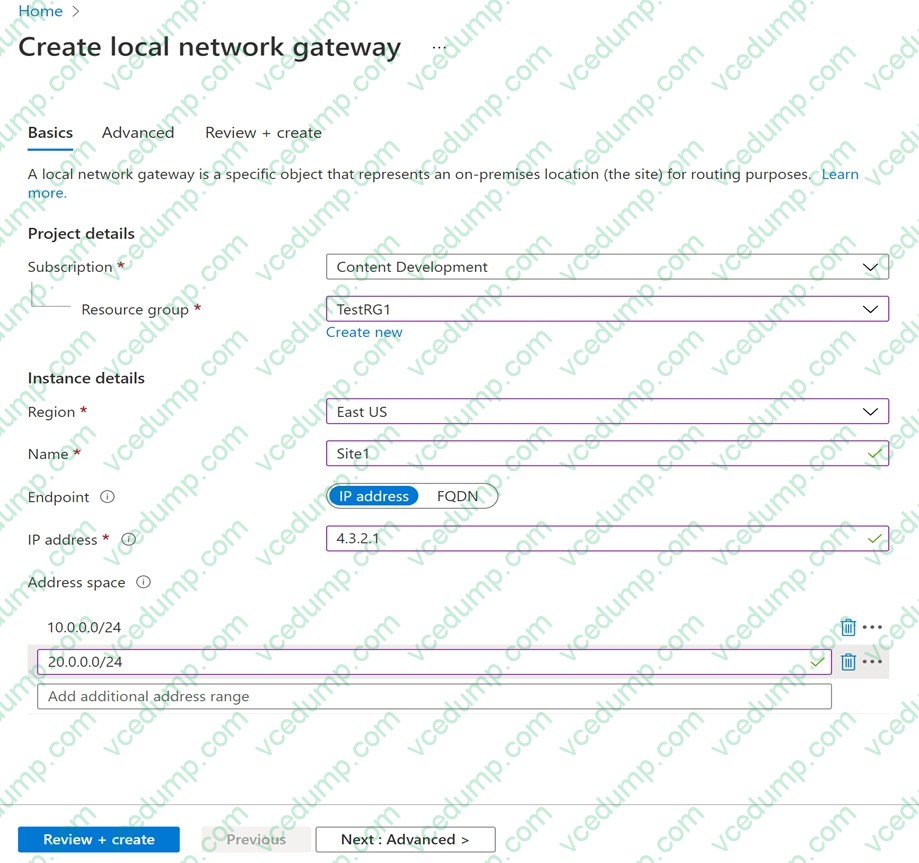
You need to create the object that will provide the IP addressing configuration of the on-premises network to the Site-to-Site VPN. You do not need to create a virtual network gateway to complete this task.
To complete this task, sign in to the Azure portal.
A. See explanation below.
B. Placeholder
C. Placeholder
D. Placeholder -
Question 353:
You have an Azure application gateway configured for a single website that is available at https://www.contoso.com.
The application gateway contains one backend pool and one rule. The backend pool contains two backend servers. Each backend server has an additional website that is available on port 8080.
You need to ensure that if port 8080 is unavailable on a backend server, all the traffic for https://www.contoso.com is redirected to the other backend server.
What should you do?
A. Create a health probe
B. Add a new rule
C. Change the port on the listener
D. Add a new listener -
Question 354:
HOTSPOT
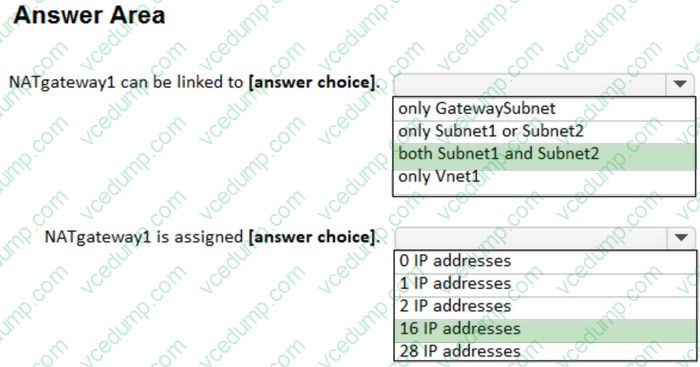
You have an Azure virtual network named Vnet1 that contains two subnets named Subnet1 and Subnet2.
Both subnets contain virtual machines.
You create a NAT gateway named NATgateway1 as shown in the following exhibit.
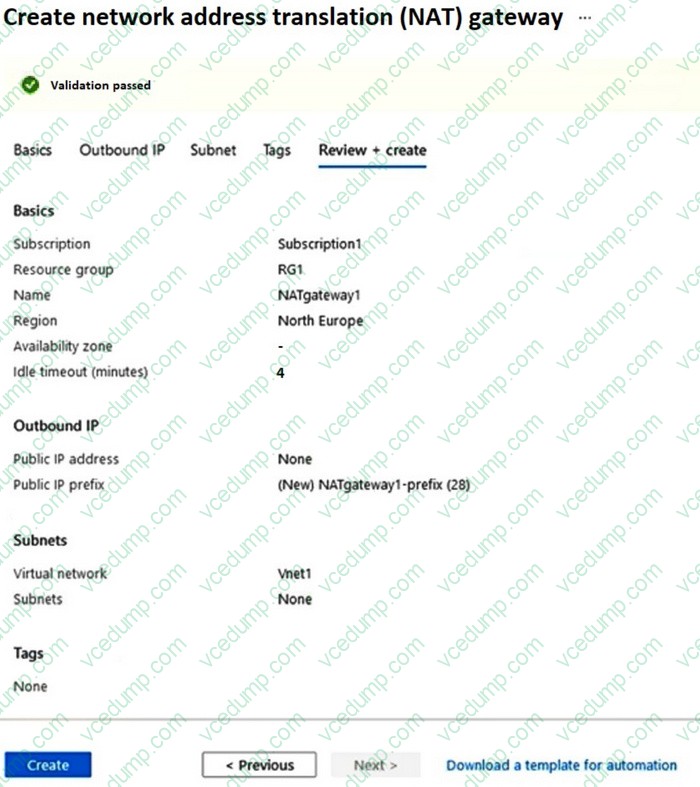
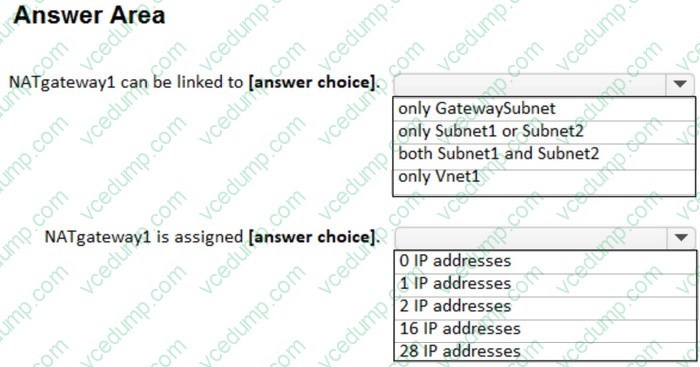
Use the drop-down menus to select the answer choice that completes each statement based on the information presented in the graphic.
NOTE: Each correct selection is worth one point.
-
Question 355:
Your company has a single on-premises datacenter in Washington DC. The East US Azure region has a peering location in Washington DC.
The company only has Azure resources in the East US region.
You need to implement ExpressRoute to support up to 1 Gbps. You must use only ExpressRoute Unlimited data plans. The solution must minimize costs.
Which type of ExpressRoute circuits should you create?
A. ExpressRoute Local
B. ExpressRoute Direct
C. ExpressRoute Premium
D. ExpressRoute Standard -
Question 356:
HOTSPOT
You have an Azure subscription that contains a virtual network named VNet1. VNet1 contains the resources shown in the following table.

You need to publish App1 by using AG1 and a URL of https://app1.contoso.com. The solution must meet the following requirements:
1. TLS connections must terminate on AG1.
2. Minimize the number of targets in the backend pool of AG1.
3. Minimize the number of deployed copies of the SSL certificate of App1.
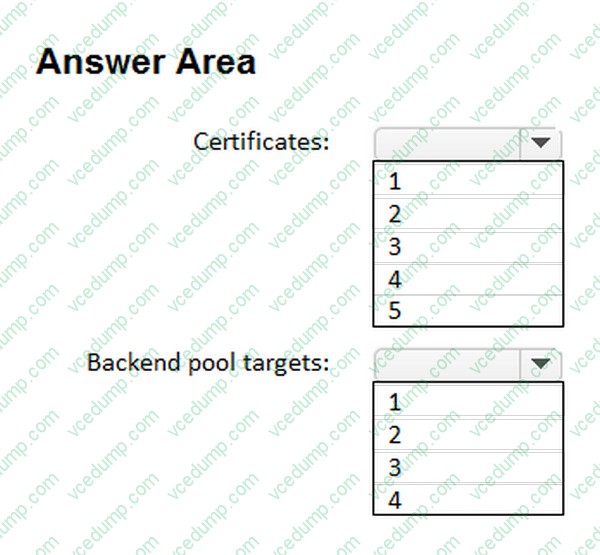
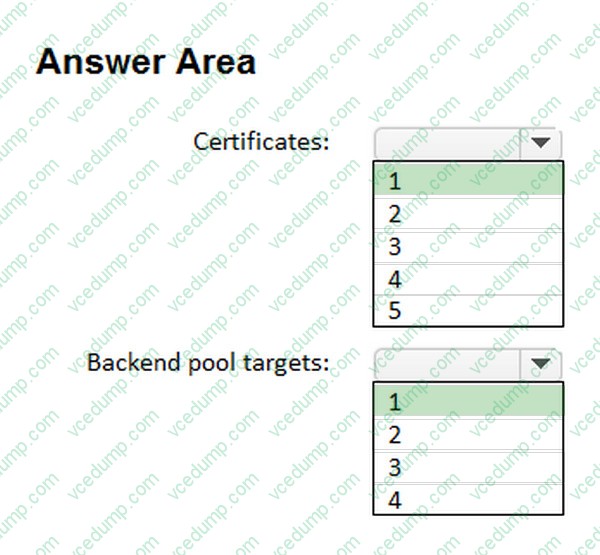
How many locations should you import to the certificate, and how many targets should you add to the backend pool of AG1? To answer, select the appropriate options in the answer area.
NOTE: Each correct selection is worth one point.
-
Question 357:
You have an Azure subscription that contains an Azure App Service web app named WebApp1 and an Azure Front Door profile named FDProfile1. FDProfile1 forwards requests addressed to https://www.contoso.com to WebApp1.
You need to ensure that only requests addressed to https://www.contoso.com/users/* are forwarded to WebApp1.
What should you modify in FDProfile1?
A. the origin group
B. the endpoint
C. the routes
D. the domain -
Question 358:
HOTSPOT
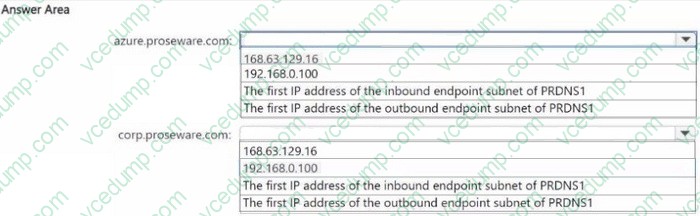
You ate configuring the DNS forwarding luleset for DNSR1
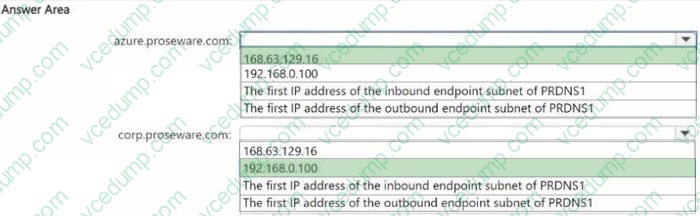
You need to configure the destination IP address for azure.proseware.com and for corp.proseware.com. The solution must meet the general requirements.
Which IP addiesses should you configure for each namespace? To answer, select the appropriate options in the answer area.
NOTE: Each correct selection is worth one point.
-
Question 359:
Your company has offices in Montreal, Seattle, and Paris. The outbound traffic from each office originates from a specific public IP address.
You create an Azure Front Door instance named FD1 that has Azure Web Application Firewall (WAF) enabled. You configure a WAF policy named Policy1 that has a rule named Rule1. Rule1 applies a rate limit of 100 requests for traffic that originates from the office in Montreal.
You need to apply a rate limit of 100 requests for traffic that originates from each office.
What should you do?
A. Modify the rate limit threshold of Rule1.
B. Create two additional associations.
C. Modify the conditions of Rule1.
D. Modify the rule type of Rule1. -
Question 360:
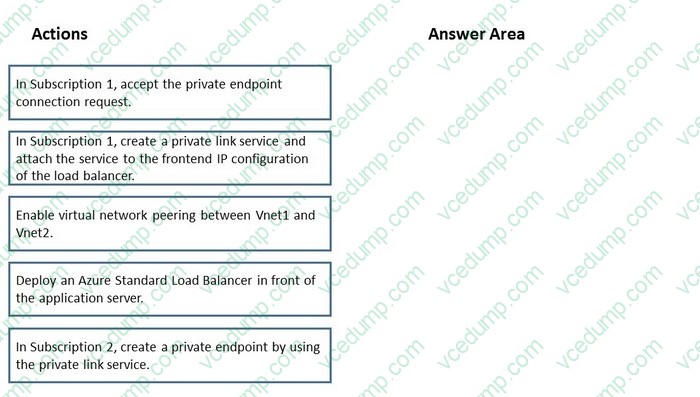
DRAG DROP
You have two Azure subscriptions named Subscnption1 and Subscription2. Subscription1 contains a virtual network named Vnet1. Vnet1 contains an application server. Subscription2 contains a virtual network named Vnet2.
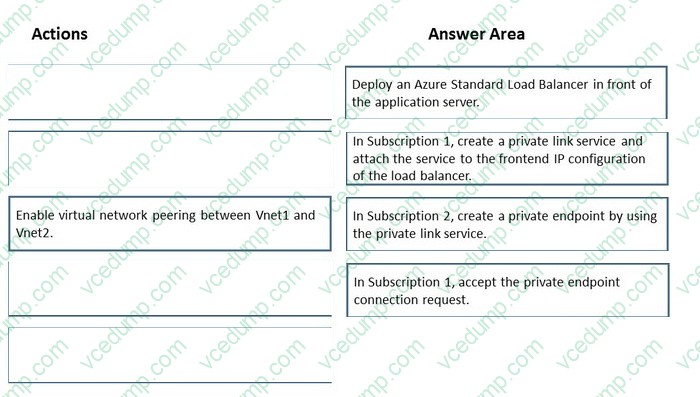
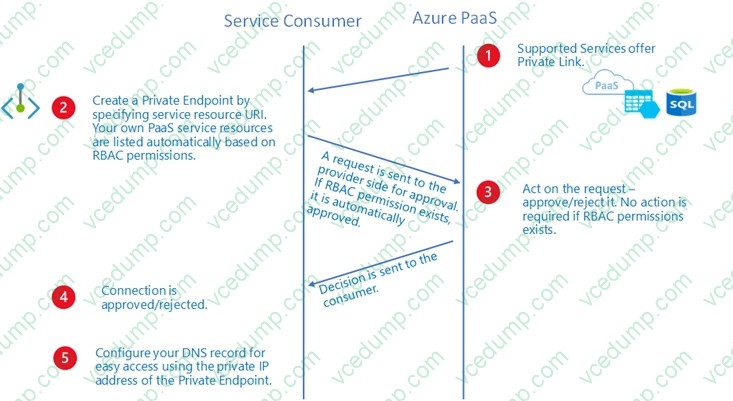
You need to provide the virtual machines in Vnet2 with access to the application server in Vnet1 by using a private endpoint.
Which four actions should you perform in sequence? To answer, move the appropriate actions from the list of actions to the answer area and arrange them in the correct order.
Select and Place:
Related Exams:
-
62-193
Technology Literacy for Educators -
70-243
Administering and Deploying System Center 2012 Configuration Manager -
70-355
Universal Windows Platform – App Data, Services, and Coding Patterns -
77-420
Excel 2013 -
77-427
Excel 2013 Expert Part One -
77-725
Word 2016 Core Document Creation, Collaboration and Communication -
77-726
Word 2016 Expert Creating Documents for Effective Communication -
77-727
Excel 2016 Core Data Analysis, Manipulation, and Presentation -
77-728
Excel 2016 Expert: Interpreting Data for Insights -
77-731
Outlook 2016 Core Communication, Collaboration and Email Skills
Tips on How to Prepare for the Exams
Nowadays, the certification exams become more and more important and required by more and more enterprises when applying for a job. But how to prepare for the exam effectively? How to prepare for the exam in a short time with less efforts? How to get a ideal result and how to find the most reliable resources? Here on Vcedump.com, you will find all the answers. Vcedump.com provide not only Microsoft exam questions, answers and explanations but also complete assistance on your exam preparation and certification application. If you are confused on your AZ-700 exam preparations and Microsoft certification application, do not hesitate to visit our Vcedump.com to find your solutions here.