AD0-E559 Exam Details
-
Exam Code
:AD0-E559 -
Exam Name
:Adobe Marketo Engage Business Practitioner Expert -
Certification
:Adobe Certifications -
Vendor
:Adobe -
Total Questions
:50 Q&As -
Last Updated
:Jul 15, 2026
Adobe AD0-E559 Online Questions & Answers
-
Question 11:
An Engagement Program has not deployed the next new email even though there are people in the stream and the cadence set correctly.
What is one possible reason the email has not been launched?
A. The new email has not been activated.
B. The stream has not been set as activated.
C. All Persons in the stream have exhausted their content. -
Question 12:
A marketer has run a whole email A/B test within an email program, and there was a clear winner defined when the test finished running. The marketer then wants to send a follow-up email to everyone who received the losing email. How would they find the list of people who received the losing email?
A. It is not possible to see who received which test variant
B. Use the Was Sent A/B Test filter with a Variant constraint
C. Use the Was Sent Email filter with the Test Variant constraint -
Question 13:
A marketer decided to check the activity log of a person but does not find any activities as displayed below:
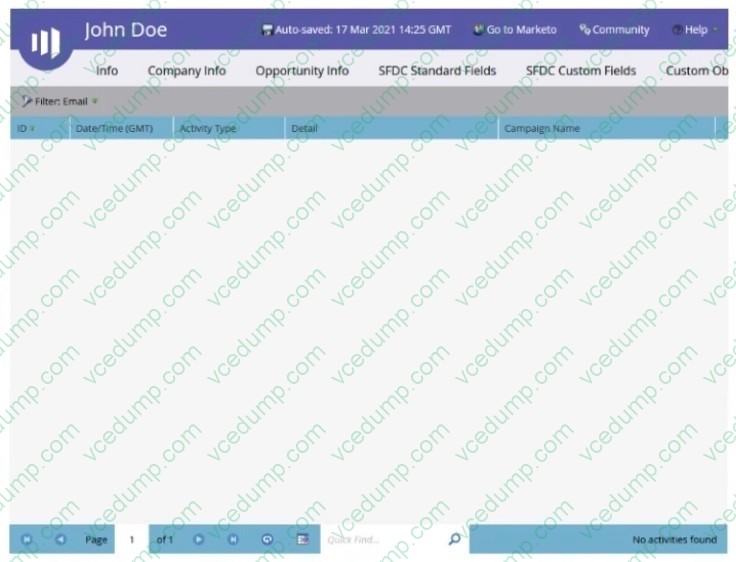
What is the reason the Activity Log tab is empty?
A. The person activity Is filtered.
B. The activity log was exported by an API and is now empty
C. The lead is anonymous. -
Question 14:
Jay has set up a webinar program and successfully connected it to a launchpoint webinar provider. The webinar confirmation email is using the {{member.webinar url}} token of a Adobe Marketo Engage program. The webinar program is live and 40 people have registered on a Adobe Marketo Engage LP andhave a program status of registered and received a confirmation email. However, the unique link for all registrants is not being populated.
What are two things that Jay could try to identify the issue? (Choose two.)
A. Look in field management to check the value of the token.
B. Go into the Members tab of the webinar program and check if any person has the program status of Registration Error'.
C. Go into the Members tab of the webinar program and change the program status on the 40 persons that have a status of 'Members' to Registered.
D. Go into the Members tab of the webinar program and check that the webinar url column is populated using a custom view. -
Question 15:
Kelsey is building a consent management program. As part of the program build, Kelsey has built a smart campaign that will update a person's record with the opt-in date in the flow when their Marketing Opt-in changes to True. She has set up the following trigger campaign.
There are no other triggers or filters in the smart list in the smart campaign.
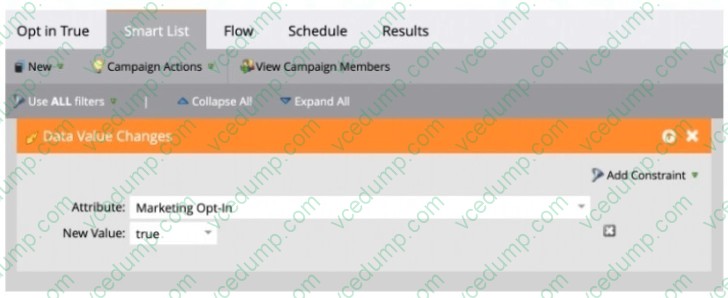
Will the campaign process all leads who have a Marketing Opt-in value of True?
A. Yes, the campaign will process new and existing leads regardless of source (i.e., webform fill out. list import. CRM, etc.)
B. No, the campaign will only process web form fill out leads but not leads from a list import.
C. No, the campaign will process only existing leads but not new leads. -
Question 16:
An Adobe Marketo Engage instance has the following folders set up under Marketing Activities:
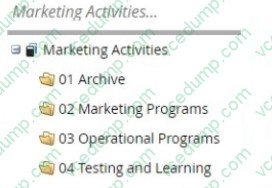
In the My Tokens tab of the 02 Marketing Programs folder, several tokens have been set up:
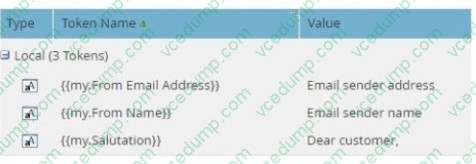
Why have these tokens been set up in this folder?
A. As an easy example to copy to all programs Inside the folder.
B. So they will be available in all programs inside the folder.
C. No reason. Tokens only have a function inside a program. -
Question 17:
An Adobe Marketo Engage administrator is building a revenue model:
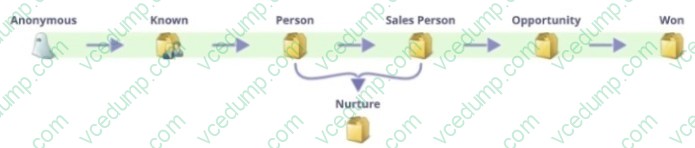
When validating the model, they received an error message.
What does the administrator need to do to correct the model validation error?
A. Add triggers to all stage transitions.
B. Add at least one SLA stage to the model.
C. Add all stages to the success path. -
Question 18:
Michael has instituted a new program naming convention for his Marketo instance. It instructs his users to begin each program name with an abbreviation indicating which channel the program belongs to. For example, programs of the Webinar channel are designated to begin with the 'WBN' abbreviation. Michael has ensured all existing program names have been updated to adhere to this new naming convention.
Moving forward, how would Michael monitor for the existence of programs in the Webinar channel that do not adhere to this new naming convention?
A. In Marketing Activities, search for 'WBN' and filter results to only Include Event programs.
B. Use Audit Trail and filter by Asset Type and Actions.
C. Create a Program Performance report and filter by Channel = Webinar. -
Question 19:
A marketer wants to be efficient and effective with their A/B testing strategy. What A/B testing best practice should the user follow?
A. Run a combination of many tests sequentially and methodically.
B. Vary as many elements as possible in each test.
C. End the test as soon as one version surpasses the other. -
Question 20:
Aya has finished building a webinar program in Adobe Marketo Engage and connected it to a Launchpoint partner. Webinar registration is being handled by an Adobe Marketo Engage landing page. During the quality assurance process, she visited the landing page and registered for the webinar for the first time, however, a confirmation email was not sent.
What are two places to troubleshoot? (Choose two.)
A. Check to see if the confirmation email has the correct {{memberwebinar uri?token.
B. Check to see if the smart campaign is set to run every time or run once.
C. Check to see if the smart campaign handling the registration has any members.
D. Check to see if the person is a member of the Adobe Marketo Engage webinar program and set to the registered status.
Related Exams:
-
9A0-019
Adobe Photoshop 6.0 Product Proficiency -
9A0-042
Acrobat 7.0 Prowith Adobe LiveCycle Designer ACE Exam -
9A0-043
Adobe Illustrator CS 2 ACE -
9A0-044
Adobe Photoshop CS 2 ACE Exam -
9A0-045
Adobe InDesign CS 2 ACE Exam -
9A0-046
Adobe GoLive CS2 ACE Exam -
9A0-055
Adobe InDesign CS3 ACE Exam -
9A0-056
Adobe Dreamweaver CS3 ACE Exam -
9A0-057
Adobe Illustrator CS3 ACE Exam -
9A0-058
Adobe Flash CS3 ACE Exam
Tips on How to Prepare for the Exams
Nowadays, the certification exams become more and more important and required by more and more enterprises when applying for a job. But how to prepare for the exam effectively? How to prepare for the exam in a short time with less efforts? How to get a ideal result and how to find the most reliable resources? Here on Vcedump.com, you will find all the answers. Vcedump.com provide not only Adobe exam questions, answers and explanations but also complete assistance on your exam preparation and certification application. If you are confused on your AD0-E559 exam preparations and Adobe certification application, do not hesitate to visit our Vcedump.com to find your solutions here.