Atlassian ACP-610 Online Practice
Questions and Exam Preparation
ACP-610 Exam Details
Exam Code
:ACP-610
Exam Name
:Managing Jira Projects for Data Center and Server
Certification
:Atlassian Certifications
Vendor
:Atlassian
Total Questions
:75 Q&As
Last Updated
:Jul 09, 2026
Atlassian ACP-610 Online Questions &
Answers
Question 11:
A project uses several issue Types that have different workflows.
Sam can only see some of the issues on the project's Kanban board but sees all of them in the issue search.
Identify a possible reason.
A. board permissions B. column mapping C. issue-level security D. workflow conditions
B. column mapping
Explanation/Reference:
A possible reason why Sam can only see some of the issues on the project's Kanban board but sees all of them in the issue search is that the column mapping of the board does not include all the statuses of the different workflows used by the issue types. Column mapping determines which statuses are mapped to which columns on a board, and only issues with mapped statuses are displayed on the board. If an issue type has a workflow with a status that is not mapped to any column, then it will not appear on the board. Board permissions, issue-level security, and workflow conditions do not affect the visibility of issues on a board, as they apply to both the board and the issue search. Therefore, the correct answer is B. References: [Configuring columns], [Configuring workflows]
Question 12:
The MR manager is unsure whether she wants a Scrum or Kanban board for her project.
Identify one difference between the boards.
A. Only Kanban boards support column constraints. B. Only Scrum boards support a card layout for backlog view. C. Only Kanban boards can display Days in column D. Only Scrum boards have a sub filter E. Only Scrum boards support selecting an estimation method.
E. Only Scrum boards support selecting an estimation method.
Explanation/Reference:
One difference between Scrum and Kanban boards is that only Scrum boards support selecting an estimation method. Estimation is a way of measuring how much work is required to complete an issue or a sprint. Scrum boards allow you to choose between story points, original time estimate, or issue count as estimation methods. Kanban boards do not have estimation methods, as they focus on managing the flow of work rather than planning sprints. References: Configuring estimation and tracking, Estimating an issue
Question 13:
Paul and Tessa are in the Auditors role of every project.
You need to write a JQL query that shows Issues reported by either of them that are still unassigned.
Select the correct JQL query.
A. Reporter IN (Paul, Tessa) AND Assignee IS EMPTY B. Reporter IN (Auditors) AND assignee - EMPTY C. Reporter IN membersOfCAuditors") AND assignee = NULL D. Reporter IS Paul OR Reporter IS Tessa AND Assignee IS NULL E. (Reporter - Paul OR Reporter ?Tessa) AND Assignee - Unassigned
A. Reporter IN (Paul, Tessa) AND Assignee IS EMPTY
Explanation/Reference:
The correct JQL query to find issues reported by either Paul or Tessa that are still unassigned is: Reporter IN (Paul, Tessa) AND Assignee IS EMPTY. This query uses the IN operator to specify a list of values for the Reporter field, and the IS EMPTY operator to check if the Assignee field has no value. The other options are incorrect because they use invalid syntax or operators, such as "-", NULL, or Unassigned. For more information on JQL syntax and operators, see JQL operators and Use advanced search with Jira Query Language (JQL). References: JQL operators, Use advanced search with Jira Query Language (JQL)
Question 14:
Currently, the Done column of the Finance board shows all issues ever completed, regardless of age. Now, the team wants to do a periodic clean-up of the Done column.
1.
They want to do the clean-up whenever it is needed on an ad-hoc basis.
2.
They want to be able to report on all the issues that were removed during each clean-up.
Which solution meets their need?
A. remove issues as needed using the Release link B. exclude issues in Done status from the board filter C. exclude issues in Done status via a sub-filter D. exclude issues where Resolution != EMPTY from the board filter
A. remove issues as needed using the Release link
Explanation/Reference:
The team can use the Release link to remove issues as needed from the Done column. This will create a version in the project that contains all the issues that were removed, and the team can use the version report to see the details of each clean-up. Excluding issues in Done status from the board filter or via a sub-filter will not remove them from the Done column, but only hide them from view. Excluding issues where Resolution != EMPTY from the board filter will also hide issues from other columns that have a resolution set, which is not desired. References: [Releasing a version], [Managing Jira Projects Data Center and Server: Certification Bundle]
Question 15:
A product owner is responsible for two scrum teams. He needs to:
1.
see a snapshot displaying key sprint information like time elapsed and percentage of scope change
2.
monitor the overall progress of the next release to determine if it will ship on time
Which two gadgets will show this information? (Choose two.)
A. Version Report B. Issues in progress C. Sprint Health Gadget D. Activity Stream E. Projects F. Filter Results
A. Version Report C. Sprint Health Gadget
Explanation/Reference:
The Version Report and the Sprint Health Gadget are two gadgets that can show the information that the product owner needs. The Version Report shows the progress of a version by comparing the estimated amount of work to the completed work. The report also shows a projected release date based on the team's average velocity. The product owner can use this report to monitor the overall progress of the next release and determine if it will ship on time. The Sprint Health Gadget shows a snapshot of key sprint information such as time elapsed, percentage of scope change, sprint goal, and team members' availability. The product owner can use this gadget to see how each scrum team is performing in their current sprint and identify any issues or risks. References: Managing Jira Projects Data Center and Server: Certification Bundle, Version Report, Sprint Health Gadget
Question 16:
You are moving an epic between projects that share an issue type scheme. Which issues are moved along with the epic5
A. all standard issues in the epic B. all standard and sub-task issues in the epic C. only Story issues in the epic D. all sub-tasks of the epic itself E. all issues linked to the epic through issue links
A. all standard issues in the epic
Explanation/Reference:
When you move an epic between projects that share an issue type scheme, all standard issues in the epic are moved along with it. This means that any issue type that is not a sub-task or an epic will be moved to the new project. Sub-task issues in the epic will not be moved unless their parent issues are also in the epic. Story issues in the epic will be moved only if they are standard issue types, not sub-tasks. Issues linked to the epic through issue links will not be moved as they are not part of the epic hierarchy. Therefore, the correct answer is A. References: Moving an issue, Working with epics
Question 17:
You want to create a new Scrum board with the following requirements:
1.
Show all issue types from project BERT but do not show sub-tasks in the backlog
2.
Show only epics from project ERNIE
3.
Do not show issues from any other projects
Which board filler query meets these requirements?
A. project in (BERT, ERNIE) AND type in (standardlssueTypesG, Epic) B. project in (BERT. ERNIE) AND issuetype - Epic AND type not in subTasklssueTypesO C. (project = BERT AND type not in subTasklssueTypesO) OR (project = ERNIE AND issuetype Epic) D. project = BERT OR (project - ERNIE AND type = Epic) E. (project - BERT AND type in standardlssueTypes(J) OR (project - ERNIE AND issuetype -Epic)
C. (project = BERT AND type not in subTasklssueTypesO) OR (project = ERNIE AND issuetype Epic)
Explanation/Reference:
The board filter query that meets these requirements is (project = BERT AND type not in subTasklssueTypesO) OR (project = ERNIE AND issuetype Epic). This query will show all issue types from project BERT except sub-tasks, as well as only epics from project ERNIE. It will not show issues from any other projects, as it uses the OR operator to combine two conditions that specify the project names. The other queries do not meet all the requirements, as they either include sub-tasks from project BERT, exclude epics from project ERNIE, or show issues from other projects. References: Configuring filters, Advanced searching - fields reference
Question 18:
You need to display data on a dashboard that shows the correlation between the following:
1.
the number of days that issues have been open
2.
the number of comments on the issues
3.
the number of participants on the issues
Identify the single gadget that meets these requirements.
A. Heat Map B. Bubble Chart C. Activity Stream D. Issue Statistics E. Voted Issues
B. Bubble Chart
Explanation/Reference:
Question 19:
The release manager is requesting a list of all issues included in a particular sprint. Which report will provide this information?
A. Control Chart B. Release Burndown C. Version Report D. Sprint Report E. Average Age Report
D. Sprint Report
Explanation/Reference:
A Sprint Report is the best report to provide a list of all issues included in a particular sprint. A Sprint Report shows the scope, status, and completion date of each sprint. It also displays a breakdown of the completed, incomplete, and added issues in the sprint. The release manager can easily view the list of incomplete issues in the Issue Navigator by clicking on the View in Issue Navigator link at the bottom of the report. A Sprint Report also helps to track the team's performance and identify any scope changes during the sprint. References: Managing Jira Projects Data Center and Server: Certification Bundle, [Sprint Report | Jira Software Cloud]
Question 20:
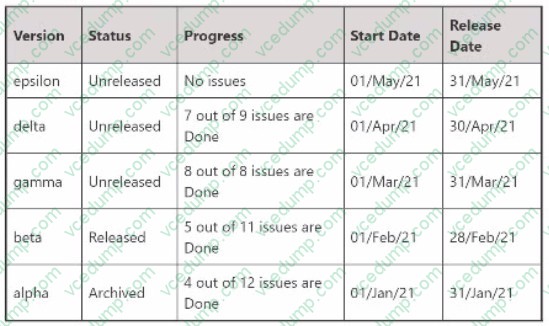
A Scrum project has the following five configured versions: Howmany of them will be available in the versions panel of the project backlog?
A. 4 B. 1 C. 2 D. 5 E. 3
E. 3
Explanation/Reference:
Three versions will be available in the versions panel of the project backlog:
epsilon, delta, and gamma. These are the three unreleased versions in the project, as shown in the image. The versions panel only shows unreleased versions, as they are used to plan and track the progress of upcoming releases. Released
and archived versions are not shown in the versions panel, as they are considered completed and no longer relevant for planning purposes. References: [Working with versions], [Managing Jira Projects Data Center and Server: Certification
Nowadays, the certification exams become more and more important and required by more and more
enterprises when applying for a job. But how to prepare for the exam effectively? How to prepare
for the exam in a short time with less efforts? How to get a ideal result and how to find the
most reliable resources? Here on Vcedump.com, you will find all the answers.
Vcedump.com provide not only Atlassian exam questions,
answers and explanations but also complete assistance on your exam preparation and certification
application. If you are confused on your ACP-610 exam preparations
and Atlassian certification application, do not hesitate to visit our
Vcedump.com to find your solutions here.