Microsoft AB-730 Online Practice
Questions and Exam Preparation
AB-730 Exam Details
Exam Code
:AB-730
Exam Name
:AI Business Professional
Certification
:Microsoft Certifications
Vendor
:Microsoft
Total Questions
:104 Q&As
Last Updated
:Jul 09, 2026
Microsoft AB-730 Online Questions &
Answers
Question 1:
HOTSPOT
For each of the following statements, select Yes if the statement is true. Otherwise, select No.
NOTE: Each correct selection is worth one point.
All three prompt injection statements are selected as Yes. Prompt injection can cause data exposure or unintended behavior because malicious instructions may try to override the user's intended task or system boundaries. It can embed harmful instructions in content that an AI system reads, such as documents, pages, emails, or other natural-language inputs. It is a security risk for generative AI systems that interpret and respond to natural language, so users should treat untrusted content as a possible instruction source.
Question 2:
You are using Microsoft 365 Copilot to plan a trip and have asked Copilot to remember several details about the trip.
You cancel the trip plans.
You need to ensure that Copilot forgets the details.
What should you do?
A. From the My Account portal, delete the Copilot activity history. B. From Copilot, delete memories. C. From Copilot, delete custom instructions. D. From Copilot, delete all the conversation about the trip.
B. From Copilot, delete memories.
Explanation
Copilot Memory stores remembered details that Copilot can use as personalization context in later chats. If the user explicitly asked Copilot to remember trip details and later wants Copilot to forget them, the relevant control is to manage and delete saved memories. Deleting conversation history or activity history is not the same as deleting stored memories, and custom instructions are a separate personalization feature. The exam takeaway is to use Copilot Memory controls when the issue is remembered personal or work preferences.
Question 3:
HOTSPOT
Select the answer that correctly completes the sentence.
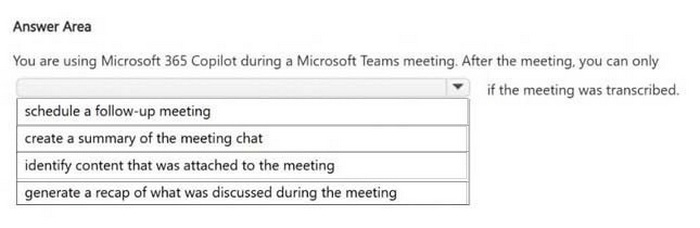
The selected completion is Microsoft Purview. Microsoft Purview provides compliance, governance, eDiscovery, audit, retention, and related policy controls for Microsoft 365 content and interactions. Defender for Cloud, Entra ID, and Intune address different security or device identity areas. For governance policies over Copilot-generated conversations and compliance handling, Purview is the relevant Microsoft governance service.
Question 4:
You have a Microsoft 365 Copilot license.
You are preparing a business presentation by using Copilot in PowerPoint.
Which two tasks can you achieve by using Copilot in PowerPoint?
Each correct answer presents a complete the solution.
NOTE: Each correct selection is worth one point.
A. Insert a custom animation for a specific object on a slide. B. Create a slide layout based on the content of your presentation. C. Customize the design theme of your presentation to match your company's branding. D. Produce a summary slide based on the key points in your presentation.
B. Create a slide layout based on the content of your presentation. D. Produce a summary slide based on the key points in your presentation.
Explanation
Copilot in PowerPoint can use presentation content to help create or organize slides and can summarize the important points in a deck. Creating a slide structure from the presentation content and producing a summary-style slide are content-generation and content-analysis tasks that match the PowerPoint Copilot feature set. Manually applying a custom animation to a single object or enforcing a company design theme is a PowerPoint design and formatting workflow, not the primary Copilot reasoning task. Students should associate Copilot in PowerPoint with drafting, summarizing, transforming, and organizing presentation content.
Question 5:
HOTSPOT
You are a business user who uses Microsoft 365 apps and services, including Microsoft Teams. You have a work account.
You want to use Microsoft 365 Copilot to help with meetings. For each of the following statements, select Yes if the statement is true. Otherwise, select No.
NOTE: Each correct selection is worth one point.
All three statements are selected as Yes. Scheduled prompts can be web-grounded when web grounding is available, and Microsoft's scheduled prompt guidance limits how often they can run. The image indicates a maximum frequency of once per day and a maximum of 15 runs. The exam takeaway is that prompt scheduling is useful for recurring work, but it has defined frequency and run-count limits.
Question 6:
You need to manage previous Microsoft 365 Copilot Chat conversations.
Which two actions can you perform from the conversation history experience?
Each correct answer presents part of the solution.
NOTE: Each correct selection is worth one point.
A. Continue a previous conversation by selecting it. B. Change the organization's Conditional Access policy for Copilot. C. Rename or delete a conversation from its more actions menu. D. Convert every previous chat into a Teams meeting transcript automatically. E. Increase another user's file permissions for a referenced SharePoint site.
A. Continue a previous conversation by selecting it. C. Rename or delete a conversation from its more actions menu.
Explanation
The conversation history experience lets users return to previous Copilot chats and continue them. It also provides management actions such as renaming or deleting a conversation from the more actions menu. Conditional Access policy changes, permission changes, and automatic conversion to Teams meeting transcripts are administrative or unrelated tasks. The history feature is for finding, continuing, renaming, and deleting the user's own conversations.
Question 7:
Copilot creates a useful project plan in chat.
You want teammates to edit and build on the plan together, but you do not want to share your entire Copilot chat session.
What should you use?
A. Microsoft 365 Copilot Pages B. Delete chat history C. A scheduled prompt D. A sensitivity label downgrade
A. Microsoft 365 Copilot Pages
Explanation
Copilot Pages lets a user turn a useful Copilot response into a persistent, editable, shareable page without sharing the entire chat session. That matches the requirement to let teammates collaborate on the project plan while keeping the broader conversation private. A scheduled prompt automates future runs, and deleting history or changing labels does not create a collaborative workspace. The key use case for Pages is converting generated content into a durable collaboration artifact.
Question 8:
HOTSPOT
You plan to create an agent by using the Microsoft 365 Copilot app. For each of the following statements, select Yes if the statement is true. Otherwise, select No.
NOTE: Each correct selection is worth one point.
All three statements are selected as Yes. A Microsoft 365 Copilot agent can be made available in Microsoft Word when supported by the host experience, and it can be shared with other users in the organization. Agents can also include complex workflows or connector-based capabilities when configured through the appropriate Microsoft 365 agent tooling. The exam point is that agents are not limited to simple chat answers; they can be integrated into Microsoft 365 apps and extended with connectors and workflows.
Question 9:
You plan to use a notebook in Microsoft 365 Copilot.
What is the purpose of a notebook?
A. to create a transcript of a conversation that you can easily email to other users B. to provide a private location that can be used to organize reference materials across related conversations C. to generate a summary of all the interactions you had with Copilot during a specific conversation
B. to provide a private location that can be used to organize reference materials across related conversations
Explanation
A Microsoft 365 Copilot Notebook is a private, scoped workspace for collecting related reference material and using it as context across related Copilot work. It is not primarily a transcript export tool and it does not simply summarize one chat conversation. The value of a notebook is that it lets the user curate the source material Copilot should use for a topic or project. Students should associate notebooks with organized references and context-aware conversations.
Question 10:
HOTSPOT
For each of the following statements, select Yes if the statement is true. Otherwise, select No. NOTE: Each correct selection is worth one point.
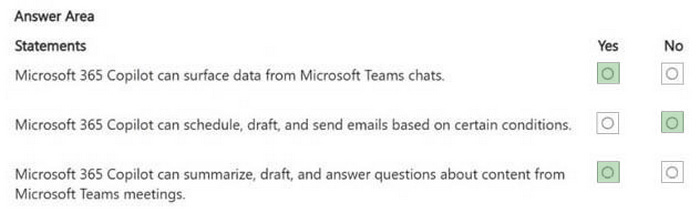
The selected responses are No, No, and Yes. The Microsoft 365 Copilot desktop app is not limited to only the last 20 conversations, and users can delete conversations rather than merely hiding them. Copilot chat history is tied to the user's account, so a conversation started in the desktop app can be continued from a browser on another computer after signing in. The key concept is account-based chat continuity across supported Copilot clients.
Nowadays, the certification exams become more and more important and required by more and more
enterprises when applying for a job. But how to prepare for the exam effectively? How to prepare
for the exam in a short time with less efforts? How to get a ideal result and how to find the
most reliable resources? Here on Vcedump.com, you will find all the answers.
Vcedump.com provide not only Microsoft exam questions,
answers and explanations but also complete assistance on your exam preparation and certification
application. If you are confused on your AB-730 exam preparations
and Microsoft certification application, do not hesitate to visit our
Vcedump.com to find your solutions here.