AB-730 Exam Details
-
Exam Code
:AB-730 -
Exam Name
:AI Business Professional -
Certification
:Microsoft Certifications -
Vendor
:Microsoft -
Total Questions
:104 Q&As -
Last Updated
:Jul 09, 2026
Microsoft AB-730 Online Questions & Answers
-
Question 21:
A user asks Microsoft 365 Copilot to summarize all documents about a confidential acquisition. Some files are stored in a SharePoint site that the user cannot open directly.
What should you expect Copilot to do?
A. Include the restricted files because Copilot can search the whole tenant.
B. Include the restricted files only if they have no sensitivity label.
C. Use only the content that the signed-in user is authorized to access.
D. Ask the user to approve temporary tenant-wide access for the prompt. -
Question 22:
A team is discussing a confidential issue in a Teams meeting.
They want to use Copilot during the meeting, but they do not want to record or transcribe the meeting, and they do not need Copilot content after the meeting ends.
Which meeting configuration best matches the requirement?
A. Use Copilot only during the meeting without turning on recording or transcription.
B. Turn on transcription so Copilot will be available after the meeting.
C. Record the meeting and then delete the recording immediately.
D. Move the meeting chat to a Copilot Page before the meeting starts. -
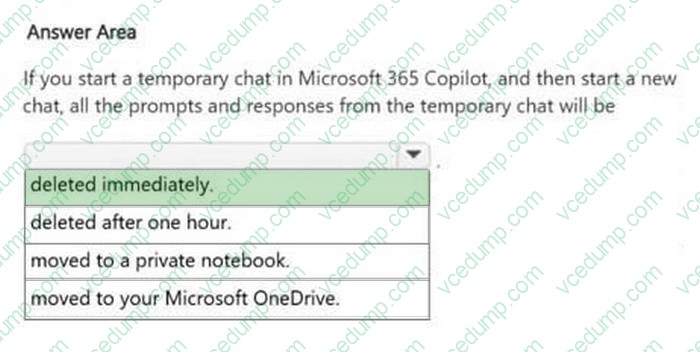
Question 23:
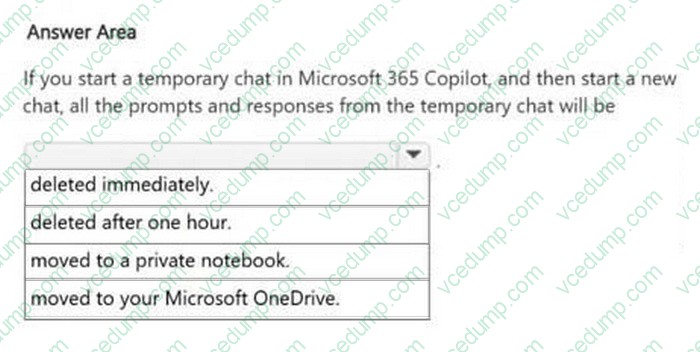
HOTSPOT
Select the answer that correctly completes the sentence.
-
Question 24:
You have an open Microsoft 365 Copilot conversation.
You need to chat with an agent named Agent1 during the conversation.
What should you enter to call Agent1?
A. [Agent1]
B. #Agent1
C. /Agent1
D. @Agent1 -
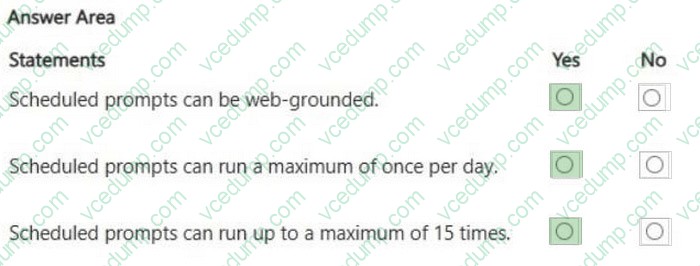
Question 25:
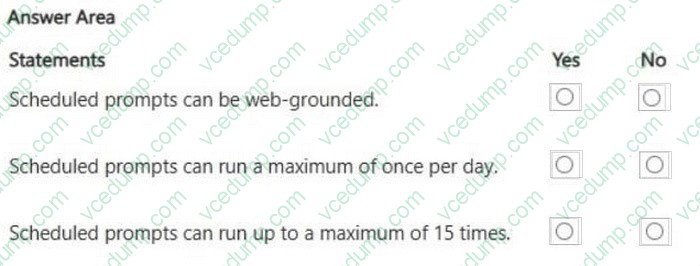
HOTSPOT
For each of the following statements, select Yes if the statement is true. Otherwise, select No.
NOTE: Each correct selection is worth one point.
-
Question 26:
You create a Microsoft 365 Copilot notebook and add a file named Process.docx from a local folder.
Yesterday, you updated Process.docx in the local folder.
What will occur when you chat in the notebook?
A. The chat will reference the most recent version of Process.docx.
B. The chat will reference both versions of Process.docx.
C. The chat will reference only the original version of Process.docx. -
Question 27:
You are using Microsoft 365 Copilot to enhance your productivity in Microsoft Excel.
Which two tasks can you achieve by using Copilot in Excel?
Each correct answer presents a complete the solution.
NOTE: Each correct selection is worth one point.
A. Customize the conditional formatting rules for your data.
B. Insert a custom chart that has specific formatting.
C. Generate a summary of key insights from your data.
D. Build a pivot table based on your data. -
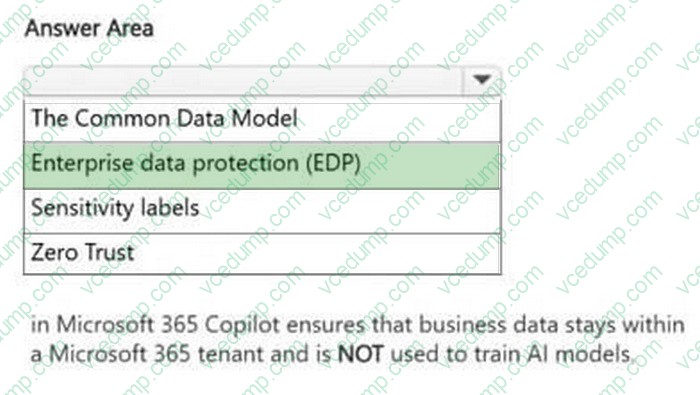
Question 28:
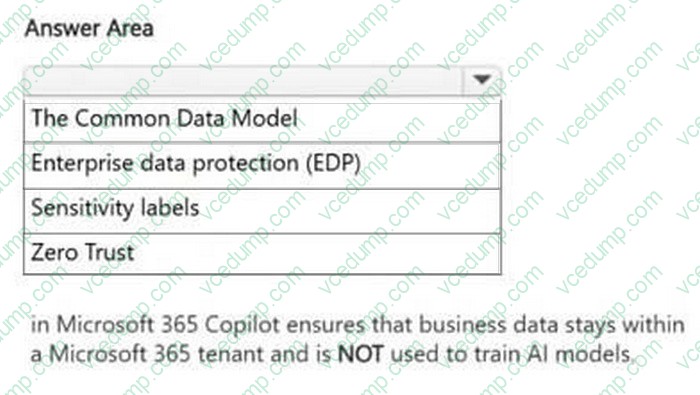
HOTSPOT
Select the answer that correctly completes the sentence.
-
Question 29:
You create a Microsoft 365 Copilot notebook and add a file named Process.docx from a Microsoft SharePoint site as a reference.
Yesterday, a user updated Process.docx in the SharePoint site.
What will occur when you chat in the notebook?
A. The chat will reference only the original version of Process.docx.
B. The chat will reference the most recent version of Process.docx.
C. The chat will reference both versions of Process.docx. -
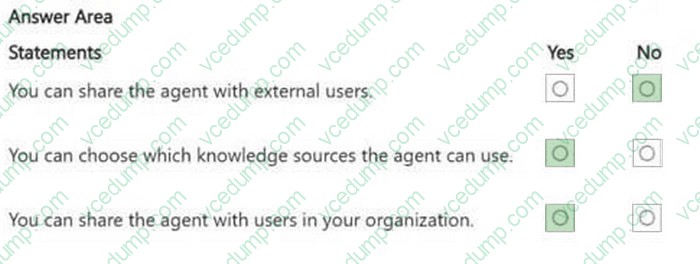
Question 30:
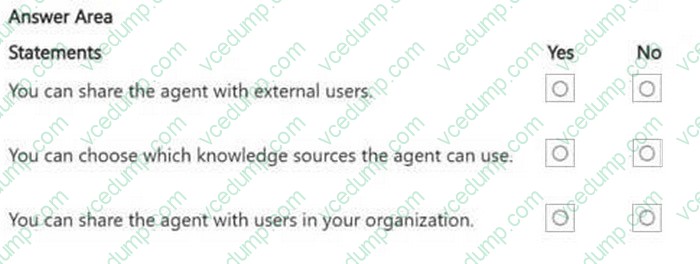
HOTSPOT
You create an agent in the Microsoft 365 Copilot app by using a template.
For each of the following statements, select Yes if the statement is true. Otherwise, select No.
NOTE: Each correct selection is worth one point.
Related Exams:
-
62-193
Technology Literacy for Educators -
70-243
Administering and Deploying System Center 2012 Configuration Manager -
70-355
Universal Windows Platform – App Data, Services, and Coding Patterns -
77-420
Excel 2013 -
77-427
Excel 2013 Expert Part One -
77-725
Word 2016 Core Document Creation, Collaboration and Communication -
77-726
Word 2016 Expert Creating Documents for Effective Communication -
77-727
Excel 2016 Core Data Analysis, Manipulation, and Presentation -
77-728
Excel 2016 Expert: Interpreting Data for Insights -
77-731
Outlook 2016 Core Communication, Collaboration and Email Skills
Tips on How to Prepare for the Exams
Nowadays, the certification exams become more and more important and required by more and more enterprises when applying for a job. But how to prepare for the exam effectively? How to prepare for the exam in a short time with less efforts? How to get a ideal result and how to find the most reliable resources? Here on Vcedump.com, you will find all the answers. Vcedump.com provide not only Microsoft exam questions, answers and explanations but also complete assistance on your exam preparation and certification application. If you are confused on your AB-730 exam preparations and Microsoft certification application, do not hesitate to visit our Vcedump.com to find your solutions here.