9L0-403 Exam Details
-
Exam Code
:9L0-403 -
Exam Name
:Mac OS X Support Essentials 10.6 -
Certification
:Apple Certifications -
Vendor
:Apple -
Total Questions
:105 Q&As -
Last Updated
:Dec 15, 2021
Apple 9L0-403 Online Questions & Answers
-
Question 81:
Which of these lets you build a workflow in Mac OS X by dragging actions from a library?
A. Terminal
B. Automator
C. Services menu
D. AppleScript Editor -
Question 82:
Which items in a Mac OS X v10.6 file system are accessible to any guest user who connects to the computer via SMB?
A. The contents of /System/
B. The contents of /Users/Shared/
C. The home folder of all standard users on the system
D. The Public folder of all standard and admin users on the system
E. The Drop Box folder of all standard and admin users on the system -
Question 83:
Which statement presents a benefit of protected memory?
A. Applications that crash automatically save open files.
B. Data in memory used by running applications is encrypted.
C. Applications that crash have the data in memory saved to a new file.
D. Applications that crash do not adversely affect other running applications. -
Question 84:
You are about to install Mac OS X v10.6 on a computer whose hard disk is formatted as a single volume. Which statement presents a rational motivation for repartitioning the disk into multiple volumes before performing the installation?
A. You want to manually specify volume block size.
B. You want to avoid using a dedicated swap file system.
C. You want to create a RAID 5 volume that includes the internal hard disk.
D. You want to run both Mac OS X v10.6 and Mac OS X v10.5 on the computer. -
Question 85:
How do you reset the Mac OS X v10.6 printing system?
A. Navigate to /Library/Printers/ in the Finder, select all items, and move them to the Trash.
B. Open Printer Setup Utility and choose Reset Printing System from the Printer Setup Utility menu.
C. Control-click in the Printers list of the Print and Fax preferences, then choose Reset printing system.
D. Open System Preferences, Option-click the Print and Fax preferences icon, and click Reset in the dialog that appears. -
Question 86:
When you enable Internet Sharing on a Mac OS X computer, which three network services start? Choose three.
A. NAT
B. SSH
C. DNS
D. DHCP
E. HTTP
F. WebDAV -
Question 87:
Which statement describes characteristics of starting up a Mac OS X v10.6 computer in Safe Boot?
A. To simplify troubleshooting, non-core components of the operating system do not load.
B. To prevent user access to sensitive system files, Simple Finder loads instead of the standard Finder.
C. To increase data security, local volumes are mounted with read-only privileges assigned to all standard users.
D. To increase data security, Firewall and Sharing settings are modified to enable only the minimum set of protocols. -
Question 88:
Personal File Sharing is enabled on a Mac OS X v10.6 computer. Warren has a standard user account and Tina has an admin user account on the computer. What two share points will be available for Warren to mount when he connects to the computer via AFP?
Choose two.
A. /Users/Public/
B. /Users/Shared/
C. Tinas home folder
D. Tinas Public folder
E. Warrens home folder -
Question 89:
Review the screenshot of a Network preferences pane, and then answer the question below.
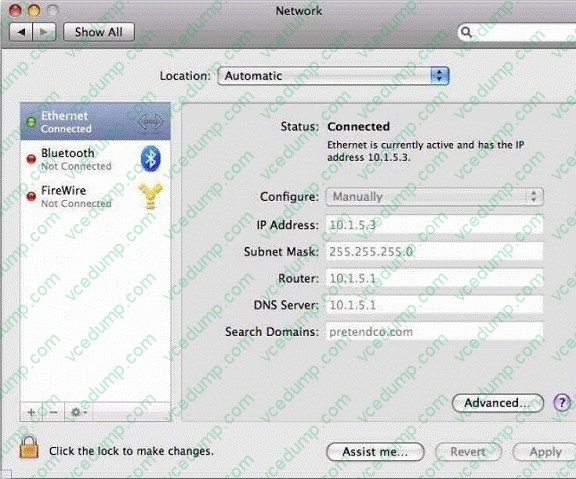
What is the range of IP addresses in this computer's local network?
A. 10.1.0.0 to 10.1.255.255
B. 10.1.5.0 to 10.1.5.255
C. 10.1.5.0 to 10.1.7.255
D. 10.1.5.1 to 10.1.5.256 -
Question 90:
Which of these is the result of an authorization denial?
A. The login window shakes after a user enters an incorrect password.
B. Finder displays an insufficient access privileges dialog when you try to open a folder.
C. Connect To Server displays an invalid password dialog when you try to connect to a share point.
D. Finder displays a dialog that says, "The disk 'Data' is in use and could not be ejected" when you try to eject a CD.
Related Exams:
-
9L0-004
Apple Desktop Service Exam -
9L0-005
Apple Desktop Service Certification Exam -
9L0-006
Apple Macintosh Service Exam -
9L0-007
Macintosh Service Certification Exam -
9L0-009
Macintosh Service Certification Exam -
9L0-011
Mac Service Certification Exam -
9L0-012
Mac Service Certification -
9L0-060
Mac OS X 10.4 Service and Support Exam -
9L0-061
MAC OS X 10.5 Troubleshooting Exam -
9L0-062
Mac OS X v10.6 Troubleshooting Exam
Tips on How to Prepare for the Exams
Nowadays, the certification exams become more and more important and required by more and more enterprises when applying for a job. But how to prepare for the exam effectively? How to prepare for the exam in a short time with less efforts? How to get a ideal result and how to find the most reliable resources? Here on Vcedump.com, you will find all the answers. Vcedump.com provide not only Apple exam questions, answers and explanations but also complete assistance on your exam preparation and certification application. If you are confused on your 9L0-403 exam preparations and Apple certification application, do not hesitate to visit our Vcedump.com to find your solutions here.