9L0-403 Exam Details
-
Exam Code
:9L0-403 -
Exam Name
:Mac OS X Support Essentials 10.6 -
Certification
:Apple Certifications -
Vendor
:Apple -
Total Questions
:105 Q&As -
Last Updated
:Dec 15, 2021
Apple 9L0-403 Online Questions & Answers
-
Question 61:
Which procedure can help you identify an application that will run with Rosetta?
A. Control-click the application icon, and choose Display Environment; if the Finder displays the Rosetta icon, the application will run with Rosetta.
B. From the command line, run ls in the directory where the application resides; if the application type is X11, the application will run with Rosetta.
C. Click the application icon, then choose Get Info from the Finder's File menu; if the Kind field says, "Application (PowerPC)", the application will run with Rosetta.
D. Click the application icon, then choose Get Info from the Finder's File menu; if the Application Environment field says, "Rosetta", the application will run with Rosetta. -
Question 62:
How does the Finder in Mac OS X v10.6 identify the application it will use to open a file?
A. The Finder queries the Spotlight index.
B. The Finder consults a directory of Spotlight plug-ins provided by each application.
C. The Finder queries the volume catalog stored on the Mac OS Extended file system.
D. The Finder queries Launch Services, which queries a database in /Library/Caches/. -
Question 63:
You want to configure a Mac OS X v10.6 computer to authenticate users using account information stored on an Active Directory server. On the Mac OS X v10.6 computer, where do you enter the information it needs in order to bind to the Active Directory server?
A. In the Open Directory plug-in the Directory Servers pane of Directory Utility
B. In the Open Directory tab of the pane that appears when you press the Advanced button in Network preferences
C. In the Active Directory tab of the pane that appears when you press the Advanced button in Network preferences
D. In the dialog that appears when you press the Network Account Server: Join button in Accounts preferences' Login Options pane -
Question 64:
How can you find out which application the Finder will use to open a document?
A. Select the document icon in the Finder, and choose Show Default Application from the File menu.
B. Control-click the document icon in the Finder, and choose Show Application from the shortcut menu.
C. Select the document icon in the Finder, choose Get Info from the File menu, click the "Open with" disclosure triangle in the Info window, and note the application listed in the "Open with" field.
D. Open Finder preferences, and locate your document's file type in the File Type column of the File Bindings list, then look in the Application column to find the application that the Finder will use to open your document. -
Question 65:
You want to update a Mac OS X v10.5 computer to Mac OS X v10.6. Which aspect of the computers current configuration can you choose NOT to change when using the Archive and Install option to install Mac OS X v10.6?
A. System fonts
B. Hardware drivers
C. Network settings
D. Printer configurations -
Question 66:
Which information must you know about a corporate VPN server before configuring the VPN software on a user's computer to access the corporate network?
A. If the corporate VPN server supports PPPoE
B. If the corporate VPN server supports DNSsec
C. If the corporate VPN server supports L2TP or PPTP
D. Which network protocols will be encrypted by the corporate VPN -
Question 67:
The primary role of the master password in Mac OS X v10.6 is to let you ________.
A. access all the passwords stored in a local keychain
B. reset the password of an account that has FileVault enabled
C. change the startup device by holding down the Option key while the computer starts up
D. connect to any password-protected web server whose password is stored in a local keychain -
Question 68:
Review the screenshot of an alert dialog, and then answer the question below.
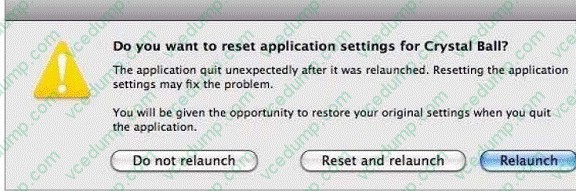
You are using a forecasting application, Crystal Ball, on a Mac OS X v10.6 computer, when you see the alert dialog above. What will happen if you click Reset and relaunch?
A. The applications preferences file is deleted, the application is relaunched, and a new preferences file is created.
B. The applications preferences file is renamed, the application is relaunched, and a new preferences file is created.
C. The applications preferences file is unchanged, the application is relaunched, and a new preferences file is saved in a new location.
D. The applications preferences file is deleted, the application is relaunched with reduced privileges, and a new preferences file is created. -
Question 69:
When you enable File Sharing in the Sharing preferences on a Mac OS X v10.6 computer, which protocol(s) is (are) enabled by default?
A. AFP
B. NFS
C. SMB
D. FTP
E. AFP and FTP
F. AFP and SMB
G. FTP and SMB
H. NFS and FTP -
Question 70:
When a user opens an application, in what order does Mac OS X v10.6 search the three Library folders in the local file system for resources that the application accesses, such as fonts?
A. 1. ~/Library/ 2. /Library/ 3. /System/Library/
B. 1. /Library/ 2. ~/Library/ 3. /System/Library/
C. 1. /System/Library/ 2. ~/Library/ 3. /Library/
D. 1. /Library/ 2. /System/Library/ 3. ~/Library/
Related Exams:
-
9L0-004
Apple Desktop Service Exam -
9L0-005
Apple Desktop Service Certification Exam -
9L0-006
Apple Macintosh Service Exam -
9L0-007
Macintosh Service Certification Exam -
9L0-009
Macintosh Service Certification Exam -
9L0-011
Mac Service Certification Exam -
9L0-012
Mac Service Certification -
9L0-060
Mac OS X 10.4 Service and Support Exam -
9L0-061
MAC OS X 10.5 Troubleshooting Exam -
9L0-062
Mac OS X v10.6 Troubleshooting Exam
Tips on How to Prepare for the Exams
Nowadays, the certification exams become more and more important and required by more and more enterprises when applying for a job. But how to prepare for the exam effectively? How to prepare for the exam in a short time with less efforts? How to get a ideal result and how to find the most reliable resources? Here on Vcedump.com, you will find all the answers. Vcedump.com provide not only Apple exam questions, answers and explanations but also complete assistance on your exam preparation and certification application. If you are confused on your 9L0-403 exam preparations and Apple certification application, do not hesitate to visit our Vcedump.com to find your solutions here.