9L0-403 Exam Details
-
Exam Code
:9L0-403 -
Exam Name
:Mac OS X Support Essentials 10.6 -
Certification
:Apple Certifications -
Vendor
:Apple -
Total Questions
:105 Q&As -
Last Updated
:Dec 15, 2021
Apple 9L0-403 Online Questions & Answers
-
Question 1:
Review the screenshot, and then answer the question below.
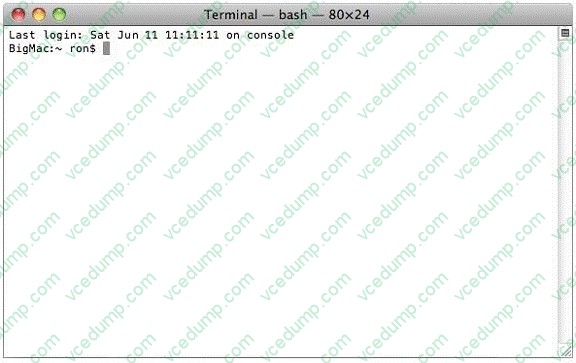
You open Terminal on your Mac OS X v10.6 computer, and see the window displayed in the screenshot above. What does the "~" indicate?
A. The current shell.
B. The current working directory.
C. The path to the admin command.
D. An argument passed to the admin command. -
Question 2:
Which tool should you use to manually configure 100BASE-TX Ethernet on a Mac OS X v10.6 computer?
A. Console
B. Network Utility
C. Internet Connect
D. Network preferences -
Question 3:
Review the screenshot, and then answer the question below.

You are starting up an Intel-based Mac OS X computer, and see the screen shown above. What does it mean?
A. The system's firmware cannot locate a valid booter file.
B. The system has detected an unmountable Boot Camp partition.
C. Invalid startup modifier keys are being pressed on the keyboard.
D. The folder that holds all the user home folders cannot be located or accessed. -
Question 4:
Review the two screenshots of the contents of the /Users/admin/Downloads/ folder, and then answer the question below.
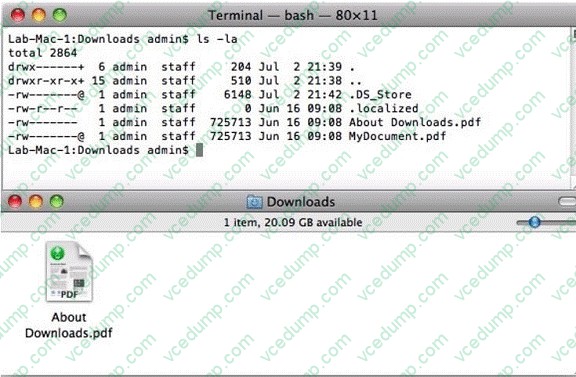
Which statement describes why the file "MyDocument.pdf" is displayed in Terminal but not in the Finder?
A. The file's sticky bit is enabled.
B. The file's hidden flag is enabled.
C. The file is stored in an aliased location.
D. The file has an active access control list. -
Question 5:
You are an admin user, and have enabled the Ignore Volume Ownership option for an external FireWire hard disk. What will happen the next time a standard user attempts to mount the disk?
A. The disk will mount, and the user will be able to read, modify, and delete any file on the disk.
B. The disk will mount, and the user will be able to read any file on the disk; the user will be required to enter an administrator password to modify or delete files on the disk.
C. The user will be required to enter an administrator password to mount the disk; once the disk is mounted the user will be able to read, modify, and delete any file on the disk.
D. The user will be required to enter an administrator password to mount the disk; once the disk is mounted, the user will be able to read any file on the disk, but will be required to re- enter an administrator password to modify or delete files. -
Question 6:
Which process will let you start up a computer in target disk mode?
A. Start up the computer from the Mac OS X Install DVD, then choose Target Disk Mode from the Utilities menu.
B. Hold down the S key on the keyboard while the computer starts up, then type the command reboot -target.
C. Hold down the T key on the keyboard while the computer starts up, until a FireWire icon appears on the screen.
D. Hold down the Option key on the keyboard while the computer starts up, until a dialog appears, then select Target Disk Mode from the dialog. -
Question 7:
In a default Mac OS X v10.6 file system, which of these is an absolute path to the home folder for a user account named becky?
A. ./becky/
B. ~/becky/
C. Users/becky/
D. /Users/becky/ -
Question 8:
What does setting the sticky bit on a folder in Mac OS X do?
A. It makes invisible files inside the folder visible.
B. It protects files in user home folders from being moved by other users.
C. It allows users to delete files that were moved to the folder by another user.
D. It prevents users from deleting files from the folder if the files are owned by another user. -
Question 9:
Which three issues can occur when multiple users are logged via fast user switching?
Choose three.
A. Peripherals in use by one user's application may be inaccessible to other users.
B. Some applications may run out of memory due to the number of processes running.
C. iTunes librairies cannot be shared between users who are logged at the same time.
D. Some applications may fail to open for one user if they are already open in another user's account.
E. Access to some services may be granted inappropriately to users who log in after certificates have been validated.
F. Changes to documents that are open in multiple users account may not be able to be saved by some of the users.
G. Display resolution preferences may conflict, and cause resolution not to change appropriately when new users log in. -
Question 10:
You have both Preview and Adobe Reader installed on a Mac OS X v10.6 computer. Both applications can open PDFs. When you double-click a PDF file in the Finder, the file automatically opens in Preview. How can you set the file to open by default in Adobe Reader instead?
A. Edit the users FileBindings.plist file so that Adobe Reader is the value for the key, PDF.
B. Open Finder Preferences, select PDF under File Type, and choose Adobe Reader from the pop-up menu.
C. Hold down the Option key while double-clicking the file icon, and choose Adobe Reader from the dialog.
D. Select the file icon, choose Get Info from the Finders File menu, click the Open with disclosure triangle in the Info window, and choose Adobe Reader from the Open with pop-up menu.
Related Exams:
-
9L0-004
Apple Desktop Service Exam -
9L0-005
Apple Desktop Service Certification Exam -
9L0-006
Apple Macintosh Service Exam -
9L0-007
Macintosh Service Certification Exam -
9L0-009
Macintosh Service Certification Exam -
9L0-011
Mac Service Certification Exam -
9L0-012
Mac Service Certification -
9L0-060
Mac OS X 10.4 Service and Support Exam -
9L0-061
MAC OS X 10.5 Troubleshooting Exam -
9L0-062
Mac OS X v10.6 Troubleshooting Exam
Tips on How to Prepare for the Exams
Nowadays, the certification exams become more and more important and required by more and more enterprises when applying for a job. But how to prepare for the exam effectively? How to prepare for the exam in a short time with less efforts? How to get a ideal result and how to find the most reliable resources? Here on Vcedump.com, you will find all the answers. Vcedump.com provide not only Apple exam questions, answers and explanations but also complete assistance on your exam preparation and certification application. If you are confused on your 9L0-403 exam preparations and Apple certification application, do not hesitate to visit our Vcedump.com to find your solutions here.