70-698 Exam Details
-
Exam Code
:70-698 -
Exam Name
:Installing and Configuring Windows 10 -
Certification
:Microsoft Certifications -
Vendor
:Microsoft -
Total Questions
:181 Q&As -
Last Updated
:Dec 07, 2021
Microsoft 70-698 Online Questions & Answers
-
Question 171:
Note: This question is part of a series of questions that use the same scenario. For your convenience, the scenario is repeated in each question. Each question presents a different goal and answer choices, but the text of the scenario is exactly the same in each question in this series.

Your network contains a single Active Directory domain named adatum.com.
The network contains five servers configured as shown in the following table:
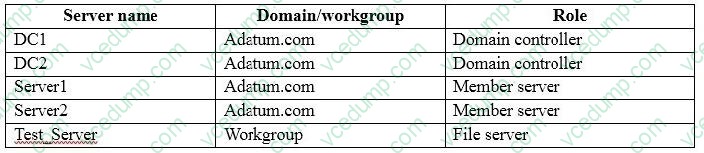
All of the servers run Windows Server 2012 R2.
Test_Server has a shared folder named ShareA. Only local users have permissions to ShareA.
The network contains a mainframe computer that is administered by using the Telnet protocol.
The domain contains four client computers configured as shown in the following table:
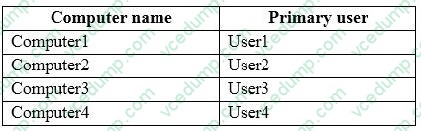
All of the client computers run the 64-bit version of Windows. User3 frequently accesses ShareA. Remote Desktop is enabled on Computer4.
Your company identifies the following requirements.
A. Install a Universal Windows Platform (UWP) application.
B. Modify the settings of a firewall rule.
C. Install a Windows feature.
D. Modify the membership of a local group. -
Question 172:
Note: This question is part of a series of questions that present the same scenario. Each question in the series contains a unique solution. Determine whether the solution meets the stated goals.
While performing maintenance on a computer, you open Indexing Options, and then you click Pause.
You complete the computer maintenance.
You need to resume indexing.
Solution: From the Start menu, you click Power and then you click Restart.
Does this meet the goal?
A. Yes
B. No -
Question 173:
You have set up a new wireless network for one of your prestigious clients.
The director wants to ensure that only certain designated wireless laptops can connect to the new network to prevent misuse.
What do you need to do?
A. Use MAC address control
B. UseIPv4 address control
C. Use WEP
D. Use WPA -
Question 174:
Note: This question is part of a series of a questions that use the same set of answer choices. Each answer choice may be used once, more than once, or not at all. You have a computer named Computer1 that has storage configured as shown in the following table.
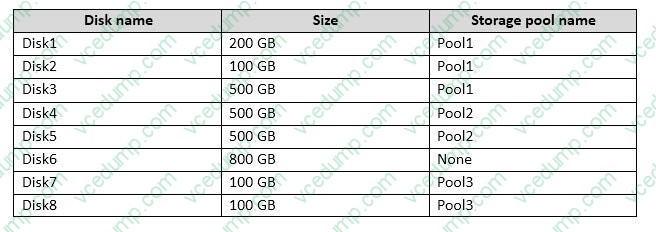
Pool1 contains a storage space named Space1 that is 300 GB. Pool3 contains a storage space named Space2 that is 100 GB. Pool2 is empty.
You need to configure Space3 to be 200 GB.
What should you use?
A. Add-PhysicalDisk
B. Diskpart
C. New-VirtualDisk
D. Remove-PhysicalDisk
E. Resize-VirtualDisk
F. Set-StoragePool
G. Subst Update-Disk
H. Update-Disk -
Question 175:
Note: This question is part of a series of questions that present the same scenario. Each question in the series contains a unique solution. Determine whether the solution meets the stated goals.
While performing maintenance on a computer, you open Indexing Options, and then you click Pause.
You complete the computer maintenance.
You need to resume indexing.
Solution: From the Services console, you restart the Windows Search service.
Does this meet the goal?
A. Yes
B. No -
Question 176:
You administer a group of 10 client computers that run Windows 10. The client computers are members of a local workgroup. Employees log on to the client computers by using their Microsoft accounts.
The company plans to use Windows BitLocker Drive Encryption. You need to back up the BitLocker recovery key.
Which two options can you use? (Each correct answer presents a complete solution. Choose two.)
A. Save the recovery key to a file on the BitLocker-encrypted drive.
B. Save the recovery key in the Credential Store.
C. Save the recovery key to OneDrive.
D. Print the recovery key. -
Question 177:
You have a computer named Computer1 that has a 1-TB volume named E.
You need to receive a notification when volume E has less than 100 GB of free space.
Which tool should you use?
A. Event Viewer
B. Disk Cleanup
C. Performance Monitor
D. System Configuration
E. Resource Monitor -
Question 178:
Note: This question is part of a series of questions that use the same set of answer choices. Each answer choice may be used once, more than once, or not at all.
Your network contains a single Active Directory domain. The domain contains a VPN server that supports all of the VPN protocols.
From a computer that runs Windows 10 Pro, a user named User1 creates an SSTP VPN connection to a network named VPN1.
User1 successfully connects to the VPN server. When User1 roams between different Wi-Fi access points, the user loses the connection to the corporate network and must manually re-establish the VPN connection.
You need to ensure that VPN1 automatically maintains the connection while the user roams between Wi-Fi access points.
What should you do?
A. Click Turn on password protected sharing.
B. Disable Network Discovery.
C. Modify the Profile settings of an incomingfirewall rule.
D. Run the Add-VpnConnectionTriggerApplication cmdlet.
E. Run the New-NetFirewallRule cmdlet and specify the- Direction Outbound parameter.
F. Run the New-VpnConnection cmdlet.
G. Run the Set-NetConnectionProfile cmdlet.
H. Run the Set-VPNConnection cmdlet. -
Question 179:
You have a computer named Computer1 that runs Windows 10 Enterprise.
You plan to install the most recent updates to Computer1.
You need to ensure that you can revert to the current state of Computer1 in the event that the computer becomes unresponsive after the update.
What should you include in your solution?
A. The Reset this PC option from the Recovery section of the Settings app
B. The Sync your settings options from the Accounts section of the Settings app
C. The Backup and Restore (Windows 7) control panel item
D. The Refresh your PC option from the PC Settings -
Question 180:
Note: This question is part of a series of questions that use the same set of answer choices. Each answer choice may be used once, more than once, or not at all.
You have a computer that has a dual-boot configuration. Windows 10 Pro is installed on the local disk. Windows 10 Enterprise is installed in a VHDX file named Disk1.vhdx.
You start the computer to Windows 10 Pro, and then you download a driver package.
You need to ensure that the next time the Windows 10 Enterprise installation starts, the driver is installed already.
What should you run first?
A. Add-WindowsImage
B. bcdboot.exe
C. bcdedit.exe
D. bootcfg.exe
E. bootim.exe
F. bootsect.exe
G. G. diskpart.exe
H. Expand-WindowsImage
Related Exams:
-
62-193
Technology Literacy for Educators -
70-243
Administering and Deploying System Center 2012 Configuration Manager -
70-355
Universal Windows Platform – App Data, Services, and Coding Patterns -
77-420
Excel 2013 -
77-427
Excel 2013 Expert Part One -
77-725
Word 2016 Core Document Creation, Collaboration and Communication -
77-726
Word 2016 Expert Creating Documents for Effective Communication -
77-727
Excel 2016 Core Data Analysis, Manipulation, and Presentation -
77-728
Excel 2016 Expert: Interpreting Data for Insights -
77-731
Outlook 2016 Core Communication, Collaboration and Email Skills
Tips on How to Prepare for the Exams
Nowadays, the certification exams become more and more important and required by more and more enterprises when applying for a job. But how to prepare for the exam effectively? How to prepare for the exam in a short time with less efforts? How to get a ideal result and how to find the most reliable resources? Here on Vcedump.com, you will find all the answers. Vcedump.com provide not only Microsoft exam questions, answers and explanations but also complete assistance on your exam preparation and certification application. If you are confused on your 70-698 exam preparations and Microsoft certification application, do not hesitate to visit our Vcedump.com to find your solutions here.