70-698 Exam Details
-
Exam Code
:70-698 -
Exam Name
:Installing and Configuring Windows 10 -
Certification
:Microsoft Certifications -
Vendor
:Microsoft -
Total Questions
:181 Q&As -
Last Updated
:Dec 07, 2021
Microsoft 70-698 Online Questions & Answers
-
Question 161:
You have a computer named Computer1 that runs Windows 10 Enterprise. Computer1 is configured to receive Windows updates from the Internet.
If a user is logged on to Computer1, you need to prevent Computer1 from automatically restarting without the logged on user's consent after the installation of the Windows updates.
What should you do?
A. Enable the Defer upgrades setting.
B. Edit the Automatic App Update scheduled task.
C. Configure the Choose how updates are delivered setting.
D. Configure the Choose how updates are installed setting. -
Question 162:
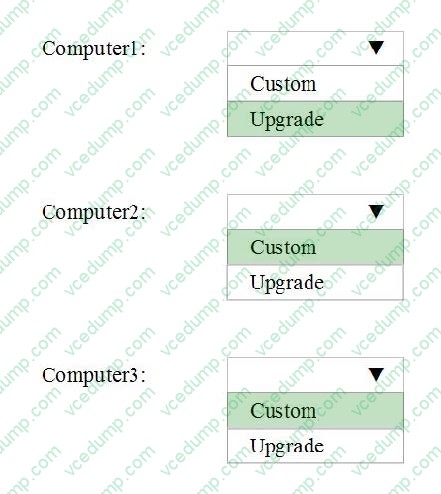
You have three computers configured as shown in the following table.
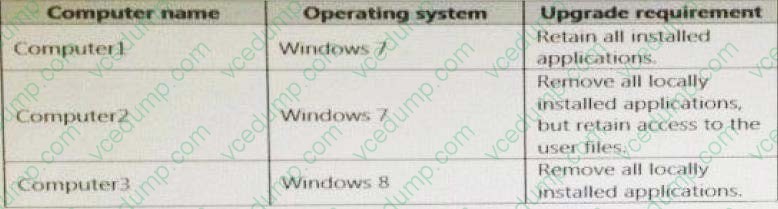
You plan to migrate the computers to Windows 10.
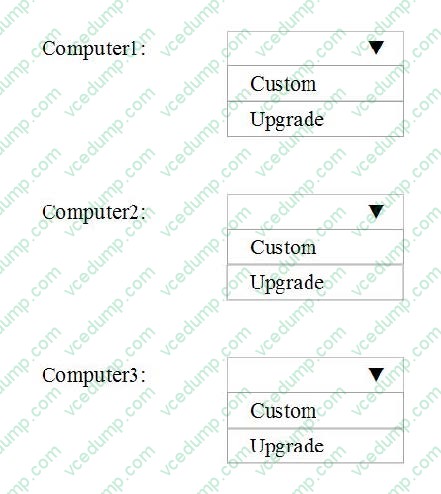
Which installation option should you use for each computer? To answer, select the appropriate options in the answer area.
Hot Area:
-
Question 163:
You have computers that run Windows 10.
You need to identify both active malware instances and past malware instances from the last three months.
Which command should you run?
A. Get-EventSubscriber
B. Get-MpThreatCatalog
C. Get-WindowsErrorReporting
D. Get-MpThreatDetection -
Question 164:
You have a computer that runs the 32-bit version of Windows 7 Professional.
You need to perform an in-place upgrade to Windows 10.
Which two editions of Windows 10 can you upgrade the computer? Each correct answer presents a complete solution.
A. the 32-bit version of Windows 10 Pro
B. the 64-bit version of Windows 10 Pro
C. the 32-bit version of Windows 10 Enterprise
D. the 64-bit version of Windows 10 Enterprise
E. the 32-bit version of Windows 10 Home -
Question 165:
You are the desktop administrator for a company. You plan to deploy a new custom application named App1.
All employees must be able to find and install the application. Users who are not employees must not be able to find or install the application.
You need to configure access for App1.
What should you do?
A. Allow access to the Microsoft Store and publish App1.
B. Run the Publish-Module Windows PowerShell cmdlet.
C. Implement Microsoft Store for Business and publish App1.
D. Run the Publish-BCWebContent Windows PowerShell cmdlet. -
Question 166:
Note: This question is part of a series of questions that use the same set of answer choices. Each answer choice may be used once, more than once, or not at all.
You have 10 computers that run Windows 10 Pro. The computers are in a workgroup.
A computer named PC_User1 has shared folder named Share1. Users are not prompted for credentials when they access Share1.
You modify the permissions on Share1 so that the share is shared only to a user named User1.
You need to ensure that when users from other computers in the workgroup access Share1, they must authenticate by using the credentials of User1. What should you do?
A. Click Turn on password protected sharing.
B. Disable Network Discovery.
C. Modify the Profile settings of an incoming firewall rule.
D. Run the Add-VpnConnectionTriggerApplication cmdlet.
E. Run the New-NetFirewallRule cmdlet and specify the- Direction Outbound parameter.
F. Run the New-VpnConnection You modify to ensure thta cmdlet.
G. Run the Set-NetConnectionProfile cmdlet.
H. Run the Set-VPNConnection cmdlet. -
Question 167:
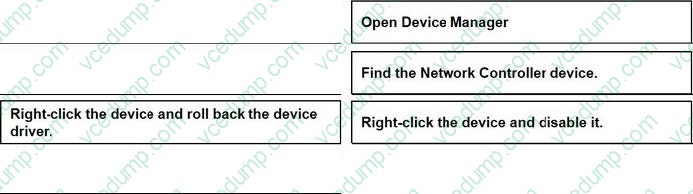
You are the desktop administrator for a company. You plan to deploy Windows 10 Pro. You configure a single existing deployment image to use for all devices.
You purchase a newer device hardware model. You deploy the company image to a new device. You observe that there is no network connectivity and the device displays a stop error.
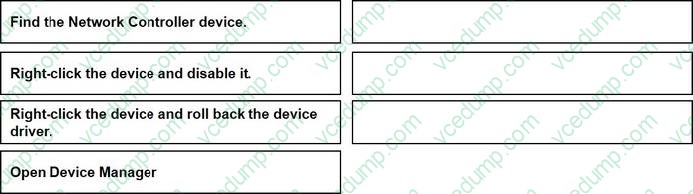
You need to prevent the stop error to continue troubleshooting the issue. Which three actions should you perform in sequence? To answer, move the appropriate actions from the list of actions to the answer area and arrange them in the correct order.
Select and Place:
-
Question 168:
Note: This question is part of a series of questions that present the same scenario. Each question in the series contains a unique solution. Determine whether the solution meets the stated goals. Your network contains a single Active Directory domain named contoso.com.
The domain contains two computers named Computer1 and Computer2.
A user named User1 is a member of the local Administrators group on Computer1 and Computer2.
User1 fails to remotely manage the devices on Computer2 by using Device Manager on Computer1.
User1 can connect to Computer2 remotely by using Computer Management.
You need to ensure that User1 can disable a device on Computer2 remotely.
Solution: You enable Remote Desktop on Computer2, and you instruct User1 to use Remote Desktop.
Does this meet the goal?
A. Yes
B. No -
Question 169:
Note: This question is part of a series of questions that use the same set of answer choices. Each answer choice may be used once, more than once, or not at all.
You have a computer named Computer1 that has a virtual hard disk (VHD) named Disk1.vhdx.
You plan to configure Computer1 for dual boot from Disk1.vhdx.
You need to install Windows on Disk1.vhdx by using dism.exe.
What should you nm before you install Windows?
A. Add-Windows Image
B. bcdboot.exe
C. bcdedit.exe
D. bootcfg.exe
E. bootim.exe
F. bootsect.exe
G. diskpart.exe
H. Expand-Windows Image -
Question 170:
You have a computer named Computer1.
A user named User1 is a member of two groups named Group1 and Group2.
You have a file named Doc1.docx that is located in E:\Data.
The file permissions for E:\Data\Doc1.docx are configured as shown in the exhibit. (Click the Exhibit button.)
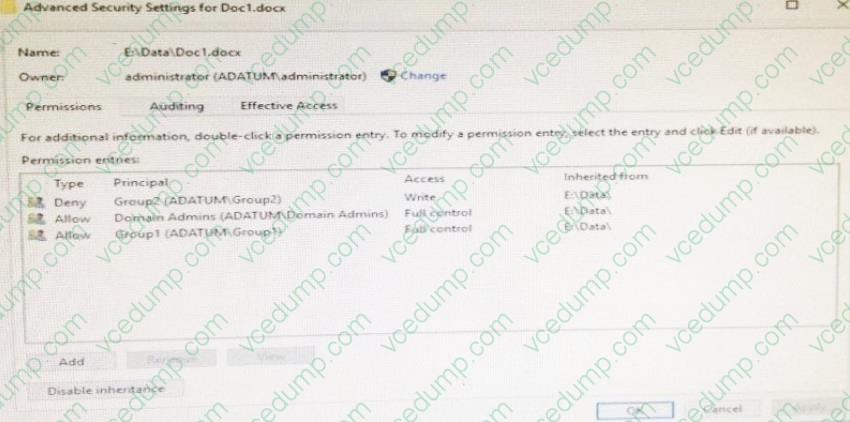
You need to provide User1 with Write access to Doc1.docx. What should you do?
A. Grant User1 Full control accessto folder E:\Data.
B. Remove User1 from Group2 and instruct the user to sign out, and then sign back in.
C. Grant User1 Full control access to the E:\Data\Doc1.docx file, disable inheritance for the file, and then convert the inherited permissions to explicit permissions for the file.
D. Grant User1 Write access to folder E.
Related Exams:
-
62-193
Technology Literacy for Educators -
70-243
Administering and Deploying System Center 2012 Configuration Manager -
70-355
Universal Windows Platform – App Data, Services, and Coding Patterns -
77-420
Excel 2013 -
77-427
Excel 2013 Expert Part One -
77-725
Word 2016 Core Document Creation, Collaboration and Communication -
77-726
Word 2016 Expert Creating Documents for Effective Communication -
77-727
Excel 2016 Core Data Analysis, Manipulation, and Presentation -
77-728
Excel 2016 Expert: Interpreting Data for Insights -
77-731
Outlook 2016 Core Communication, Collaboration and Email Skills
Tips on How to Prepare for the Exams
Nowadays, the certification exams become more and more important and required by more and more enterprises when applying for a job. But how to prepare for the exam effectively? How to prepare for the exam in a short time with less efforts? How to get a ideal result and how to find the most reliable resources? Here on Vcedump.com, you will find all the answers. Vcedump.com provide not only Microsoft exam questions, answers and explanations but also complete assistance on your exam preparation and certification application. If you are confused on your 70-698 exam preparations and Microsoft certification application, do not hesitate to visit our Vcedump.com to find your solutions here.