70-698 Exam Details
-
Exam Code
:70-698 -
Exam Name
:Installing and Configuring Windows 10 -
Certification
:Microsoft Certifications -
Vendor
:Microsoft -
Total Questions
:181 Q&As -
Last Updated
:Dec 07, 2021
Microsoft 70-698 Online Questions & Answers
-
Question 151:
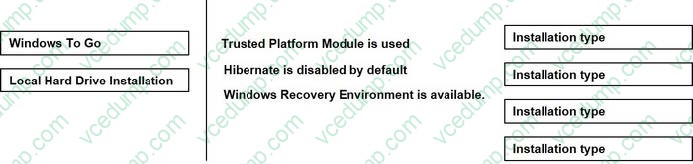
You are the system administrator for a company. You plan to run Windows 10 Enterprise on all devices.
Groups of devices must implement specific features.
You need to determine which type of deployment you should perform for each feature.
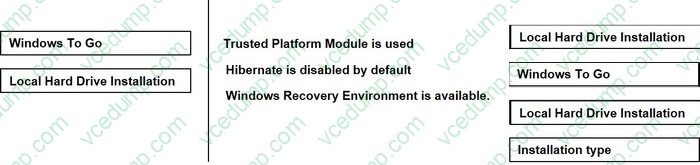
Which installation types should you use? To answer, drag the appropriate installation types to the correct features. Each installation type may be used once, more than once, or not at all. You may need to drag the split bar between panes or scroll to view content.
NOTE: Each correct selection is worth one point.
Select and Place:
-
Question 152:
Note: This question is part of a series of questions that use the same scenario. For your convenience, the scenario is repeated in each question. Each question presents a different goal and answer choices, but the text of the scenario is
exactly the same in each question in this series.
Start of repeated scenario
Your network contains a single Active Directory domain named contoso.com. All computers are members of the domain and run the 64-bit version of Windows 10 Enterprise.
On a test computer named Computer_Test1, you pin several company-specific applications in a group named Contoso Apps, and then you export the start menu layout to a file named contoso.xml.
You install Client Hyper-V on a computer named Computer6.
You identity the following requirements.
A. NUMA spanning
B. enhanced session mode
C. Hyper-V Guest Service Interface
D. RemoteFX -
Question 153:
Note: This question is part of a series of questions that present the same scenario. Each question in the series contains a unique solution that might meet the stated goals. Some question sets might have more than one correct solution, while
others might not have a correct solution.
After you answer a question in this section, you will NOT be able to return to \t. Asa result, these questions will not appear in the review screen.
You have been tasked with standing on Windows.
You are the system administrator for moving each computer windows 10.
Solution: Upgrade Windows 8 Pro computer to Windows 10.
Does the solution meet the goal?
A. Yes
B. No -
Question 154:
Your network contains a single Active Directory domain. The domain contains two computers named Computer1 and Computer2.
From Computer1, you need to view the installed devices and their associated drivers on Computer2.
What should you use?
A. the Get-PnpDevice cmdlet
B. the Get-WindowsDriver cmdlet
C. the Get-OdbcDriver cmdlet
D. the driverquery.exe command -
Question 155:
You have a Windows 10 Enterprise computer named Computer1. Computer1 has File History enabled.
You create a folder named Folder1 in the root of the C: drive.
You need to ensure that Folder1 is protected by File History.
What are two possible ways to achieve the goal? Each correct answer presents a complete solution.
A. From File Explorer, include Folder1 in an existing library.
B. Modify the Advanced settings from the FileHistory Control Panel item.
C. From the Settings app, modify the Backup options.
D. From File Explorer, modify the system attribute of Folder1. -
Question 156:
Note: This question is part of a series of questions that use the same scenario. For your convenience, the scenario is repeated in each question. Each question presents a different goal and answer choices, but the text of the scenario exactly
the same in each question in this series.
Start of repeated scenario
Your network contains a single Active Directory domain named contoso.com. All computers are members of the domain and run the 64-bit version of Windows 10 Enterprise.
On a test computer named Computer_Test1, you pin several company-specific applications in a group named Contoso Apps, and then you export the start menu layout to a file named contoso.xml.
You install Client Hyper-V on a computer named Computer6.
You identity the following requirements.
A. a smart card reader
B. Second Level Address Translation (SLAT)
C. Trusted Platform Module (TPM)
D. Unified Extensible Firmware Interface (UEFI) -
Question 157:
You have a computer named Computer1 that runs Windows 10.
File History is turned on.
You have files located in D:\Photos.
You need to ensure that you can recover previous versions of the files in D:\Photos.
What should you do?
A. Add D:\Photos to the Pictures library.
B. Turn on System Protection for drive D.
C. Enable sharing for D:\Photos.
D. Modify the Recovery settings in the Settings app. -
Question 158:
You are the administrator for a company. All devices turn Windows 10 Enterprise. You have a group of devices in the human resources (HR) department that use a local D. drive to slot sensitive information.
You plan to upgrade all HR devices to increase the local storage capacity by adding a new E: drive.
You have the following new requirements:
All sensitive documents must be stored locally on a virtual hard disk (VHD).
Data migration must be quick and have no data loss.
Minimize impacts to the user experience.
You need to meet the requirements.
What should you do?
A. Download the tool, and run the disk2vhd command.
B. Run the diskpart command.
C. Run the New-VirtualDisk Windows PowerShell cmdlet.
D. Use the Disk Management MMC snap-in. -
Question 159:
Your network contains a single Active Directory domain. The domain contains a computer that runs Windows 10.
You plan to use the computer to test applications.
You need to install Windows Insider Preview builds on the computer.
What should you do?
A. From Group Policy, configure the Add features to Windows 10 settings.
B. From theSettings app, configure the Advanced options for Windows Update.
C. From Group Policy, configure the Windows Update settings.
D. From the Settings app, select Developer mode. -
Question 160:
Your networks contain a single Active Directory domain.
On a domain controller, an administrator creates a custom Microsoft Management Console (MMC) that uses the Active Directory Users and Computer snap-in.
The domain contains a computer named Computer1 that runs Windows 10. You use the computer to perform management tasks. You copy the custom MMC to the computer.
You need to ensure that you can use MMC and all of the features of the MMC.
What should you do on Computer1?
A. Enable the Sideload apps developer feature.
B. Install the Remote Server Administration Tools (RSAT).
C. Install the Microsoft Application Compatibility Toolkit (ACT).
D. Disable User Account Control (UAC).
Related Exams:
-
62-193
Technology Literacy for Educators -
70-243
Administering and Deploying System Center 2012 Configuration Manager -
70-355
Universal Windows Platform – App Data, Services, and Coding Patterns -
77-420
Excel 2013 -
77-427
Excel 2013 Expert Part One -
77-725
Word 2016 Core Document Creation, Collaboration and Communication -
77-726
Word 2016 Expert Creating Documents for Effective Communication -
77-727
Excel 2016 Core Data Analysis, Manipulation, and Presentation -
77-728
Excel 2016 Expert: Interpreting Data for Insights -
77-731
Outlook 2016 Core Communication, Collaboration and Email Skills
Tips on How to Prepare for the Exams
Nowadays, the certification exams become more and more important and required by more and more enterprises when applying for a job. But how to prepare for the exam effectively? How to prepare for the exam in a short time with less efforts? How to get a ideal result and how to find the most reliable resources? Here on Vcedump.com, you will find all the answers. Vcedump.com provide not only Microsoft exam questions, answers and explanations but also complete assistance on your exam preparation and certification application. If you are confused on your 70-698 exam preparations and Microsoft certification application, do not hesitate to visit our Vcedump.com to find your solutions here.