70-692 Exam Details
-
Exam Code
:70-692 -
Exam Name
:Upgrading Your Windows XP Skills to MCSA Windows 8 -
Certification
:Microsoft Certifications -
Vendor
:Microsoft -
Total Questions
:76 Q&As -
Last Updated
:Dec 14, 2021
Microsoft 70-692 Online Questions & Answers
-
Question 61:
You have a Windows 8.1 Pro desktop computer and a Windows RT 8.1 mobile device.
You sign in to the computer and the device by using the same Microsoft account.
You discover that the settings are not being synchronized between the Windows 8.1 computer and the Windows RT 8.1 device,
You need to ensure that the settings are synchronized.
What should you do first?
A. Enable the Trusted Hosts Group Policy setting.
B. Enable the Configure Default consent Group Policy setting.
C. From the PC settings page, click Trust this PC.
D. From the PC settings page, modify the Privacy settings, -
Question 62:
You are a system administrator for Contoso, Ltd. You manage a remote site that consists of 50 users. Each user has a Windows 8.1 desktop computer. You grant local admin rights to a small group of power users that have proven a level of
proficiency with Windows 8.1.
This group helps with minor problems as needed.
One of the power users makes configuration changes on a desktop computer. Now the computer freezes for two minutes during the boot process.
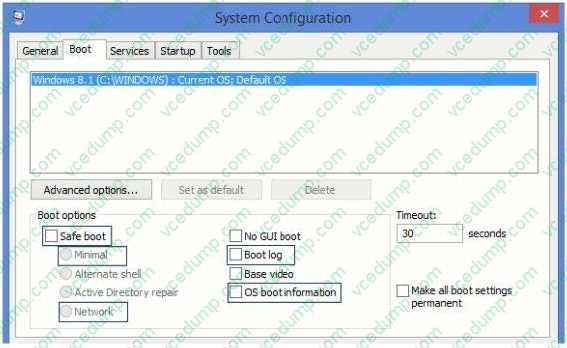
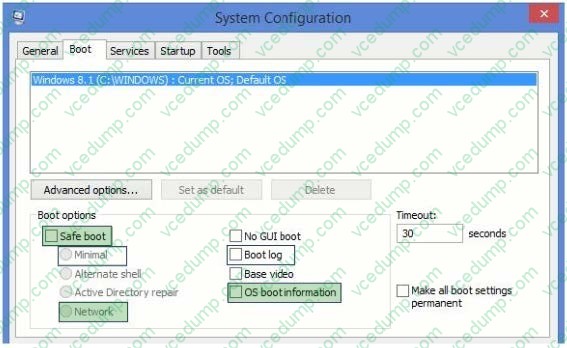
You need to use msconfig to change the boot options to meet the following requirements:
1. Boot in safe mode
2. Boot the computer with a minimal set of drivers
3. Networking enabled
4. See the splash startup screen
5. Read drivers as they are loaded
Which three options should you select? (To answer, select the appropriate three options from the System Configuration Boot tab in the answer area.)
Hot Area:
-
Question 63:
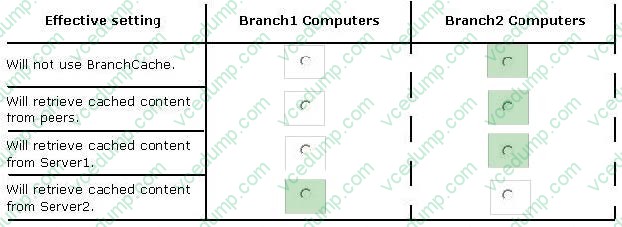
Your company has a main office and two branch offices named Branch1 and Branch2. The main office contains a file server named Server1 that has BranchCache enabled. Branch1 contains a server named Server2 that is configured as a
hosted cache server.
All client computers run Windows 8.1 Enterprise. All of the computers are joined to an Active Directory domain.
The BranchCache settings of all the computers are configured as shown in the following exhibit. (Click the Exhibit button.)
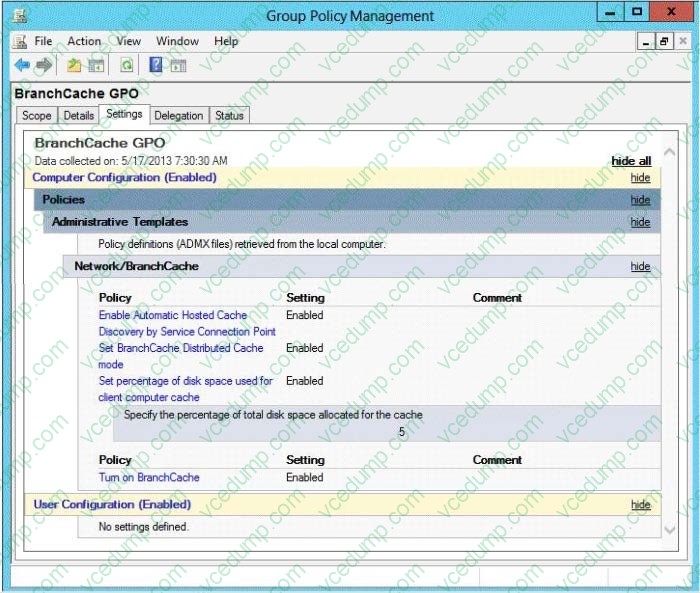
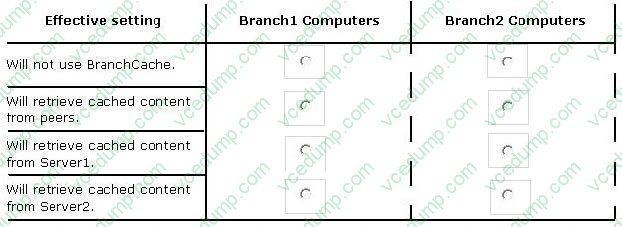
In the table below, identify the effective setting for the client computers in each branch office. Make one selection in each column. Each correct selection is worth one point.
Hot Area:
-
Question 64:
You are the desktop administrator for your company, which uses Windows 8.1 computers.
The company decides to use virtual disks at your location so the programmers can build and test applications in a closed network.
You need to use the file given as a virtual hard disk and be able to boot to the vhd.
What should you do?
A. Move the vhd file to a network share, map the network share, and allow a network boot.
B. Attach the vhd in computer management and add it to the Boot Menu.
C. Copy the vhd file to the root of C:\ open msconfig, and choose Safe Boot and Alternate Shell.
D. Copy the vhd file to the root of C:\ run bcdedit and add an entry to the boot options that includes the path to the vhd. -
Question 65:
You plan to purchase new Windows 8.1 tablets for your company network.
You need to ensure that tablet users are able to use the Windows 8.1 Snap feature.
Which hardware specifications should you meet in choosing tablets?
A. Monitor that supports at least five simultaneous touches
B. Monitor and video adapter that support a minimum screen resolution of 1024 x 768
C. Monitor and video adapter that support a minimum screen resolution of 1366 x 768
D. Monitor that supports at least three simultaneous touches -
Question 66:
You update the video card driver on a computer that runs Windows 8.1.
You can no longer configure the display settings to extend the display to a projector. You need to restore the display options as quickly as possible and retain all user data. What should you do?
A. Run the DisplaySwitch /extend command.
B. Roll back the video card driver to the previous version.
C. Start the computer from the Windows 8 installation media and perform a system image recovery.
D. Run the sfc /scannow command. -
Question 67:
A company has an Active Directory Domain Services (AD DS) domain. All client computers run Windows 7. You plan to upgrade the client computers to Windows 8.1 Pro.
You need to choose the methods that do not require the manual entry of a product key during the upgrade.
Which two methods should you choose? (Each correct answer presents a complete solution. Choose two.)
A. Extract the contents of the Windows 8.1 .iso image file to a new shared folder and run the setup program from that folder.
B. Use the Microsoft Deployment Toolkit.
C. Use the Windows 8.1 online upgrade tool.
D. Use Group Policy to assign the Windows 8 installation file to the client computers. -
Question 68:
You manage computers that run Windows 8.1.
You plan to install a desktop app named App1 on one of the client computers.
You need to install the app without any user interaction and without displaying a progress bar.
Which command should you run?
A. msiexec /i appl.msi /qb
B. msiexec /x appl.msi /qn
C. msiexec /i appl.msi /qn
D. msiexec /x appl.msi /qb -
Question 69:
You are the network administrator for Contoso.com and are creating an image for a Windows 8.1 implementation for all of your users.
You find out that an application your company has used for many years is not compatible with Windows 8.1. It has always worked on your Vista computers with SP2. The application requires administrator privileges.
You need to configure the correct settings so that the application can run on Windows 8.
Which two actions should you perform? (Each correct answer presents part of the solution. Choose two.)
A. Select Run this program as an administrator in the Compatibility Troubleshooter.
B. Assign the application to Run as administrator on the Security tab of the application executable file properties.
C. Modify the User Account Control Settings by adjusting the slider to Never Notify.
D. Using the Compatibility Troubleshooter, check Run this application in compatibility mode for and select Vista (Service Pack 2).
E. Using the Application Compatibility toolkit, run the Windows Vista Compatibility Evaluator for Windows 8, and select the Service Pack 2 option. -
Question 70:
Your network contains Windows 8.1 Enterprise client computers. The computers are members of an Active Directory domain.
Your company purchases a subscription to Windows Intune. Synchronization between Active Directory and Windows Intune is not configured.
You enroll all of the computers in Windows Intune.
You plan to create groups that contain the computers by using dynamic membership.
You need to identify which criteria you can use to populate the groups dynamically.
Which three criteria should you identify? (Each correct answer presents a complete solution. Choose three.)
A. organizational unit (OU)
B. manager
C. security group
D. device type
E. domain
Related Exams:
-
62-193
Technology Literacy for Educators -
70-243
Administering and Deploying System Center 2012 Configuration Manager -
70-355
Universal Windows Platform – App Data, Services, and Coding Patterns -
77-420
Excel 2013 -
77-427
Excel 2013 Expert Part One -
77-725
Word 2016 Core Document Creation, Collaboration and Communication -
77-726
Word 2016 Expert Creating Documents for Effective Communication -
77-727
Excel 2016 Core Data Analysis, Manipulation, and Presentation -
77-728
Excel 2016 Expert: Interpreting Data for Insights -
77-731
Outlook 2016 Core Communication, Collaboration and Email Skills
Tips on How to Prepare for the Exams
Nowadays, the certification exams become more and more important and required by more and more enterprises when applying for a job. But how to prepare for the exam effectively? How to prepare for the exam in a short time with less efforts? How to get a ideal result and how to find the most reliable resources? Here on Vcedump.com, you will find all the answers. Vcedump.com provide not only Microsoft exam questions, answers and explanations but also complete assistance on your exam preparation and certification application. If you are confused on your 70-692 exam preparations and Microsoft certification application, do not hesitate to visit our Vcedump.com to find your solutions here.