70-692 Exam Details
-
Exam Code
:70-692 -
Exam Name
:Upgrading Your Windows XP Skills to MCSA Windows 8 -
Certification
:Microsoft Certifications -
Vendor
:Microsoft -
Total Questions
:76 Q&As -
Last Updated
:Dec 14, 2021
Microsoft 70-692 Online Questions & Answers
-
Question 1:
You support Windows 8.1 Enterprise computers that are members of a workgroup.
Users are able to download and install any app from Windows Store. You need to ensure that only approved apps can be installed from Windows Store.
What should you do?
A. Configure a Software Restriction Policy Certificate rule.
B. Configure an AppLocker Publisher rule.
C. Enable Windows SmartScreen and select the Get administrator approval before running an unrecognized app from the Internet option.
D. Configure an AppLocker Packaged app rule. -
Question 2:
You are a desktop administrator for your organization.
You have a small group of Windows 8.1 computers you want to upgrade to Windows 8.1 Pro.
You need to ensure that these computers have Windows 8.1 Pro installed on them.
You receive product keys from your contracting team. What should you do next?
A. Under settings, add roles > Windows 8 Pro. Then input the license file.
B. Select Run > Regedit > HKLM > License. Then overwrite the dword license file.
C. Under Control Panel, select "Add features to Windows 8', and choose 'Add product key'.
D. Put in a Windows 8 DVD. Your current product key will be recognized, and then you can install Windows Pro. -
Question 3:
You have a Windows 8.1 Enterprise desktop computer.
You add three new 3-terabyte disks.
You need to create a new 9-terabyte volume.
A. From Disk Management, create a new spanned volume.
B. From Disk Management, convert all of the 3-terabyte disks to GPT.
C. From PowerShell, run the New-VirtualDisk cmdlet.
D. From Disk Management, bring all disks offline.
E. From Diskpart, run the Convert MBR command.
F. From PowerShell, run the Add-PhysicalDisk cmdlet. -
Question 4:
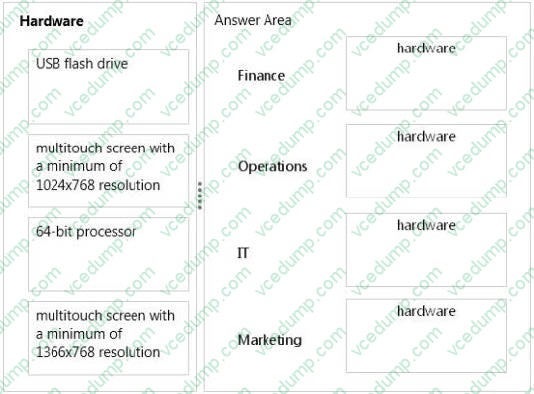
Your company is deploying new Windows 8.1 computers.
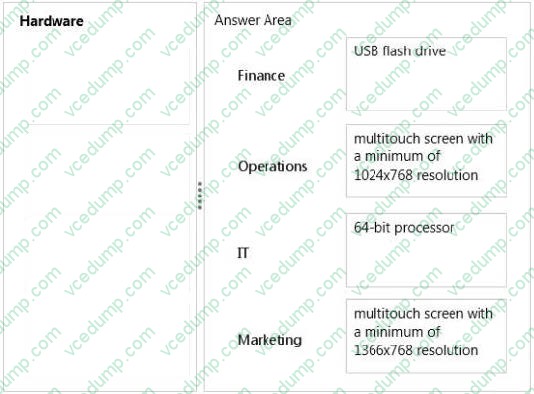
The company has several departments. Each department requires different hardware configurations.
You need to implement the appropriate hardware. You have the following requirements:
1. Finance must have BitLocker To Go.
2. Operations must have the ability to use tablets and access the Windows Store to download and run apps.
3. IT must have the ability to use Hyper-V with Windows 8.1.
4. Marketing must have the ability to use tablets as well as the snap app functionality.
What are the minimum hardware requirements to meet each department's needs? (To answer, drag the appropriate hardware to the correct location or locations in the answer area. Each answer may be used more than once.)
Select and Place:
-
Question 5:
Your company has a main office that has a connection to the Internet.
The company has 100 Windows 8.1 Pro client computers that run Microsoft Office 2010.
You purchase a subscription to Office 365 for each user. You download the Office Deployment Tool for Click-to-Run,
You need to deploy Office 365 ProPlus to the computers. The solution must minimize the amount of traffic over the Internet connection.
Which two actions should you perform? (Each correct answer presents part of the solution. Choose two.)
A. On a file server, run setup.exe and specify the /download parameter.
B. On each client computer, run setup.exe and specify the /configure parameter.
C. On a file server, run setup.exe and specify the /configure parameter.
D. On each client computer, run setup.exe and specify the /download parameter, -
Question 6:
You manage computers that run Windows 8.1.
You plan to install a desktop app named MarketingApp on one of the client computers.
You need to display a progress bar to the user while installing the app.
Which command should you run?
A. msiexec /i marketingapp.msi /qn
B. msiexec /x marketingapp.msi /qb
C. msiexec /x marketingapp.msi /qn
D. msiexec /i marketingapp.msi /qb -
Question 7:
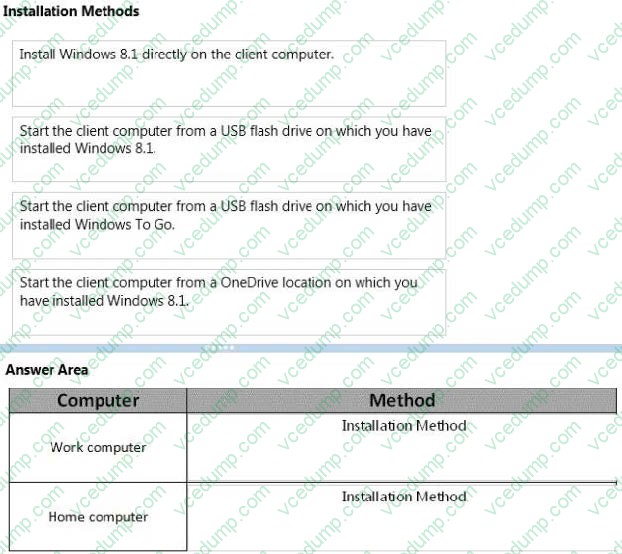
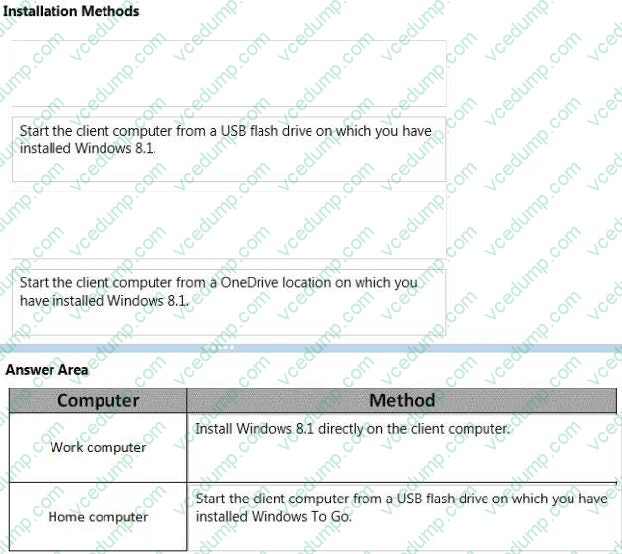
A company has client computers that run Windows 7. Each employee has two client computers: one at work and one at home.
The company plans to deploy Windows 8.1 to all client computers.
You are planning a deployment strategy.
You have the following requirements:
1. Minimize deployment time.
2. Ensure that the PC Reset and PC Refresh features can be utilized on all work computers.
You need to plan a deployment strategy that meets the requirements.
What should you do? (To answer, drag the appropriate installation method or methods to the correct location or locations in the answer area. Methods may be used once, more than once, or not at all. You may need to drag the split bar between panes or scroll to view content.)
Select and Place:
-
Question 8:
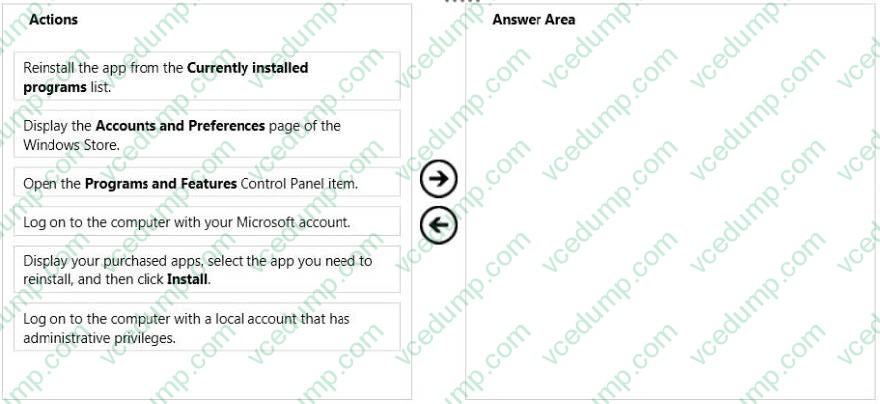
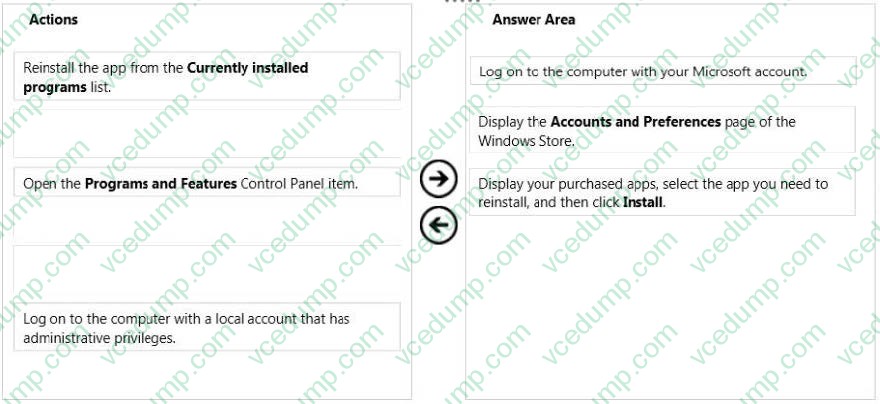
A company has 10 Windows 8.1 client computers. You purchase a Windows Store app and install the app on several computers.
The hard drive of a computer on which the application is installed fails. You reinstall Windows 8.1.
You need to reinstall the Windows Store app on the computer.
Which three actions should you perform in sequence? (To answer, move the appropriate actions from the list of actions to the answer area and arrange them in the correct order.)
Select and Place:
-
Question 9:
You are a system administrator for a local construction company. The company uses Windows 8.1 Pro desktop and laptop computers. All desktop computers have a 160 GB disk drive.
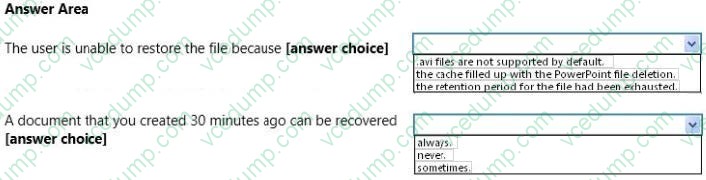
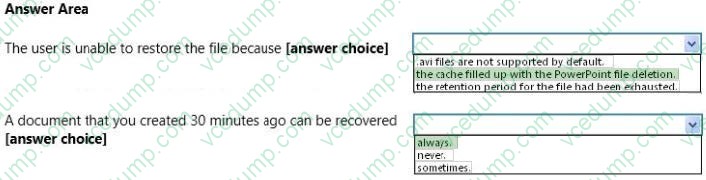
You receive a call from a user who needs to a recover an .avi file from file history but discovers that the file no longer exists. The user reports recently deleting a large PowerPoint presentation from the hard drive.
The user's File History configuration is displayed in the graphic below:
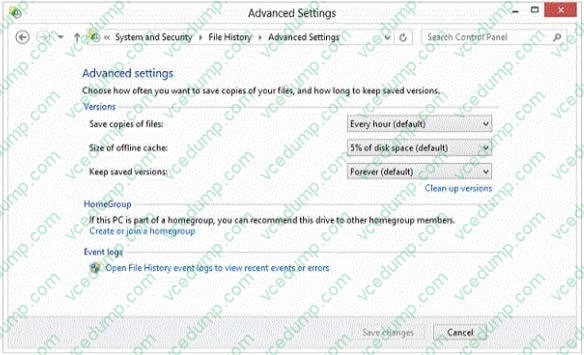
Use the drop-down menus to select the answer choice that completes each statement. Each correct selection is worth one point.
Hot Area:
-
Question 10:
You administer Windows 8.1 Enterprise computers in your company's Active Directory Domain Services (AD DS) domain.
Your company uses several peripheral devices. The drivers for these devices are not available on Windows Update.
You need to ensure that the drivers install when users connect these devices to their computers.
What should you do?
A. For the Group Policy setting Prioritize all digitally signed drivers equally during the driver ranking and selection process, select Disabled
B. For the Group Policy setting Configure driver search locations, select Enabled. Make the drivers available on the UNC path to the driver's share.
C. Add the following registry key to the computers: HKEY_LOCAL_MACHINE/Software/Microsoft/Windows/Current Version/ DevicePath. Add %systemroot%\inf and the UNC path to the drivers share.
D. From Device Manager, find the detected scanner device and select Update Driver.
Related Exams:
-
62-193
Technology Literacy for Educators -
70-243
Administering and Deploying System Center 2012 Configuration Manager -
70-355
Universal Windows Platform – App Data, Services, and Coding Patterns -
77-420
Excel 2013 -
77-427
Excel 2013 Expert Part One -
77-725
Word 2016 Core Document Creation, Collaboration and Communication -
77-726
Word 2016 Expert Creating Documents for Effective Communication -
77-727
Excel 2016 Core Data Analysis, Manipulation, and Presentation -
77-728
Excel 2016 Expert: Interpreting Data for Insights -
77-731
Outlook 2016 Core Communication, Collaboration and Email Skills
Tips on How to Prepare for the Exams
Nowadays, the certification exams become more and more important and required by more and more enterprises when applying for a job. But how to prepare for the exam effectively? How to prepare for the exam in a short time with less efforts? How to get a ideal result and how to find the most reliable resources? Here on Vcedump.com, you will find all the answers. Vcedump.com provide not only Microsoft exam questions, answers and explanations but also complete assistance on your exam preparation and certification application. If you are confused on your 70-692 exam preparations and Microsoft certification application, do not hesitate to visit our Vcedump.com to find your solutions here.