70-692 Exam Details
-
Exam Code
:70-692 -
Exam Name
:Upgrading Your Windows XP Skills to MCSA Windows 8 -
Certification
:Microsoft Certifications -
Vendor
:Microsoft -
Total Questions
:76 Q&As -
Last Updated
:Dec 14, 2021
Microsoft 70-692 Online Questions & Answers
-
Question 31:
You are the PC Support Specialist for Contoso, Ltd. You are configuring Windows 8.1 so that you can create an image. An additional web browser is installed on the image.
You need to ensure that Internet Explorer 11 for the Desktop is the default web browser.
Which two actions should you perform? (Each correct answer presents a complete solution. Choose two.)
A. Go to Programs and Features in Control Panel and set Internet Explorer as the default application.
B. Tap the tile of another web browser on the Start Menu and tap the Unpin from start option.
C. Under Set program access and computer defaults, select Default Programs, then choose Microsoft Windows.
D. On the Security tab of Internet options, click Reset all zones to default level.
E. In Default Programs, associate the .htm and .html files with Internet Explorer. -
Question 32:
A company has Windows 8.1 client computers. The company develops a Windows Store app but does not publish it to the Windows Store.
You need to sideload the Windows Store app on all client computers.
Which two actions should you perform? (Each correct answer presents part of the solution.
Choose two.)
A. Run the get-appxpackage Windows PowerShell cmdlet.
B. Run the add-appxpackage Windows PowerShell cmdlet.
C. Enable the Allow all trusted applications to install Group Policy setting.
D. Enable the Allow installation of desktop items Group Policy setting.
E. Run the msiexec command. -
Question 33:
Your company has client computers that run either Windows XP or Windows 7.
You plan to deploy Windows 8.1 Enterprise to all of the computers.
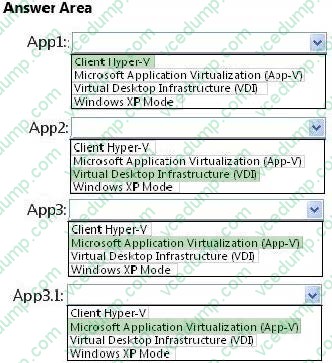
You plan to deploy the applications shown in the following table.
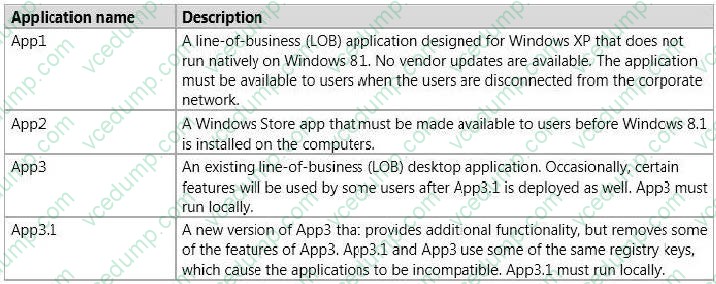
You need to recommend the appropriate technology to deploy each application. Each solution must ensure that the users can access all of the applications. The solution that uses the least amount of system resources must be selected, whenever possible.
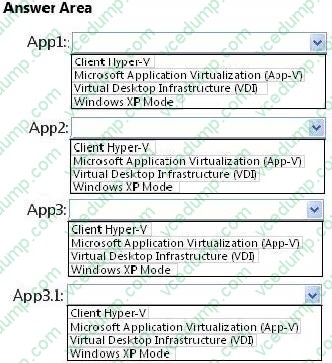
Which technology should you recommend for each application? (To answer, select the appropriate technology for each application in the answer area.)
Hot Area:
-
Question 34:
You administer computers that run windows 7 and Windows 8. You run an application that saves files that contain local settings unique to each user.
You want to allow users to synchronize settings for an application to any enterprise computer when they log on to the enterprise computer.
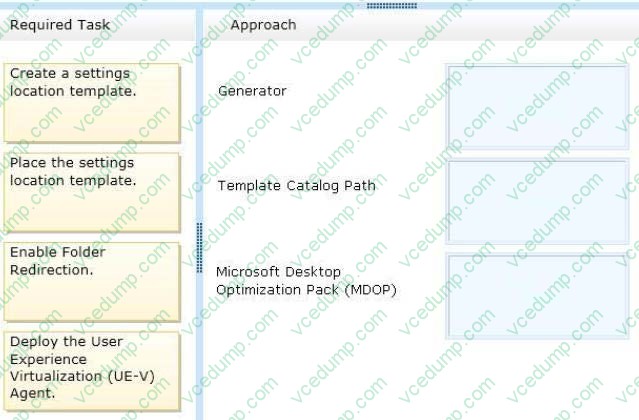
You need to implement a solution that will move a user's settings files to any computer.
You also need to ensure that you can roll back the changes if necessary.
Which required task or tasks should you perform with each approach? (To answer, drag the appropriate required task to the corresponding approach. Each required task may be used once, more than once, or not at all. You may need to drag
the split bar between
panes or scroll to view content.)
Select and Place:
-
Question 35:
A company has Windows 8.1 client computers. File History is on. An employee downloads data to a folder on drive D named Archives.
You need to ensure that the user can restore files from the Archives folder by using File History.
What should you do?
A. Create a library named History and add the Archives folder to the library.
B. Move the Archives folder into the Windows system folder.
C. Configure the File History advanced settings to include the Archives folder.
D. From the File History configuration options, change the drive and select the Archives folder. -
Question 36:
A company has 10 client computers that run Windows 8. You are responsible for technical support. You purchase a support tool from the Windows Store while logged in with your Microsoft account.
You install the support tool on several client computers.
Three months later, you attempt to install the support tool on another client computer. The installation fails.
You need to ensure that you can install the support tool on the client computer.
What should you do?
A. On the computer on which you want to install the tool, synchronize the Windows Store application licenses.
B. Disassociate your Microsoft account from the computer on which you want to install the tool. Then reassociate your Microsoft account with the computer.
C. Reset your Microsoft account password.
D. Log in with your Microsoft account and remove a computer from the Windows Store device list. -
Question 37:
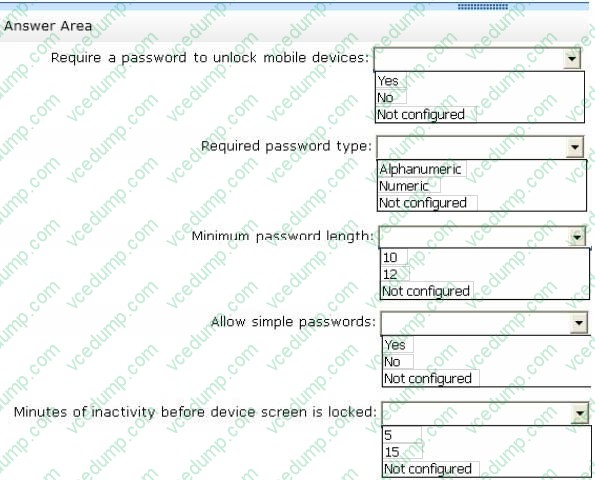
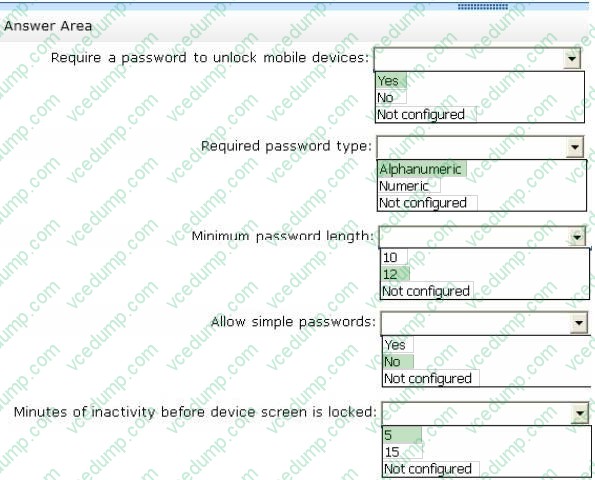
Your company has several Windows RT 8.1 devices. The devices connect to Exchange Online in Microsoft Office 365 and to Windows Intune for device management. The security policies of Office 365 and Windows Intune are configured as shown in the following table.
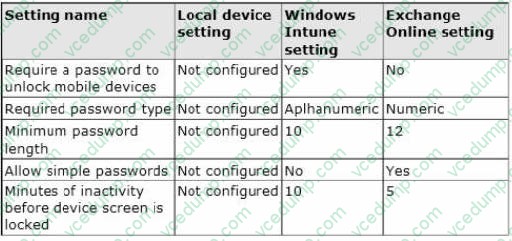
You need to identify the effective settings on the Windows RT devices.
What should you identify? (To answer, select the appropriate effective configuration for each setting in the answer area.)
Hot Area:
-
Question 38:
You manage a client Windows 8.1 computer named Computer1. The computer has the OneDrive desktop application installed.
You have an OneDrive synchronized folder that contains .pdf files.
You need to ensure that you can restore previous versions of the .pdf files.
What should you do?
A. Configure System Restore.
B. Enable Sync your settings on Computer1.
C. Enable File History.
D. Configure Computer1 as a trusted PC. -
Question 39:
A company has 100 client computers that run Windows 8.1.
You plan to install a custom app that requires a license key.
You need to ensure that the installation process does not prompt for the manual entry of a license key.
What should you do?
A. Install and run the Microsoft Deployment Toolkit.
B. Install and run the Windows Application Compatibility Toolkit.
C. Install and run the Windows App Certification Kit.
D. Install and run the Microsoft Assessment and Planning Toolkit. -
Question 40:
A company has Windows 8.1 client computers. The company uses Windows BitLocker Drive Encryption and BitLocker Network Unlock on all client computers.
Your need to collect information about BitLocker Network Unlock status.
Which command should you run?
A. Run the BdeHdCfg command.
B. Run the bitsadmin command.
C. Run the BitLockerWizard command.
D. Run the manage-bde command.

Related Exams:
-
62-193
Technology Literacy for Educators -
70-243
Administering and Deploying System Center 2012 Configuration Manager -
70-355
Universal Windows Platform – App Data, Services, and Coding Patterns -
77-420
Excel 2013 -
77-427
Excel 2013 Expert Part One -
77-725
Word 2016 Core Document Creation, Collaboration and Communication -
77-726
Word 2016 Expert Creating Documents for Effective Communication -
77-727
Excel 2016 Core Data Analysis, Manipulation, and Presentation -
77-728
Excel 2016 Expert: Interpreting Data for Insights -
77-731
Outlook 2016 Core Communication, Collaboration and Email Skills
Tips on How to Prepare for the Exams
Nowadays, the certification exams become more and more important and required by more and more enterprises when applying for a job. But how to prepare for the exam effectively? How to prepare for the exam in a short time with less efforts? How to get a ideal result and how to find the most reliable resources? Here on Vcedump.com, you will find all the answers. Vcedump.com provide not only Microsoft exam questions, answers and explanations but also complete assistance on your exam preparation and certification application. If you are confused on your 70-692 exam preparations and Microsoft certification application, do not hesitate to visit our Vcedump.com to find your solutions here.