70-687 Exam Details
-
Exam Code
:70-687 -
Exam Name
:Configuring Windows 8.1 -
Certification
:Microsoft Certifications -
Vendor
:Microsoft -
Total Questions
:266 Q&As -
Last Updated
:Dec 07, 2021
Microsoft 70-687 Online Questions & Answers
-
Question 231:
A company has 100 client computers.
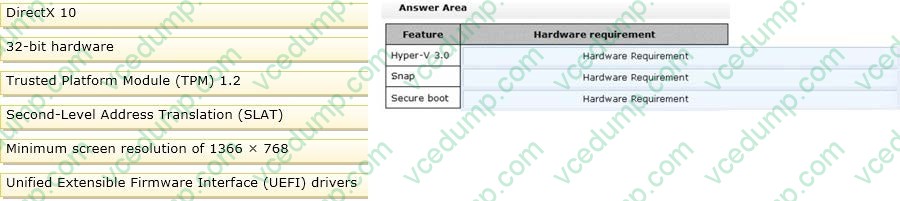
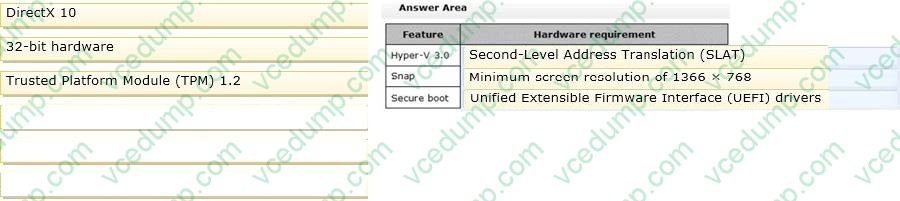
The company plans to deploy Windows 8.1 to the client computers and utilize the following features:
1. Microsoft Hyper-V 3.0
2. Snap
3. Secure boot You need to establish whether the current hardware supports the features. What hardware is required to enable each of the features? (To answer, drag the appropriate hardware requirements to the correct location or locations in the answer area. Requirements may be used once, more than once, or not at all. You may need to drag the split bar between panes or scroll to view content.)
Select and Place:
-
Question 232:
A company has 10 client computers that run Windows 8.
An employee updates a device driver on her computer and then restarts the computer. Windows does not start successfully. You start the computer in Safe Mode.
You need to identify the most recently installed driver and gather the maximum amount of information about the driver installation.
What should you do?
A. In Device Manager, run a scan for hardware changes.
B. In the Event Viewer console, display the Hardware Events log.
C. In the Programs and Features Control Panel item, display the installed updates.
D. Display the contents of the Windows\inf\setupapi.dev.log file. -
Question 233:
You update the video card driver on a portable computer that runs Windows 8.
When a user connects the portable computer to an external monitor, the external monitor duplicates the display on the portable computer screen.
You need to ensure that the user can display additional desktop space on the external monitor.
What should you do?
A. Run the DisplaySwitch /extend command.
B. Start the computer from the Windows 8 installation media and perform a system image recovery.
C. Roll back the video card driver to the previous version.
D. Run the sic /scannow command. -
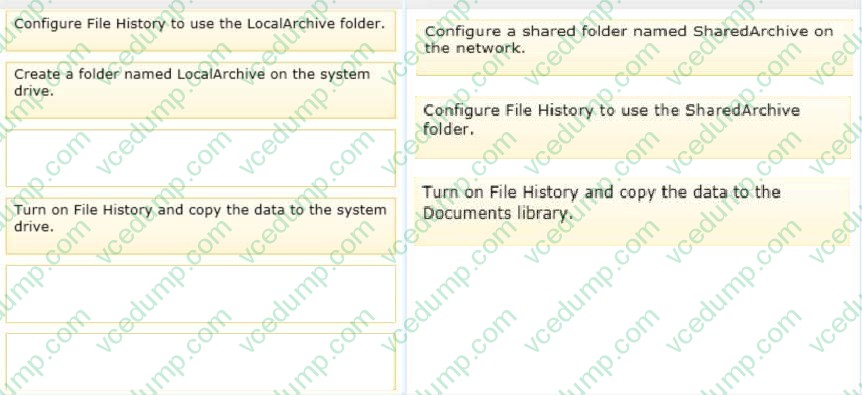
Question 234:
A company has a branch office with client computers that run Windows 8. Files are saved locally on the client computers and are not backed up regularly.
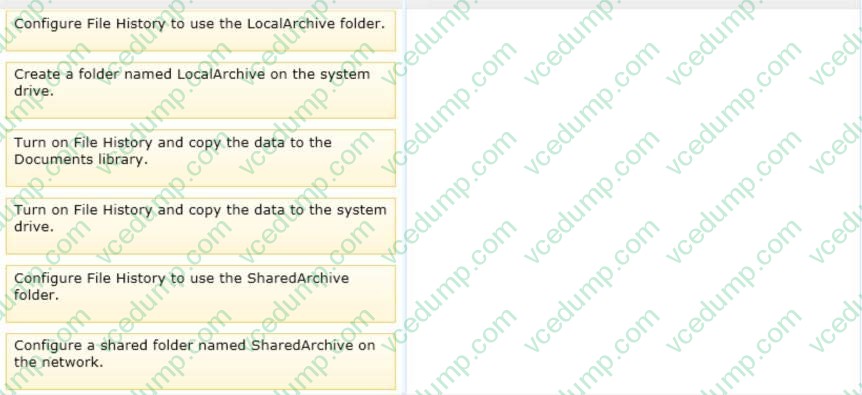
You need to ensure that you can retrieve previous versions of locally saved files from each client computer.
Which three actions should you perform in sequence? (To answer, move the appropriate actions from the list of actions to the answer area and arrange them in the correct order.)
Select and Place:
-
Question 235:
You administer Windows 8 Enterprise client computers in your company network.
You change settings on a reference computer by using the Windows Firewall with Advanced Security tool. You want to apply the same settings to other computers.
You need to save the Windows Firewall with Advanced Security configuration settings from the reference computer. You also need to be able to import the configuration settings into a Group Policy object later.
What should you do?
A. Run the netshadvfirewall export c:\settings.xrnl command.
B. Run the netshadvfirewall export c:\settings.txt command.
C. Run the netshadvfirewall export c:\settinqs.wfw command.
D. Run the netsh firewall export c:\settings.xml command. -
Question 236:
A company has an Active Directory Domain Services (AD DS) domain. All client computers run Windows 7. You plan to upgrade the client computers to Windows 8 Pro.
You need to choose the methods that do not require the manual entry of a product key during the upgrade.
Which two methods should you choose? (Each correct answer presents a complete solution. Choose two.)
A. Use the Volume Activation Management Tool.
B. Use the Microsoft Deployment Toolkit.
C. Use the Windows 8 online upgrade tool.
D. Create a catalog (.clg) file by using Windows System Image Manager (SIM). -
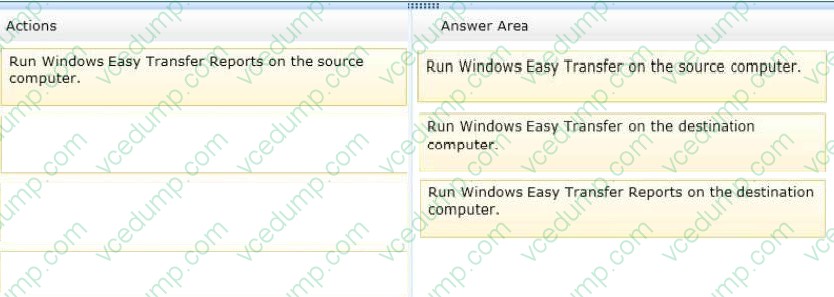
Question 237:
You are preparing to deploy a new computer that runs Windows 8. You plan to copy the user's data from his current computer to the new computer.
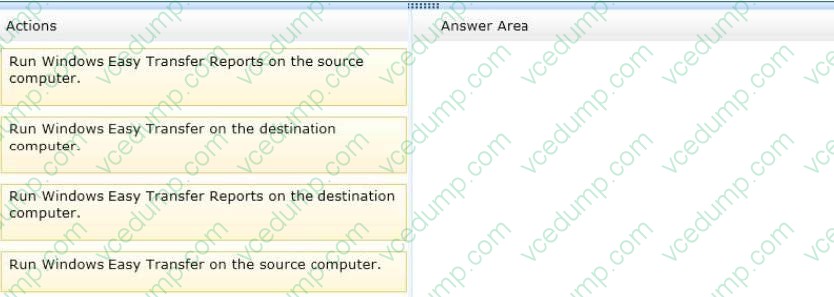
You need to generate a list of data that will be copied from his existing computer to the new computer.
Which three actions should you perform in sequence? (To answer, move the appropriate actions from the list of actions to the answer area and arrange them in the correct order.)
Select and Place:
-
Question 238:
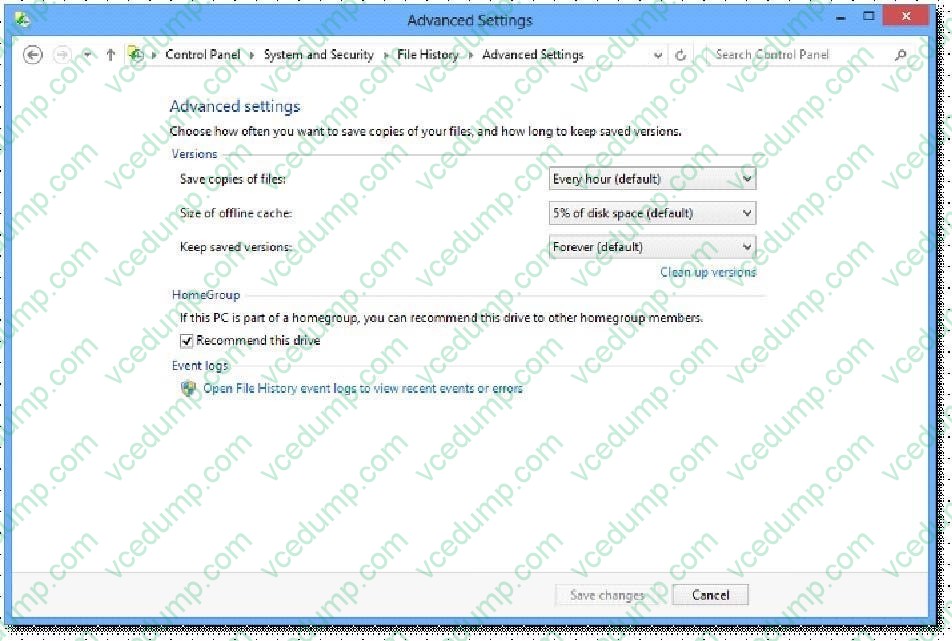
You are in the process of setting up File History on your workstation.
You are configuring the Size of offline cache Advanced settings. Which of the following is the default setting?
A. 2%
B. 5%
C. 10%
D. 20% -
Question 239:
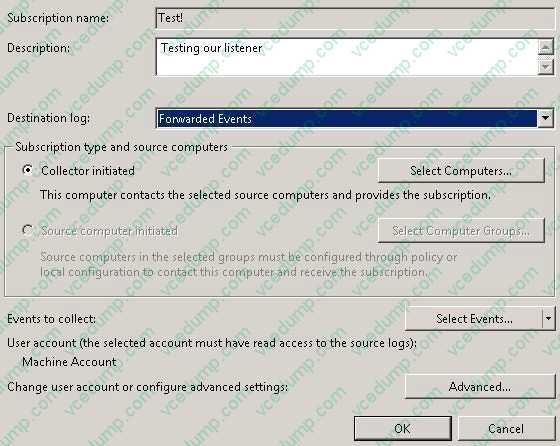
A company has client computers that run Windows 8. The client computers are in a workgroup. Windows Remote Management (WinRM) is configured on all computers.
You need to configure a computer named COMPUTER1 to retrieve Windows event logs from all other computers in the workgroup.
Which three actions should you perform? (Each correct answer presents part of the solution. Choose three.)
A. Start the Windows Event Collector service on COMPUTER1.
B. Add machine accounts of all other computers to the Event Log Readers local group on COMPUTER1.
C. Start the Windows Event Log service on all computers other than COMPUTER1.
D. Create and configure a source computer-initiated subscription.
E. Add the COMPUTER1 machine account to the Event Log Readers local group on all computers.
F. Start the Windows Event Collector service on all computers other than COMPUTER1.
G. Create and configure a collector-initiated subscription. -
Question 240:
You administer Windows 8.1 computers in your company network.
You need to configure remote computers to receive Windows Remote Shell commands.
Which cmdlet should you run on the remote computers?
A. Enable-PSRemoting
B. Set-PSSessionConfiguration
C. New-PSSession
D. Set-NetConnectionProfile
Related Exams:
-
62-193
Technology Literacy for Educators -
70-243
Administering and Deploying System Center 2012 Configuration Manager -
70-355
Universal Windows Platform – App Data, Services, and Coding Patterns -
77-420
Excel 2013 -
77-427
Excel 2013 Expert Part One -
77-725
Word 2016 Core Document Creation, Collaboration and Communication -
77-726
Word 2016 Expert Creating Documents for Effective Communication -
77-727
Excel 2016 Core Data Analysis, Manipulation, and Presentation -
77-728
Excel 2016 Expert: Interpreting Data for Insights -
77-731
Outlook 2016 Core Communication, Collaboration and Email Skills
Tips on How to Prepare for the Exams
Nowadays, the certification exams become more and more important and required by more and more enterprises when applying for a job. But how to prepare for the exam effectively? How to prepare for the exam in a short time with less efforts? How to get a ideal result and how to find the most reliable resources? Here on Vcedump.com, you will find all the answers. Vcedump.com provide not only Microsoft exam questions, answers and explanations but also complete assistance on your exam preparation and certification application. If you are confused on your 70-687 exam preparations and Microsoft certification application, do not hesitate to visit our Vcedump.com to find your solutions here.