70-687 Exam Details
-
Exam Code
:70-687 -
Exam Name
:Configuring Windows 8.1 -
Certification
:Microsoft Certifications -
Vendor
:Microsoft -
Total Questions
:266 Q&As -
Last Updated
:Dec 07, 2021
Microsoft 70-687 Online Questions & Answers
-
Question 131:
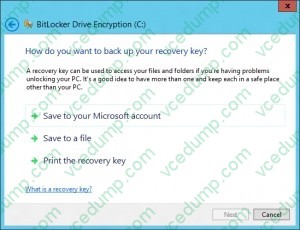
You administer a group of 10 client computers that run Windows 8. The client computers are members of a local workgroup. Employees log on to the client computers by using their Microsoft accounts.
The company plans to use Windows BitLocker Drive Encryption.
You need to back up the BitLocker recovery key.
Which two options can you use? (Each correct answer presents a complete solution.
Choose two.)
A. Save the recovery key to a file on the BitLocker-encrypted drive.
B. Save the recovery key in the Credential Store.
C. Save the recovery key to SkyDrive.
D. Print the recovery key. -
Question 132:
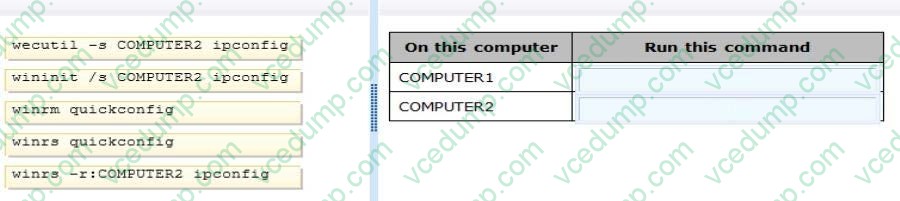
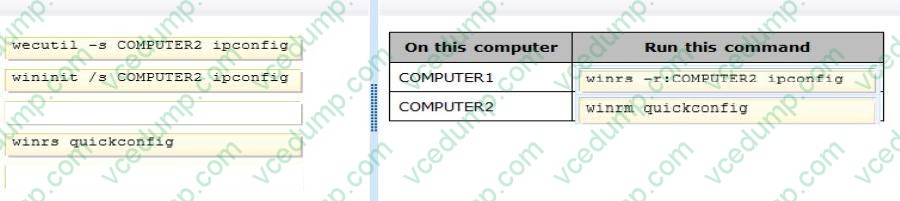
A company has an Active Directory Domain Services (AD DS) domain. All client computers run Windows 8. Two computers named COMPUTER1 and COMPUTER2 are connected to one network switch and joined to the domain. Windows Firewall is turned off on both computers.
You are planning a remote management solution. You have the following requirements:
1. Ensure that COMPUTER1 can run remote commands on COMPUTER2.
2. Test the solution by successfully running a command from COMPUTER1 that executes on COMPUTER2.
You need to select the commands to run on COMPUTER1 and COMPUTER2 to meet the remote management requirements.
Which commands should you run? (To answer, drag the appropriate command or commands to the correct location or locations in the answer area. Commands may be used once, more than once, or not at all. You may need to drag the split bar between panes or scroll to view content.)
Select and Place:
-
Question 133:
Your computer runs Windows 8 and is connected to an Active Directory Domain Services (AD DS) domain.
You create a folder and share the folder with everyone in your organization.
You need to modify the NTFS permissions of the folder to meet the following criteria:
Users from the Marketing security group must be able to open files, but not modify them.
Users from the Supervisors security group must be able to create, modify, and delete files.
Users from both groups must not be able to delete the folder.
Which permissions should you set?
A. Assign the Marketing group the Read permission. Assign the Supervisors group the Read and Write permissions and the Delete Subfolders and Files special permission.
B. Assign the Marketing group the Read and Write permissions. Assign the Supervisors group the Full Control permission.
C. Assign the Marketing group the Read and Write permissions. Assign the Supervisors group the Modify permission and the Delete Subfolders and Files special permission.
D. Assign the Marketing group the Read permission. Assign the Supervisors group the Read and Write permissions and the Delete special permission. -
Question 134:
You use a Windows 8.1 Pro computer. You turn on File History and install several applications.
The computer becomes slow and unresponsive.
You need to restore the computer to its default settings, You also need to keep your personal files stored on the computer.
What should you do?
A. Run Refresh your PC.
B. Run the Clear-Content PowerShell crndlet.
C. Restore files from File History.
D. Run Reset your PC. -
Question 135:
A company has a client computer that runs Windows 8 with secure boot enabled. You install a third-party adapter with an Option ROM in the computer.
When you start the computer, it starts in the Windows Recovery Environment (Windows RE).
You need to ensure that the computer starts normally.
What should you do?
A. Install a Trusted Platform Module (TPM) chip.
B. Start the computer in Safe Mode. Then update the adapter drivers.
C. Replace the third-party adapter with an adapter that is signed by a trusted Certificate Authority (CA).
D. Create a self-signed certificate. Associate the certificate with the third-party adapter. -
Question 136:
A company has a main office and several branch offices. The company has an Active Directory Domain Services (AD DS) domain. All client computers run Windows 8. All printers are deployed to all client computers by using Group Policy.
When a user attempts to print from his portable client computer while at a branch office, the main office printer is set as his default printer.
You need to ensure that a location-specific default printer for each branch office is set for the user.
What should you do?
A. Create a Group Policy object (GPO) that enables the Computer location policy setting.
B. In the Manage Default Printers dialog box, select the Always use the same printer as my default printer option.
C. In the Manage Default Printers dialog box, select the Change my default printer when I change networks option.
D. Create a Group Policy object (GPO) that enables the Allow Print Spooler to accept client connections policy setting. -
Question 137:
You administer Windows 8.1 Pro computers in your company network. A server named Server1 runs Windows Server 2012. Server1 allows incoming VPN and Remote Desktop connections.
A remote user requires access to files on Server1.
You need to prevent the user from downloading any files from Server1 to his local computer.
Your solution must ensure that the user can read the files on Server1.
What should you do?
A. Create a new VPN connection. Disable local drive mappings.
B. Create a new VPN connection. Disable offline files.
C. Create a new Remote Desktop connection. Set the Local Computer policy to Disable drives redirection for Remote Desktop Services.
D. Create a new Remote Desktop connection. Set the Local Computer policy to Disable clipboard redirection for Remote Desktop Services. -
Question 138:
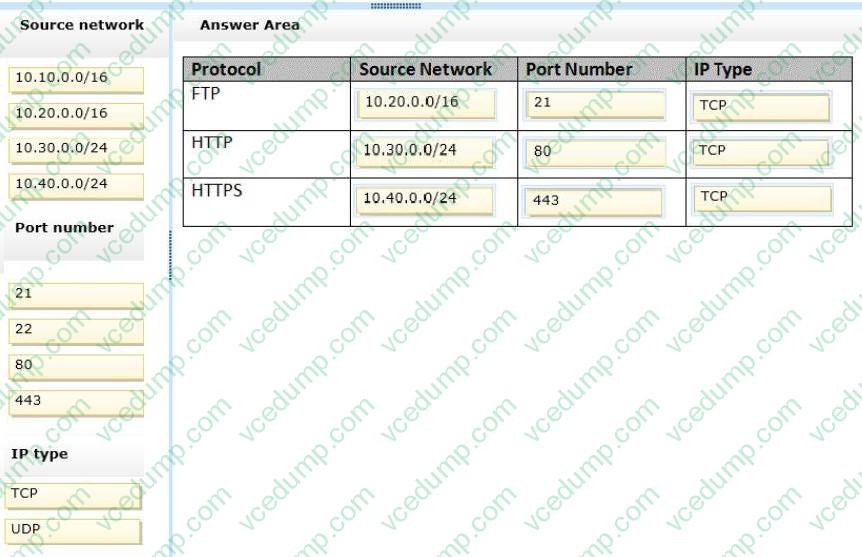
A company has a main office located in Miami, and branch offices in Boston, Los Angeles, and Portland. The office networks are configured as described in the following table.
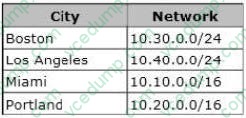
A management computer in the main office, named COMPUTER1, runs Windows 8 and several third-party management applications. You are configuring access to COMPUTER1. You have the following requirements:
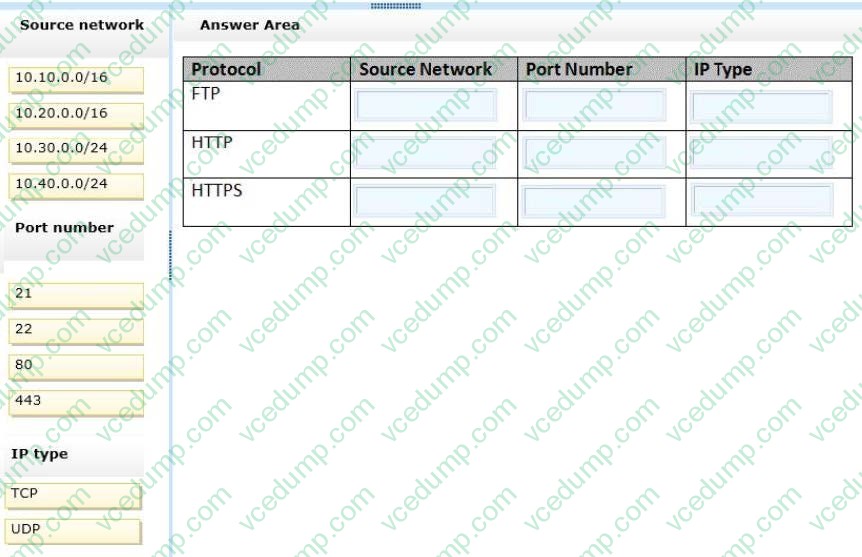
1. Ensure that only users in the Boston office can connect to COMPUTER1 by using HTTP.
2. Ensure that only users in the Los Angeles office can connect to COMPUTER1 by using HTTPS.
3. Ensure that only users in the Portland office can connect to COMPUTER1 by using FTP.
You need to configure access to COMPUTER1.
How should you configure Windows Firewall? (To answer, drag the appropriate elements to the correct location or locations in the answer area. Elements may be used once, more than once, or not at all. You may need to drag the split bar between panes or scroll to view content.)
Select and Place:
-
Question 139:
A company has 100 client computers that run Windows Vista. The company uses several custom applications.
The company plans to replace the Windows Vista computers with new computers that run Windows 8.
You need to establish which of the currently installed applications will work on Windows 8.
What should you do?
A. Install and run the Windows App Certification Kit.
B. Install and run the Microsoft Assessment and Planning Toolkit.
C. Install and run the Microsoft Deployment Toolkit.
D. Install and run the Windows Application Compatibility Toolkit. -
Question 140:
A company has client computers that run Windows 8.
Users can run applications that have been downloaded from the Internet only with administrator approval.
You need to ensure that users can run downloaded applications without administrator approval.
What should you do?
A. Set the Internet zone privacy level to Low.
B. Set the Internet zone security level to Medium.
C. Set the User Account Control (UAC) settings to Never notify.
D. Turn off Windows SmartScreen.
Related Exams:
-
62-193
Technology Literacy for Educators -
70-243
Administering and Deploying System Center 2012 Configuration Manager -
70-355
Universal Windows Platform – App Data, Services, and Coding Patterns -
77-420
Excel 2013 -
77-427
Excel 2013 Expert Part One -
77-725
Word 2016 Core Document Creation, Collaboration and Communication -
77-726
Word 2016 Expert Creating Documents for Effective Communication -
77-727
Excel 2016 Core Data Analysis, Manipulation, and Presentation -
77-728
Excel 2016 Expert: Interpreting Data for Insights -
77-731
Outlook 2016 Core Communication, Collaboration and Email Skills
Tips on How to Prepare for the Exams
Nowadays, the certification exams become more and more important and required by more and more enterprises when applying for a job. But how to prepare for the exam effectively? How to prepare for the exam in a short time with less efforts? How to get a ideal result and how to find the most reliable resources? Here on Vcedump.com, you will find all the answers. Vcedump.com provide not only Microsoft exam questions, answers and explanations but also complete assistance on your exam preparation and certification application. If you are confused on your 70-687 exam preparations and Microsoft certification application, do not hesitate to visit our Vcedump.com to find your solutions here.