70-687 Exam Details
-
Exam Code
:70-687 -
Exam Name
:Configuring Windows 8.1 -
Certification
:Microsoft Certifications -
Vendor
:Microsoft -
Total Questions
:266 Q&As -
Last Updated
:Dec 07, 2021
Microsoft 70-687 Online Questions & Answers
-
Question 151:
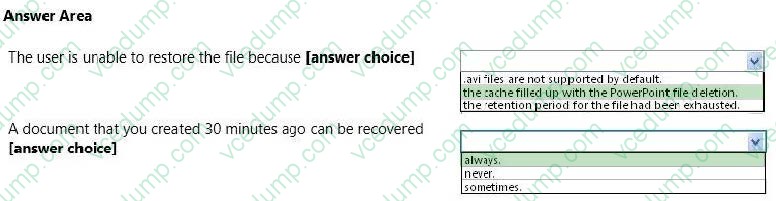
You are a system administrator for a local construction company. The company uses Windows 8.1 Pro desktop and laptop computers. All desktop computers have a 160 GB disk drive.
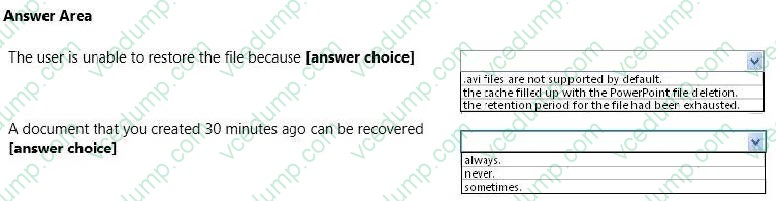
You receive a call from a user who needs to a recover an .avi file from file history but discovers that the file no longer exists. The user reports recently deleting a large PowerPoint presentation from the hard drive.
The user's File History configuration is displayed in the graphic below:
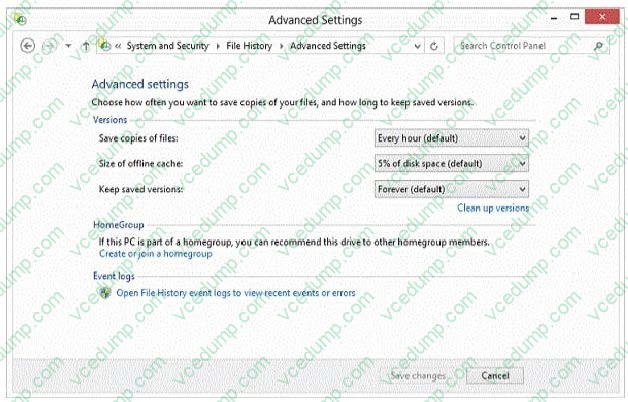
Use the drop-down menus to select the answer choice that completes each statement Each correct selection is worth one point.
Hot Area:
-
Question 152:
You administer Windows 8 computers for a software development company.
The marketing department is going to meet a potential customer to demonstrate the product. You want to configure a laptop that has a stand-alone virtual machine that runs Windows 8 Enterprise and the latest build of your software.
You need to enable BitLocker on the system drive of the virtual machine.
What should you do first?
A. Activate Windows.
B. Join the virtual machine to an Active Directory Domain Services (AD DS) domain.
C. Turn on the Require additional authentication at startup local policy.
D. Turn off the Require additional authentication at startup local policy. -
Question 153:
A company has client computers that run Windows 8.
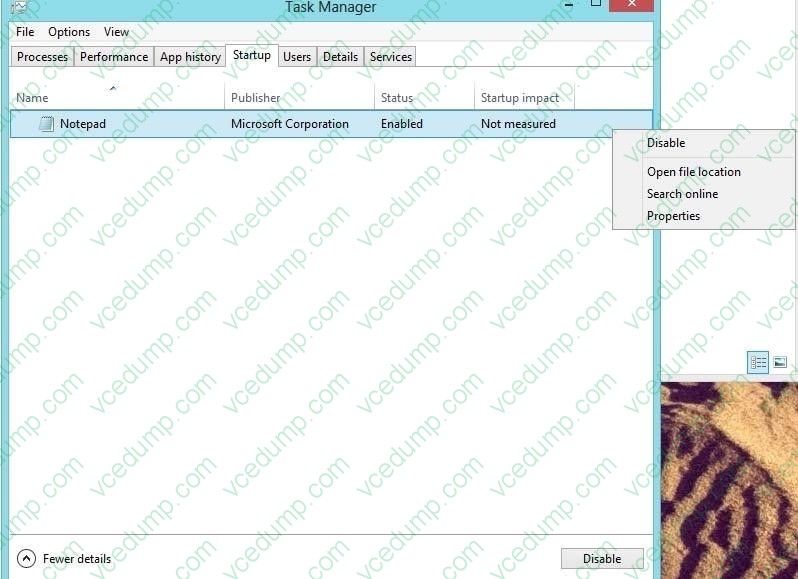
You install a new device on a client computer. The device installation includes an application that runs when the computer starts. You experience problems with the application.
You need to prevent the application from running when the computer starts, without affecting any other application.
What should you do?
A. Configure the application by using Task Manager.
B. Run the bcdedit command.
C. Configure the device by using Device Manager.
D. Run the msconuig command. -
Question 154:
A company has client computers that run Windows 8. File History is on.
An employee downloads data to a folder on drive D named Archives.
You need to ensure that the user can restore files from the Archives folder by using File History.
What should you do?
A. Configure the File History advanced settings to include the Archives folder.
B. From the File History configuration options, change the drive and select the Archives folder.
C. Create a library named History and add the Archives folder to the library.
D. Move the Archives folder into the Windows system folder. -
Question 155:
You administer Windows 8.1 laptops. The laptops are configured to connect to an unsecured wireless access point.
You plan to configure the wireless access point to encrypt wireless traffic and turn off SSID broadcast.
You need to ensure the laptops will join the secured wireless network automatically after the configuration changes.
What should you do?
A. Set Network Discovery to Enabled for the Public profile.
B. Create an ad hoc network.
C. Set the Unidentified Networks Properties User permissions to User can change location.
D. Create a network profile. -
Question 156:
A company has 10 client computers that run Windows 8. Employees log on to resources by using multiple accounts.
You need to back up the user name and password for each logon account.
What should you do on each client computer?
A. Back up each user's Personal Information Exchange PKCS #12 (.pfx) certificate.
B. Use Credential Manager to save the information to a USB flash drive.
C. Use File History to back up the ntuser.dat file.
D. Run the Export-Certificate Windows PowerShell cmdlet. -
Question 157:
A computer runs Windows 8. You install an application by running an .msi file.
You need to apply a patch to the application.
Which command should you run?
A. dism /Online /add-package:C:\MyPatch.msp
B. dism /get-AppPatches /get-PackageInfo:C:\MyPatch.msp
C. msiexec /x "C:\MyPatch.msp"
D. msiexec/p "C:\MyPatch.msp" -
Question 158:
You are employed as an administrator at contoso.com. The contoso.com network is made up of an Active Directory Domain Services (AD DS) domain, named ABC.com.
All workstations on the contoso.com network, including laptops, have Windows 8 installed. Your users have just been issued new laptops for use outside the office.
These users currently log in to their desktop workstations using a Windows domain account.
They would like their laptops to be set up exactly like their desktop workstations.
Which of the following would easily allow them to achieve this?
A. Transfer the user settings with the File and Transfer wizard
B. Windows Easy Transfer
C. Migrate the user profiles with USMT
D. Link the Windows domain accounts to a Windows Live ID. -
Question 159:
You are the PC support specialist for Contoso, Ltd.
Your department upgrades your company's laptops to Windows 8.1.
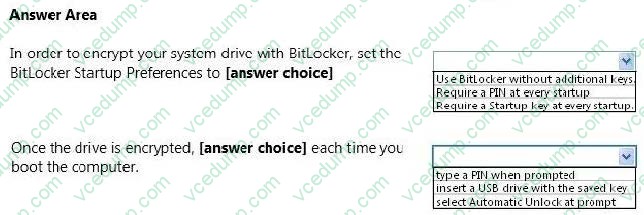
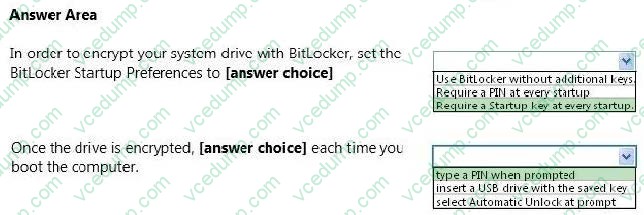
You need to use BitLocker to encrypt the system drives on these laptops. You attempt to encrypt several laptops but receive an error message shown in the following image:
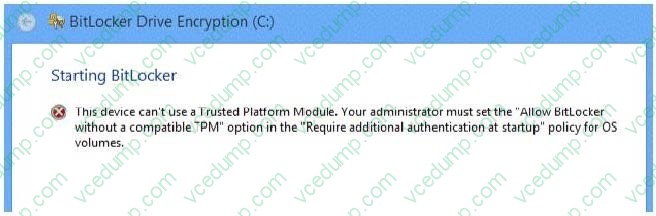
Use the drop-down menus to select the answer choice that completes each statement. Each correct selection is worth one point.
Hot Area:
-
Question 160:
You are a system administrator for your company.
The company has satellite offices located within different regions around the world and does not want employees to rely on carrying computers around when they visit the satellite offices. The company is deploying Windows To Go as a
solution.
You need to ensure that the company has the proper configuration for Windows To Go before deploying the solution.
Which configuration should you use?
A. a Windows To Go server that provides the use of a network boot and can provide files to run the operating system
B. at least one USB 2.0 port on the host PC
C. a second partition to run Windows To Go with a minimum of a DVD-RW to write Windows To Go data
D. a 20GB or greater SSD used as a secondary drive
Related Exams:
-
62-193
Technology Literacy for Educators -
70-243
Administering and Deploying System Center 2012 Configuration Manager -
70-355
Universal Windows Platform – App Data, Services, and Coding Patterns -
77-420
Excel 2013 -
77-427
Excel 2013 Expert Part One -
77-725
Word 2016 Core Document Creation, Collaboration and Communication -
77-726
Word 2016 Expert Creating Documents for Effective Communication -
77-727
Excel 2016 Core Data Analysis, Manipulation, and Presentation -
77-728
Excel 2016 Expert: Interpreting Data for Insights -
77-731
Outlook 2016 Core Communication, Collaboration and Email Skills
Tips on How to Prepare for the Exams
Nowadays, the certification exams become more and more important and required by more and more enterprises when applying for a job. But how to prepare for the exam effectively? How to prepare for the exam in a short time with less efforts? How to get a ideal result and how to find the most reliable resources? Here on Vcedump.com, you will find all the answers. Vcedump.com provide not only Microsoft exam questions, answers and explanations but also complete assistance on your exam preparation and certification application. If you are confused on your 70-687 exam preparations and Microsoft certification application, do not hesitate to visit our Vcedump.com to find your solutions here.