70-687 Exam Details
-
Exam Code
:70-687 -
Exam Name
:Configuring Windows 8.1 -
Certification
:Microsoft Certifications -
Vendor
:Microsoft -
Total Questions
:266 Q&As -
Last Updated
:Dec 07, 2021
Microsoft 70-687 Online Questions & Answers
-
Question 91:
A company has an Active Directory Domain Services (AD DS) domain. Client computers in the Test department run Windows 8 and are connected to the domain.
You need to ensure that Windows updates are not automatically applied and cannot be enabled by users. What should you do?
A. Create a Group Policy object (GPO) to enable the Turn on recommended updates via Automatic Updates policy setting.
B. Configure Windows Update to install updates automatically.
C. Create a Group Policy object (GPO) to configure the Remove access to use all Windows Update features policy setting.
D. Create a Group Policy object (GPO) to configure the Configure Automatic Updates policy setting. -
Question 92:
You are troubleshooting a computer that runs Windows 8.1. A third-party application no longer functions correctly. You need to repair the application. What should you do?
A. Run the reset /f command and specify the application's .msi file.
B. Run the msiexec /f command and specify the application's .msi file.
C. Use File History to revert the application's .msifile to a previous version.
D. Run the replace command, specify the application's .msi file as the source, and then specify the application's original installation directory as the destination. -
Question 93:
A company has client computers that run Windows 8 in a kiosk environment.
You need to ensure that Windows updates are automatically applied and cannot be disabled by users.
What should you do?
A. Configure Windows Update to install updates automatically.
B. In the local Group Policy, enable the Turn on recommended updates via Automatic Updates policy setting.
C. msiexec /i app1.msi /qn
D. In the local Group Policy, configure the Remove access to use all Windows Update features policy setting. -
Question 94:
You provide IT support for a small business.
A member of the team needs the ability to use Remote Desktop and VPN to access a desktop computer from a laptop when traveling. This desktop computer is running Windows 8.1 Pro, while the laptop is running Windows 7 Professional.
You need to set up a secure Remote Desktop connection on the desktop computer.
Which two actions should you perform? (Each correct answer presents part of the solution.Choose two.)
A. Require Network Level Authentication.
B. Allow remote connections.
C. Disable Remote Assistance connections.
D. Make the user account a standard user. -
Question 95:
You are a desktop administrator for a small company.
You are building a Windows 8.1 image to rollout to all new computers. Your company plans to administer all client computers from a single location.
You need to ensure that you can manage all client computers remotely once they are deployed.
Which action should you perform from the computer you are building the image from?
A. Run the winrmenumerate command.
B. Run the Enable-PSRemotingcmdlet.
C. Run the Set-PSStrictModecmdlet.
D. Run the New-PSSessionConfigurationFilecmdlet. -
Question 96:
A company has 100 client computers that run Windows 8.
You plan to install a custom app that requires a license key.
You need to ensure that the installation process does not prompt for the manual entry of a license key.
What should you do?
A. Install and run the Microsoft Deployment Toolkit.
B. Install and run the Microsoft Assessment and Planning Toolkit.
C. Install and run the Windows App Certification Kit.
D. Install and run the Windows Application Compatibility Toolkit. -
Question 97:
You are a system administrator for Fabrikam, Inc.
You are upgrading an end user's computer to Windows 8.1.
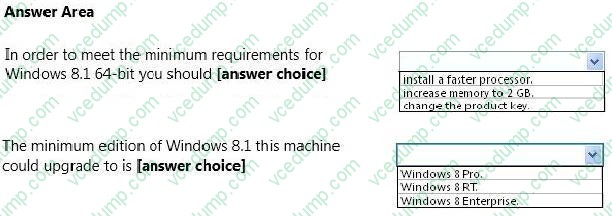
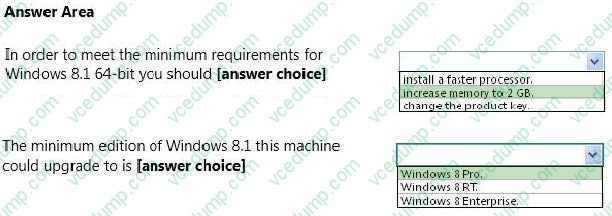
You need to evaluate the system's readiness for the upgrade. The computer properties are displayed in the graphic below:
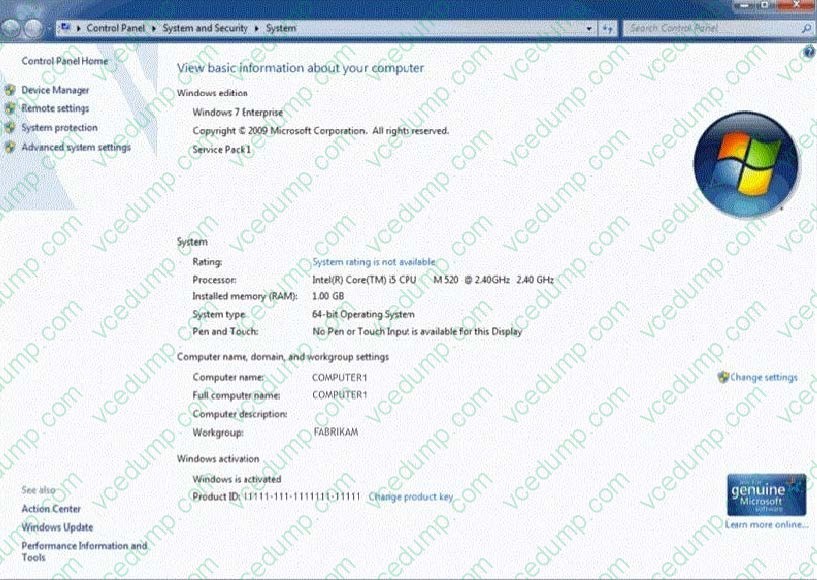
Use the drop-down menus to select the answer choice that completes each statement. Each correct selection is worth one point.
Hot Area:
-
Question 98:
A company has 100 client computers that run Windows XP 64-bit Edition. You are deploying new computers that run a 32-bit version of Windows B.
You need to transfer the contents of each user's Documents folder to the new computer by using the least amount of administrative effort.
What should you do?
A. Back up the folders by running the NTBackup command. Then restore the backup to the new computer.
B. Manually copy the folder content to a USB flash drive. Then paste the files to the new computer.
C. Use Windows Easy Transfer.
D. Use the User State Migration Tool. -
Question 99:
A company has an Active Directory Domain Services (AD DS) domain. The corporate environment includes a Windows Software Update Services (WSUS) server. All client computers run Windows 8 and a custom web application. The
company has a Microsoft Software Assurance for Volume Licensing agreement.
After deploying Windows Updates to the computers, the web application stops responding. You establish that a specific optional update installed by Windows Update is causing the problem. In the Windows Update Control Panel item, the
option to remove the update is unavailable.
You need to remove the optional update from one client computer. What should you do?
A. Install and run the Debugging tools for Windows.
B. Clear the SusClientID registry value on the client computer.
C. Restart the computer from a Diagnostic and Repair Toolset (DaRT) boot disk and use the Crash Analyzer tool.
D. Run the wuauclt /resetauthorization command on the client computer.
E. Restart the computer from a Diagnostic and Repair Toolset (DaRT) boot disk and use the Hotfix Uninstaller tool. -
Question 100:
You administer a Windows 8.1 Pro client computer. You disable system protection, install custom drivers, and create a system image.
You test a new application and discover that the computer becomes unresponsive.
You need to return your computer to the state that existed prior to the installation of the application.
What should you do?
A. Start the computer from a system recovery drive, and then perform System Restore.
B. Start the computer from a system repair disk, and then perform System Image Recovery.
C. Start the computer from the system repair disk, and then from the command prompt, run the BCDEdit /copy command.
D. Run Reset your PC.
Related Exams:
-
62-193
Technology Literacy for Educators -
70-243
Administering and Deploying System Center 2012 Configuration Manager -
70-355
Universal Windows Platform – App Data, Services, and Coding Patterns -
77-420
Excel 2013 -
77-427
Excel 2013 Expert Part One -
77-725
Word 2016 Core Document Creation, Collaboration and Communication -
77-726
Word 2016 Expert Creating Documents for Effective Communication -
77-727
Excel 2016 Core Data Analysis, Manipulation, and Presentation -
77-728
Excel 2016 Expert: Interpreting Data for Insights -
77-731
Outlook 2016 Core Communication, Collaboration and Email Skills
Tips on How to Prepare for the Exams
Nowadays, the certification exams become more and more important and required by more and more enterprises when applying for a job. But how to prepare for the exam effectively? How to prepare for the exam in a short time with less efforts? How to get a ideal result and how to find the most reliable resources? Here on Vcedump.com, you will find all the answers. Vcedump.com provide not only Microsoft exam questions, answers and explanations but also complete assistance on your exam preparation and certification application. If you are confused on your 70-687 exam preparations and Microsoft certification application, do not hesitate to visit our Vcedump.com to find your solutions here.