70-533 Exam Details
-
Exam Code
:70-533 -
Exam Name
:Implementing Microsoft Azure Infrastructure Solutions -
Certification
:Microsoft Certifications -
Vendor
:Microsoft -
Total Questions
:337 Q&As -
Last Updated
:Dec 08, 2021
Microsoft 70-533 Online Questions & Answers
-
Question 151:
Note: This question is part of a series of questions that present the same scenario. Each questions in the series contains a unique solution that might meet the stated goals. Some questions sets might have more than one correct solution,
while others might not have a correct solution.
After you answer a question in this section, you will NOT be able to return to it. As a result, these questions will not appear in the review scree.
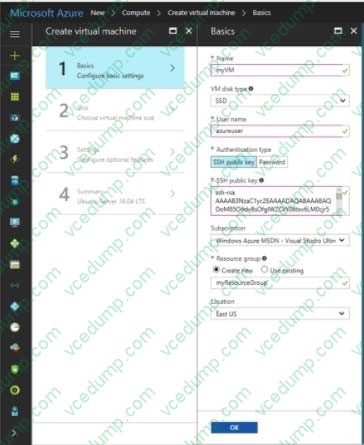
You create an Ubuntu Linux virtual machine (VM) by using the Azure Portal. You do not specify a password when you create the VM.
You need to connect to the terminal of the VM.
Solution: You connect to the public IP address of the VM by using Secure Shell (SSH) and specify your public key.
Does the solution meet the goal?
A. Yes
B. No -
Question 152:
HOTSPOT
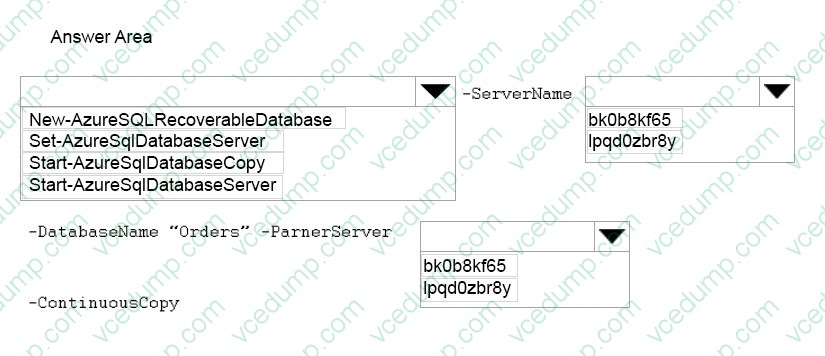
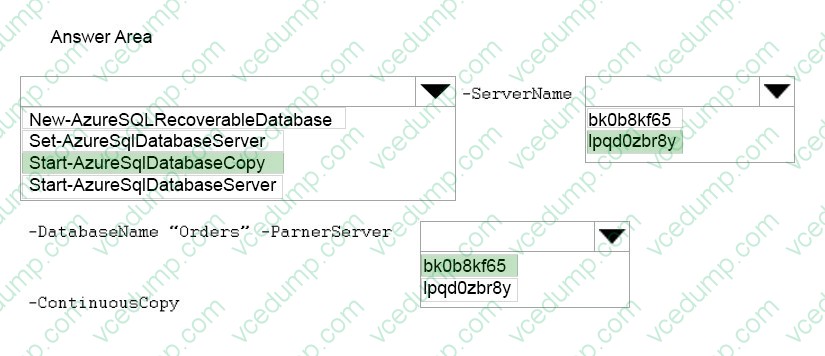
You have an Azure subscription that contains two Azure SQL Database servers named lpqd0zbr8y and bk0b8kf65. lpqd0zbr8y contains a database named Orders.
You need to implement active geo-replication for the Orders database.
Which command should you run? To answer, select the appropriate options in the answer area.
Hot Area:
-
Question 153:
You administer a Windows Server virtual machine (VM).
You upload the VM to Azure.
You need to ensure that you are able to deploy the BGInfo and VMAccess extensions.
What should you do?
A. Select the Install the VM Agent checkbox while provisioning a VM based on your uploaded VHD.
B. Select the Enable the VM Extensions checkbox while provisioning a VM based on your uploaded VHD.
C. Install the VM Agent MSI and execute the following Power Shell commands:$vm = Get-AzureVM -serviceName $svc -Name $name$vm.VM.ProvisionGuestAgent = $trueUpdate-AzureVM -Name Sname -VM $vm.VM -ServiceName $svc
D. Install the VM Agent MSI and execute the following Power Shell commands:$vm = Get-AzureVM -serviceName $svc -Name $nameSet-AzureVMBGInfoExtension -VM $vm.VMSet-AzureVM Access Extension -VM $vm.VMUpdate-AzureVM -Name Sname -VM $vm.VM -ServiceName $svc -
Question 154:
You are the Azure administrator for your company. The company has developed a mobile application used to support sales people in the field.
The application uses Azure Active Directory (Azure AD) accounts for authentication. The application sends and receives HTTP requests on publicly accessible endpoints.
You need to provide the ability to authenticate the application using Azure.
Which tool should you use?
A. OAuth 2.0 authorization code grant
B. Azure AD Connect
C. Azure Portal
D. Azure AD Graph API -
Question 155:
Your network includes a legacy application named LegacyApp1. The application only runs in the Microsoft .NET 3.5 Framework on Windows Server 2008.
You plan to deploy to Azure Cloud Services.
You need to ensure that LegacyApp1 will run correctly in the new environment.
What are two possible ways to achieve this goal? Each correct answer presents a complete solution.
A. Upload a VHD with Windows Server 2008 installed.
B. Deploy LegacyApp1 to a cloud service instance configured with Guest OS Family 2.
C. Deploy LegacyApp1 to a cloud service instance configured with Guest OS Family 1.
D. Deploy LegacyApp1 to a cloud service instance configured with Guest OS Family 3. -
Question 156:
You have an application that needs to use single sign-on (SSO) between the company's Azure Active Directory (Azure AD) and the on-premises Windows Server 2012 R2 Active Directory. You configure the application to use Integrated
Windows Authentication (IWA). You install an Application Proxy connector in the same domain as the server that is publishing the application.
You need to configure the published application in Azure AD to enable SSO.
What should you do?
A. Set the external authentication method to IWA.
B. Set the preauthenticated method to Pass through.
C. Set the internal authentication method to IWA.
D. Enable an access rule to require Multi-Factor Authentication. -
Question 157:
You manage an Azure virtual network that hosts 15 virtual machines (VMs) on a single subnet which is used for testing a line of business (LOB) application. The application is deployed to a VM named TestWebServiceVM. You need to ensure that TestWebServiceVM always starts by using the same IP address. You need to achieve this goal by using the least amount of administrative effort.
What should you do?
A. Use the Management Portal to configure TestWebServiceVM.
B. Use RDP to configure TestWebServiceVM.
C. Run the Set-AzureStaticVNetIP PowerShell cmdlet.
D. Run the Get-AzureReservedIP PowerShell cmdlet. -
Question 158:
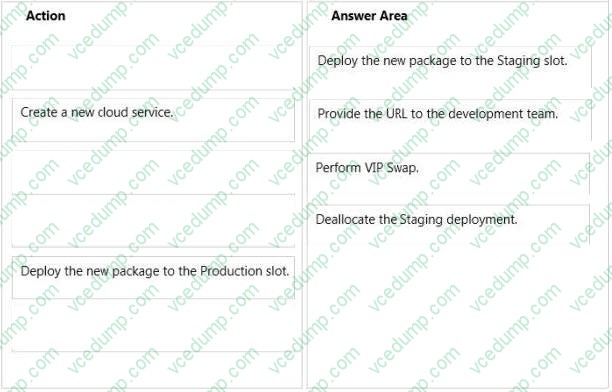
DRAG DROP
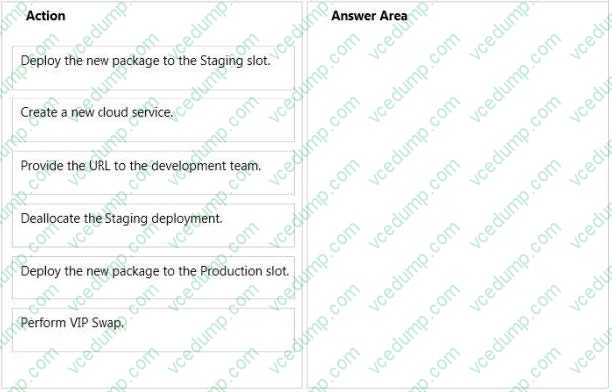
You manage an application hosted on cloud services. The development team creates a new version of the application. The updated application has been packaged and stored in an Azure Storage account.
You have the following requirements:
Which four steps should you perform in sequence? To answer, move the appropriate actions from the list of actions to the answer area and arrange them in the correct order.
Select and Place:
-
Question 159:
You manage an application that has a front-end tier, a middle tier, and a back-end tier. Each tier is located on a different subnet. You need to apply access to and between the tiers as follows:

Only the front-end tier must be able to access the Internet.
You must permit network access between the front-end tier and the middle tier.
You must permit network access between the middle tier and the back-end tier.
You must prevent all other network traffic.
You need to apply this configuration to all virtual machines inside the subnets.
What should you do?
A. Use a Network Security Group (NSG).
B. Add a VPN gateway.
C. Add a regional VNET.
D. Add an Availability Set. -
Question 160:
A company is developing a new on-premises desktop application.
The app must be able to access Azure Active Directory (Azure AD) in addition to the on-premises Active Directory. You need to configure the application.
Which two actions should you perform? Each correct answer presents part of the solution.
A. Install and run Azure AD Connect
B. Add an application manifest JSON file to the application and configure the oauth2Permissions section.
C. Update the application to be multi-tenant.
D. Update the application to use OAuth 2.0 authentication.
E. In the Azure Management portal, register the application.
Related Exams:
-
62-193
Technology Literacy for Educators -
70-243
Administering and Deploying System Center 2012 Configuration Manager -
70-355
Universal Windows Platform – App Data, Services, and Coding Patterns -
77-420
Excel 2013 -
77-427
Excel 2013 Expert Part One -
77-725
Word 2016 Core Document Creation, Collaboration and Communication -
77-726
Word 2016 Expert Creating Documents for Effective Communication -
77-727
Excel 2016 Core Data Analysis, Manipulation, and Presentation -
77-728
Excel 2016 Expert: Interpreting Data for Insights -
77-731
Outlook 2016 Core Communication, Collaboration and Email Skills
Tips on How to Prepare for the Exams
Nowadays, the certification exams become more and more important and required by more and more enterprises when applying for a job. But how to prepare for the exam effectively? How to prepare for the exam in a short time with less efforts? How to get a ideal result and how to find the most reliable resources? Here on Vcedump.com, you will find all the answers. Vcedump.com provide not only Microsoft exam questions, answers and explanations but also complete assistance on your exam preparation and certification application. If you are confused on your 70-533 exam preparations and Microsoft certification application, do not hesitate to visit our Vcedump.com to find your solutions here.