70-417 Exam Details
-
Exam Code
:70-417 -
Exam Name
:Upgrading Your Skills to MCSA Windows Server 2012 -
Certification
:Microsoft Certifications -
Vendor
:Microsoft -
Total Questions
:711 Q&As -
Last Updated
:Feb 03, 2022
Microsoft 70-417 Online Questions & Answers
-
Question 661:
HOTSPOT
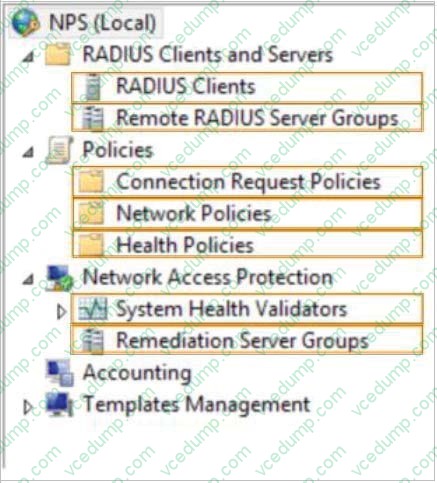
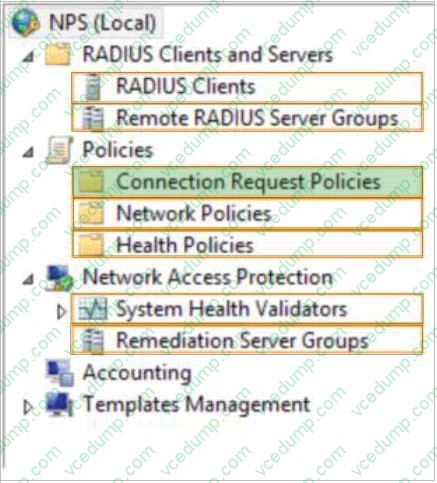
Your network contains a RADIUS server named Admin1.
You install a new server named Server2 that runs Windows Server 2012 R2 and has Network Policy Server (NPS) installed.
You need to ensure that all accounting requests for Server2 are forwarded to Admin1.
On Server2, you create a new remote RADIUS server group named Group1 that contains Admin1.
What should you configure next on Server2?
To answer, select the appropriate node in the answer area.
Hot Area:
-
Question 662:
DRAG DROP
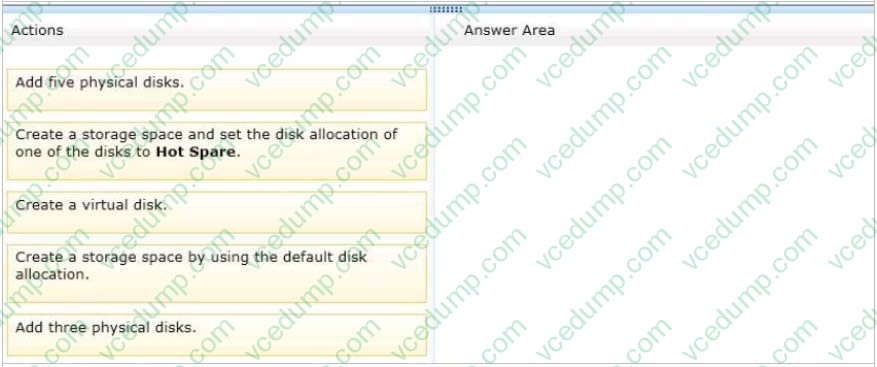
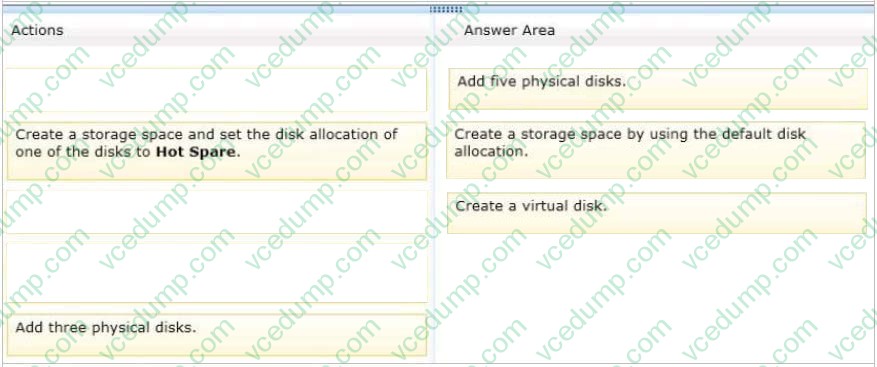
You have a server that runs Windows Server 2012 R2.
You need to create a volume that will remain online if two disks in the volume fail. The solution must minimize the number of disks used to create the volume.
Which three actions should you perform in sequence? (To answer, move the appropriate three actions from the list of actions to the answer area and arrange them in the correct order.)
Select and Place:
-
Question 663:
Your network contains an Active Directory domain named contoso.com. The domain contains two member servers named Server1 and Server2. All servers run Windows Server 2012 R2. Server1 and Server2 have the Failover Clustering feature installed. The servers are configured as nodes in a failover cluster named Cluster1.
You add two additional nodes to Cluster1.
You have a folder named Folder1 on Server1 that contains application data.
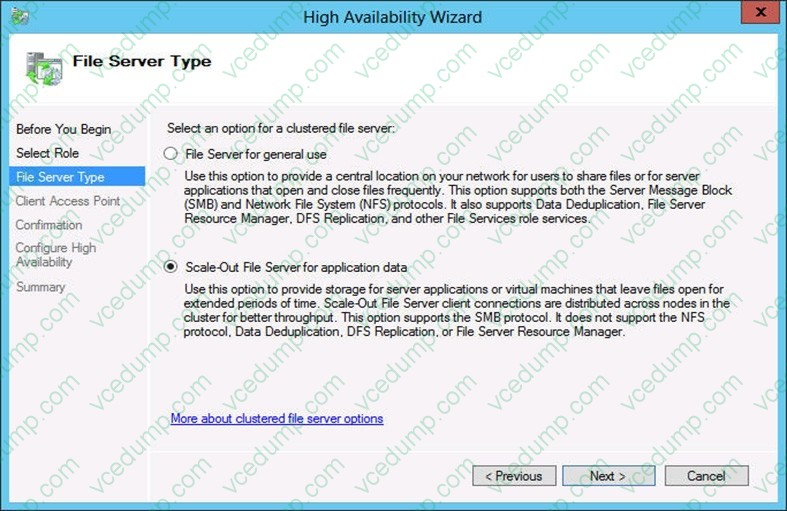
You plan to provide continuously available access to Folder1.
You need to ensure that all of the nodes in Cluster1 can actively respond to the client requests for Folder1. What should you configure?
A. Affinity - None
B. Affinity - Single
C. The cluster quorum settings
D. The failover settings
E. A file server for general u
F. The Handling priority
G. The host priority
H. Live migration
I. The possible owner
J. The preferred owner -
Question 664:
Note: This Question is part of series of question that use the same or similar answer choices. An answer choice may be correct for more than one question in the series. Each question is independent of the other questions in the series. Information and detailed provided in a question apply only to that question.
You network contains one Active Directory domain named contoso.com. The forest functional level is Windows Server 2012. All servers run Windows Server 2012 R2. All client computer run Windows 8.1.
The domain contains 10 domain controllers and a read-only domain controller (RODC) named RODC01. All domain controllers and RODCs are hosted on a Hyper-V host that runs Windows Server 2012 R2. Determine what domain controller
needs to be online to promote a RODC.
Which cmdlet should you use?
A. Get-ADGroupMember
B. Get-ADDomainControllerPasswordReplicationPolicy
C. Get-ADDomainControllerPasswordReplicationPolicyUsage
D. Get-ADDomain
E. Get-ADOptionalFeature
F. Get-ADAccountAuthorizationGroup
G. Get-ADAuthenticationPolicySlio
H. Get-ADAuthenticationPolicy -
Question 665:
Your role of Network Administrator at ABC.com includes the management of the Active Directory Domain Services (AD DS) domain named ABC.com. The network includes servers that run Windows Server 2008 R2 Service Pack 1 (SP1) and Windows Server 2012. You need to enable a user named Mia to manage servers running the IP Address Management (IPAM) feature. You add Mia to the IPAM Administrators group on all IPAM servers. Mia logs into one IPAM server but is unable to remotely manage other IPAM servers.
You need to enable Mia to manage all IPAM servers from a single IPAM server. How can you achieve this goal while minimizing permissions assigned to Mia?
A. By adding Mia to the IPAM MSM Administrators group on all IPAM servers.
B. By adding Mia to the IPAM ASM Administrators group on all IPAM servers.
C. By adding Mia to the Network Configuration Operators group on all IPAM servers.
D. By adding Mia to the Administrators group on all IPAM servers.
E. By adding Mia to the Remote Management Users group on all IPAM servers. -
Question 666:
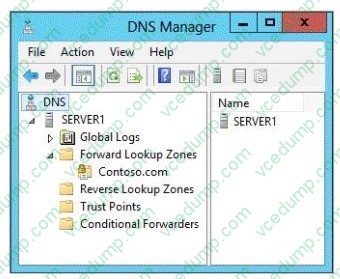
You have a server named Server1 that runs Windows Server 2012 R2. Server1 is located in the perimeter network and has the DNS Server server role installed.
Server1 has a zone named contoso.com.
You apply a security template to Server1.
After you apply the template, users report that they can no longer resolve names from contoso.com.
On Server1, you open DNS Manager as shown in the DNS exhibit. (Click the Exhibit button.)
On Server1, you open Windows Firewall with Advanced Security as shown in the Firewall exhibit. (Click the Exhibit button.)
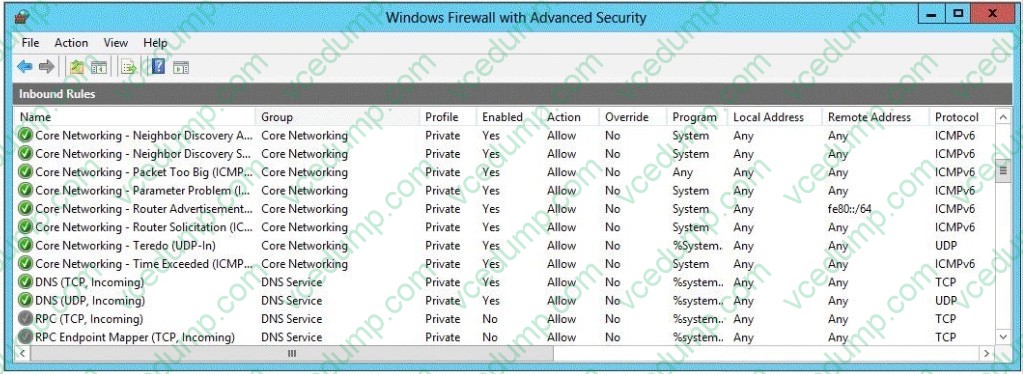
You need to ensure that users can resolve contoso.com names.
What should you do?
A. From Windows Firewall with Advanced Security, disable the DNS (TCP, Incoming) rule and the DNS (UDP, Incoming) rule.
B. From DNS Manager, modify the Zone Transfers settings of the contoso.com zone.
C. From DNS Manager, unsign the contoso.com zone.
D. From DNS Manager, modify the Start of Authority (SOA) of the contoso.com zone.
E. From Windows Firewall with Advanced Security, modify the profiles of the DNS (TCP, Incoming) rule and the DNS (UDP, Incoming) rule. -
Question 667:
You have a datacenter that contains six servers. Each server has the Hyper-V server role installed and runs Windows Server 2012 R2. The servers are configured as shown in the following table.
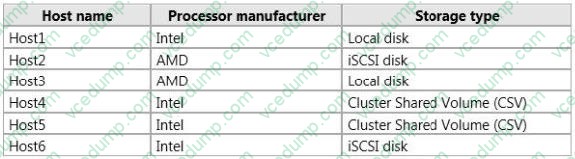
Host4 and Host5 are part of a cluster named Cluster1. Cluster1 hosts a virtual machine named VM1.
You need to move VM1 to another Hyper-V host. The solution must minimize the downtime of VM1.
To which server and by which method should you move VM1?
A. To Host3 by using a storage migration
B. To Host6 by using a storage migration
C. To Host2 by using a live migration
D. To Host1 by using a quick migration -
Question 668:
Your role of Network Administrator at ABC.com includes the management of the Active Directory Domain Services (AD DS) domain named ABC.com. The network includes servers that run Windows Server 2012.
The network includes a Windows Server 2012 server named ABC-AppSrv1. ABC-AppSrv1 runs a custom line-of-business (LOB) application used by all company users. The application creates log files in a folder named C:\Logs.
You need to automatically run a program when the free disk space on volume C: falls below 15%.
You create a custom Data Collector Set (DCS).
How should you configure the DCS?
A. You should configure Performance Counters in the DCS.
B. You should configure Event Trace Data in the DCS.
C. You should configure a Performance Counter Alert.
D. You should configure System Configuration Information in the DCS. -
Question 669:
Your network contains an Active Directory domain named contoso.com. The domain contains a server named Server1 that runs Windows Server 2012 and a server named Server2 that runs Windows Server 2008 R2 Service Pack 1 (SP1). Both servers are member servers.
On Server2, you install all of the software required to ensure that Server2 can be managed remotely from Server Manager.
You need to ensure that you can manage Server2 from Server1 by using Server Manager.
Which two tasks should you perform on Server2? (Each correct answer presents part of the solution. (Choose two.)
A. Run the Enable-PSRemoting cmdlet.
B. Run the Configure-SMRemoting.psl script.
C. Run the Enable-PSSessionConfiguration cmdlet.
D. Run the Set-ExecutionPolicycmdlet.
E. Run the systempropertiesremote.exe command. -
Question 670:
You have a server named Server1 that runs Windows Server 2012 R2.
A Microsoft Azure Backup of Server1 is created automatically every day.
You need to view the items that are included in the backup.
Which cmdlet should you run?
A. Get-WBFileSpec
B. Get-OBFileSpec
C. Get-OBJob
D. Get-WBJob
E. Get-WBSummary
F. Get-WBPolicy
G. Get-OBPolicyState
Related Exams:
-
62-193
Technology Literacy for Educators -
70-243
Administering and Deploying System Center 2012 Configuration Manager -
70-355
Universal Windows Platform – App Data, Services, and Coding Patterns -
77-420
Excel 2013 -
77-427
Excel 2013 Expert Part One -
77-725
Word 2016 Core Document Creation, Collaboration and Communication -
77-726
Word 2016 Expert Creating Documents for Effective Communication -
77-727
Excel 2016 Core Data Analysis, Manipulation, and Presentation -
77-728
Excel 2016 Expert: Interpreting Data for Insights -
77-731
Outlook 2016 Core Communication, Collaboration and Email Skills
Tips on How to Prepare for the Exams
Nowadays, the certification exams become more and more important and required by more and more enterprises when applying for a job. But how to prepare for the exam effectively? How to prepare for the exam in a short time with less efforts? How to get a ideal result and how to find the most reliable resources? Here on Vcedump.com, you will find all the answers. Vcedump.com provide not only Microsoft exam questions, answers and explanations but also complete assistance on your exam preparation and certification application. If you are confused on your 70-417 exam preparations and Microsoft certification application, do not hesitate to visit our Vcedump.com to find your solutions here.