70-417 Exam Details
-
Exam Code
:70-417 -
Exam Name
:Upgrading Your Skills to MCSA Windows Server 2012 -
Certification
:Microsoft Certifications -
Vendor
:Microsoft -
Total Questions
:711 Q&As -
Last Updated
:Feb 03, 2022
Microsoft 70-417 Online Questions & Answers
-
Question 641:
Your network contains an Active Directory domain named contoso.com. All user accounts reside in an organizational unit (OU) named OU1.
You create a Group Policy object (GPO) named GPO1.
You link GPO1 to OU1.
You configure the Group Policy preference of GPO1 to add a shortcut named Link1 to the desktop of each user.
You discover that when a user deletes Link1, the shortcut is removed permanently from the desktop.
You need to ensure that if a user deletes Link1, the shortcut is added to the desktop again.
What should you do?
A. Modify the Link1 shortcut preference of GPO1
B. Enable loopback processing in GPO1
C. Enforce GPO1
D. Modify the Security Filtering settings of GPO1 -
Question 642:
Your network contains an Active Directory forest named contoso.com. The forest contains a single domain. All domain controllers run Windows Server 2012 R2. The domain contains two domain controllers. The domain controllers are configured as shown in the following table.
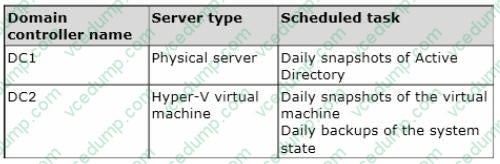
Active Directory Recycle Bin is enabled.
You discover that a support technician accidentally removed 100 users from an Active Directory group named Group1 an hour ago.
You need to restore the membership of Group1.
What should you do?
A. Perform an authoritative restore.
B. Perform a non-authoritative restore.
C. Recover the items by using Active Directory Recycle Bin.
D. Apply a virtual machine snapshot to VM1. -
Question 643:
You have five servers that run Windows Server 2012 R2. The servers have the Failover Clustering feature installed. You deploy a new cluster named Cluster1. Cluster1 is configured as shown in the following table.
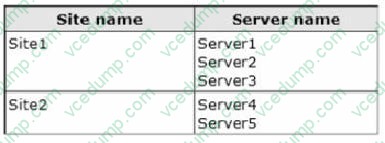
Server1, Server2/ and Server3 are configured as the preferred owners of the cluster roles. Dynamic quorum management is disabled.
You plan to perform hardware maintenance on Server3.
You need to ensure that if the WAN link between Site1 and Site2 fails while you are performing maintenance on Server3, the cluster resource will remain available in Site1.
What should you do?
A. Remove the node vote for Server3.
B. Enable DrainOnShutdown on Cluster1.
C. Add a file share witness in Site1.
D. Remove the node vote for Server4 and Server5. -
Question 644:
Your network contains an Active Directory domain named contoso.com. All domain controllers run Windows Server 2008 R2. One of the domain controllers is named DC1.
The network contains a member server named Server1 that runs Windows Server 2012 R2.
You need to promote Server1 to a domain controller by using install from media (IFM).
What should you do first?
A. Run the Active Directory Domain Services Installation Wizard on DC1.
B. Upgrade DC1 to Windows Server 2012 R2.
C. Run the Active Directory Domain Services Configuration Wizard on Server1.
D. Create a system state backup of DC1.
E. Create IFM media on DC1. -
Question 645:
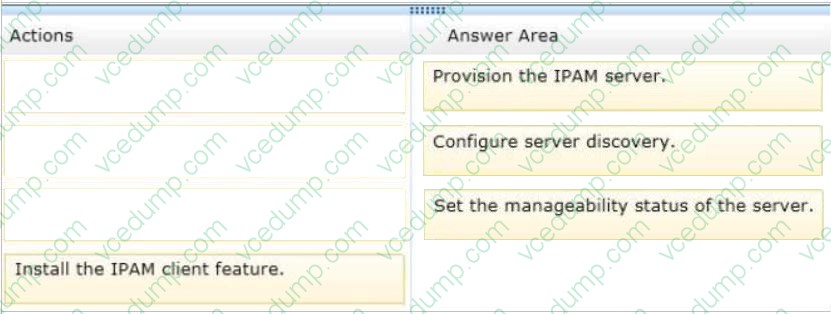
DRAG DROP
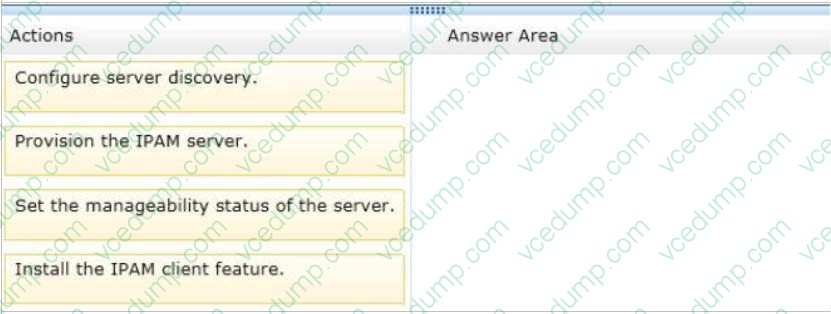
Your network contains an Active Directory domain named contoso.com. The domain contains two DHCP servers named DHCP1 and DHCP2 that run Windows Server 2012.
You install the IP Address Management (IPAM) Server feature on a member server named Server1 and you run the Run Invoke-IpamGpoProvisioningcmdlet.
You need to manage the DHCP servers by using IPAM on Server1.
Which three actions should you perform?
To answer, move the three appropriate actions from the list of actions to the answer area and arrange them in the correct order.
Select and Place:
-
Question 646:
You have a DNS server that runs Windows Server 2012 R2. The server hosts the zone for contoso.com and is accessible from the internet. You need to create a DNS record for the Sender Policy Framework (SPF) to list that are authorized ti send email for contoso.com
Which type of record should you create?
A. Name Server (NS)
B. Mail.exchanger (MX)
C. Resource record signature (RRSIG)
D. Text (TXT) -
Question 647:
Your role of Network Administrator at ABC.com includes the management of the Active Directory Domain Services (AD DS) domain named ABC.com. The network includes servers that run Windows Server 2012.
A Windows Server 2012 server named ABC-NPS1 and is configured as a Network Policy Server (NPS) server. ABC-NPS1 also runs the DHCP server role and has a DHCP scope for local subnet. You need to ensure that Network Access
Protection (NAP) health requirement checks are performed on only the computers that send a Statement of Health (SoH). You configure a health policy to define the computer health requirements.
How can you ensure that only the computers that send an SoH are checked?
A. By configuring Connection Properties conditions.
B. By configuring NAS Port Type constraints.
C. By configuring MS-Service Class conditions.
D. By configuring NAP-Capable Computers conditions -
Question 648:
Your network contains an Active Directory domain named contoso.com. The domain contains two member servers named Server1 and Server2. All servers run Windows Server 2012 R2.
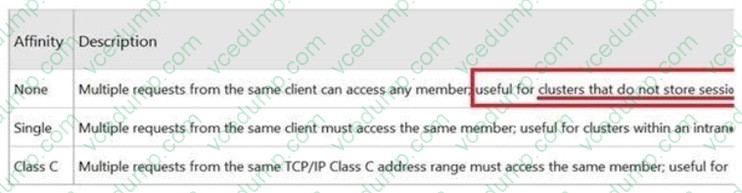
Server1 and Server2 have the Network Load Balancing (NLB) feature installed. The servers are configured as nodes in an NLB cluster named Cluster1. Cluster1 hosts a secure web Application named WebApp1. WebApp1 saves user state information locally on each node.
You need to ensure that when users connect to WebApp1, their session state is maintained.
What should you configure?
A. Affinity None
B. Affinity Single
C. The cluster quorum settings
D. The failover settings
E. A file server for general use
F. The Handling priority
G. The host priority
H. Live migration
I. The possible owner
J. The preferred owner -
Question 649:
Your network contains an Active Directory domain named contoso.com. The domain contains a domain controller named DC1. On DC1, you add a new volume and you stop the Active Directory Domain Services (AD DS) service.
You run ntdsutil.exe and you set NTDS as the active instance.
You need to move the Active Directory database to the new volume.
Which Ntdsutil context should you use?
A. Files
B. IFM
C. Configurable Settings
D. Partition management -
Question 650:
HOTSPOT
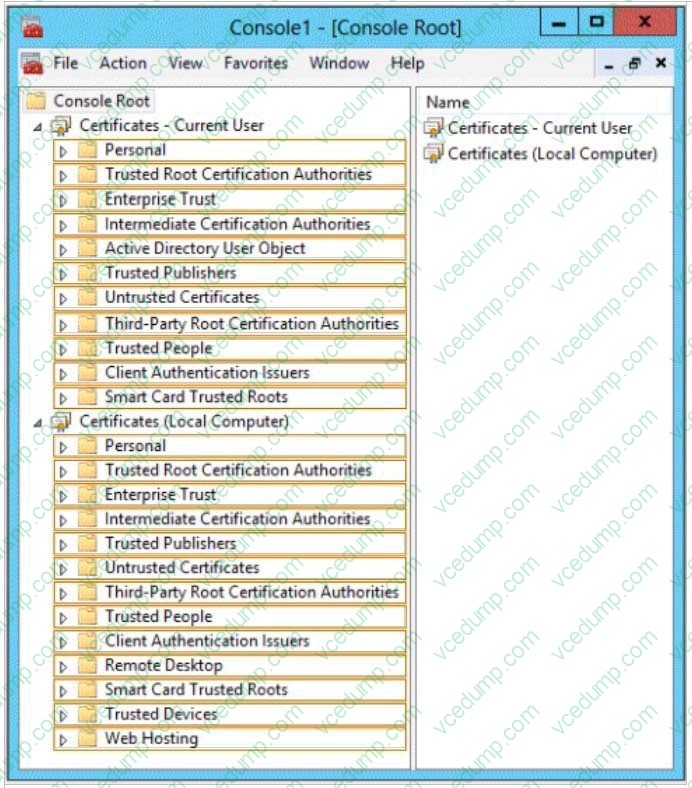
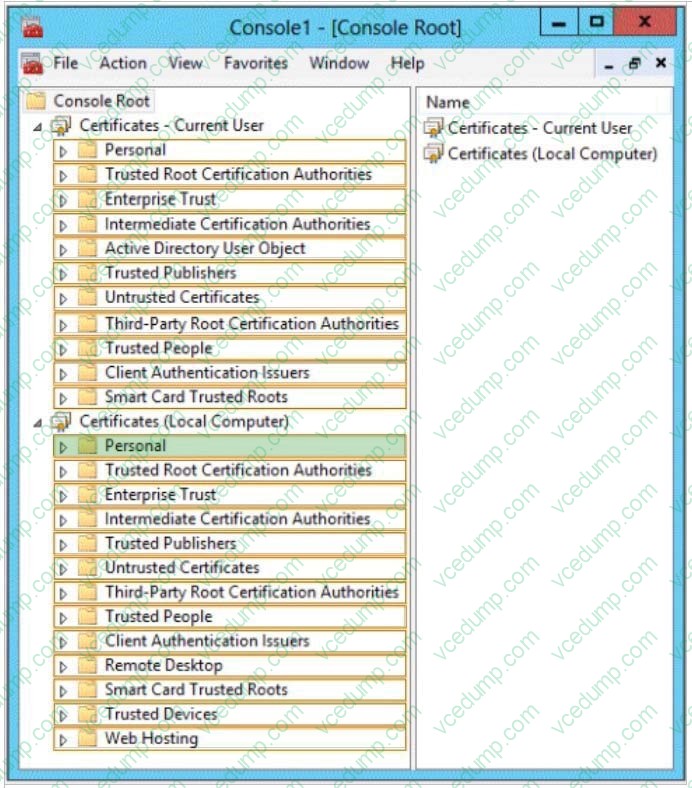
You have a server named Server1 that has the Network Policy and Access Services server role installed.
You plan to configure Network Policy Server (NPS) on Server1 to use certificate-based authentication for VPN connections.
You obtain a certificate for NPS.
You need to ensure that NPS can perform certificate-based authentication.
To which store should you import the certificate?
To answer, select the appropriate store in the answer area.
Hot Area:
Related Exams:
-
62-193
Technology Literacy for Educators -
70-243
Administering and Deploying System Center 2012 Configuration Manager -
70-355
Universal Windows Platform – App Data, Services, and Coding Patterns -
77-420
Excel 2013 -
77-427
Excel 2013 Expert Part One -
77-725
Word 2016 Core Document Creation, Collaboration and Communication -
77-726
Word 2016 Expert Creating Documents for Effective Communication -
77-727
Excel 2016 Core Data Analysis, Manipulation, and Presentation -
77-728
Excel 2016 Expert: Interpreting Data for Insights -
77-731
Outlook 2016 Core Communication, Collaboration and Email Skills
Tips on How to Prepare for the Exams
Nowadays, the certification exams become more and more important and required by more and more enterprises when applying for a job. But how to prepare for the exam effectively? How to prepare for the exam in a short time with less efforts? How to get a ideal result and how to find the most reliable resources? Here on Vcedump.com, you will find all the answers. Vcedump.com provide not only Microsoft exam questions, answers and explanations but also complete assistance on your exam preparation and certification application. If you are confused on your 70-417 exam preparations and Microsoft certification application, do not hesitate to visit our Vcedump.com to find your solutions here.