70-417 Exam Details
-
Exam Code
:70-417 -
Exam Name
:Upgrading Your Skills to MCSA Windows Server 2012 -
Certification
:Microsoft Certifications -
Vendor
:Microsoft -
Total Questions
:711 Q&As -
Last Updated
:Feb 03, 2022
Microsoft 70-417 Online Questions & Answers
-
Question 521:
HOTSPOT
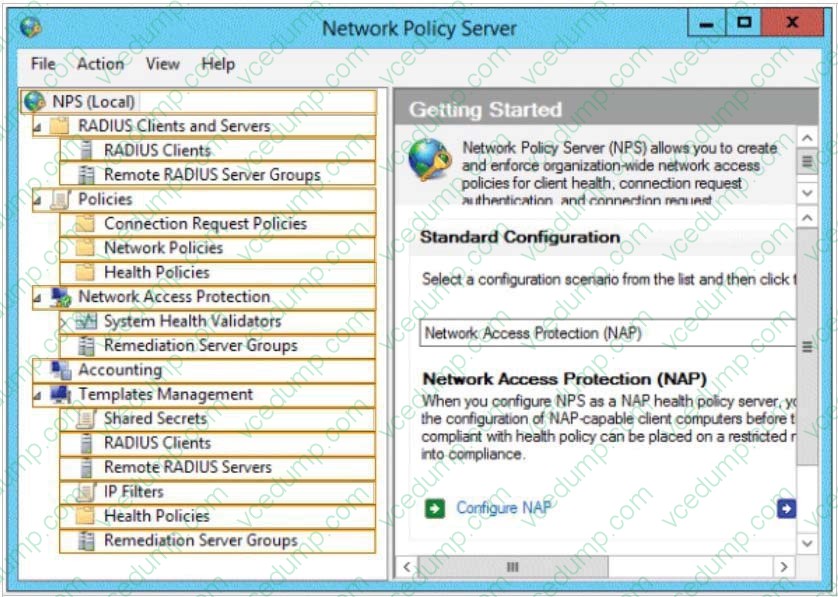
Your network contains an Active Directory domain named contoso.com. The domain contains a server named Server1 that has the Network Policy Server server role installed. The domain contains a server named Server2 that is configured for RADIUS accounting.
Server1 is configured as a VPN server and is configured to forward authentication requests to Server2.
You need to ensure that only Server2 contains event information about authentication requests from connections to Server1.
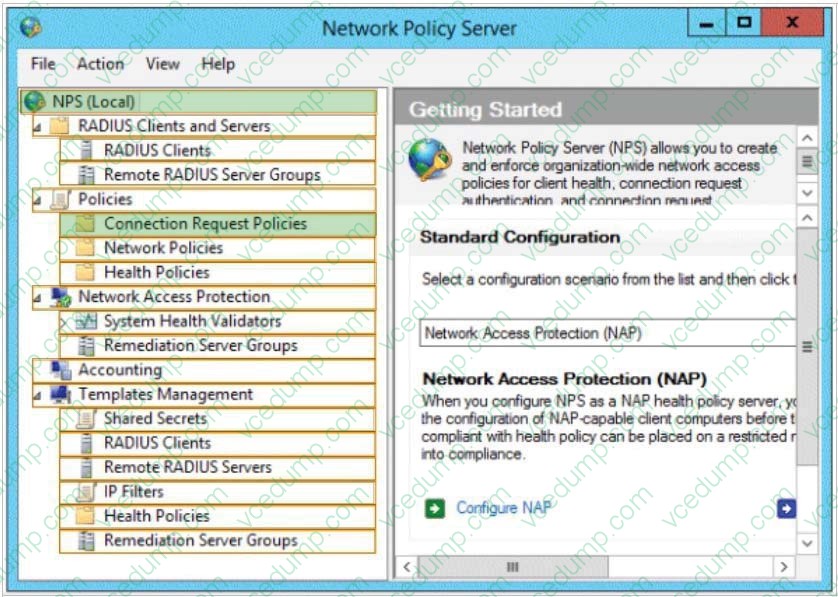
Which two nodes should you configure from the Network Policy Server console?
To answer, select the appropriate two nodes in the answer area.
Hot Area:
-
Question 522:
Your role of Network Administrator at ABC.com includes the management of the Active Directory Domain Services (AD DS) domain named ABC.com. The network includes servers that run Windows Server 2012.
The company has a Production department and a Research department. Each department is a separate subnet.
A Windows Server 2012 server named ABC-NPS1 and is configured as a Network Policy Server (NPS) server. ABC-NPS1 also runs the DHCP server role and has a DHCP scope for the Production subnet and the Research subnet.
You need to configure NPS to ensure that computers on the Production subnet that do not comply with the NPS requirements receive a restrictive set of network policies. You also need to ensure that computers on the Research subnet that
do not comply with the NPS requirements receive a more restrictive set of network policies than the non-compliant Production computers.
You configure policies to apply to NAP-Capable Computers.
How can you apply different restrictions to computer based on their subnet?
A. By configuring Connection Properties conditions.
B. By configuring NAS Port Type constraints.
C. By configuring MS-Service Class conditions
D. By configuring Authentication Methods constraints. -
Question 523:
You have a server named Data1 that runs a Server Core Installation of Windows Server 2012 R2 Standard.
You need to configure Data1 to run a Server Core Installation of Windows Server 2012 R2 Datacenter. You want to achieve this goal by using the minimum amount of administrative effort.
What should you perform?
A. An online servicing by using Dism
B. An offline servicing by using Dism
C. An upgrade installation of Windows Server 2012 R2
D. A clean installation of Windows Server 2012 R2 -
Question 524:
Your network contains a server named Server1 that runs Windows Server 2012 R2. Server1 has the Print and Document Services server role installed. You connect a new print device to the network. The marketing department and the sales department will use the print device.
You need to provide users from both departments with the ability to print to the network print device.
The solution must ensure that if there are multiple documents queued to print, the documents from the sales users print before the documents from the marketing users.
What should you do on Server1?
A. Add one printer. Modify the printer priority and the security settings.
B. Add two printers. Modify the priorities of each printer and the security settings of each printer.
C. Add two printers and configure printer pooling.
D. Add one printer and configure printer pooling. -
Question 525:
You have 20 servers that run Windows Server 2012 R2.
You need to create a Windows PowerShell script that registers each server in Microsoft Azure Backup and sets an encryption passphrase.
Which two PowerShell cmdlets should you run in the script? (Each correct answer presents part of the solution. Choose two.)
A. Set-OBMachineSetting
B. Add-OBFileSpec
C. Start-OBRegistration
D. New OBPolicy
E. New-OBRetentionPolicy -
Question 526:
Your network contains an Active Directory domain named contoso.com.
All user accounts reside in an organizational unit (OU) named OU1.
All of the users in the marketing department are members of a group named Marketing.
All of the users in the human resources department are members of a group named HR.
You create a Group Policy object (GPO) named GPO1.
You link GPO1 to OU1.
You configure the Group Policy preferences of GPO1 to add two shortcuts named Link1 and Link2 to the desktop of each user.
You need to ensure that Link1 only appears on the desktop of the users in Marketing and that Link2 only appears on the desktop of the users in HR.
What should you configure?
A. Security Filtering
B. WMI Filtering
C. Group Policy Inheritance
D. Item-level targeting -
Question 527:
Note: This question is part of a series of questions that use the same or similar answer choices. An answer may be correct for more than one question in the series. Each question is independent of the other questions in this series.
Information and details provided in a question apply only to that question.
Your network contains one Active Directory domain named contoso.com. The forest functional level is Windows Server 2012. All servers run Windows Server 2012 R2. All client computers run Windows 8.1.
The domain contains 10 domain controllers and a read-only domain controller (RODC) named RODC01. All domain controllers and RODCs are hosted on a Hyper-V host that runs Windows Server 2012 R2.
You need to identify which domain controllers are authorized to be cloned by using virtual domain controller cloning.
Which cmdlet should you use?
A. Get-AdGroupMember
B. Get-ADDomainControllerPasswordReplicationPolicy
C. Get-ADDomainControllerPasswordReplicationPolicyUsage
D. Get-ADDomain
E. Get-ADOptionalFeature
F. Get-ADAccountAuthorizationGroup
G. Get-ADAuthenticationPolicySilo
H. Get-ADAuthenticationPolicy -
Question 528:
Your network contains an Active Directory domain named contoso.com. The domain contains two member servers named Server1 and Server2. All servers run Windows Server 2012 R2. Server1 and Server2 have the Failover Clustering feature installed. The servers are configured as nodes in a failover cluster named Cluster1.
Cluster1 hosts an application named App1.
You need to ensure that Server2 handles all of the client requests to the cluster for App1. The solution must ensure that if Server2 fails, Server1 becomes the active node for App1.
What should you configure?
A. Affinity - None
B. Affinity - Single
C. The cluster quorum settings
D. The failover settings
E. A file server for general u
F. The Handling priority
G. The host priority
H. Live migration
I. The possible owner
J. The preferred owner -
Question 529:
Your role of Network Administrator at ABC.com includes the management of the Active Directory Domain Services (AD DS) domain named ABC.com. The network includes servers that run Windows Server 2012.
The network contains a server named ABC-Fed1. ABC-Fed1 runs Active Directory Federation Services (AD FS).
You need to configure a federated trust between ABC.com and a partner company named Weyland Industries.
You need to provide the ABC.com federation metadata to a network administrator at Weyland Industries to enable him to configure their end.
How can you locate a text file containing the required information?
A. By opening the Service\Endpoints node in the AD FS console.
B. By opening the Service\Certificates node in the AD FS console.
C. By opening the Trust Relationships\Claims Provider Trusts node in the AD FS console.
D. By opening the Trust Relationships\Attribute Stores node in the AD FS console. -
Question 530:
Your role of Network Administrator at ABC.com includes the management of the Active Directory Domain Services (AD DS) domain named ABC.com. The network includes servers that run Windows Server 2012.
The domain controller that hosts the PDC emulator FSMO role suffers a complete hardware failure.
You need to seize the PDC emulator role on another domain controller. You log in to the domain controller and open ntdsutil.exe.
Which context should you use in ntdsutil to seize an FSMO role?
A. Partition Management
B. Roles
C. DS Behaviour
D. Local Roles
E. Metadata Cleanup
F. Configurable Settings
Related Exams:
-
62-193
Technology Literacy for Educators -
70-243
Administering and Deploying System Center 2012 Configuration Manager -
70-355
Universal Windows Platform – App Data, Services, and Coding Patterns -
77-420
Excel 2013 -
77-427
Excel 2013 Expert Part One -
77-725
Word 2016 Core Document Creation, Collaboration and Communication -
77-726
Word 2016 Expert Creating Documents for Effective Communication -
77-727
Excel 2016 Core Data Analysis, Manipulation, and Presentation -
77-728
Excel 2016 Expert: Interpreting Data for Insights -
77-731
Outlook 2016 Core Communication, Collaboration and Email Skills
Tips on How to Prepare for the Exams
Nowadays, the certification exams become more and more important and required by more and more enterprises when applying for a job. But how to prepare for the exam effectively? How to prepare for the exam in a short time with less efforts? How to get a ideal result and how to find the most reliable resources? Here on Vcedump.com, you will find all the answers. Vcedump.com provide not only Microsoft exam questions, answers and explanations but also complete assistance on your exam preparation and certification application. If you are confused on your 70-417 exam preparations and Microsoft certification application, do not hesitate to visit our Vcedump.com to find your solutions here.