70-417 Exam Details
-
Exam Code
:70-417 -
Exam Name
:Upgrading Your Skills to MCSA Windows Server 2012 -
Certification
:Microsoft Certifications -
Vendor
:Microsoft -
Total Questions
:711 Q&As -
Last Updated
:Feb 03, 2022
Microsoft 70-417 Online Questions & Answers
-
Question 331:
Your corporate network includes an Active Directory Domain Services (AD DS) domain named contoso. The domain contains a Windows Server 2012 R2 member server named Server1. On Server1 the Resource Manager role service is
installed on the file server.
You need to configure Server1 to the following requirements:
-Old files that are located in a folder named Folder1, must be moved to a folder named Archiv1.

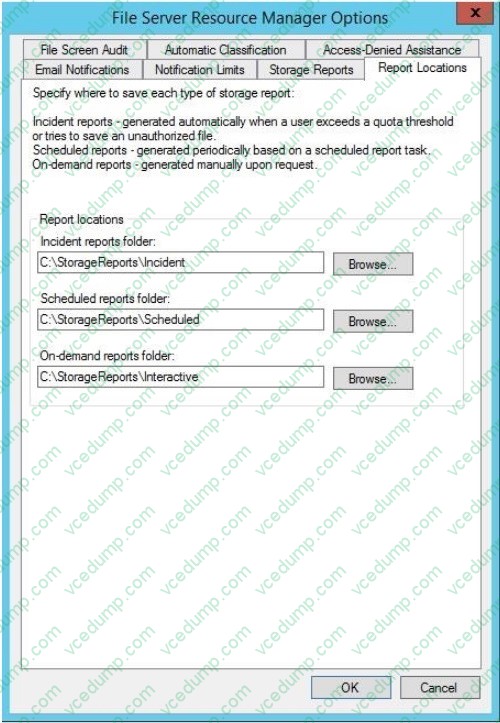
-All reports must be stored in a network share.
Which two nodes need to Configure? (To be configured dialog box shown in the picture. Click the Drawing button.)
A. Resource Manager File Server (locally)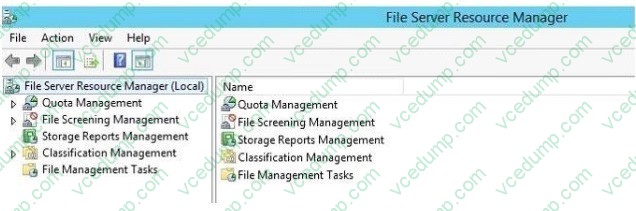
B. Quotas
C. File Screens
D. Storage Reports Management
E. Classification rules
F. File management tasks -
Question 332:
Your network contains several servers that run Windows Server 2012 R2 and client computers that run Windows 8.1.
You download several signed Windows PowerShell scripts from the Internet. You need to run the PowerShell scripts on all of the servers and all of the client computers. What should you modify first?
A. the environment variables on all of the servers
B. the environment variables on all client computers
C. the execution policy on all of the servers
D. the execution policy on all of the client computers -
Question 333:
Server manager is a great tool for managing most of your server settings and configuration all in one central place. Which one of the following Server manager Features is used for Storage management, replication and searching?
A. Dynamic Host Configuration Server
B. Terminal Services
C. Domain Name Service
D. File Services -
Question 334:
Your network contains an Active Directory domain named contoso.com. The domain contains client computers that run Either Windows XP, Windows 7, or Windows 8.
Network Policy Server (NPS) is deployed to the domain.
You plan to create a system health validator (SHV).
You need to identify which policy settings can be applied to all of the computers.
Which three policy settings should you identify? (Each correct answer presents part of the solution. Choose three.)
A. Automatic updating is enabled.
B. A firewall is enabled for all network connections.
C. An antispyware application is on.
D. Antispyware is up to date.
E. Antivirus is up to date. -
Question 335:
DRAG DROP
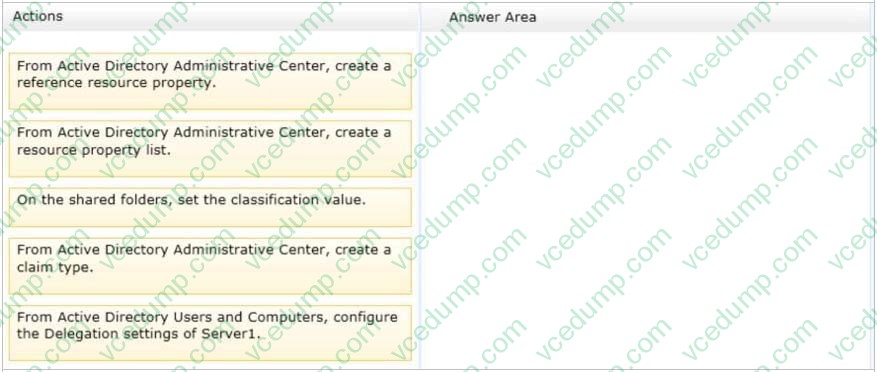
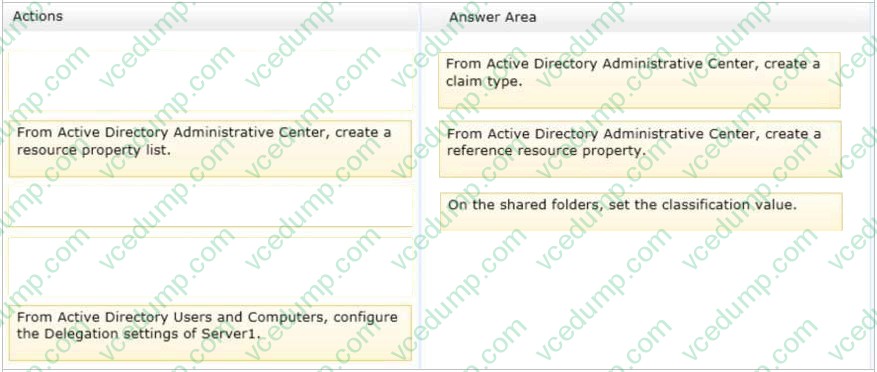
Your network contains an Active Directory domain named contoso.com. The domain contains a file server named Server1. All servers run Windows Server 2012 R2.
All domain user accounts have the Division attribute automatically populated as part of the user provisioning process. The Support for Dynamic Access Control and Kerberos armoring policy is enabled for the domain.
You need to control access to the file shares on Server1 based on the values in the Division attribute and the Division resource property.
Which three actions should you perform in sequence?
Select and Place:
-
Question 336:
Your network contains an Active Directory domain named contoso.com. The domain contains two member servers named Server1 and Server2 that run Windows Server 2012 R2. You log on to Server1.
You need to retrieve the IP configurations of Server2.
Which command should you run from Server1?
A. winrm get server2
B. dsquery * -scope base -attrip/server2
C. winrs -r:server2ipconfig
D. ipconfig> server2.ip -
Question 337:
You have a server named Server1 that runs a Server Core installation of Windows Server 2012 R2 Standard. You establish a remote management session to Server1.
You need to identify which task can be performed on Server1 from within the remote management session.
What should you identify?
A. Install a feature by using Server Manager.
B. Modify the network settings by using Sconfig.
C. Disable services by using Msconfig.
D. Join a domain by using the System Properties. -
Question 338:
You install the Service Manager Self-Service Portal on a server named CONTOSOSSP1.
Users report that they receive access denied messages when they try to connect to the portal.
You must grant users the minimum required permissions.
You need to ensure that all users in the Contoso domain can access the Service Manager Self-Service Portal.
What should you do?
A. In Active Directory, create a new group named PortalUsers. Add the PortalUsers group to the Contoso \Domain Users group, and then add the group to the local users group on CONTOSOSSP1.
B. Using the account that you used to install the Self-Service portal, grant the Contoso\Domain Users group Read permissions to the portal.
C. In Service Manager, create a new user role named PortalUsers. Grant the PortalUsers role rights to all catalog items, and then add the Contoso\Domain Users Active Directory Domain Services group to the PortalUsers role.
D. Using the account that you used to install the Self-Serviceportal, grant the Contoso\Domain Users group Contribute permissions to the portal. -
Question 339:
DRAG DROP
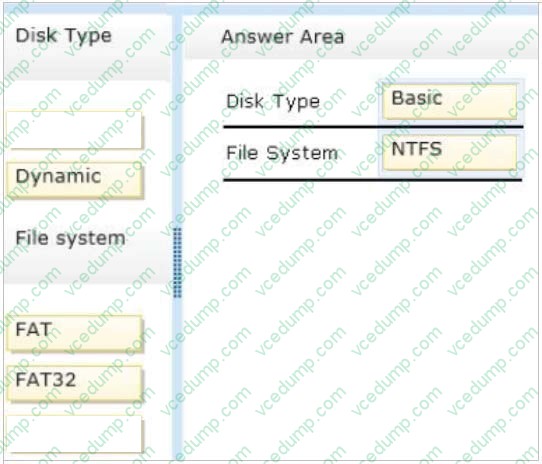
You plan to deploy a failover cluster that will contain two nodes that run Windows Server 2012 R2.
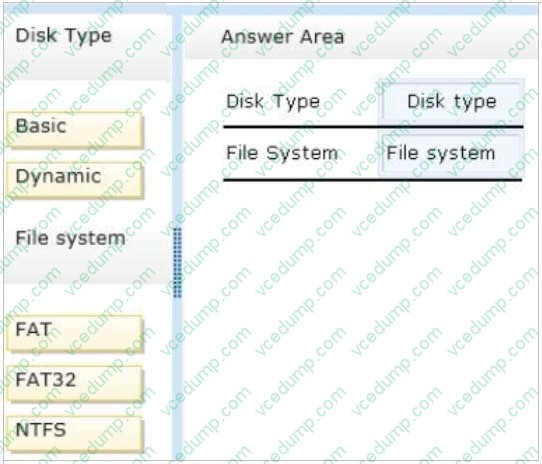
You need to configure a witness disk for the failover cluster.
How should you configure the witness disk?
To answer, drag the appropriate configurations to the correct location or locations. Each configuration may be used once, more than once, or not at all. You may need to drag the split bar between panes or scroll to view content.
Select and Place:
-
Question 340:
You have a server named Server1 that runs a Server Core Installation of Windows Server 2012 R2. You attach a 4-TB disk to Server1.
The disk is configured as an MBR disk. You need to ensure that you can create a 4-TB volume on the disk.
Which Diskpart command should you use?
A. Automount
B. Convert
C. Expand
D. Attach
Related Exams:
-
62-193
Technology Literacy for Educators -
70-243
Administering and Deploying System Center 2012 Configuration Manager -
70-355
Universal Windows Platform – App Data, Services, and Coding Patterns -
77-420
Excel 2013 -
77-427
Excel 2013 Expert Part One -
77-725
Word 2016 Core Document Creation, Collaboration and Communication -
77-726
Word 2016 Expert Creating Documents for Effective Communication -
77-727
Excel 2016 Core Data Analysis, Manipulation, and Presentation -
77-728
Excel 2016 Expert: Interpreting Data for Insights -
77-731
Outlook 2016 Core Communication, Collaboration and Email Skills
Tips on How to Prepare for the Exams
Nowadays, the certification exams become more and more important and required by more and more enterprises when applying for a job. But how to prepare for the exam effectively? How to prepare for the exam in a short time with less efforts? How to get a ideal result and how to find the most reliable resources? Here on Vcedump.com, you will find all the answers. Vcedump.com provide not only Microsoft exam questions, answers and explanations but also complete assistance on your exam preparation and certification application. If you are confused on your 70-417 exam preparations and Microsoft certification application, do not hesitate to visit our Vcedump.com to find your solutions here.