70-410 Exam Details
-
Exam Code
:70-410 -
Exam Name
:Installing and Configuring Windows Server 2012 -
Certification
:Microsoft Certifications -
Vendor
:Microsoft -
Total Questions
:537 Q&As -
Last Updated
:Feb 03, 2022
Microsoft 70-410 Online Questions & Answers
-
Question 371:
You have a server named dc2.contoso.com that runs Windows Server 2012 R2 and has the DNS Server server role installed. You open DNS Manager as shown in the exhibit. (Click the Exhibit button.)
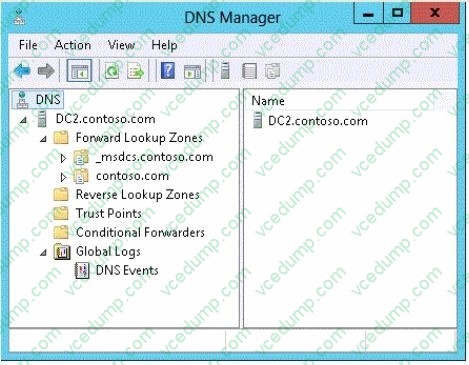
You need to view the DNS server cache from DNS Manager. What should you do first?
A. From the View menu, click Filter...
B. From the Action menu, click Configure a DNS Server...
C. From the Action menu, click Properties.
D. From the View menu, click Advanced. -
Question 372:
What should you do for server core so it can be managed from another server 2012 R2?
A. 1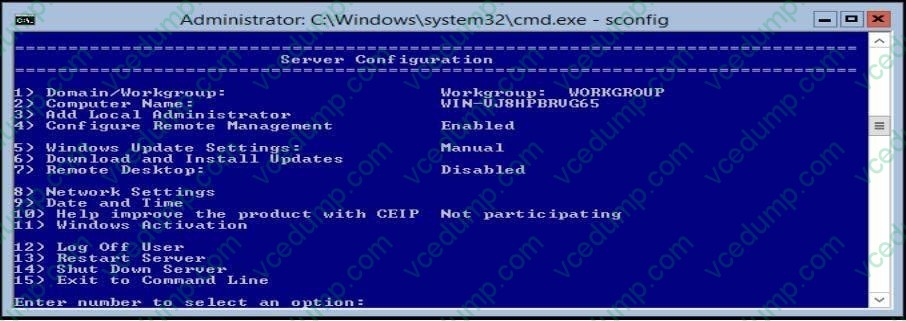
B. 2
C. 3
D. 4
E. 5
F. 6
G. 7
H. 8
I. 9
J. 10 -
Question 373:
Your network contains an Active Directory domain named adatum.com. The domain contains a member server named Host1. Host1 runs Windows Server 2012 R2 and has the Hyper-V server role installed.
Host1 hosts two virtual machines named VM5 and VM6. Both virtual machines connect to a virtual switch named Virtual1.
On VM5, you install a network monitoring application named Monitor1.
You need to capture all of the inbound and outbound traffic to VM6 by using Monitor1.
Which two commands should you run from Windows PowerShell? (Each correct answer presents part of the solution. Choose two.)
A. Get-VM "VM6 | Set-VMNetworkAdapter-IovWeight 1
B. Get-VM "VM5 I Set-VMNetworkAdapter -IovWeight 0
C. Get-VM "VM5 | Set-VMNetworkAdapter -PortMirroring Source
D. Get-VM "VM6 | Set-VMNetworkAdapter -AllowTeaming On
E. Get-VM "VM6 | Set-VMNetworkAdapter -PortMirroring Destination
F. Get-VM "VM5 | Set-VMNetworkAdapter -AllowTeaming On -
Question 374:
Your company has a main office and four branch offices. The main office contains a server named Server1 that runs Windows Server 2012 R2.
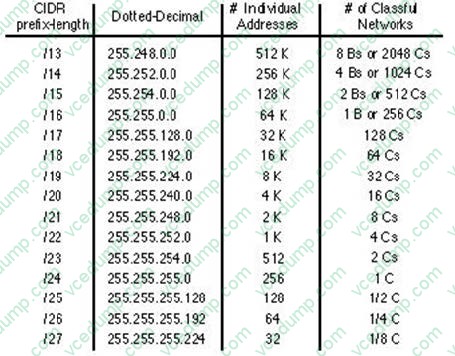
The IP configuration of each office is configured as shown in the following table.
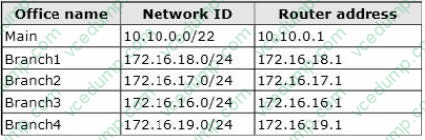
You need to add a single static route on Server1 to ensure that Server1 can communicate with the hosts on all of the subnets. Which command should you run?
A. route.exe add -p 10.10.0.0 mask 255.255.252.0 10.10.0.1
B. route.exe add -p 172.16.16.0 mask 255.255.252.0 10.10.0.1
C. route.exe add -p 10.10.0.0 mask 255.255.252.0 172.16.0.0
D. route.exe add -p 172.16.18.0 mask 255.255.252.0 10.10.0.1 -
Question 375:
You have Windows Server 2012 R2 DHCP servers with 50 leases.
You want to convert leases into reservations using PowerShell command.
What do you need to have to accomplish this?
A. Computer names
B. Computer GUIDs
C. Computer MAC Addresses
D. Hardware information -
Question 376:
Your network contains an Active Directory domain named contoso.com. The domain contains two servers named Server1 and Server2 that run Windows Server 2012 R2. Server1 has the Group Policy Management feature installed. Server2 has the Print and Document Services server role installed.
On Server2, you open Print Management and you deploy a printer named Printer1 by using a Group Policy object (GPO) named GPO1.When you open GPO1 on Server1, you discover that the Deployed Printers node does not appear.
You need to view the Deployed Printers node in GPO1.
What should you do?
A. On Server1, modify the Group Policy filtering options of GPO1.
B. On a domain controller, create a Group Policy central store.
C. On Server2, install the Group Policy Management feature.
D. On Server1, configure the security filtering of GPO1. -
Question 377:
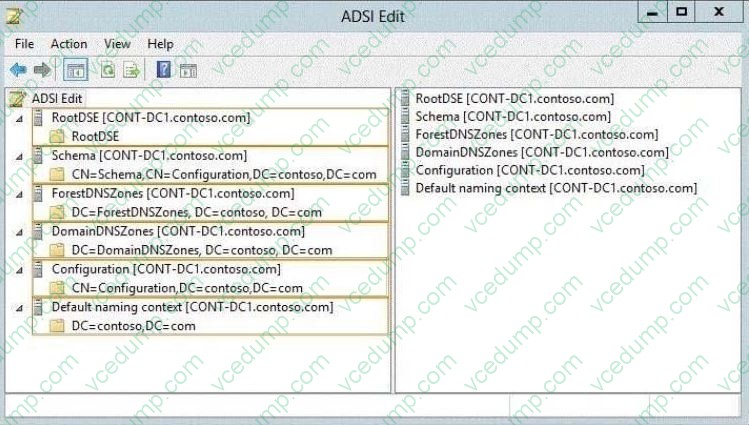
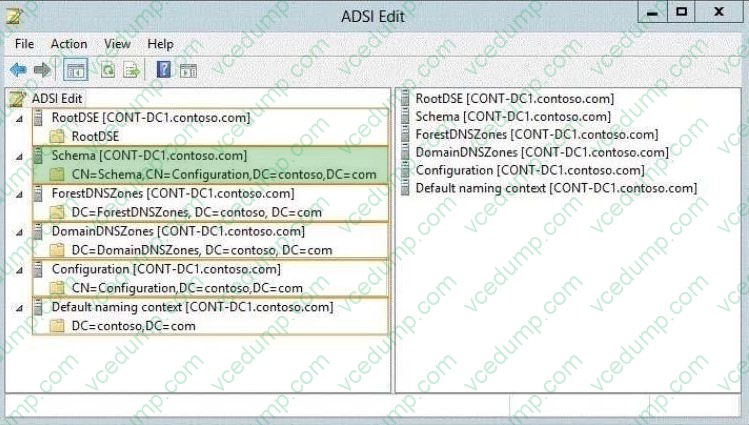
Your network contains an Active Directory domain named contoso.com. You need to identify whether the Company attribute replicates to the global catalog. Which part of the Active Directory partition should you view? To answer, select the appropriate Active Directory object in the answer area.
Hot Area:
-
Question 378:
Your network contains three servers that run Windows Server 2012 R2. The servers are configured as shown in the following table.
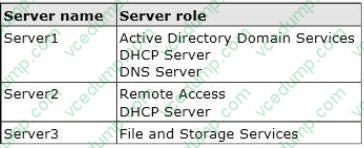
Server3 is configured to obtain an IP address automatically.
You need to prevent Server3 from receiving an IP address from Server1.
What should you create on Server1?
A. A reservation
B. A filter
C. A scope option
D. An exclusion -
Question 379:
Your network contains an Active Directory domain named contoso.com.
All user accounts in the marketing department reside in an organizational unit (OU) named OU1.
You have a Group Policy object (GPO) named GPO1. GPO1 contains Folder Redirection settings. GPO1 has default permissions.
You discover that the Folder Redirection settings are not applied to the users in the marketing department.
You open Group Policy Management as shown in the exhibit. (Click the Exhibit button.)
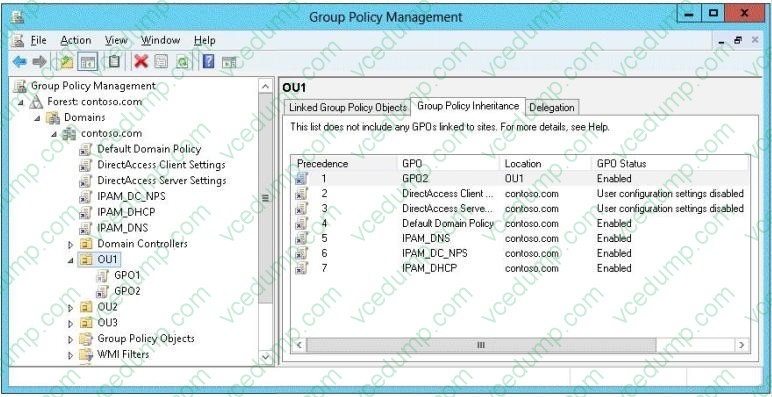
You need to ensure that the Folder Redirection settings in GPO1 apply to the marketing users. What should you do?
A. Modify the Delegation settings of GPO1.
B. Enable the link of GPO1.
C. Enforce GPO1.
D. Modify the link order of GPO1. -
Question 380:
Your network contains an Active Directory forest named contoso.com. The forest contains a single domain. The domain contains two domain controllers named DC1 and DC2 that run Windows Server 2012 R2.
The domain contains a user named User1 and three global security groups named Group1, Group2 and, Group3.
You need to add User1 to Group1, Group2, and Group3.
Which cmdlet should you run?
A. Add-AdPrincipalGroupMembership
B. Install-AddsDomainController
C. Install-WindowsFeature
D. Install-AddsDomain
E. Rename-AdObject
F. Set-AdAccountControl
G. Set-AdGroup
H. Set-User
Related Exams:
-
62-193
Technology Literacy for Educators -
70-243
Administering and Deploying System Center 2012 Configuration Manager -
70-355
Universal Windows Platform – App Data, Services, and Coding Patterns -
77-420
Excel 2013 -
77-427
Excel 2013 Expert Part One -
77-725
Word 2016 Core Document Creation, Collaboration and Communication -
77-726
Word 2016 Expert Creating Documents for Effective Communication -
77-727
Excel 2016 Core Data Analysis, Manipulation, and Presentation -
77-728
Excel 2016 Expert: Interpreting Data for Insights -
77-731
Outlook 2016 Core Communication, Collaboration and Email Skills
Tips on How to Prepare for the Exams
Nowadays, the certification exams become more and more important and required by more and more enterprises when applying for a job. But how to prepare for the exam effectively? How to prepare for the exam in a short time with less efforts? How to get a ideal result and how to find the most reliable resources? Here on Vcedump.com, you will find all the answers. Vcedump.com provide not only Microsoft exam questions, answers and explanations but also complete assistance on your exam preparation and certification application. If you are confused on your 70-410 exam preparations and Microsoft certification application, do not hesitate to visit our Vcedump.com to find your solutions here.