70-410 Exam Details
-
Exam Code
:70-410 -
Exam Name
:Installing and Configuring Windows Server 2012 -
Certification
:Microsoft Certifications -
Vendor
:Microsoft -
Total Questions
:537 Q&As -
Last Updated
:Feb 03, 2022
Microsoft 70-410 Online Questions & Answers
-
Question 91:
Catalog Servers. Your domain structure contains one root domain and one child domain. You modify the folder permissions on a file server that is in the child domain. You discover that some Access Control entries start with S-1-5-21 and that no account name is listed.
You need to list the account names. What should you do?
A. Move the RID master role in the child domain to a domain controller that holds the Global Catalog.
B. Modify the schema to enable replication of the friendly names attribute to the Global Catalog.
C. Move the RID master role in the child domain to a domain controller that does not hold the Global Catalog.
D. Move the infrastructure master role in the child domain to a domain controller that does not hold the Global Catalog. -
Question 92:
Which of the following groups do you use to consolidate groups and accounts that either span multiple domains or the entire forest?
A. Global
B. Domain local
C. Built-in
D. Universal -
Question 93:
You have a server named Server1 that runs Windows Server 2012 R2. Server1 has the Hyper-V server role installed. Server1 has 8 GB of RAM.
Server1 hosts five virtual machines that run Windows Server 2012 R2.
The settings of a virtual machine named Server3 are configured as shown in the exhibit. (Click the Exhibit button.)
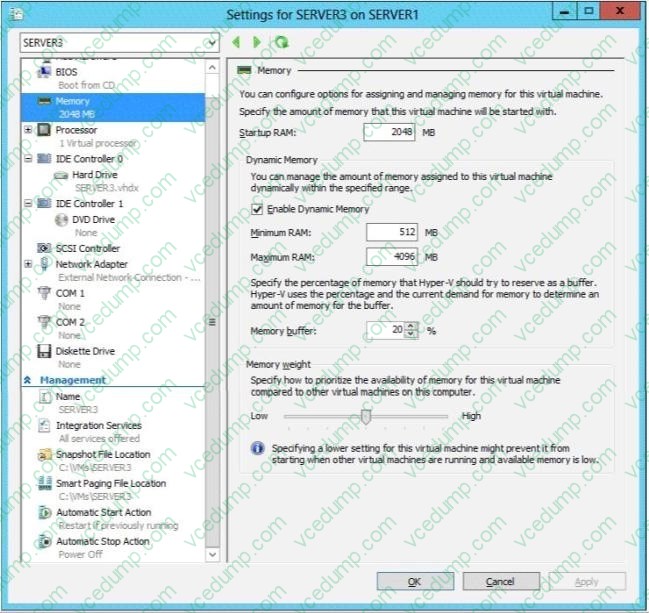
You need to ensure that when Server1 restarts, Server3 automatically resumes without intervention. The solution must prevent data loss. Which settings should you modify?
A. BIOS
B. Automatic Start Action
C. Automatic Stop Action
D. Integration Services -
Question 94:
Your network contains an Active Directory domain named contoso.com. The domain contains 100 user accounts that reside in an organizational unit (OU) named OU1.
You need to ensure that a user named User1 can link and unlink Group Policy objects (GPOs) to OU1. The solution must minimize the number of permissions assigned to User1.
What should you do?
A. Run the Delegation of Control Wizard on the Policies containers
B. Run the Set-GPPermission cmdlet
C. Run the Delegation of Control Wizard on OU1
D. Modify the permission on the user1 account -
Question 95:
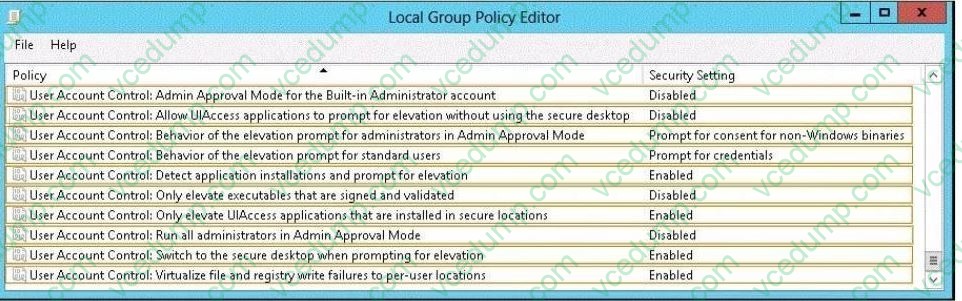
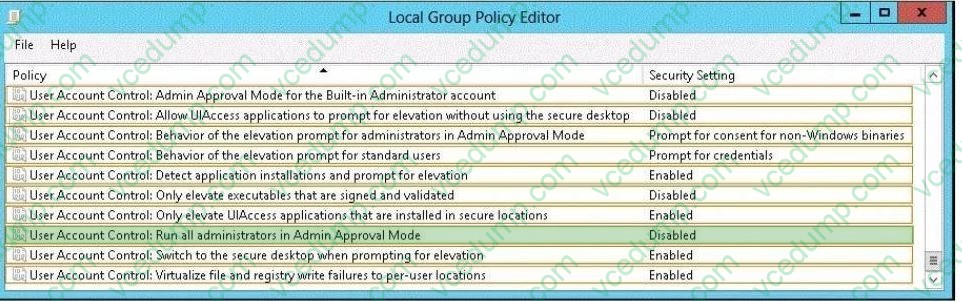
You have a server named Server1. Server1 runs Windows Server 2012 R2. A user named Admin1 is a member of the local Administrators group. You need to ensure that Admin1 receives a User Account Control (UAC) prompt when attempting to open Windows PowerShell as an administrator. Which setting should you modify from the Local Group Policy Editor? To answer, select the appropriate setting in the answer area.
Hot Area:
-
Question 96:
Your network contains an Active Directory domain named contoso.com. The network contains a domain controller named DC1 that has the DNS Server server role installed. DC1 has a standard primary DNS zone for contoso.com.
You need to ensure that only client computers in the contoso.com domain will be able to add their records to the contoso.com zone.
What should you do first?
A. Sign the contoso.com zone.
B. Modify the Security settings of DC1.
C. Modify the Security settings of the contoso.com zone.
D. Store the contoso.com zone in Active Directory. -
Question 97:
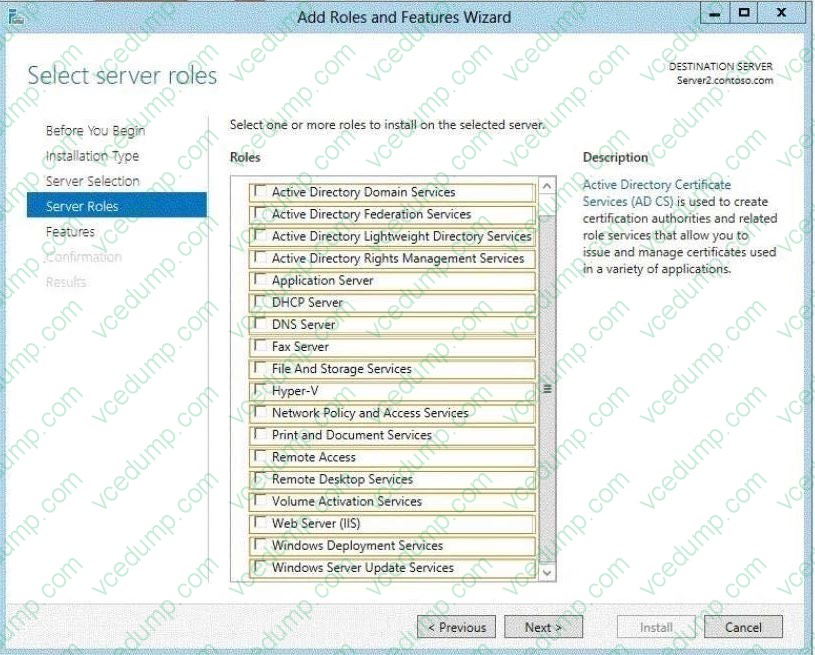
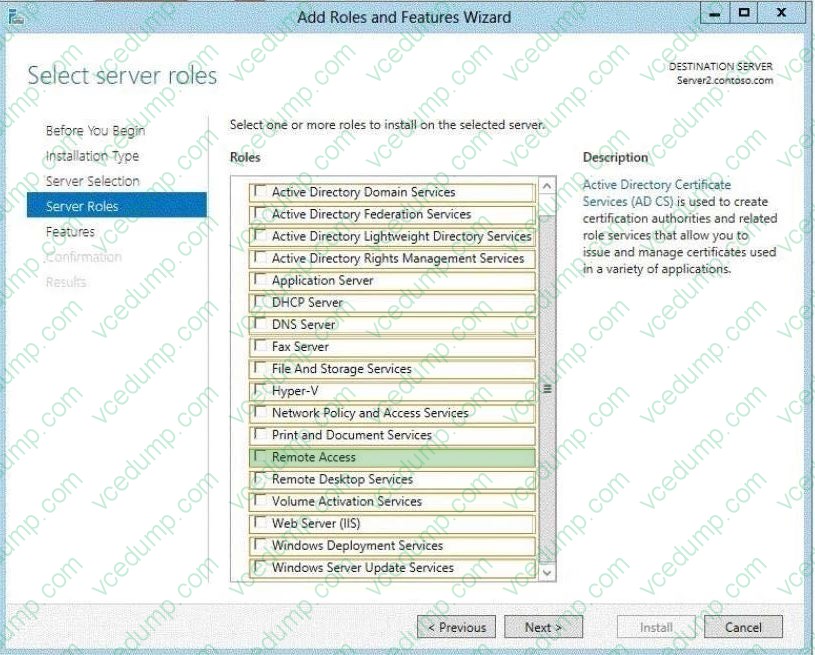
Your network contains a subnet named Subnet1. Subnet1 contains a DHCP server named Server1. You deploy a new subnet named Subnet2. On Subnet2, you deploy a new server named 5erver2 that runs Windows Server 2012 R2. You need to configure Server2 to route DHCP broadcast from Subnet2 to Server1. Which server role should you install on Server2? To answer, select the appropriate role in the answer area.
Hot Area:
-
Question 98:
You work as an administrator at Contoso.com. The Contoso.com network consists of a single domain named Contoso.com. All servers on the Contoso.com network have Windows Server 2012 R2 installed.
Contoso.com has a server, named ENSUREPASS-SR07, which has two physical disks installed. The C: drive hosts the boot partition, while the D: drive is not being used. Both disks are online. You have received instructions to create a virtual machine on ENSUREPASS-SR07. Subsequent to creating the virtual machine, you have to connect the D: drive to the virtual machine.
Which of the following is TRUE with regards to connecting a physical disk to a virtual machine?
A. The physical disk should not be online.
B. The physical disk should be uninstalled and re-installed.
C. The physical disk should be configured as a striped disk.
D. The physical disk should be configured as a mirrored disk. -
Question 99:
Your network contains an Active Directory forest named adatum.com.
The forest contains a child domain named asia.adatum.com. The asia.adatum.com child domain contains a server named DHCP1 that runs Windows Server 2012 R2.
You install the DHCP Server server role on DHCP1.
You have access to the administrative accounts shown in the following table.
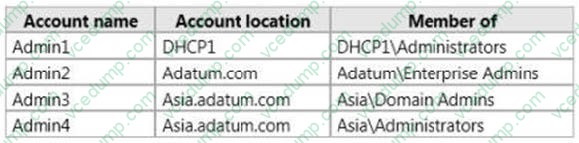
You need to authorize DHCP1. Which user account should you use?
A. Admin1
B. Admin2
C. Admin3
D. Admin4 -
Question 100:
You have a domain controller named Server1 that runs Windows Server 2012 R2 and has the DNS Server server role installed. Server1 hosts a DNS zone named contoso.com and a GlobalNames zone.
You discover that the root hints were removed from Server1.
You need to view the default root hints of Server1.
Which file should you open?
A. Netlogon.dns
B. Cache.dns
C. Globalnames.dns
D. Place.dns
Related Exams:
-
62-193
Technology Literacy for Educators -
70-243
Administering and Deploying System Center 2012 Configuration Manager -
70-355
Universal Windows Platform – App Data, Services, and Coding Patterns -
77-420
Excel 2013 -
77-427
Excel 2013 Expert Part One -
77-725
Word 2016 Core Document Creation, Collaboration and Communication -
77-726
Word 2016 Expert Creating Documents for Effective Communication -
77-727
Excel 2016 Core Data Analysis, Manipulation, and Presentation -
77-728
Excel 2016 Expert: Interpreting Data for Insights -
77-731
Outlook 2016 Core Communication, Collaboration and Email Skills
Tips on How to Prepare for the Exams
Nowadays, the certification exams become more and more important and required by more and more enterprises when applying for a job. But how to prepare for the exam effectively? How to prepare for the exam in a short time with less efforts? How to get a ideal result and how to find the most reliable resources? Here on Vcedump.com, you will find all the answers. Vcedump.com provide not only Microsoft exam questions, answers and explanations but also complete assistance on your exam preparation and certification application. If you are confused on your 70-410 exam preparations and Microsoft certification application, do not hesitate to visit our Vcedump.com to find your solutions here.