70-347 Exam Details
-
Exam Code
:70-347 -
Exam Name
:Enabling Office 365 Services -
Certification
:Microsoft Certifications -
Vendor
:Microsoft -
Total Questions
:344 Q&As -
Last Updated
:Dec 10, 2021
Microsoft 70-347 Online Questions & Answers
-
Question 71:
HOTSPOT
You have an Office 365 subscription.
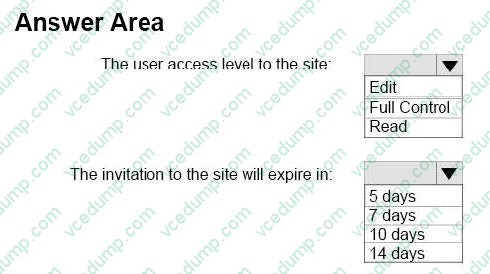
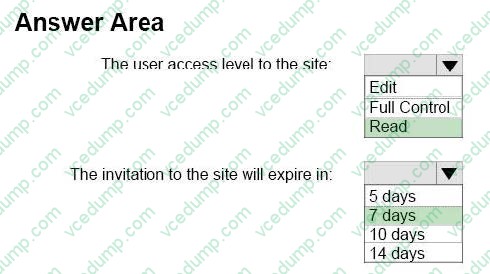
A user adds an external user to the Team Site Visitors role for a team site.
What is the effect of adding the user to the role? To answer, select the appropriate options in the answer area. NOTE: Each correct selection is worth one point.
Hot Area:
-
Question 72:
You are the Office 365 ProPlus administrator for your company. Each user is assigned an E3 license. All client computers are on a local area network. Users do not have administrative privileges on their client computers.
You are configuring a network-based installation of the most recent version of Office for all client computers.
You need to ensure that the installation process does not display any dialog boxes or require user input.
Which option should you specify in the Configuration. xml file?
A. < Display Level = "Minimal" AcceptEULA="TRUE" />
B. < Display Level="Silent" AcceptEULA="TRUE" />
C. < Display Level="None" AcceptEULA="TRUE" />
D. < Display Level = "Full" AcceptEULA="TRUE" /> -
Question 73:
You need to configure StaffHub based on the business requirements.
What should you do?
A. In the Office 365 admin center, set Teams license type to Business and Enterprise
B. In the StaffHub admin site, disable the Enable Microsoft StaffHub option.
C. In the StaffHub admin site, enable the Self Provision Accounts option.
D. In the StaffHub admin site, select Apply License Checking -
Question 74:
Your company has an Office 365 subscription. A user named Test5 has a mailbox. You need to ensure that all of the email messages sent and received by Test5 are accessible to members of the audit department for 60 days, even if Test5 permanently deletes the messages. What should you do?
A. Run the Set-User cmdlet.
B. Run the Set-Mailbox cmdlet.
C. Run the Set-RetentionPolicyTag cmdlet.
D. Run the Set-MailboxDatabase cmdlet.
E. Run the Set-RetentionPolicy cmdlet. -
Question 75:
You manage a Microsoft SharePoint Online deployment.
You need to ensure that files are only preserved from the moment that in-Place hold was created.
You open the document library settings as shown in the exhibit.
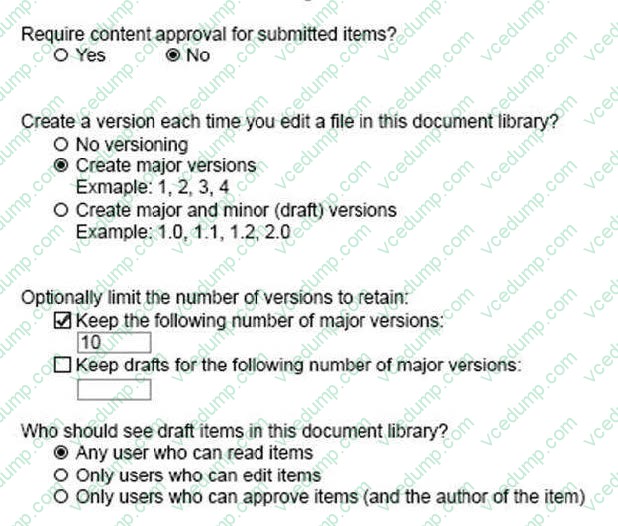
What should you do next?
A. Set Create a version each time you edit a file in this document library to Create major and minor (drafts) versions.
B. Set Create a version each time you edit a file in this document library to No versioning.
C. Set Require documents to be checked out before they can be edited to Yes.
D. Set Keep the following number of major versions option to 0. -
Question 76:
You have an Office 365 subscription.
A new compliance policy requires that a Microsoft Exchange Server administrator must be able to search all user email messages.
You add the Exchange administrator to the Discovery Management role group.
You need to deploy an eDiscovery Center in Microsoft SharePoint Online.
Which three actions should you perform? Each correct answer presents part of the solution.
NOTE: Each correct selection is worth one point.
A. From the Site settings of the eDiscovery Center, add the Exchange administrator as an owner of the eDiscovery Center.
B. From search in the SharePoint admin center, add Exchange Online as a Result Resources.
C. From the Site settings of the eDiscovery Center, add Exchange Online as Result Resources.
D. From the SharePoint admin center, create an eDiscovery Center as a site collection.
E. From search in the SharePoint admin center, import a search configuration. -
Question 77:
Your company uses Microsoft SharePoint Online for collaboration. A document library is configured as shown in the following table.

You need to enable the coauthoring of documents in the library. What should you do?
A. Change the Who should see draft items in this document library? setting to Any user who can read items.
B. Change the Create a version each time you edit a file in this document library? setting to No Versioning.
C. Change the Require documents to be checked out before they can be edited? setting to No.
D. Change the Require content approval for submitted items? setting to No. -
Question 78:
Your company has an Office 365 Small Business subscription. You are the Microsoft SharePoint Online administrator.
The company wants to have two separate public websites with different URLs.
You need to configure the environment to support the public websites.
What should you do?
A. Upgrade to SharePoint Online for Office 365 Enterprise, Education, and Government.
B. Create one public website and one subsite, and then configure a redirect.
C. Create two public websites and configure the DNS records for each site.
D. Upgrade to SharePoint Online for Office 365 Midsize Business. -
Question 79:
You are the Office 365 administrator for your company. The company uses Microsoft Exchange Online and Microsoft Lync Online.
An employee named User1 has the user name, email address, and Lync address [email protected]. The employee requests that you change only his Lync address to User1- [email protected].
You start a Windows PowerShell session and run the following commands, providing your admin account credentials when prompted:

You need to complete the process of updating the employee's Lync address without affecting any other addresses. Which Windows PowerShell command should you run next?
A. Set-MsolUser -UserPrincipalName $ID -ProxyAddresses@{add = "$NewAddress"; remove = "$OldAddress">
B. Set-Mailbox -Identity $ID -EmailAddresses@{add = "$NewAddress"; remove = "$Old Address"}
C. Set-Mailbox -Identity $ID-WindowsEmailAddress $NewAddress
D. Set-CsUser -Identity $ID -ProxyAddresses@{add = M$NewAddress''; remove="$OldAddress"> -
Question 80:
You are the Office 365 administrator for a company.
You need to set the default storage limit for all Microsoft OneDrive for Business users to 2 terabytes (TB).
What should you do?
A. On the OneDrive admin center Settings page, configure settings for the OneDrive for Business experience web interface.
B. On the Microsoft SharePoint admin center Settings page, configure settings for the Site Collections web interface.
C. Run the Windows PowerShell command Set-SPOSite –ResourceQuota 2000.
D. On the OneDrive admin center Storage page, configure settings for default storage.
Related Exams:
-
62-193
Technology Literacy for Educators -
70-243
Administering and Deploying System Center 2012 Configuration Manager -
70-355
Universal Windows Platform – App Data, Services, and Coding Patterns -
77-420
Excel 2013 -
77-427
Excel 2013 Expert Part One -
77-725
Word 2016 Core Document Creation, Collaboration and Communication -
77-726
Word 2016 Expert Creating Documents for Effective Communication -
77-727
Excel 2016 Core Data Analysis, Manipulation, and Presentation -
77-728
Excel 2016 Expert: Interpreting Data for Insights -
77-731
Outlook 2016 Core Communication, Collaboration and Email Skills
Tips on How to Prepare for the Exams
Nowadays, the certification exams become more and more important and required by more and more enterprises when applying for a job. But how to prepare for the exam effectively? How to prepare for the exam in a short time with less efforts? How to get a ideal result and how to find the most reliable resources? Here on Vcedump.com, you will find all the answers. Vcedump.com provide not only Microsoft exam questions, answers and explanations but also complete assistance on your exam preparation and certification application. If you are confused on your 70-347 exam preparations and Microsoft certification application, do not hesitate to visit our Vcedump.com to find your solutions here.