70-347 Exam Details
-
Exam Code
:70-347 -
Exam Name
:Enabling Office 365 Services -
Certification
:Microsoft Certifications -
Vendor
:Microsoft -
Total Questions
:344 Q&As -
Last Updated
:Dec 10, 2021
Microsoft 70-347 Online Questions & Answers
-
Question 291:
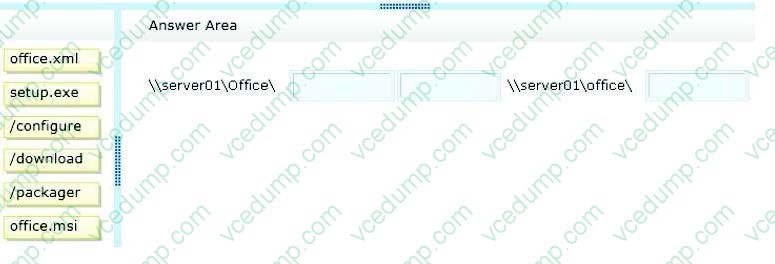
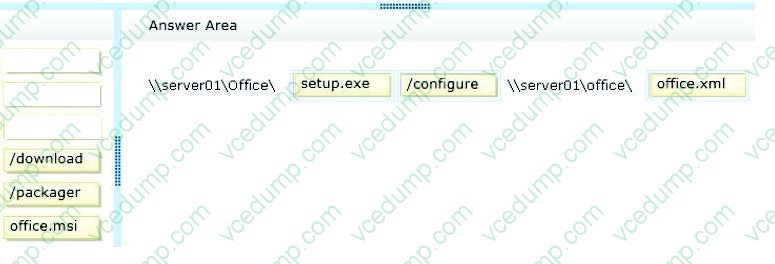
You are the Office 365 administrator for your company. The company recently migrated to Office 365 and is planning to deploy Office 365 ProPlus to client computers in the main office and all branch offices.
Due to limited bandwidth at the branch offices, the company decides to have users install Office 365 ProPlus from a network share by using the Click-to-Run deployment method.
You need to install Office 365 ProPlus on a client computer.
How should you complete the relevant command? To answer, drag the appropriate command segments to the correct targets. Each command segment may be used once, more than once, or not at all. You may need to drag the split bar between panes or scroll to view content.
Select and Place:
-
Question 292:
HOTSPOT
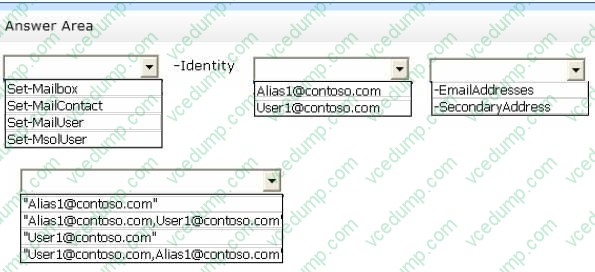
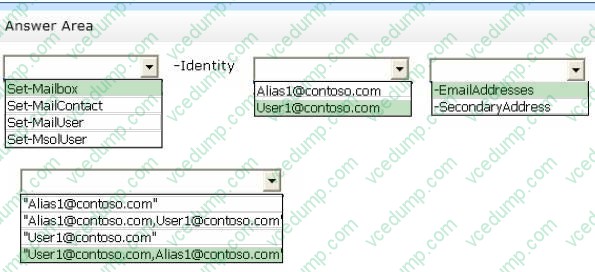
You are the SharePoint Online administrator for Contoso, Ltd. You create a test site. The specifications for the site are described in the following table:

You need to configure the specified site.
How should you complete the relevant Windows PowerShell script? To answer, select the appropriate option from each list in the answer area.
Hot Area:
-
Question 293:
A company uses Skype for Business Online.
You need to ensure that all employees can search for and add Skype consumer contacts.
What should you do?
A. Instruct all employees to use the Skype for Business client, and connect to Skype for Business Online by using their Skype ID credentials.
B. Instruct all employees to use the Skype consumer client, and connect to Skype for Business Online by using their Skype ID credentials.
C. Instruct all employees to use the Skype consumer client, and connect to Skype for Business Online by using their Office 365 credentials.
D. Instruct all employees to use the Skype for Business client and connect to Skype for Business Online by using their Office 365 credentials. -
Question 294:
Note: This question is part of a series of questions that present the same scenario. Each question in the series holds a unique solution that might meet the stated goals. Some question sets might have more than one correct solution, while others might not have a correct solution.
How should you configure Teams?
Solution: Enable the Use Skype for Business for recipients who don't have Teams option.
Does the solution meet the goal?
A. YES
B. NO -
Question 295:
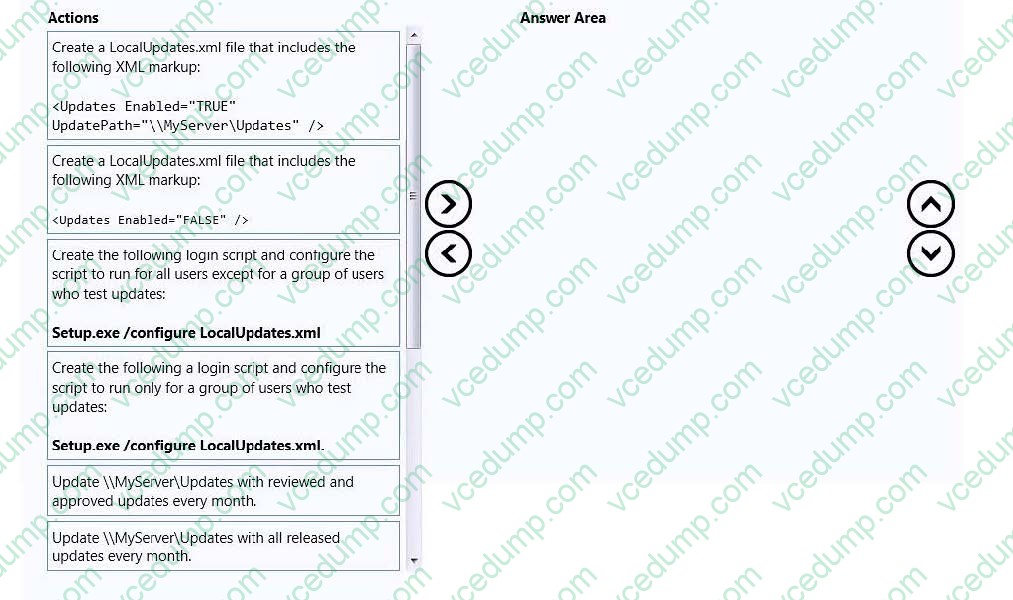
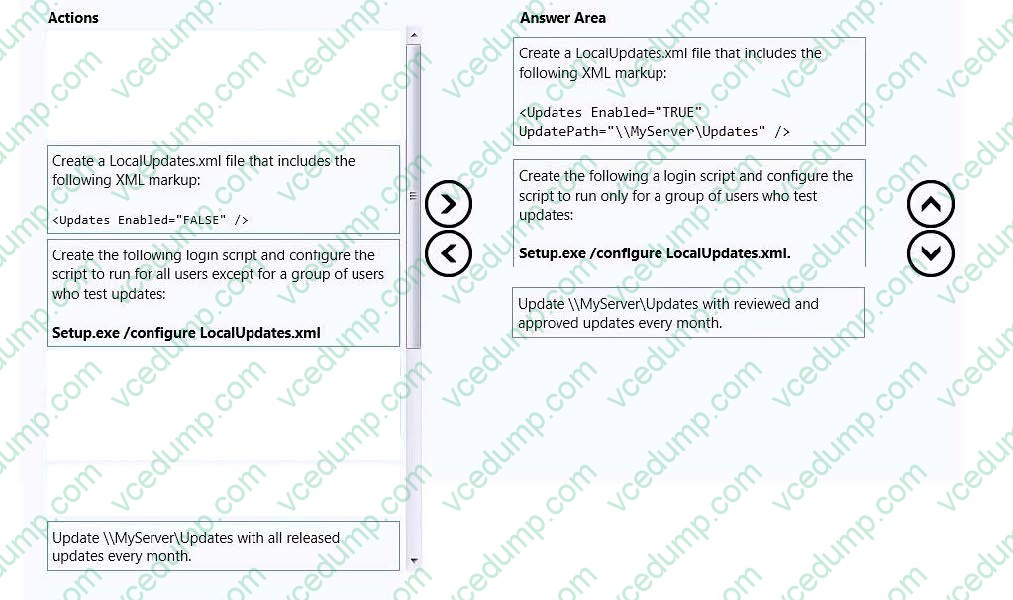
You are the Office 365 administrator for a company. You deploy Office 365 ProPlus. You plan to implement a software change control process for software updates.
You have a group of test users that need custom updates.
You need to install updates for only the test users.
Which three actions should you perform in sequence? To answer, move the appropriate actions from the list of actions to the answer area and arrange them in the correct order.
Select and Place:
-
Question 296:
You manage a Microsoft Exchange server that is on an isolated network. The server has no internet access from the corporate network.
The organization purchases an Office 365 subscription and plans to migrate to Office 365.
You need to recommend a migration strategy that does not require data to be sent over the internet.
Which migration strategy should you recommend?
A. staged migration
B. Office 365 Import Service
C. cutover migration
D. hybrid migration -
Question 297:
HOTSPOT
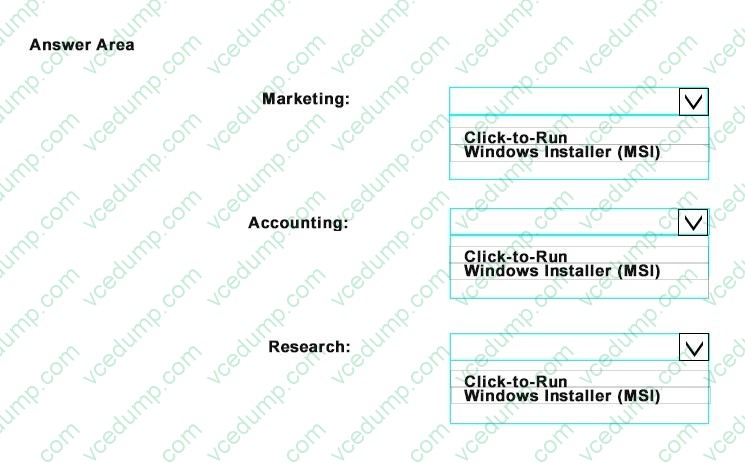
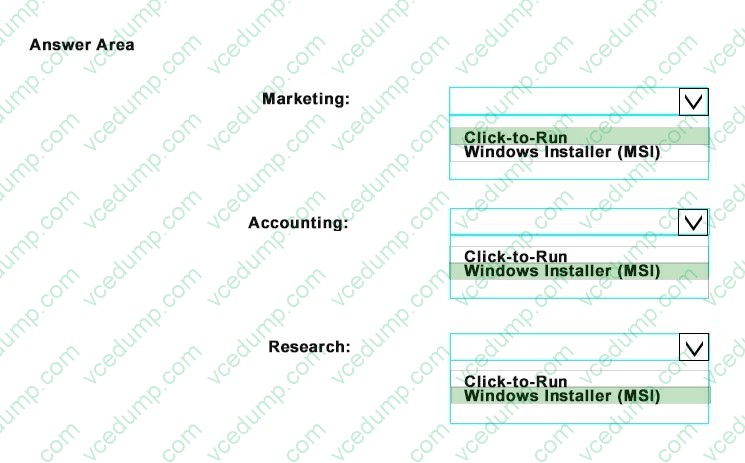
You are planning the deployment of Office 365 ProPlus.
You need to identify which deployment method to use for each department based on the current business model and the technical requirement.
Which method should you identify for each department? To answer, select the appropriate options in the answer area.
Hot Area:
-
Question 298:
HOTSPOT
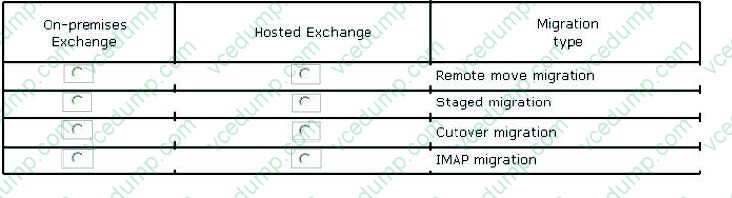
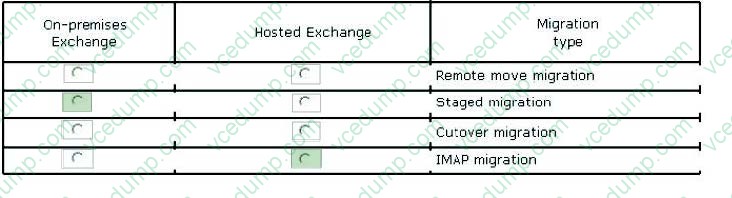
You are the Office 365 administrator for your company. You manage an on-premises Microsoft Exchange Server 2003 environment that has 500 users and an externally-hosted Exchange environment that has 500 users. The hosted Exchange environment does not allow Outlook Anywhere connectivity. You do not have administrative access to all mailboxes in the hosted environment.
You plan to migrate and consolidate both environments into Office 365.
You have the following migration requirements:

Migrate on-premises mailboxes in batches by department.
Migrate email, calendar, and contact items from the on-premises environment.
Migrate only email from the hosted environment.
In the table below, identify the migration type that must be used for each environment. Make only one selection in each column. Each correct selection is worth one point.
Hot Area:
-
Question 299:
You need to migrate a Microsoft Exchange Server 2007 organization that has 50 mailboxes to Exchange Online by using the cutover migration method. Which two requirements should be met before you can begin the mailbox migration? Each correct answer presents part of the solution.
A. The migration administrator account must be granted Full Access permission for each on-premises mailbox that will be migrated.
B. The migration administrator account must be granted Send As permission for each on-premises mailbox that will be migrated.
C. Exchange Web Services (EWS) must be enabled and accessible from the Internet.
D. The migration administrator account must be granted Receive As permission for each on-premises mailbox that will be migrated.
E. Outlook Anywhere must be enabled and accessible from the Internet. -
Question 300:
Note: This question is part of a series of questions that present the same scenario. Each question in the series contains a unique solution. Determine whether the solution meets the stated goals.
You need to resolve the incorrect Skype for Business Online user sign-in SIP address of User1.
What should you do?
A. From users in the Skype for Business admin center, modify the general options for User1.
B. Instruct User1 to go to his personal site and edit his contact information.
C. From users in the Office 365 admin center, change the primary email address for User1.
D. From recipients in the Exchange admin center, modify the email addresses for User1.
Related Exams:
-
62-193
Technology Literacy for Educators -
70-243
Administering and Deploying System Center 2012 Configuration Manager -
70-355
Universal Windows Platform – App Data, Services, and Coding Patterns -
77-420
Excel 2013 -
77-427
Excel 2013 Expert Part One -
77-725
Word 2016 Core Document Creation, Collaboration and Communication -
77-726
Word 2016 Expert Creating Documents for Effective Communication -
77-727
Excel 2016 Core Data Analysis, Manipulation, and Presentation -
77-728
Excel 2016 Expert: Interpreting Data for Insights -
77-731
Outlook 2016 Core Communication, Collaboration and Email Skills
Tips on How to Prepare for the Exams
Nowadays, the certification exams become more and more important and required by more and more enterprises when applying for a job. But how to prepare for the exam effectively? How to prepare for the exam in a short time with less efforts? How to get a ideal result and how to find the most reliable resources? Here on Vcedump.com, you will find all the answers. Vcedump.com provide not only Microsoft exam questions, answers and explanations but also complete assistance on your exam preparation and certification application. If you are confused on your 70-347 exam preparations and Microsoft certification application, do not hesitate to visit our Vcedump.com to find your solutions here.