70-347 Exam Details
-
Exam Code
:70-347 -
Exam Name
:Enabling Office 365 Services -
Certification
:Microsoft Certifications -
Vendor
:Microsoft -
Total Questions
:344 Q&As -
Last Updated
:Dec 10, 2021
Microsoft 70-347 Online Questions & Answers
-
Question 201:
You are the Office 365 administrator for your company. Employees do not have local administrative privileges on client computers.
The company has the following client computer software:
Windows 7 and Windows 8
32-bit and 64-bit Office 2007, Office 2010, and Office 2013
When accessing the corporate Microsoft SharePoint 2010 site, some users are unable to display SharePoint lists in the Datasheet view.
You need to ensure that all users can display SharePoint lists in the Datasheet view. What should you do?
A. Upgrade to the latest version of Office 365 ProPlus.
B. Force a reinstallation of Office by using Group Policy and specifying a network location.
C. Uninstall the 64-bit version of Office and then install the 32-bit version of Office.
D. Upgrade all Office 2007 and Office 2010 versions to Office 2013. -
Question 202:
You implement Skype for Business Online. You deploy the following client policy:
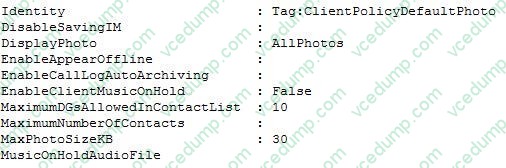
You have the following requirements:
• Photos must be displayed for users.
• If possible, the maximum size for user photos must be 25 KB.
You need to reconfigure the environment.
Which Windows PowerShell command or commands should you run?
A. Get-CsOnlineUser | Set-CsClientPolicy –PolicyName ClientPolicyDefaultPhoto –MaxPhotoSizeKB 25
B. New-CsClientPolicy –Identity PhotoPolicy –DisplayPhoto AllPhotos –MaxPhotoSizeKB 25Get-CsOnlineUser |Grant-CsClientPolicy –PolicyName PhotoPolicy
C. Set-CsClientPolicy –Identity ClientPolicyDefaultPhoto –MaxPhotoSizeKB 25Get-CsOnlineUser | Grant-CsClientPolicy –PolicyName ClientPolicyDefaultPhoto
D. New-CsClientPolicyEntry –Identity ClientPolicyDefaultPhoto –MaxPhotoSizeKB 25Get-CsOnlineUser | Grant-CsClientPolicy –PolicyName ClientPolicyDefaultPhoto
E. Get-CsOnlineUser | Grant-CsClientPolicy –PolicyName ClientPolicyDefaultPhoto -
Question 203:
You are the Office 365 administrator for your company.
You need to configure Microsoft Lync Online to disable alerts for voicemail and instant messages to Windows Phones.
What should you do?
A. Use the Set-CsHostedVoiceMailPolicy Windows PowerShell cmdlet.
B. Use the Set-CsPushNotificationConfiguration Windows PowerShell cmdlet.
C. In the Lync admin center, select the Display presence information only to a user's contacts option.
D. Use the Set-CsUser Windows PowerShell cmdlet. -
Question 204:
HOTSPOT
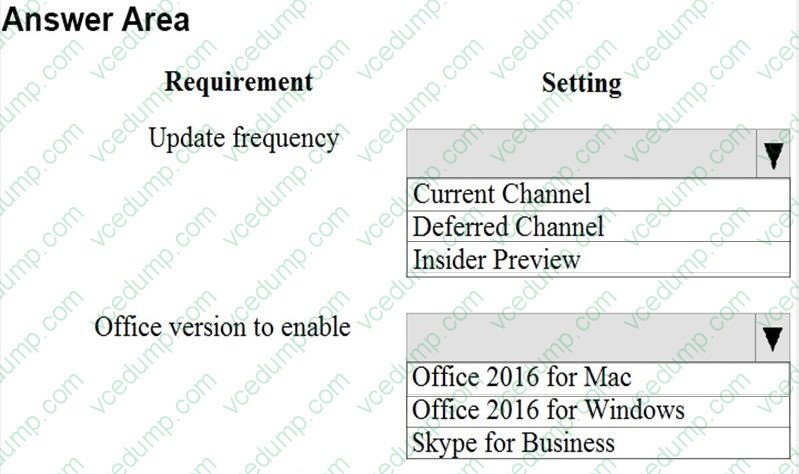
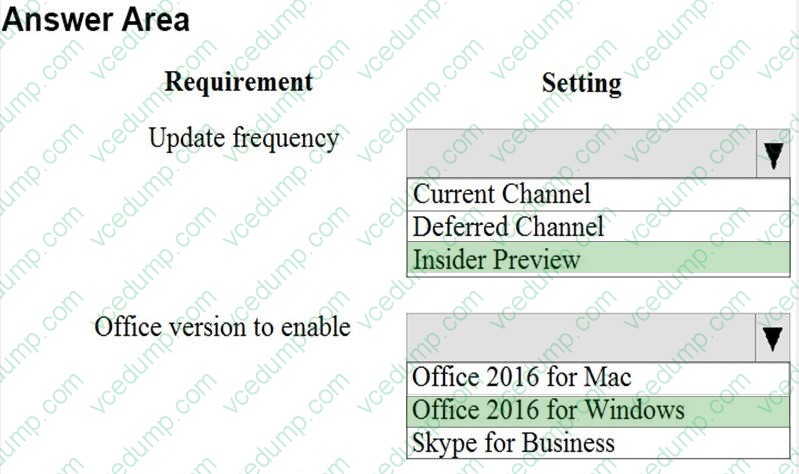
You need to configure the Office application deployment options.
What should you do? To answer, select the appropriate options in the answer area.
NOTE: Each correct selection is worth one point.
Hot Area:
-
Question 205:
Note: This question is part of a series of questions that present the same scenario. Each question in the series contains a unique solution. Determine whether the solution meets the stated goals.
You need to modify the existing environment to meet the technical requirement for Outlook on the web.
Solution: You run the Set-Mailbox command.
Does this meet the goal?
A. Yes
B. No -
Question 206:
HOTSPOT
You are the Office 365 administrator for your company.
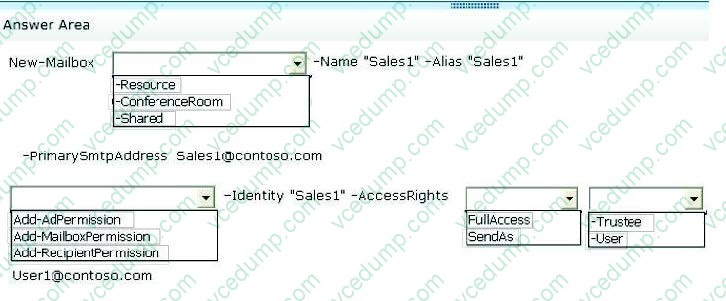
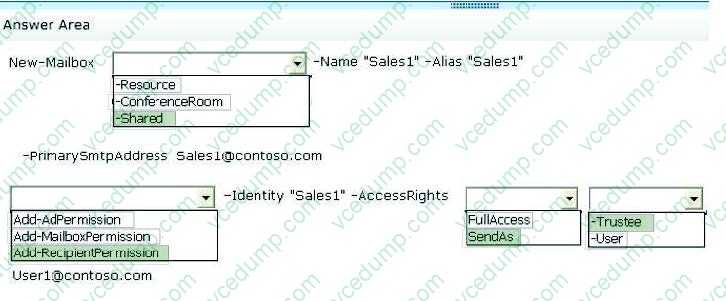
An employee with the user name User1 requests a shared mailbox named Sales1. User1 must be able to send messages from the Sales1 mailbox.
You need to create and configure the online mailbox.
How should you complete the relevant Windows PowerShell script? To answer, select the correct answer from each list in the answer area.
Hot Area:
-
Question 207:
You are the Office 365 administrator for a company.
You must modify the configuration of the Office 365 tenant to allow users to instant message users only with partner companies.
You need to configure Office 365 tenant.
What should you use?
A. the Office 365 admin center
B. the Windows PowerShell Set-CsExternalAccessPolicy cmdlet
C. the Microsoft Exchange admin center
D. the Windows PowerShell Set-CsPersistentChatPolicy cmdlet -
Question 208:
NOTE: This question is part of a series of questions that present the same scenario. Each question in the series holds a unique solution that might meet the stated goals. Some question sets might have more than one correct solution, while
others might not have a correct solution.
After you answer a question in this section, you will NOT be able to return to it. As a result, these questions will not appear in the review screen.
You need to configure external user sharing for One Drive.
Solution: You set the value of the OneDrive External sharing option to New and existing external users.
Does the solution meet the goal?
A. Yes
B. No -
Question 209:
You administer the Office 365 tenant for an organization. You assign Enterprise E5 licenses to all users. A partner organization reports that they are not receiving email from your organization.
You must ensure that the partner organization can receive emails from your organization. The solution must meet the following requirements:
It must be implemented as a component of the message header.
It must not require any user intervention or the creation of DNS records.
You need to configure your Office 365 environment to ensure that the partner organization can receive emails from your organization.
Which Security and Compliance feature in Office 365 should you implement?
A. Secure Policy Framework (SPF) record
B. Domain-based Messaging and Reporting Compliance (DMARC)
C. DomainKeys Identified Mail (DKIM)
D. data loss prevention (DLP) policy -
Question 210:
You are the Office 365 administrator for a company.
You need to set the default storage limit for all Microsoft OneDrive for Business users to 2 terabytes (TB).
What should you do?
A. On the Microsoft SharePoint admin center Settings page, configure settings for the OneDrive for Business experience web interface.
B. Run the Windows PowerShell command Set-SPOSite –StorageQuota 2000.
C. Run the Windows PowerShell command Set-SPOTenant –OneDriveStorageQuota 2 TB.
D. Run the Windows PowerShell command Set-SPOTenant –OneDriveStorageQuota 2097152.

Related Exams:
-
62-193
Technology Literacy for Educators -
70-243
Administering and Deploying System Center 2012 Configuration Manager -
70-355
Universal Windows Platform – App Data, Services, and Coding Patterns -
77-420
Excel 2013 -
77-427
Excel 2013 Expert Part One -
77-725
Word 2016 Core Document Creation, Collaboration and Communication -
77-726
Word 2016 Expert Creating Documents for Effective Communication -
77-727
Excel 2016 Core Data Analysis, Manipulation, and Presentation -
77-728
Excel 2016 Expert: Interpreting Data for Insights -
77-731
Outlook 2016 Core Communication, Collaboration and Email Skills
Tips on How to Prepare for the Exams
Nowadays, the certification exams become more and more important and required by more and more enterprises when applying for a job. But how to prepare for the exam effectively? How to prepare for the exam in a short time with less efforts? How to get a ideal result and how to find the most reliable resources? Here on Vcedump.com, you will find all the answers. Vcedump.com provide not only Microsoft exam questions, answers and explanations but also complete assistance on your exam preparation and certification application. If you are confused on your 70-347 exam preparations and Microsoft certification application, do not hesitate to visit our Vcedump.com to find your solutions here.