70-210 Exam Details
-
Exam Code
:70-210 -
Exam Name
:Installing, Configuring and Administering Microsoft Windows 2000 Professional -
Certification
:Microsoft Certifications -
Vendor
:Microsoft -
Total Questions
:145 Q&As -
Last Updated
:Dec 13, 2021
Microsoft 70-210 Online Questions & Answers
-
Question 21:
Your company upgrades its network to 100 Mbps. You remove the old network adapter and install a new 10/100 Mbps network adapter into a Windows 2000 Professional computer. You configure the TCP/IP protocol settings to be the same as they were for the previously installed network adapter.When you restart the computer, however, you cannot access the network. You try to ping your network adapter's TCP/IP address locally. You receive the following error message: "Request timed out." Next, you try to ping 127.0.0.1 and receive the same error message.What must you do?
A. Configure a different TCP/IP address.
B. Enable DHCP in the TCP/IP properties.
C. Enable DNS in the TCP/IP properties.
D. Configure the network adapter to run at 100 Mbps only.
E. Replace the network adapter. -
Question 22:
You need to install Windows 2000 Professional on 30 new computers. You also need to deploy a Windows 2000 Professional Service Pack during the installation.First, you create a network distribution folder named InstallFiles. You copy the i386 folder from the Windows 2000 Professional CD to the InstallFiles folder.What should you do next?
A. Copy the Service Pack files to the InstallFiles\Misc folder.
B. Copy the Service Pack files to the InstallFiles\$OEM$ folder.
C. From an existing client computer, run the Update -u command from the Service Pack to the InstallFiles folder.
D. From an existing client computer, run the Update -s:InstallFiles command from the Service Pack to the InstallFiles folder. -
Question 23:
You attach a USB camera to your Windows 2000 Professional computer. Windows 2000 Professional detects the camera and prompts you to install the manufacturer's device driver. You insert the manufacturer-provided floppy disk.After installing the device drivers, you restart the computer. When Windows 2000 Professional loads, you notice that your USB keyboard does not respond. You suspect that the camera drivers are not certified for Windows 2000 Professional. You want to configure your computer to enable your USB keyboard and to prevent uncertified drivers from being installed in the future.What should you do? (Choose two.)
A. Configure Windows 2000 Professional to enable driver signing.
B. Configure Windows 2000 Professional to disable driver signing.
C. Start the computer by using the Recovery Console. Restore the System State data.
D. Start the computer in safe mode. Replace the camera drivers with Windows 2000 Professional certified drivers by using Device Manager.
E. Start the computer in debug mode. Replace the camera drivers with Windows 2000 Professional certified drivers by using Device Manager. -
Question 24:
You configure your Windows 2000 Professional computer for Internet connection Sharing and for TCP/IP filtering as shown in the exhibit. (Click the Exhibit button.)You test your TCP/IP filtering configuration from another client computer. You can access Web sites, but you cannot access FTP sites.What should you do to be able to access FTP sites?
A. Add Port 21 to the TCP Ports section.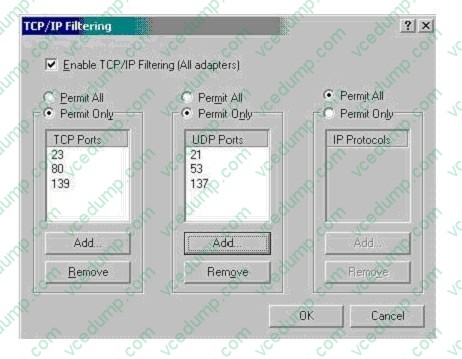
B. Add Port 138 to the TCP Ports section.
C. Add Port 21 to the IP Ports section.
D. Add Port 138 to the IP Ports section. -
Question 25:
You are the administrator of your company's network. You want to deploy a Windows 2000 Professional service pack to 10 computers in the Development organizational unit (OU).You create a Windows Installer package file for the service pack. You use the package file to successfully install the service pack to other computers in the domain. You assign the package file to the Development OU. After the installation, you notice that the service pack was not installed on any of the 10 computers.You want to ensure that the service pack is successfully installed on the computers in the Development OU.What should you do?
A. Use Computer Management to start the Windows Installer service on all of the computers in the Development OU.
B. Use the local Administrator account to log on to the computers in the Development OU. Then redeploy the service pack to the computers in the Development OU.
C. Run WinINSTALL LE to repair the package file. Then redeploy the service pack to the computers in the Development OU.
D. Add the user accounts from the Development OU to the DACL. Grant the user accounts Read permission to the service pack deployment directory. -
Question 26:
Your Windows 2000 Professional computer has 50 MB of free disk space on drive C and 500 MB of free disk space on drive D. Print jobs are failing because the available space on drive C is inadequate. You want print jobs to be able to use the space on drive D.What should you do?
A. From the Print Server Properties dialog box, change the location of the spool folder to any existing file path on drive D.
B. From the Printer Properties dialog box, use Advanced settings to change the location of the spool folder to D:\Winnt\System32\Spool\Printers.
C. Copy the C:\Winnt\System32\Spool\Printers folder to the D:\Winnt\System32\Spool\Printers folder.
D. Mount drive C as a subdirectory on drive D. -
Question 27:
Your computer has Windows 2000 Professional installed. Your office has a power outage while you are running the Windows 2000 disk defragmenter. When you restart your computer, you receive the following error message: "Bad or missing operating system."What should you do?
A. Start the computer in safe mode, and reformat the hard disk.
B. Start the computer in debug mode, and reformat the hard disk.
C. Start the computer by using the Emergency Repair Disk, and repair the Master Boot Record.
D. Start the computer by using the Windows 2000 Professional CD-ROM. Then use the Recovery Console to repair the Master Boot Record. -
Question 28:
You are the administrator of your company's network. A user named Lilly prints dozens of documents daily from her Windows 2000 Professional computer. Lilly reports that she receives a dialog box announcing that each print job she sends has printed successfully.Lilly's default printer is a shared printer that is connected to a Windows 2000 Server computer. She wants to have this notification turned off because she prints so many documents.What should you do?
A. In the server properties of the Printers system folder, clear the Notify when remote documents are printed option.
B. In the server properties of the Printers system folder, clear the Notify computer, not user, when remote documents are printed option.
C. In the default printer properties, select the Ports tab, and clear the Enable bidirectional support option.
D. In the default printer properties, select the Advanced tab, and clear the Advanced printing features option. -
Question 29:
You are the administrator of your company's network. You use your Windows 2000 Professional computer to transfer 20 large files. Each file is 100 MB in size. You want to copy the files from a UNIX server in your branch office to a computer running Microsoft SQL Server at the main office.When you copy the files by using Windows Explorer, the connection appears to time out and the file copy is aborted. You suspect that you are encountering a TCP/IP performance problem. Your network connection is shown in the Xircom LAN Properties dialog box in the exhibit. (Click the Exhibit button.)You want to monitor the performance of TCP/IP of your computer. What should you do?
A. Install the Network Monitor Agent. Use the Performance console to view all the counters of the TCP object.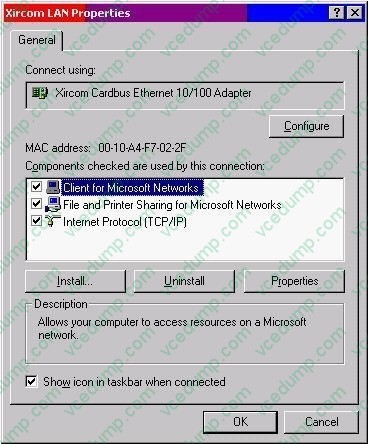
B. Install the Network Monitor Agent. Use the Performance console to view the Fragmented Datagrams/ sec counter.
C. Install SNMP. Use the Performance console to view all the counters of the TCP object.
D. Install Simple TCP/IP Services. Use the Performance console to view the Fragmentation Failures counter. -
Question 30:
You are the administrator of the Coho Vineyard network. The network consists of 10 Windows 2000 Advanced Server computers and 250 Windows 2000 Professional computers. Your company has two domains: cohovineyard.com and westcoastsales.com.The company's intranet site is on a Windows 2000 Advanced Server computer named ServerA. ServerA is in the cohovineyard.com domain and is running Internet Information Services (IIS) and Microsoft Proxy Server 2.0.You want to configure the Windows 2000 Professional computers in the westcoastsales.com domain to access the intranet site. You want users to be able to connect to the intranet site by using the URL http://ServerA rather than its fully qualified domain name.What should you do?
A. Add cohovineyard.com to the Domain Suffix Search Order on the computers.
B. Add westcoastsales.com to the Domain Suffix Search Order on the computers.
C. Add westcoastsales.com to the exceptions list in the proxy server settings on the computers.
D. Configure the proxy server settings on the computers to bypass the proxy server for intranet addresses.
Related Exams:
-
62-193
Technology Literacy for Educators -
70-243
Administering and Deploying System Center 2012 Configuration Manager -
70-355
Universal Windows Platform – App Data, Services, and Coding Patterns -
77-420
Excel 2013 -
77-427
Excel 2013 Expert Part One -
77-725
Word 2016 Core Document Creation, Collaboration and Communication -
77-726
Word 2016 Expert Creating Documents for Effective Communication -
77-727
Excel 2016 Core Data Analysis, Manipulation, and Presentation -
77-728
Excel 2016 Expert: Interpreting Data for Insights -
77-731
Outlook 2016 Core Communication, Collaboration and Email Skills
Tips on How to Prepare for the Exams
Nowadays, the certification exams become more and more important and required by more and more enterprises when applying for a job. But how to prepare for the exam effectively? How to prepare for the exam in a short time with less efforts? How to get a ideal result and how to find the most reliable resources? Here on Vcedump.com, you will find all the answers. Vcedump.com provide not only Microsoft exam questions, answers and explanations but also complete assistance on your exam preparation and certification application. If you are confused on your 70-210 exam preparations and Microsoft certification application, do not hesitate to visit our Vcedump.com to find your solutions here.