300-710 Exam Details
-
Exam Code
:300-710 -
Exam Name
:Securing Networks with Cisco Firepower (SNCF) -
Certification
:CCNP Security -
Vendor
:Cisco -
Total Questions
:433 Q&As -
Last Updated
:May 24, 2026
Cisco 300-710 Online Questions & Answers
-
Question 331:
A network security engineer must replace a faulty Cisco FTD device in a high availability pair. Which action must be taken while replacing the faulty unit?
A. Ensure that the faulty Cisco FTD device remains registered to the Cisco FMC
B. Shut down the active Cisco FTD device before powering up the replacement unit
C. Shut down the Cisco FMC before powering up the replacement unit
D. Unregister the faulty Cisco FTD device from the Cisco FMC -
Question 332:
Refer to the exhibit. An engineer is analyzing a Network Risk Report from Cisco FMC. Which application must the engineer take immediate action against to prevent unauthorized network use?
A. YouTube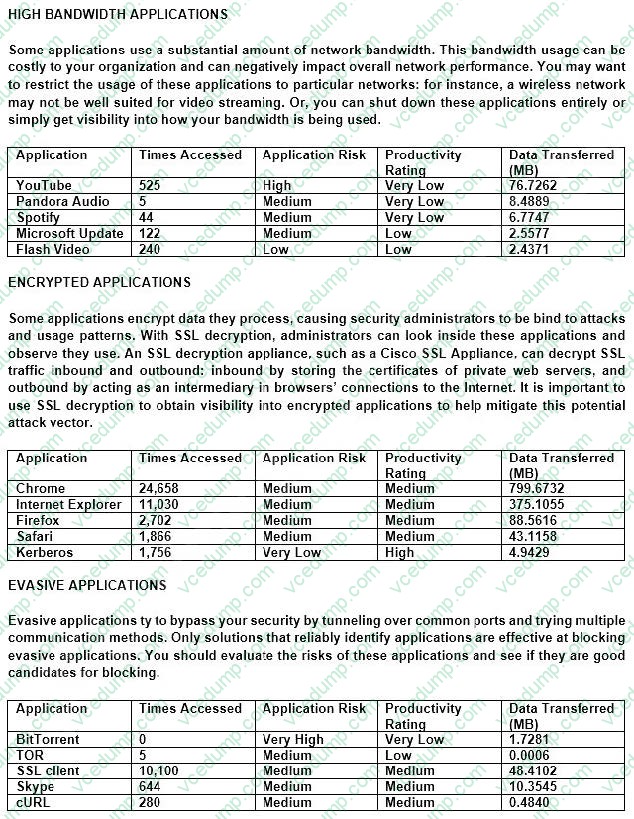
B. TOR
C. Chrome
D. Kerberos -
Question 333:
An engineer is configuring two new Cisco FTD devices to replace the existing high availability firewall pair in a highly secure environment. The information exchanged between the FTD devices over the failover link must be encrypted. Which protocol supports this on the Cisco FTD?
A. IPsec
B. SSH
C. SSL
D. MACsec -
Question 334:
A network engineer is deploying a pair of Cisco Secure Firewall Threat Defense devices managed by Cisco Secure Firewall Management Center for High Availability. Internet access is a high priority for the business and therefore they have invested in internet circuits from two different ISPs. The requirement from the customer is that internet access must be available to their users even if one of the ISPs is down. Which two features must be deployed to achieve this requirement? (Choose two.)
A. Route Tracking
B. Redundant interfaces
C. EtherChannel interfaces
D. SLA Monitor
E. BGP -
Question 335:
An engineer is tasked with deploying an internal perimeter firewall that will support multiple DMZs Each DMZ has a unique private IP subnet range. How is this requirement satisfied?
A. Deploy the firewall in transparent mode with access control policies.
B. Deploy the firewall in routed mode with access control policies.
C. Deploy the firewall in routed mode with NAT configured.
D. Deploy the firewall in transparent mode with NAT configured. -
Question 336:
An engineer wants to add an additional Cisco FTD Version 6.2.3 device to their current 6.2.3 deployment to create a high availability pair. The currently deployed Cisco FTD device is using local management and identical hardware including the available port density to enable the failover and stateful links required in a proper high availability deployment. Which action ensures that the environment is ready to pair the new Cisco FTD with the old one?
A. Change from Cisco FDM management to Cisco FMC management on both devices and register them to FMC.
B. Ensure that the two devices are assigned IP addresses from the 169 254.0.0/16 range for failover interfaces.
C. Factory reset the current Cisco FTD so that it can synchronize configurations with the new Cisco FTD device.
D. Ensure that the configured DNS servers match on the two devices for name resolution. -
Question 337:
A network administrator configured a NAT policy that translates a public IP address to an internal web server IP address. An access policy has also been created that allows any source to reach the public IP address on port 80. The web server is still not reachable from the Internet on port 80.
Which configuration change is needed?
A. The intrusion policy must be disabled for port 80.
B. The access policy rule must be configured for the action trust.
C. The NAT policy must be modified to translate the source IP address as well as destination IP address.
D. The access policy must allow traffic to the internal web server IP address. -
Question 338:
An engineer must investigate a connectivity issue from an endpoint behind a Cisco FTD device and a public DNS server. The endpoint cannot perform name resolution queries. Which action must the engineer perform to troubleshoot the issue by simulating real DNS traffic on the Cisco FTD while verifying the Snarl verdict?
A. Perform a Snort engine capture using tcpdump from the FTD CLI.
B. Use the Capture w/Trace wizard in Cisco FMC.
C. Create a Custom Workflow in Cisco FMC.
D. Run me system support firewall-engine-debug command from me FTD CLI. -
Question 339:
Which feature is supported by IRB on Cisco FTD devices?
A. redundant interface
B. dynamic routing protocol
C. EtherChannel interface
D. high-availability cluster -
Question 340:
In which two places can thresholding settings be configured? (Choose two.)
A. on each IPS rule
B. globally, within the network analysis policy
C. globally, per intrusion policy
D. on each access control rule
E. per preprocessor, within the network analysis policy
Related Exams:
-
300-710
Securing Networks with Cisco Firepower (SNCF) -
300-715
Implementing and Configuring Cisco Identity Services Engine (SISE) -
300-720
Securing Email with Cisco Email Security Appliance (SESA) -
300-725
Securing the Web with Cisco Web Security Appliance (SWSA) -
300-730
Implementing Secure Solutions with Virtual Private Networks (SVPN) -
300-735
Automating and Programming Cisco Security Solutions (SAUTO) -
300-740
Designing and Implementing Secure Cloud Access for Users and Endpoints -
350-701
Implementing and Operating Cisco Security Core Technologies (SCOR)
Tips on How to Prepare for the Exams
Nowadays, the certification exams become more and more important and required by more and more enterprises when applying for a job. But how to prepare for the exam effectively? How to prepare for the exam in a short time with less efforts? How to get a ideal result and how to find the most reliable resources? Here on Vcedump.com, you will find all the answers. Vcedump.com provide not only Cisco exam questions, answers and explanations but also complete assistance on your exam preparation and certification application. If you are confused on your 300-710 exam preparations and Cisco certification application, do not hesitate to visit our Vcedump.com to find your solutions here.