220-1201 Exam Details
-
Exam Code
:220-1201 -
Exam Name
:CompTIA A+ Certification: Core 1 -
Certification
:CompTIA Certifications -
Vendor
:CompTIA -
Total Questions
:598 Q&As -
Last Updated
:May 28, 2026
CompTIA 220-1201 Online Questions & Answers
-
Question 221:
Which of the following devices can utilize VLANs to secure networks?
A. Switch
B. Hub
C. Repeater
D. Bridge -
Question 222:
Which of the following is an email authentication method designed to detect email spoofing by attaching a digital signature to outgoing email?
A. SPF
B. DKIM
C. DNS pointer
D. MX records -
Question 223:
Which of the following is used to verify the functionality of an Ethernet NIC?
A. Toner probe
B. Loopback plug
C. Wi-Fi analyzer
D. Punchdown tool -
Question 224:
A user is trying to print diagrams on 11in x 17in (28cm x 43cm) paper. The correct paper is in the printer, but the printer prompts the user to insert paper. A technician assisting the user successfully prints the diagram to a different printer that is the same model.
Which of the following is the most likely cause of this issue on the user ' s printer?
A. Tray settings
B. Incorrect driver
C. Connectivity issues
D. Insufficient permissions -
Question 225:
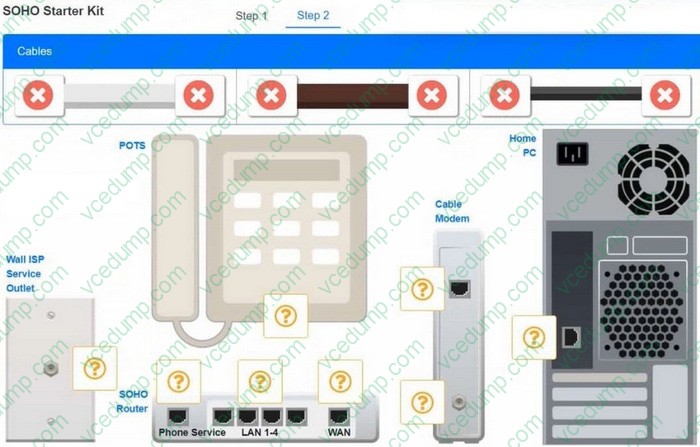
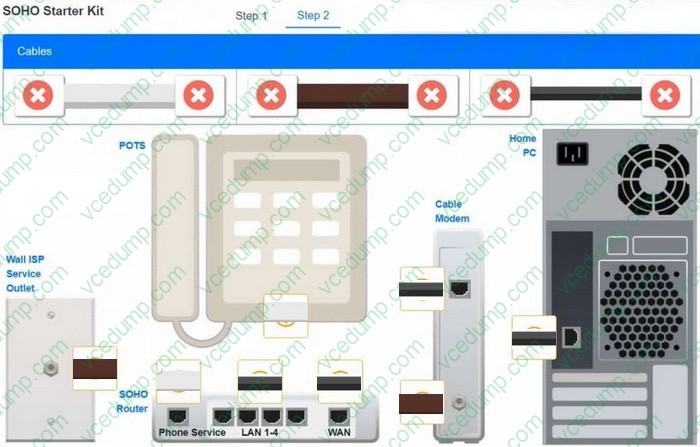
A small ISP has hired a new technician. Joe, the new technician, is being trained to configure customers' home networks. The training instructor gives the technician a starter kit with cables, cable ends, and other network equipment and asks him to build a working network.
The computer should be connected to have Internet connectivity and the phone should be connected to have a dial tone.
INSTRUCTIONS
Use the appropriate cables, cable ends, tools and equipment to configure the network and connect all components accordingly.
There are 2 steps and the simulation starts on step 1.
If at any time you would like to bring back the initial state of the simulation, please click the Reset All button.
Select and Place:
-
Question 226:
A classroom projector, which is turned on, displays a flashing LED code but does not have any video output.
Which of the following should a technician do to resolve the issue?
A. Replace the bulb.
B. Adjust the input resolution_
C. Clean the air filter.
D. Change the input source. -
Question 227:
A technician is setting up a new SOHO wireless router.
According to security best practices, which of the following should the technician do first?
A. Enable encryption.
B. Assign a static IP.
C. Change the default password.
D. Reset the router. -
Question 228:
A technician needs to select PC components with a minimal number of visible internal cables.
Which of the following should the technician use?
A. SATA drive connections
B. Liquid cooling
C. Modular power supply
D. Wireless NIC -
Question 229:
A company updates its office with a new multifunction printer. Users report issues when they try to use scan-to-email functionality. The technician must ensure this feature is properly enabled.
Which of the following should the technician do to resolve this issue?
A. Adjust the SMTP server configurations for email.
B. Check the printer ' s IP address configuration.
C. Install the printer ' s driver software on all computers.
D. Configure user authentication settings for email access. -
Question 230:
A technician needs to prepare a conference room for a meeting. The technician connects the laptop to the LCD projector and audio system, and then verifies the connectivity of each device. The meeting begins, but the visual presentation suddenly cuts off 30 minutes later. The audio continues to play without interruption. The technician brings in a backup laptop and connects it to the projector. The meeting continues without issue for 15 minutes until the presentation suddenly cuts off again.
Which of the following should the technician do to resolve this issue?
A. Check the laptop's audio output
B. Verify the input source
C. Examine the display for burn-in
D. Inspect the cables for damage
E. Clean or replace the filter
Related Exams:
-
220-1001
CompTIA A+ Certification: Core 1 -
220-1002
CompTIA A+ Certification: Core 2 -
220-1101
CompTIA A+ Certification: Core 1 -
220-1102
CompTIA A+ Certification: Core 2 -
220-1201
CompTIA A+ Certification: Core 1 -
220-1202
CompTIA A+ Core 2 (2026) -
220-902
CompTIA A+ Certification -
CAS-004
CompTIA Advanced Security Practitioner (CASP+) -
CAS-005
CompTIA SecurityX -
CLO-001
CompTIA Cloud Essentials+
Tips on How to Prepare for the Exams
Nowadays, the certification exams become more and more important and required by more and more enterprises when applying for a job. But how to prepare for the exam effectively? How to prepare for the exam in a short time with less efforts? How to get a ideal result and how to find the most reliable resources? Here on Vcedump.com, you will find all the answers. Vcedump.com provide not only CompTIA exam questions, answers and explanations but also complete assistance on your exam preparation and certification application. If you are confused on your 220-1201 exam preparations and CompTIA certification application, do not hesitate to visit our Vcedump.com to find your solutions here.