220-1102 Exam Details
-
Exam Code
:220-1102 -
Exam Name
:CompTIA A+ Certification: Core 2 -
Certification
:CompTIA Certifications -
Vendor
:CompTIA -
Total Questions
:916 Q&As -
Last Updated
:Jun 01, 2026
CompTIA 220-1102 Online Questions & Answers
-
Question 761:
An administrator received a new shipment of mobile devices. Per company policy, all enterprise-issued devices must have two authentication methods, and the organization has already enforced the use of PIN codes as one method. Which of the following device features should the administrator enable?
A. Smart card
B. Biometrics
C. Hard token
D. One-time password -
Question 762:
When a user calls in to report an issue, a technician submits a ticket on the user's behalf. Which of the following practices should the technician use to make sure the ticket is associated with the correct user?
A. Have the user provide a callback phone number to be added to the ticket
B. Assign the ticket to the department's power user
C. Register the ticket with a unique user identifier
D. Provide the user with a unique ticket number that can be referenced on subsequent calls. -
Question 763:
A technician installed Windows 10 on a workstation. The workstation only has 3.5GB of usable RAM, even though the technician installed 8GB. Which of the following is the MOST likely reason this system is not utilizing all the
available RAM?
A. The system is missing updates.
B. The systems utilizing a 32-bit OS.
C. The system's memory is failing.
D. The system requires BIOS updates. -
Question 764:
A SOHO client is having trouble navigating to a corporate website. Which of the following should a technician do to allow access?
A. Adjust the content filtering.
B. Unmap port forwarding.
C. Disable unused ports.
D. Reduce the encryption strength -
Question 765:
A customer needs to verify an executable file that the customer downloaded from a website. Which of the following should the customer use to verify the file?
A. Password manager
B. BitLocker
C. File Vault
D. Checksum
E. Secure site -
Question 766:
SIMULATION
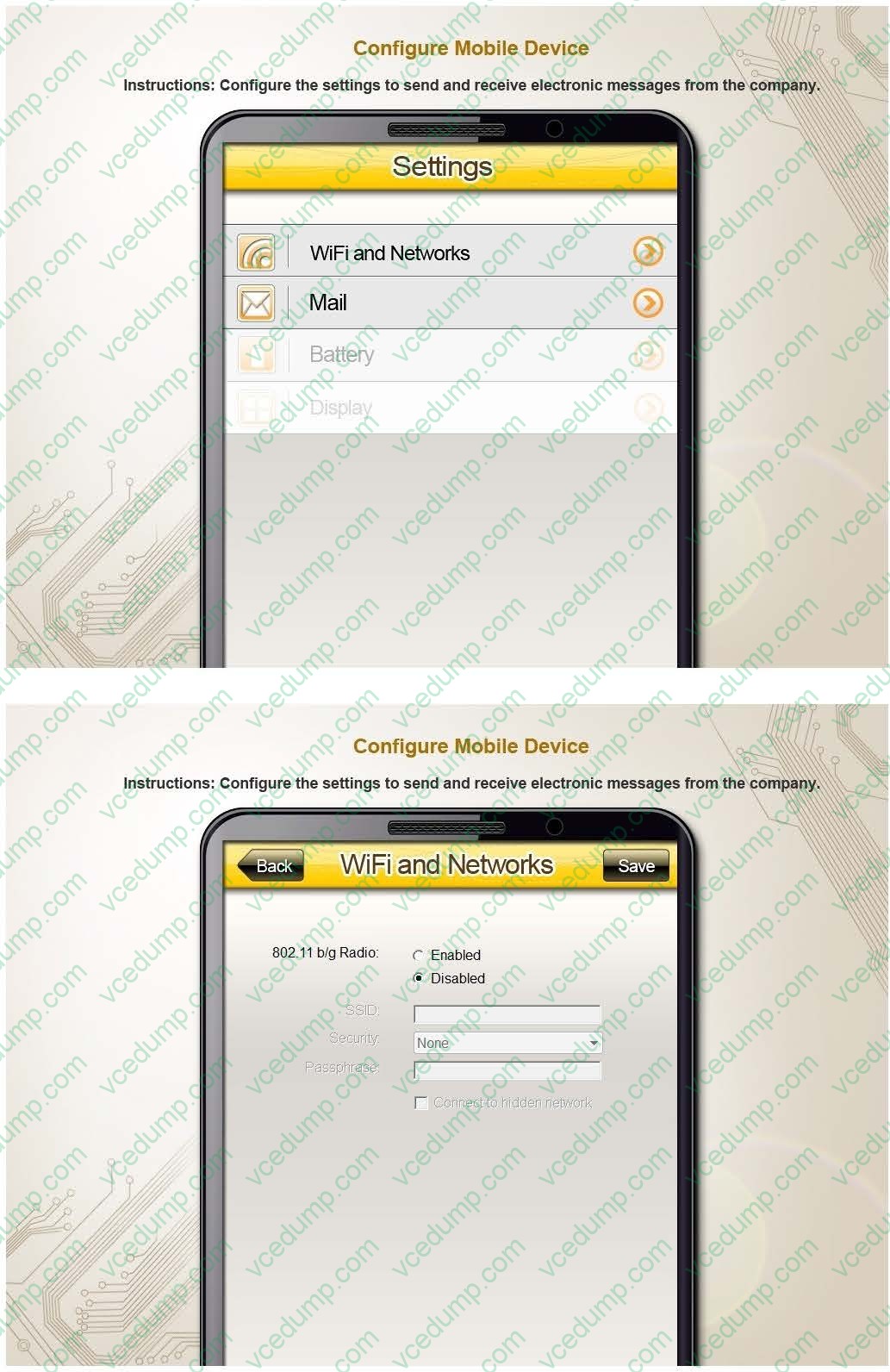
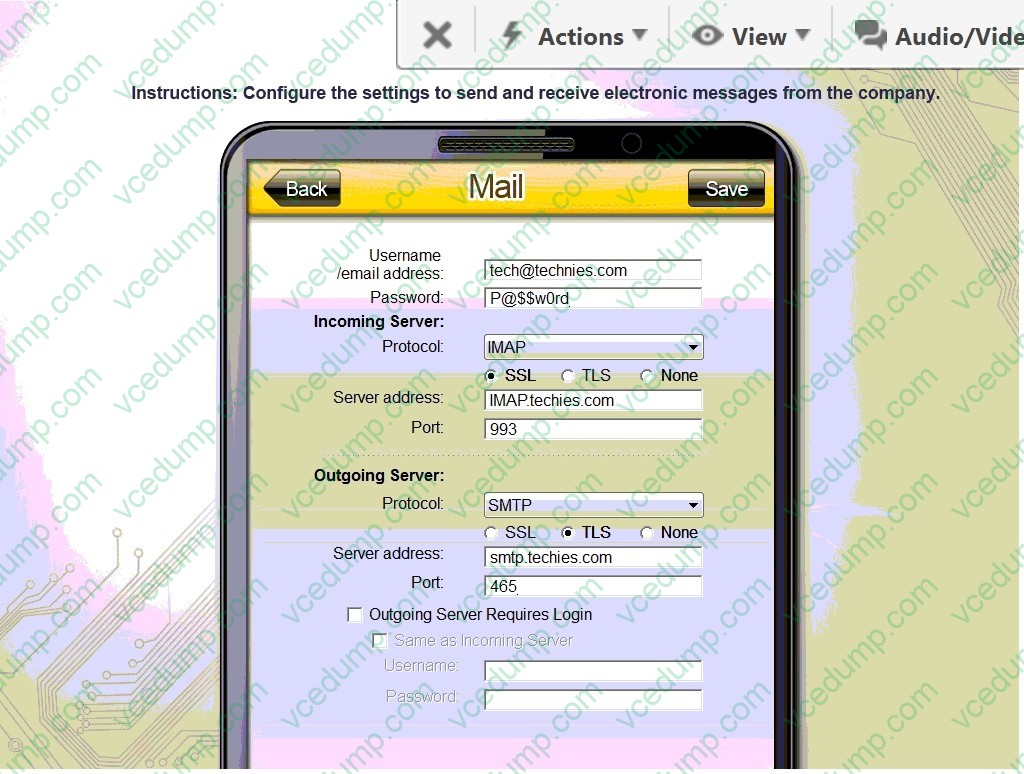
You need to configure your mobile device to send and receive electronic messages from your company. Your mobile device must be able to truly synchronize the message state with your desktop, so that when a message is read on your desktop, it is marked as read on your mobile device. These are the proper parameters:
1. Email address: [email protected]
2. Password: P@$$w0rd
3. Pop.techies.com Port: 110 Security: None
4. IMAP.techies.com Port: 993 Security: SSL
5. smtp.techies.com Port: 465 Security: TLS
6. Company SSID: Techies
7. Security: WPA2
8. Passphrase: P@$$w0rd
9. SSID is not broadcasted
Instructions: You are not authorized to use the Company's WLAN. The outgoing server does not require login credentials. When you have completed the simulation, please select the done button to submit your answer.
A. Review the explanation for all details.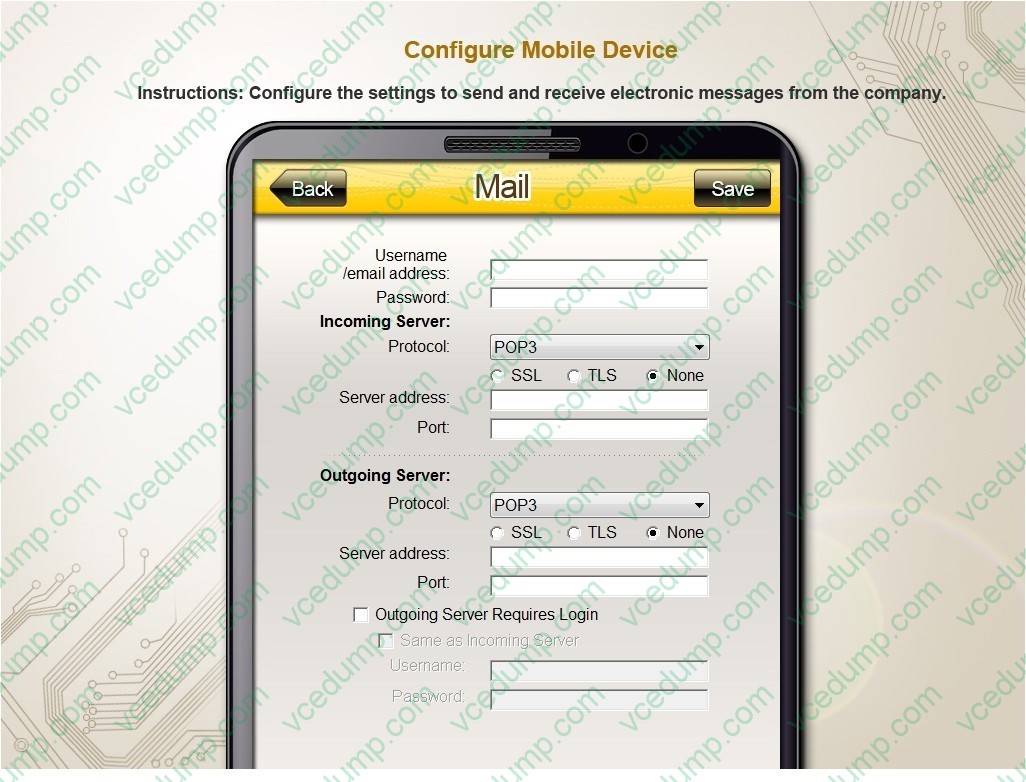
B. PlaceHolder
C. PlaceHolder
D. PlaceHolder -
Question 767:
A user turns on a new laptop and attempts to log in to specialized software, but receives a message stating that the address is already in use. The user logs on to the old desktop and receives the same message. A technician checks the account and sees a comment that the user requires a specifically allocated address before connecting to the software. Which of the following should the technician do to MOST likely resolve the issue?
A. Bridge the LAN connection between the laptop and the desktop.
B. Set the laptop configuration to DHCP to prevent conflicts.
C. Remove the static IP configuration from the desktop.
D. Replace the network card in the laptop, as it may be defective. -
Question 768:
A user notices a small USB drive is attached to the user's computer after a new vendor visited the office. The technician notices two files named grabber.exe and output.txt. Which of the following attacks is MOST likely occurring?
A. Trojan
B. Rootkit
C. Cryptominer
D. Keylogger -
Question 769:
A change advisory board authorized a setting change so a technician is permitted to implement the change. The technician successfully implemented the change. Which of the following should be done NEXT?
A. Document the date and time of change.
B. Document the purpose of the change.
C. Document the risk level.
D. Document findings of the sandbox test. -
Question 770:
Internet speeds on a user's Windows 10 device are slow, but other devices on the same network are running at normal speeds. A technician thinks the issue may be related to the proxy settings.
Which of the following should the technician check to verify the proxy configuration?
A. Network and Sharing Center
B. Internet Options
C. Firewall settings
D. System settings
Related Exams:
-
220-1001
CompTIA A+ Certification: Core 1 -
220-1002
CompTIA A+ Certification: Core 2 -
220-1101
CompTIA A+ Certification: Core 1 -
220-1102
CompTIA A+ Certification: Core 2 -
220-1201
CompTIA A+ Certification: Core 1 -
220-1202
CompTIA A+ Core 2 (2026) -
220-902
CompTIA A+ Certification -
CAS-004
CompTIA Advanced Security Practitioner (CASP+) -
CAS-005
CompTIA SecurityX -
CLO-001
CompTIA Cloud Essentials+
Tips on How to Prepare for the Exams
Nowadays, the certification exams become more and more important and required by more and more enterprises when applying for a job. But how to prepare for the exam effectively? How to prepare for the exam in a short time with less efforts? How to get a ideal result and how to find the most reliable resources? Here on Vcedump.com, you will find all the answers. Vcedump.com provide not only CompTIA exam questions, answers and explanations but also complete assistance on your exam preparation and certification application. If you are confused on your 220-1102 exam preparations and CompTIA certification application, do not hesitate to visit our Vcedump.com to find your solutions here.