220-1102 Exam Details
-
Exam Code
:220-1102 -
Exam Name
:CompTIA A+ Certification: Core 2 -
Certification
:CompTIA Certifications -
Vendor
:CompTIA -
Total Questions
:916 Q&As -
Last Updated
:Jun 01, 2026
CompTIA 220-1102 Online Questions & Answers
-
Question 621:
A technician has spent hours trying to resolve a computer issue for the company's Chief Executive Officer (CEO). The CEO needs the device returned as soon as possible. Which of the following steps should the technician take NEXT?
A. Continue researching the issue
B. Repeat the iterative processes
C. Inform the CEO the repair will take a couple of weeks
D. Escalate the ticket -
Question 622:
Which of the following are encrypted protocols? (Select TWO).
A. TELNET
B. SSH
C. POP3
D. FTP
E. HTTPS -
Question 623:
HOTSPOT
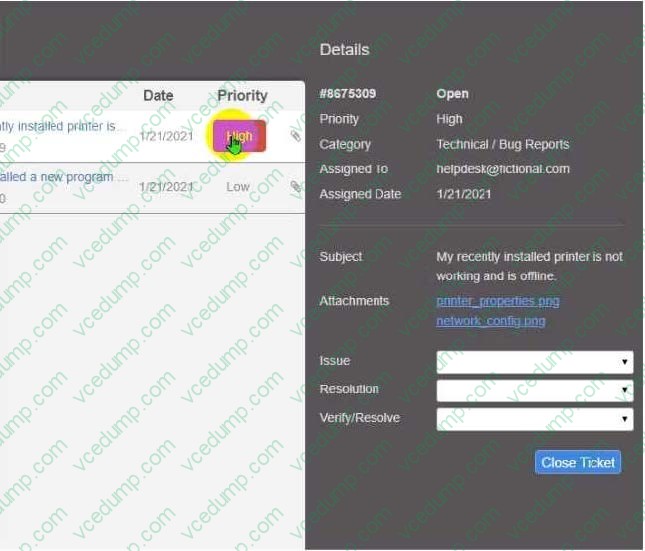
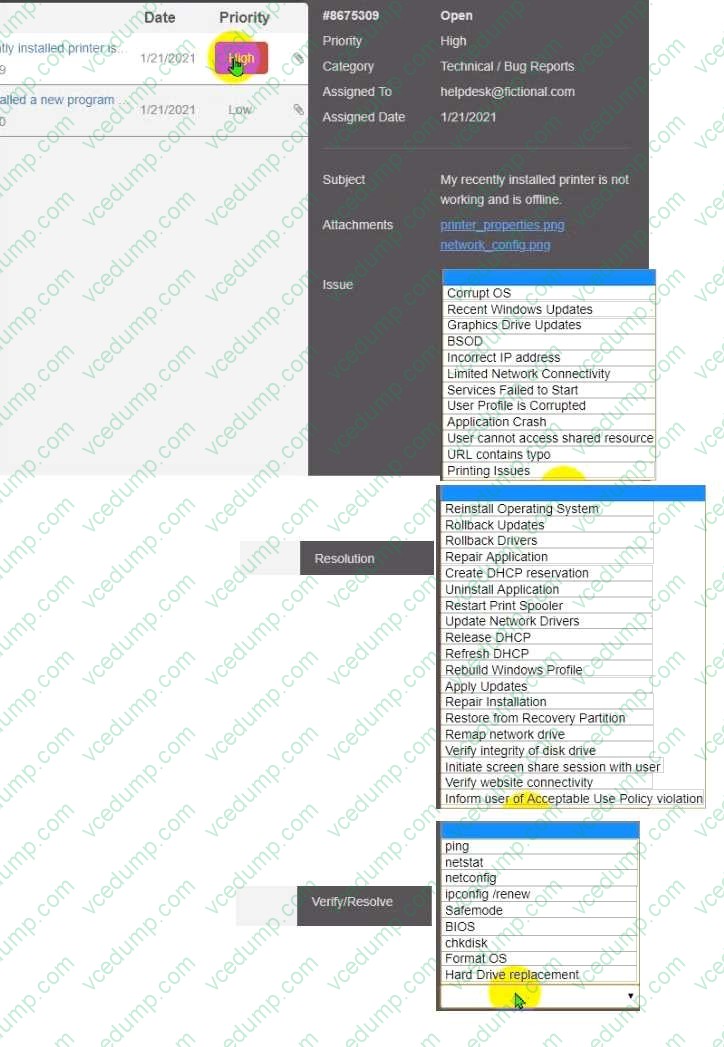
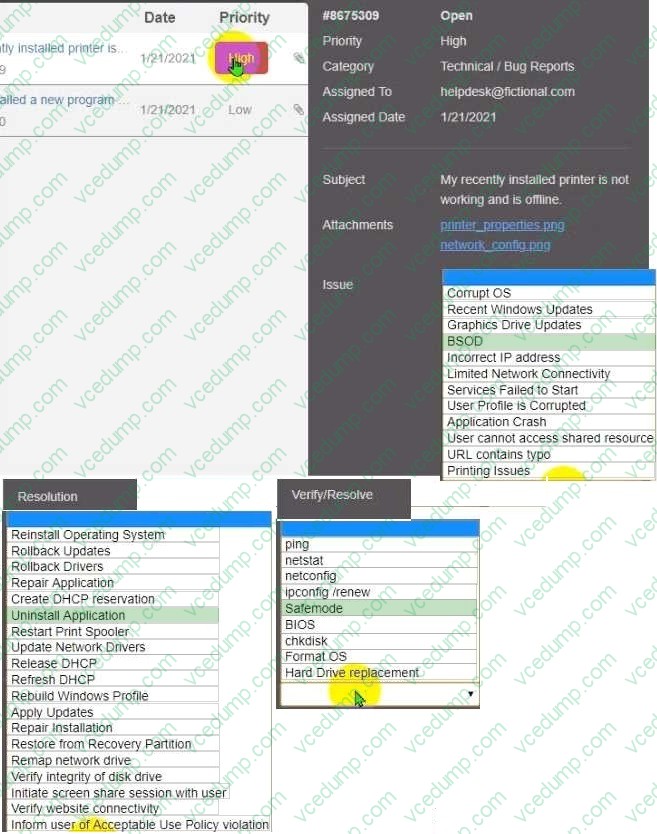
Welcome to your first day as a Fictional Company. LLC helpdesk employee. Please work the tickets in your helpdesk ticket queue.
Click on individual tickers to see the ticket details. View attachments to determine the problem. Select the appropriate issue from the 'issue' drop-down menu. Then, select the MOST efficient resolution from the 'Resolution' drop-down menu.
Finally, select the proper command or verification to remediate or confirm your fix of the issue from the Verify Resolve drop-down menu.
-
Question 624:
A large company is selecting a new Windows operating system and needs to ensure it has built-in encryption and endpoint protection. Which of the following Windows versions will MOST likely be selected?
A. Home
B. Pro
C. Pro for Workstations
D. Enterprise -
Question 625:
Which of the following security threats requires a phone call to launch the attack?
A. Vishing
B. XSS
C. Spoofing
D. DDoS -
Question 626:
A workstation does not recognize a printer. However, the previous day. the printer successfully received a job from the workstation.
Which of the following tools should a technician use to see what happened before the failure?
A. Performance Monitor
B. Devices and Printers
C. Task Scheduler
D. Event Viewer -
Question 627:
A customer service representative is unable to send jobs to a printer at a remote branch office. However, the representative can print successfully to a local network printer. Which of the following commands should a technician use to view the path of the network traffic from the PC?
A. netstat
B. ping
C. format
D. tracert -
Question 628:
A user is setting up backups on a workstation. The user wants to ensure that the restore process is as simple as possible. Which of the following backup types should the user select?
A. Full
B. Incremental
C. Differential
D. Synthetic -
Question 629:
A kiosk, which is running Microsoft Windows 10, relies exclusively on a numeric keypad to allow customers to enter their ticket numbers but no other information. If the kiosk is idle for four hours, the login screen locks. Which of the following sign-on options would allow any employee the ability to unlock the kiosk?
A. Requiring employees to enter their usernames and passwords
B. Setting up facial recognition for each employee
C. Using a PIN and providing it to employees
D. Requiring employees to use their fingerprints -
Question 630:
A user corrects a laptop that is running Windows 10 to a docking station with external monitors when working at a desk. The user would like to close the laptop when it is docked, but the user reports it goes to sleep when it is closed. Which of the following is the BEST solution to prevent the laptop from going to sleep when it is closed and on the docking station?
A. Within the Power Options of the Control Panel utility click the Change Plan Settings button for the enabled power plan and select Put the Computer to Sleep under the Plugged In category to Never
B. Within the Power Options of the Control Panel utility, click the Change Plan Settings button for the enabled power plan and select Put the Computer to Sleep under the On Battery category to Never
C. Within the Power Options of the Control Panel utility select the option Choose When to Turn Off the Display and select Turn Off the Display under the Plugged In category to Never
D. Within the Power Options of the Control Panel utility, select the option Choose What Closing the Lid Does and select When I Close the Lid under the Plugged in category to Do Nothing
Related Exams:
-
220-1001
CompTIA A+ Certification: Core 1 -
220-1002
CompTIA A+ Certification: Core 2 -
220-1101
CompTIA A+ Certification: Core 1 -
220-1102
CompTIA A+ Certification: Core 2 -
220-1201
CompTIA A+ Certification: Core 1 -
220-1202
CompTIA A+ Core 2 (2026) -
220-902
CompTIA A+ Certification -
CAS-004
CompTIA Advanced Security Practitioner (CASP+) -
CAS-005
CompTIA SecurityX -
CLO-001
CompTIA Cloud Essentials+
Tips on How to Prepare for the Exams
Nowadays, the certification exams become more and more important and required by more and more enterprises when applying for a job. But how to prepare for the exam effectively? How to prepare for the exam in a short time with less efforts? How to get a ideal result and how to find the most reliable resources? Here on Vcedump.com, you will find all the answers. Vcedump.com provide not only CompTIA exam questions, answers and explanations but also complete assistance on your exam preparation and certification application. If you are confused on your 220-1102 exam preparations and CompTIA certification application, do not hesitate to visit our Vcedump.com to find your solutions here.