SC-401 Real Exam Questions

Administering Information Security in Microsoft 365

305 questions available · Page 1 of 31

Updated Exam DumpsVerified AnswersPass Guarantee

Get Complete Exam Dumps
Question 1 Hotspot

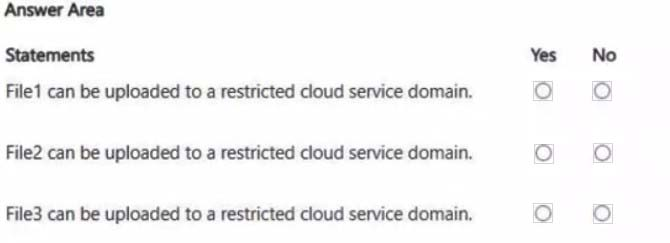
HOTSPOT

You have a Microsoft 365 E5 subscription that contains two users named User1 and User2.

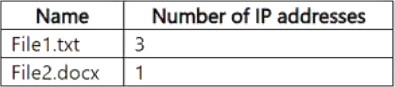
You have a Microsoft SharePoint site named Site1. Site1 stores files that contain IP addresses as shown in the following table.
User1 is assigned the SharePoint admin role for Site1. User2 is a member of Site1.

You create the data loss prevention (DLP) policy shown in the following exhibit.
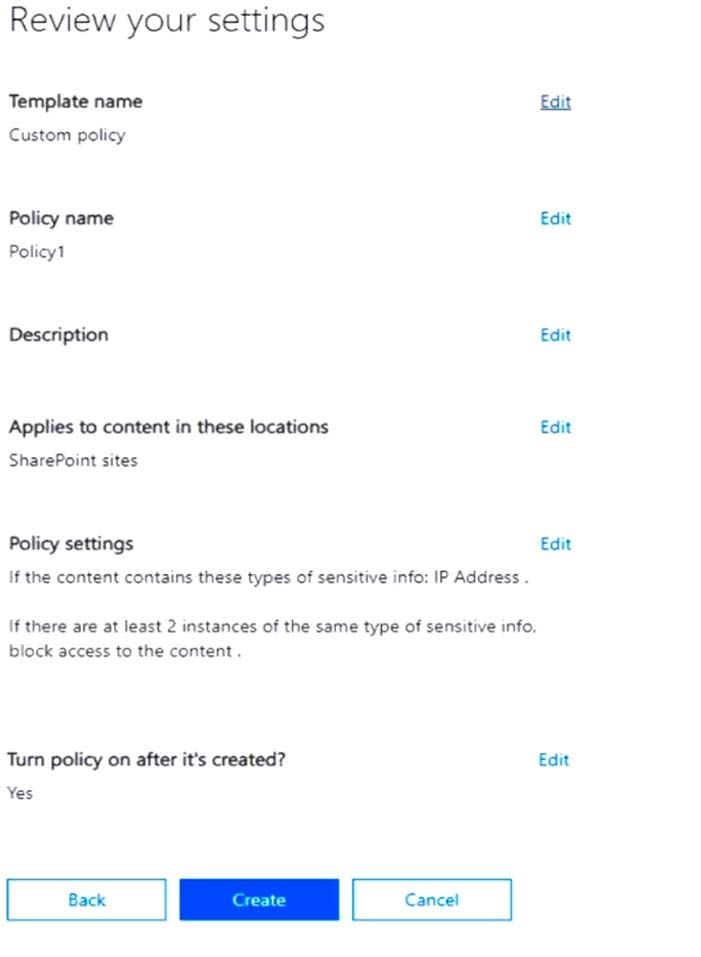
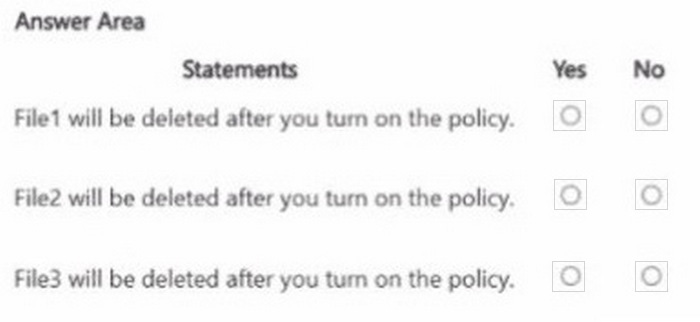
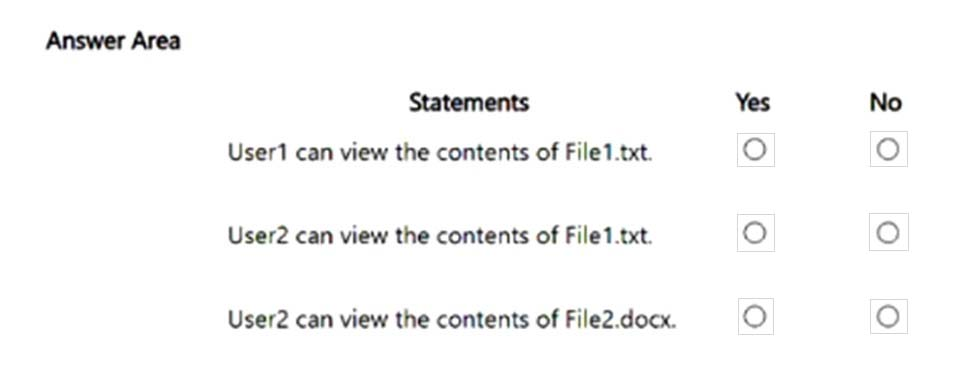
For each of the following statements, select Yes if the statement is true. Otherwise, select No.

NOTE: Each correct selection is worth one point.
Question diagram
Show answer and explanation
Correct answer diagram
Explanation

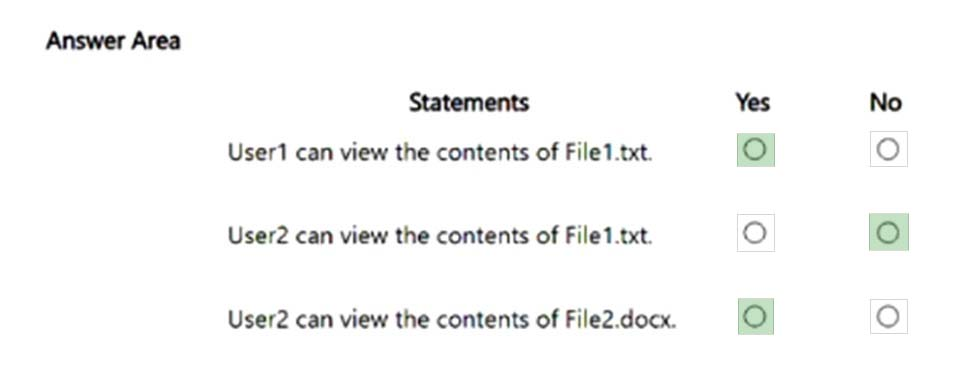
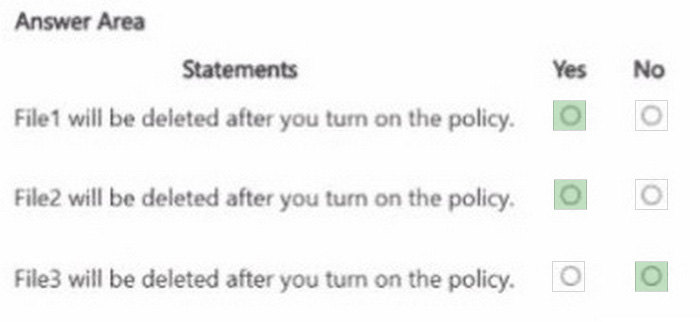
Box 1: Yes

Note: Key tasks of the SharePoint admin Here are some of the key tasks users can do when they are assigned to the SharePoint admin role: Create sites Delete sites Manage sharing settings at the organization level Add and remove site admins Manage site storage limits

Box 2: No File1.text contains 3 IP addresses.

Box 3: Yes File2.docx contains only 1 IP address.
Question 2 Single choice

Note: This question is part of a series of questions that present the same scenario. Each question in the series contains a unique solution that might meet the stated goals. Some question sets might have more than one correct solution, while others might not have a correct solution.

After you answer a question in this section, you will NOT be able to return to it. As a result, these questions will not appear in the review screen.

You implement Microsoft 365 Endpoint data loss prevention (Endpoint DLP).

You have computers that run Windows 11 and have Microsoft 365 Apps installed. The computers are joined to a Microsoft Entra tenant.

You need to ensure that Endpoint DLP policies can protect content on the computers.

Solution: You deploy the Microsoft Purview Information Protection client to the computers.

Does this meet the goal?

  1. A

    Yes

  2. B

    No

Show answer and explanation

Correct answer: B

Explanation

Deploying the Microsoft Purview Information Protection client does not onboard a Windows computer for Endpoint DLP enforcement. Endpoint DLP requires the device to be onboarded through its supported device onboarding mechanism so policies can monitor and restrict endpoint activities. Therefore, installing only the information protection client does not meet the goal.

Question 3 Drag & drop

DRAG DROP

You have a Microsoft 365 ? subscription.

You need to prevent the sharing of sensitive information in Microsoft Teams.

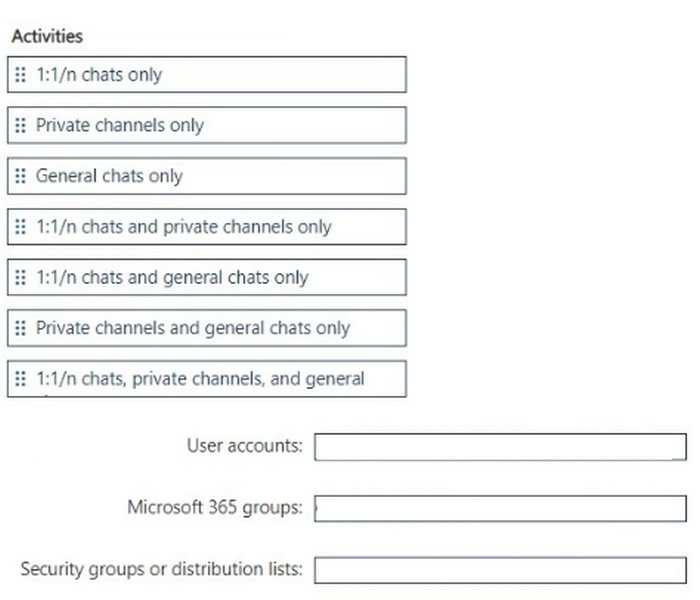
Which entities can you protect by applying a data loss prevention (DLP) policy to each resource? To answer, drag the appropriate activities to the correct entity. Each activity may be used once, more than once, or not at all. You may need to drag the split bar between panes or scroll to view content.

NOTE; Each correct selection is worth one point.

Question diagram
Show answer and explanation
Correct answer diagram
Explanation

We are asked which Microsoft Teams activities can be protected by a DLP policy when applied to different resource scopes: user accounts, Microsoft 365 groups, and security groups or distribution lists.

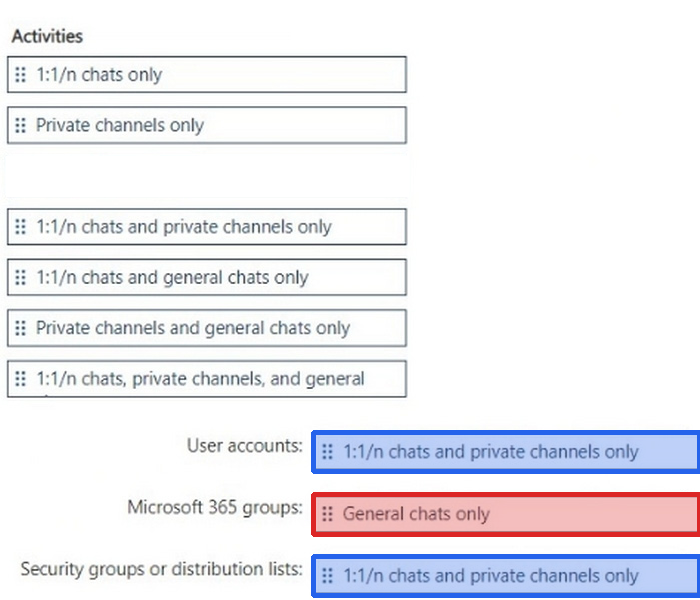
Step 1 How DLP applies in Teams User accounts # Controls 1:1 or group chats (1:1/n chats).
Microsoft 365 groups # Controls Team channel messages (general and private channels).
Security groups or distribution lists # Used as a scoping mechanism for users, but only applies to 1:1/n chats, not to channel messages.
# Reference: Learn about DLP in Microsoft Teams

Step 2 ?Map activities
User accounts # Can protect 1:1/n chats only.
Microsoft 365 groups # Can protect Private channels only and General chats only (both types of Teams channels).

Question 4 Single choice

Note: This question is part of a series of questions that present the same scenario. Each question in the series contains a unique solution that might meet the stated goals. Some question sets might have more than one correct solution, while others might not have a correct solution.

After you answer a question in this section, you will NOT be able to return to it. As a result, these questions will not appear in the review screen.

You have a Microsoft 365 tenant and 500 computers that run Windows 11. The computers are onboarded to Microsoft Purview.

You discover that a third-party application named Tailspin_scanner.exe accessed protected sensitive information on multiple computers. Tailspin_scanner.exe is installed locally on the computers.

You need to block Tailspin_scanner.exe from accessing sensitive documents without preventing the application from accessing other documents.

Solution: From the Microsoft Defender for Cloud Apps, you mark the application as Unsanctioned.

Does this meet the goal?

  1. A

    Yes

  2. B

    No

Show answer and explanation

Correct answer: B

Explanation

Marking an application as Unsanctioned in Defender for Cloud Apps is intended to control cloud-app access and does not create content-aware restrictions for a locally installed executable. It cannot allow Tailspin_scanner.exe to open ordinary documents while blocking only its access to sensitive documents.

Question 5 Lab simulation

Simulation

Username and password

Use the following login credentials as needed:

To enter your username, place your cursor in the Sign in box and select the username below.

To enter your password, place your cursor in the Enter password box and select the password below.

Microsoft 365 Username: [email protected]

Microsoft 365 Password: XXXXXXXXX

If the Microsoft Edge browser or Microsoft 365 portal does not load successfully, select the Microsoft Edge browser icon from the task bar, type the URL "https://admin.microsoft.com", and press Enter.

The following information is for technical support purposes only:

Lab Instance: XXXXXXXXX
Task 7 You need to publish the Product Retired retention label only to Exchange mailboxes and SharePoint classic and communication sites.

Show answer and explanation
Create a retention label publishing policy containing Product Retired. Enable only Exchange mailboxes and SharePoint classic and communication sites as locations.
Explanation

Retention labels become available in workloads through a retention label publishing policy. Include Product Retired in that policy, then enable Exchange mailboxes and SharePoint classic and communication sites as its only locations. Leaving every other location disabled confines publication of the label to the two requested workload categories.

Question 6 Hotspot

HOTSPOT

You have a Microsoft 365 subscription.

You have the sensitive files shown in the following tables.

You have an Endpoint data loss prevention (Endpoint DLP) policy that contains the actions shown in the Actions exhibit. (Click the Actions tab.)

The status of the Endpoint DLP policy is shown in the Status exhibit. (Click the Status tab.)

For each of the following statements, select Yes if the statement is true. Otherwise, select No.

NOTE: Each correct selection is worth one point.

Question diagram
Show answer and explanation
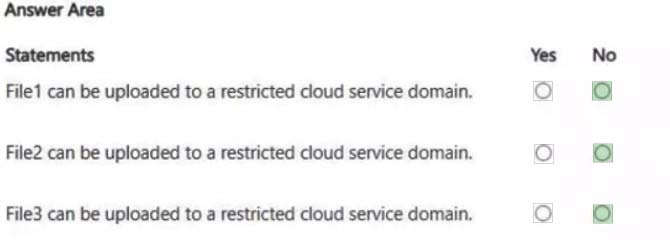
Correct answer diagram
Explanation

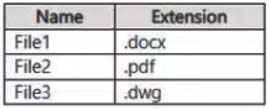
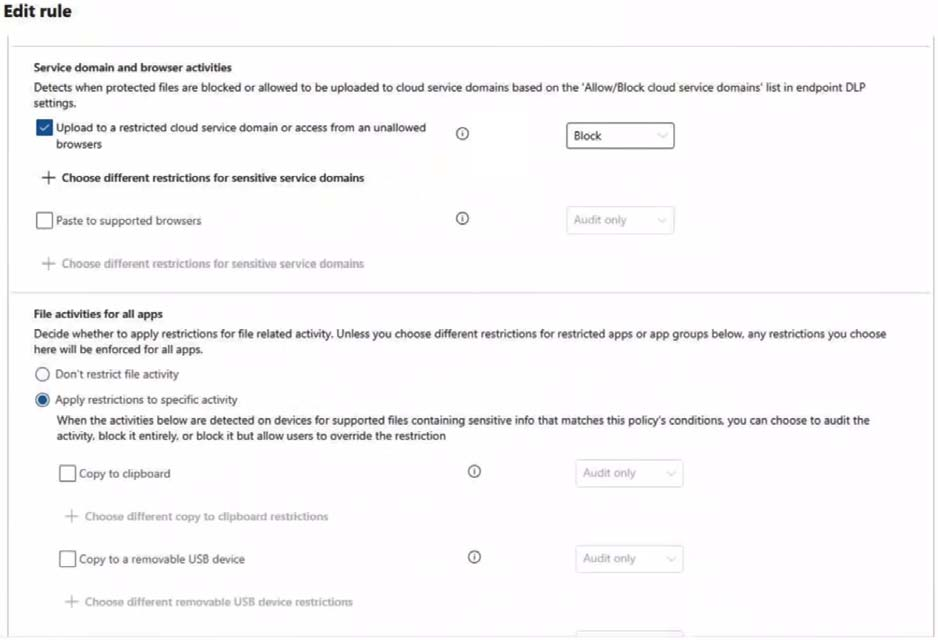
None of the files can be uploaded. The Endpoint DLP policy restricts all three sensitive files File1.docx, File2.pdf, and File3.dwg from being uploaded to a restricted cloud service domain.

Box 1: No File1 can be uploaded to a restricted cloud service domain.

Box 2: No File2 can be uploaded to a restricted cloud service domain.

Box 3: No File3 can be uploaded to a restricted cloud service domain.

1. Evaluate Policy Enforcement Endpoint Data Loss Prevention (DLP) policies apply globally to monitored files based on the activities configured, regardless of file extension. When the rule "Upload to a restricted cloud service domain or access from an unallowed browser" is turned on, the restriction blocks or audits the upload action itself for all files being handled on that endpoint.

2. File Format CompatibilityMicrosoft 365 Endpoint DLP does not restrict its protection only to Office formats. It natively monitors and protects a wide variety of file types including: Word Documents - File1.docx Portable Document Formats - File2.pdf CAD Drawings - File3.dwg

Because the policy is active (Status: On) and assigned a priority, it will actively evaluate and block the upload of any sensitive file to an unallowed or restricted domain.

References:
https://learn.microsoft.com/en-us/purview/endpoint-dlp-learn-about

Question 7 Single choice

You have a Microsoft 365 E5 subscription that uses Microsoft Defender for Cloud Apps.

You need to ensure that you receive an alert when a user uploads a document to a third-party cloud storage service.

What should you use?

  1. A

    an activity policy

  2. B

    a sensitivity label

  3. C

    a file policy

  4. D

    an insider risk policy

Show answer and explanation

Correct answer: A

Explanation

Uploading a document is a user action, so an activity policy can monitor that event in a connected third-party cloud storage service and generate an alert when it occurs. A file policy evaluates files and their properties after storage, while labels and insider risk policies do not directly provide this upload-event alert.

Question 8 Hotspot

HOTSPOT

You have a Microsoft 36S subscription.

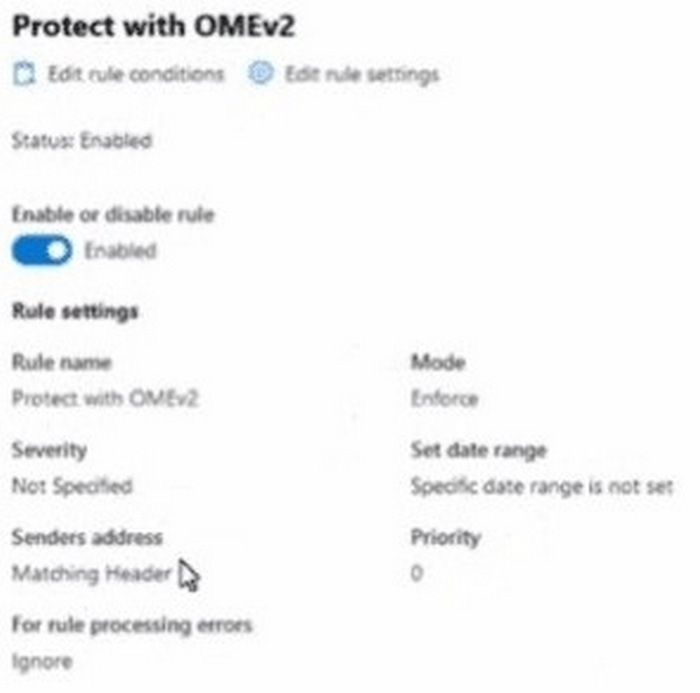
In Microsoft Exchange Online, you configure the mail flow rule shown in the following exhibit.

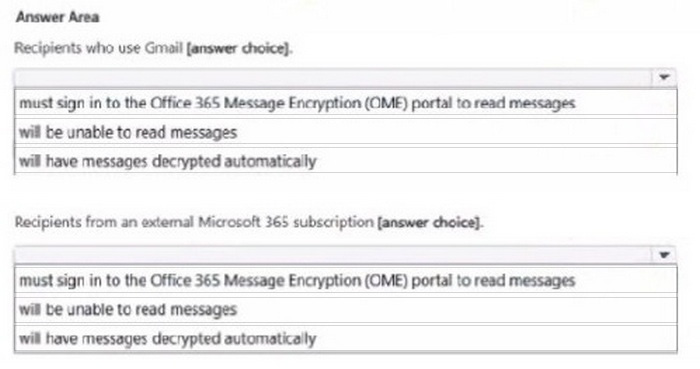
Use the drop-down menus to select the answer choice that completes each statement based on the information presented in the graphic.

NOTE: Each correct selection is worth one point.

Question diagram
Show answer and explanation
Correct answer diagram
Question 9 Hotspot

HOTSPOT

You have the files shown in the following table.

You configure a retention policy as shown >n the exhibit. (Click the Exhibit lab.) The start of the retention
period is based on when items are created. The current date is January 01. 207S.

For each of the following statements, select Yes if the statement is true. Otherwise, select No.

Question diagram
Show answer and explanation
Correct answer diagram
Question 10 Lab simulation

Simulation

Username and password

Use the following login credentials as needed:

To enter your username, place your cursor in the Sign in box and select the username below.

To enter your password, place your cursor in the Enter password box and select the password below.

Microsoft 365 Username: [email protected]

Microsoft 365 Password: XXXXXXXXX

If the Microsoft Edge browser or Microsoft 365 portal does not load successfully, select the Microsoft Edge browser icon from the task bar, type the URL "https://admin.microsoft.com", and press Enter.

The following information is for technical support purposes only:

Lab Instance: XXXXXXXXX

Task 3

You need to create a retention label that retains items for 10 years starting from June 1, 2025. The items must be deleted after the retention period.

You do NOT need to publish or auto-apply the label at this time.

Show answer and explanation
Create a retention label that retains items for 10 years, starts retention from the specific date June 1, 2025, and deletes items automatically afterward.
Explanation

The retention label must use a fixed date rather than an event or each item's creation date as its retention trigger. Configure June 1, 2025 as that specific start date, set the retention duration to 10 years, and choose deletion after the period ends. Creating only the label satisfies the requirement because publishing and automatic application are outside the requested work.