SC-300 Exam Details
-
Exam Code
:SC-300 -
Exam Name
:Microsoft Identity and Access Administrator -
Certification
:Microsoft Certifications -
Vendor
:Microsoft -
Total Questions
:465 Q&As -
Last Updated
:Jul 09, 2026
Microsoft SC-300 Online Questions & Answers
-
Question 381:
You work for a company named Contoso, Ltd. that has a Microsoft Entra tenant named contoso.com.
Contoso is working on a project with the following two partner companies:
A company named A. Datum Corporation that has a Microsoft Entra tenant named adatum.com.
A company named Fabrikam, Inc. that has a Microsoft Entra tenant named fabrikam.com.
When you attempt to invite a new guest user from adatum.com to contoso.com, you receive an error message.
You can successfully invite a new guest user from fabnkam.com to contoso.com.
You need to be able to invite new guest users from adatum.com to contoso.com.
What should you configure?
A. Guest invite settings
B. Verifiable credentials
C. Named locations
D. Collaboration restrictions -
Question 382:
You have 2,500 users who are assigned Microsoft Office 365 Enterprise E3 licenses. The licenses are assigned to individual users.
From the Groups blade in the Microsoft Entra admin center, you assign Microsoft Office 365 Enterprise E5 licenses to a group that includes all users.
You need to remove the Office 365 Enterprise E3 licenses from the users by using the least amount of administrative effort.
What should you use?
A. the Set-MgUserLicense Cmdlet
B. the Identity Governance blade in the Microsoft Entra admin center
C. the Set-WindowsProductKey Cmdlet
D. the Administrative units blade in the Microsoft Entra admin center -
Question 383:
SIMULATION
Use the following login credentials as needed:
To enter your username, place your cursor in the Sign in box and click the username below.
To enter your password, place your cursor in the Enter password box and click the password below.
Microsoft 365 Username: [email protected]
Microsoft 365 Password: 1122334455667788
If the Microsoft 365 portal does not load successfully in the browser, press CTRL+K to reload the portal in a new browser tab.
The following information is for technical support purposes only:
Lab Instance: 99999999
You need to assign a Windows 10/11 Enterprise E3 license to the sg-Retail group.
To complete this task, sign in to the appropriate admin center.
A. See the explanation below
B. PlaceHolder
C. PlaceHolder
D. PlaceHolder -
Question 384:
You have a Microsoft 365 tenant.
All users have computers that run Windows 10. Most computers are company-owned and joined to Azure Active Directory (Azure AD). Some computers are user-owned and are only registered in Azure AD.
You need to prevent users who connect to Microsoft SharePoint Online on their user-owned computer from downloading or syncing files. Other users must NOT be restricted.
Which policy type should you create?
A. a Microsoft Cloud App Security activity policy that has Microsoft Office 365 governance actions configured
B. an Azure AD conditional access policy that has session controls configured
C. an Azure AD conditional access policy that has client apps conditions configured
D. a Microsoft Cloud App Security app discovery policy that has governance actions configured -
Question 385:
Your network contains an on-premises Active Directory Domain Services (AD DS) domain that syncs user accounts with a Microsoft 365 E5 subscription.
You need to ensure that on-premises account lockout policies are applied to Microsoft Entra sign-ins.
What should you configure?
A. Azure Active Directory Seamless Single Sign-on (Azure AD Seamless SSO)
B. Microsoft Entra Cloud Sync
C. password hash synchronization
D. pass-through authentication -
Question 386:
HOTSPOT
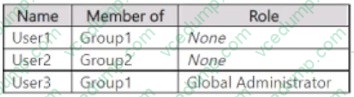
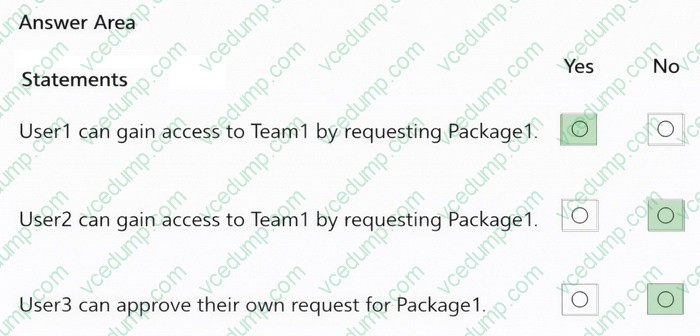
You have a Microsoft 365 E5 subscription that contains a Microsoft Teams team named Team1 and two Microsoft 365 groups named Group1 and Group2. The subscription contains the users shown in the following table.
You create an access package that has the following settings:
- Name: Package1
- Resource roles:
o Team1: Owner
- Users who can request access: For users in your directory o Specific Users and Groups: Group1
- Require approval: Yes
o Require requestor justification: No
o How many stages: 1
o First Approver: Team1, User3
o Require approver justification: Yes
- Enable new requests: Yes
- Expiration:
o Access package assignments expire: 7 days o Users can request specific timeline: Yes
For each of the following statements, select Yes if the statement is true. Otherwise, select No.
NOTE: Each correct selection is worth one point.
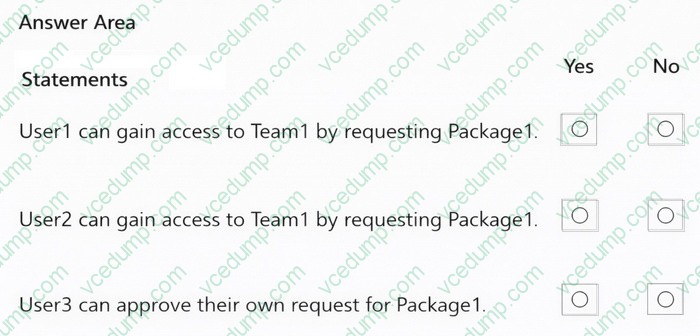
-
Question 387:
You need to configure the detection of multi staged attacks to meet the monitoring requirements.
What should you do?
A. Customize the Azure Sentinel rule logic.
B. Create a workbook.
C. Add an Azure Sentinel playbook.
D. Add Azure Sentinel data connectors. -
Question 388:
HOTSPOT
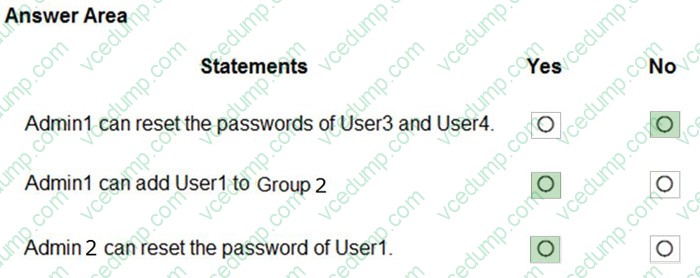
You have an Azure Active Directory (Azure AD) tenant that contains an administrative unit named Department1.
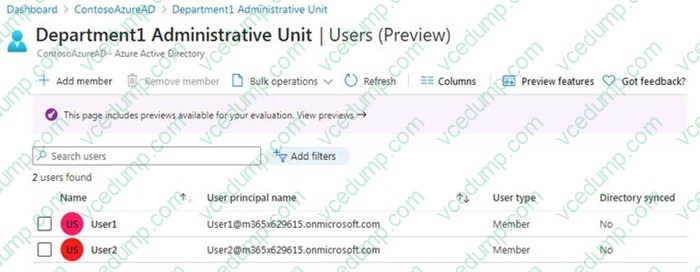
Department1 has the users shown in the Users exhibit. (Click the Users tab.)
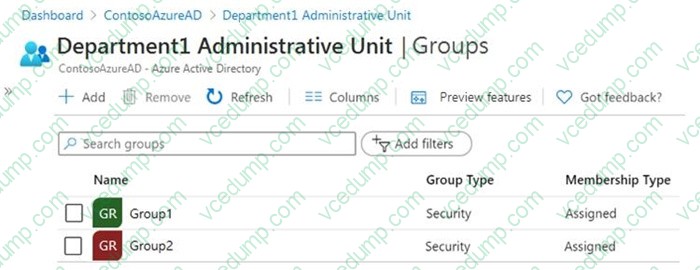
Department1 has the groups shown in the Groups exhibit. (Click the Groups tab.)
Department1 has the user administrator assignments shown in the Assignments exhibit. (Click the Assignments tab.)
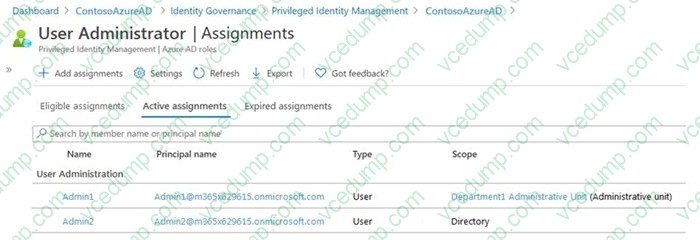
The members of Group2 are shown in the Group2 exhibit. (Click the Group2 tab.)
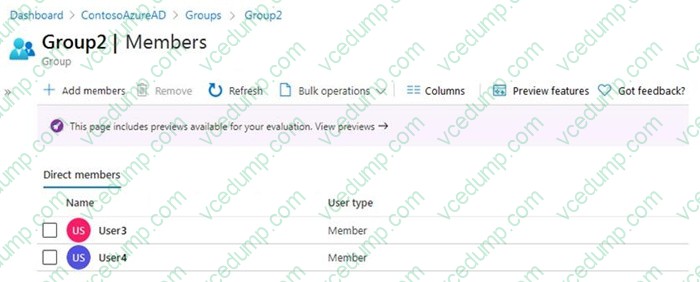
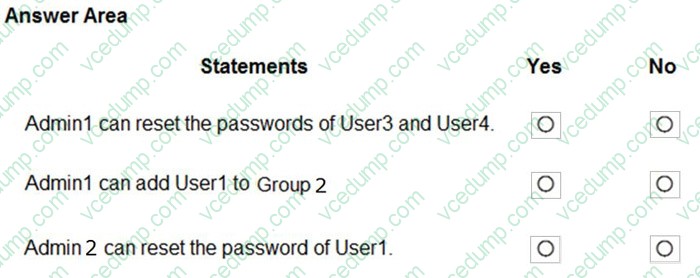
For each of the following statements, select Yes if the statement is true. Otherwise, select No.
NOTE: Each correct selection is worth one point.
-
Question 389:
You have a Microsoft Entra tenant named contoso.com that contains an enterprise application named App1.
A contractor uses the credentials of [email protected].
You need to ensure that you can provide the contractor with access to App1. The contractor must be able to authenticate as [email protected].
What should you do?
A. Add a custom domain name to contoso.com.
B. Configure the External collaboration settings.
C. Create a guest user account in contoso.com.
D. Add a WS-Fed identity provider. -
Question 390:
You have a Microsoft 365 tenant.
All users have mobile phones and Windows 10 laptops.
The users frequently work from remote locations that do not have Wi-Fi access or mobile phone connectivity.
While working from the remote locations, the users connect their laptop to a wired network that has internet access.
You plan to implement multi-factor authentication (MFA).
Which MFA authentication method can the users use from the remote location?
A. Windows Hello for Business
B. an app password
C. a notification through the Microsoft Authenticator app
D. security questions
Related Exams:
-
62-193
Technology Literacy for Educators -
70-243
Administering and Deploying System Center 2012 Configuration Manager -
70-355
Universal Windows Platform – App Data, Services, and Coding Patterns -
77-420
Excel 2013 -
77-427
Excel 2013 Expert Part One -
77-725
Word 2016 Core Document Creation, Collaboration and Communication -
77-726
Word 2016 Expert Creating Documents for Effective Communication -
77-727
Excel 2016 Core Data Analysis, Manipulation, and Presentation -
77-728
Excel 2016 Expert: Interpreting Data for Insights -
77-731
Outlook 2016 Core Communication, Collaboration and Email Skills
Tips on How to Prepare for the Exams
Nowadays, the certification exams become more and more important and required by more and more enterprises when applying for a job. But how to prepare for the exam effectively? How to prepare for the exam in a short time with less efforts? How to get a ideal result and how to find the most reliable resources? Here on Vcedump.com, you will find all the answers. Vcedump.com provide not only Microsoft exam questions, answers and explanations but also complete assistance on your exam preparation and certification application. If you are confused on your SC-300 exam preparations and Microsoft certification application, do not hesitate to visit our Vcedump.com to find your solutions here.