SC-300 Exam Details
-
Exam Code
:SC-300 -
Exam Name
:Microsoft Identity and Access Administrator -
Certification
:Microsoft Certifications -
Vendor
:Microsoft -
Total Questions
:465 Q&As -
Last Updated
:Jul 17, 2026
Microsoft SC-300 Online Questions & Answers
-
Question 341:
HOTSPOT
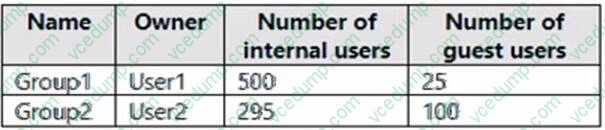
You have an Azure AD tenant that contains the groups shown in the following table.
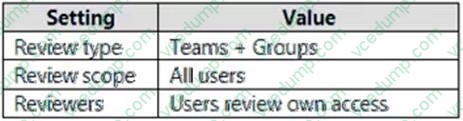
You create an access review for Group1 as shown in the following table.
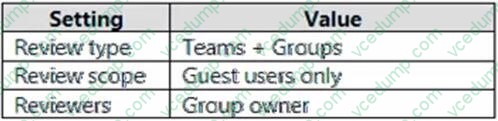
You create an access review for Group2 as shown in the following table.
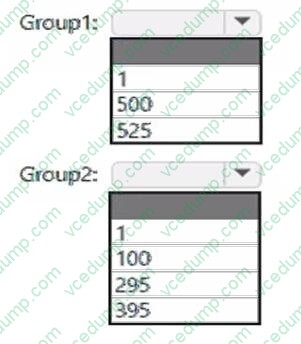
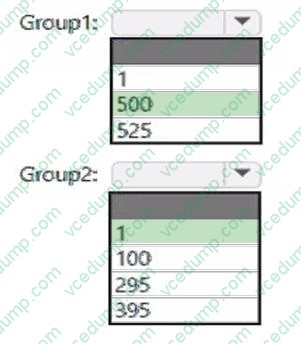
What is the minimum number of Azure AD Premium P2 licenses required for each group?
To answer, select the appropriate options in the answer area.
NOTE: Each correct selection is worth one point.
-
Question 342:
You have an Azure Active Directory (Azure AD) tenant that contains the objects shown in the following table.

Which objects can you add as members to Group3?
A. User2 and Group2 only
B. User2, Group1, and Group2 only
C. User1, User2, Group1 and Group2
D. User1 and User2 only
E. User2 only -
Question 343:
HOTSPOT
You have a Microsoft Entra tenant that contains the users shown in the following table.
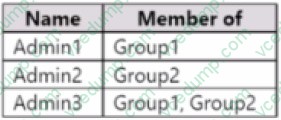
You add the following assignment for the User Administrator role:
3. Scope type: Directory
4. Selected members: Group1
5. Assignment type: Active
6. Assignments starts August
15. 2022
7. Assignment ends: December 15, 2022
You add the following assignment for the Exchange Administrator role:
1. Scope type: Directory
2. Selected members: Group2
3. Assignment type: Eligible
4. Assignments starts: October 15, 2022
5. Assignment ends: January
15. 2023
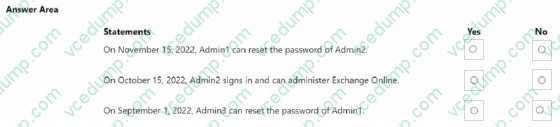
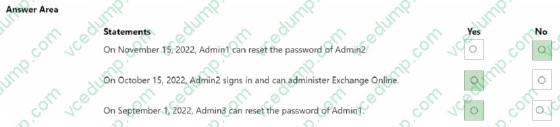
For each of the following statements, select Yes if the statement is true. Otherwise, select No.
NOTE: Each correct selection is worth one point.
-
Question 344:
You have an Azure subscription named Sub1 that contains a resource group named RG1. RG1 contains an Azure Cosmos DB database named DB1 and an Azure Kubernetes Service (AKS) cluster named AKS1. AKS1 uses a managed identity.
You need to ensure that AKS1 can access DB1. The solution must meet the following requirements:
1. Ensure that AKS1 uses the managed identity to access DB1.
2. Follow the principle of least privilege.
Which role should you assign to the managed identity of AKS1?
A. For Sub1, assign the Owner role.
B. For DB1, assign the Azure Cosmos DB Account Reader Role role.
C. For RG1, assign the Azure Cosmos DB Data Reader Role role.
D. For RG1, assign the Reader role. -
Question 345:
You have a Microsoft 365 tenant.
You need to ensure that you tan view Azure Active Directory (Azure AD) audit log information by using Azure Monitor.
What should you do first?
A. Run the Get-AzureADAuditDirectoryLogs cmdlet.
B. Create an Azure AD workbook.
C. Run the Set-AzureADTenantDetail cmdlet.
D. Modify the Diagnostics settings for Azure AD. -
Question 346:
HOTSPOT
You have a Microsoft 365 tenant.
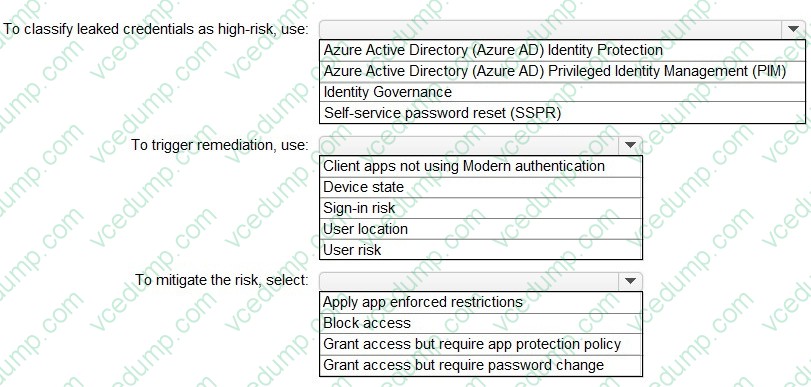
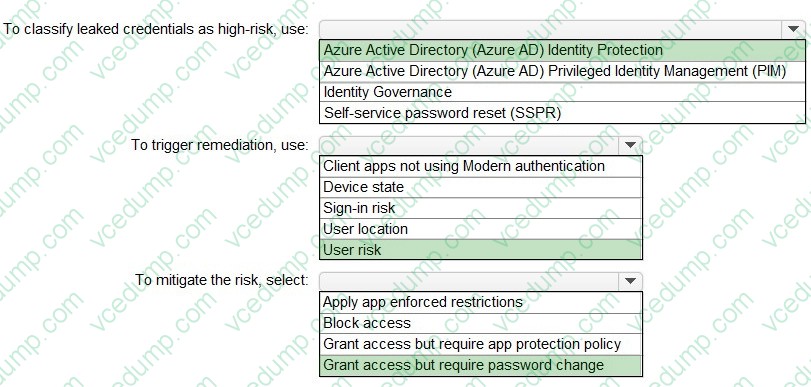
You need to identify users who have leaked credentials. The solution must meet the following requirements:
1. Identify sign-ins by users who are suspected of having leaked credentials.
2. Flag the sign-ins as a high-risk event.
3. Immediately enforce a control to mitigate the risk, while still allowing the user to access applications.
What should you use? To answer, select the appropriate options in the answer area.
NOTE: Each correct selection is worth one point.
-
Question 347:
You have an Azure subscription named Sub1 that contains a user named User1.
You need to ensure that User1 can purchase a Microsoft Entra Permissions Management license for Sub1. The solution must follow the principle of least privilege.
Which role should you assign to User1?
A. Global Administrator
B. Billing Administrator
C. Permissions Management Administrator
D. User Access Administrator -
Question 348:
You have an Azure subscription that is linked to a Microsoft Entra tenant. The tenant contains the groups shown in the following table.
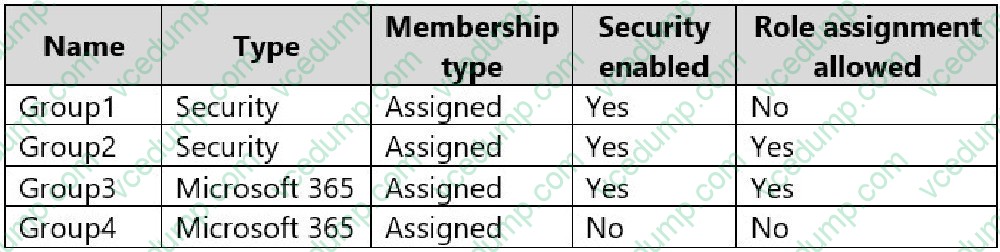
Which groups can you manage by using Privileged Identity Management (PIM)?
A. Group2 only
B. Group1 and Group2 only
C. Group2 and Group4 only
D. Group1, Group2, and Group3 only
E. Group1, Group2, Group3, and Group4 -
Question 349:
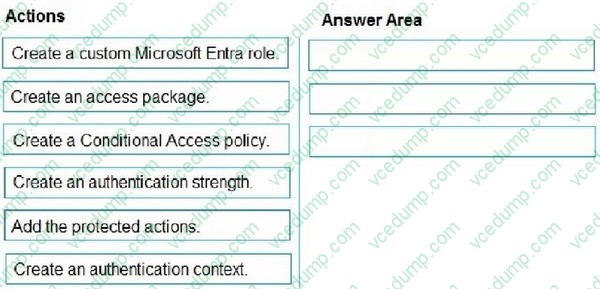
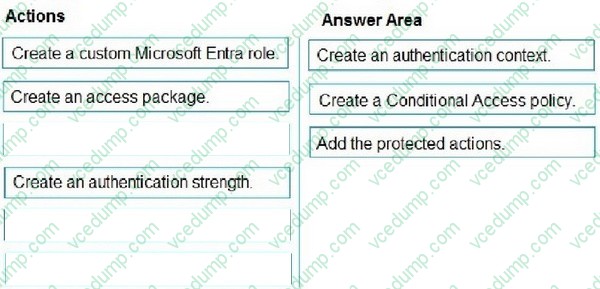
DRAG DROP
You have a Microsoft Entra tenant.
You need to implement protected actions.
Which three actions should you perform in sequence? To answer, move the appropriate actions from the list of actions to the answer area and arrange them in the correct order.
NOTE: More than one order of answer choices is correct. You will receive credit for any of the correct orders you select.
Select and Place:
-
Question 350:
You create a conditional access policy that blocks access when a user triggers a high-severity sign-in alert.
You need to test the policy under the following conditions:
1. A user signs in from another country.
2. A user triggers a sign-in risk.
What should you use to complete the test?
A. the Conditional Access What If tool
B. sign-ins logs in Azure Active Directory (Azure AD)
C. the activity logs in Microsoft Defender for Cloud Apps
D. access reviews in Azure Active Directory (Azure AD)
Related Exams:
-
62-193
Technology Literacy for Educators -
70-243
Administering and Deploying System Center 2012 Configuration Manager -
70-355
Universal Windows Platform – App Data, Services, and Coding Patterns -
77-420
Excel 2013 -
77-427
Excel 2013 Expert Part One -
77-725
Word 2016 Core Document Creation, Collaboration and Communication -
77-726
Word 2016 Expert Creating Documents for Effective Communication -
77-727
Excel 2016 Core Data Analysis, Manipulation, and Presentation -
77-728
Excel 2016 Expert: Interpreting Data for Insights -
77-731
Outlook 2016 Core Communication, Collaboration and Email Skills
Tips on How to Prepare for the Exams
Nowadays, the certification exams become more and more important and required by more and more enterprises when applying for a job. But how to prepare for the exam effectively? How to prepare for the exam in a short time with less efforts? How to get a ideal result and how to find the most reliable resources? Here on Vcedump.com, you will find all the answers. Vcedump.com provide not only Microsoft exam questions, answers and explanations but also complete assistance on your exam preparation and certification application. If you are confused on your SC-300 exam preparations and Microsoft certification application, do not hesitate to visit our Vcedump.com to find your solutions here.