SC-300 Exam Details
-
Exam Code
:SC-300 -
Exam Name
:Microsoft Identity and Access Administrator -
Certification
:Microsoft Certifications -
Vendor
:Microsoft -
Total Questions
:465 Q&As -
Last Updated
:Jul 17, 2026
Microsoft SC-300 Online Questions & Answers
-
Question 271:
Your company purchases a new Microsoft 365 E5 subscription and an app named App1.
You need to create a Microsoft Defender for Cloud Apps access policy for App1.
What should you do you first?
A. Configure a Conditional Access policy to use app-enforced restrictions.
B. Configure a Token configuration for App1.
C. Add an API permission for App1.
D. Configure a Conditional Access policy to use Conditional Access App Control. -
Question 272:
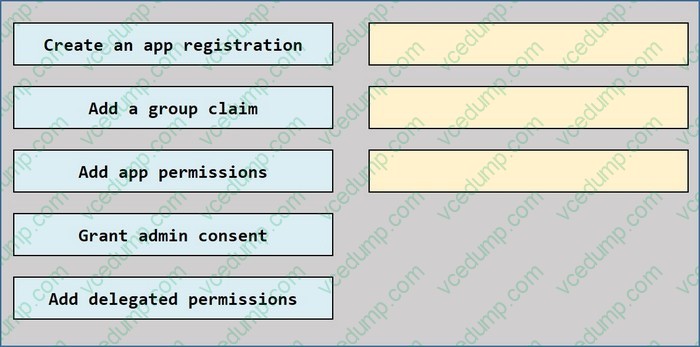
DRAG DROP
Your company has an Azure Active Directory (Azure AD) tenant named contoso.com.
The company is developing a web service named App1.
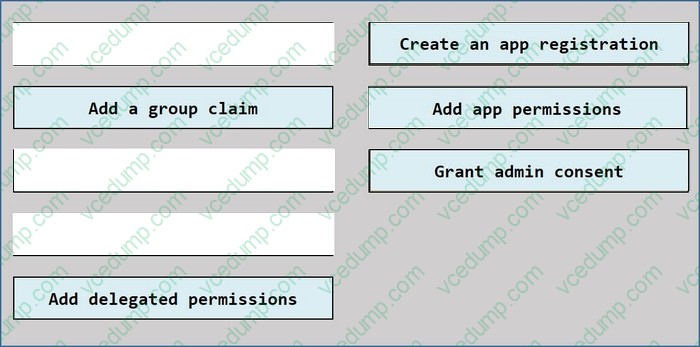
You need to ensure that App1 can use Microsoft Graph to read directory data in contoso.com.
Which three actions should yon perform in sequence? To answer, move the appropriate actions from the list of actions to the answer area and arrange them In the correct order.
Select and Place:
-
Question 273:
You have a Microsoft Entra tenant.
You open the risk detections report.
Which risk detection type is classified as a user risk?
A. impossible travel
B. anonymous IP address
C. atypical travel
D. leaked credentials -
Question 274:
HOTSPOT
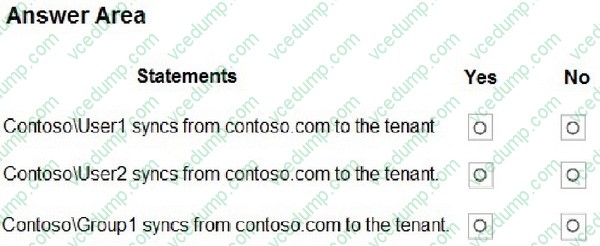
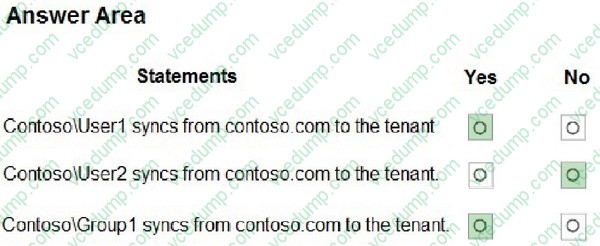
Your network contains an on-premises Active Directory Domain Services (AD DS) domain named contoso.com. Contoso.com contains the identities shown in the following table.

You have a Microsoft Entra tenant that contains a user named User1.
You deploy Microsoft Entra Cloud Sync and configure a scoping filter by using the following string:
CN=Group1,OU=OU1,DC=contoso,DC=com.
For each of the following statements, select Yes if the statement is true. Otherwise, select No.
NOTE: Each correct selection is worth one point.
-
Question 275:
You have a Microsoft Entra ID tenant that contains a user named Admin1.
You need to ensure that Admin1 can perform only the following tasks:
From the Microsoft 365 admin center, create and manage service requests.
From the Microsoft 365 admin center, read and configure service health.
From the Azure portal, create and manage support tickets.
The solution must minimize administrative effort.
What should you do?
A. Create an administrative unit and add Admin1.
B. Enable Microsoft Entra Privileged Identity Management (PIM) for Admin1.
C. Assign Admin1 the Helpdesk Administrator role.
D. Create a custom role and assign the role to Admin1. -
Question 276:
You have an Azure Active Directory (Azure AD) Azure AD tenant.
You need to bulk create 25 new user accounts by uploading a template file.
Which properties are required in the template file?
A. displayName, identityIssuer, usageLocation, and userType
B. accountEnabled, givenName, surname, and userPrincipalName
C. accountEnabled, displayName, userPrincipalName, and passwordProfile
D. accountEnabled, passwordProfile, usageLocation, and userPrincipalName -
Question 277:
HOTSPOT
You have a Microsoft Entra tenant that contains 1,000 users. All the users are assigned Microsoft Entra Suite licenses.
You perform the following actions:
1. Deploy Global Secure Access.
2. Create a Global Secure Access security profile named Profile1.
3. Create the following Conditional Access policies:
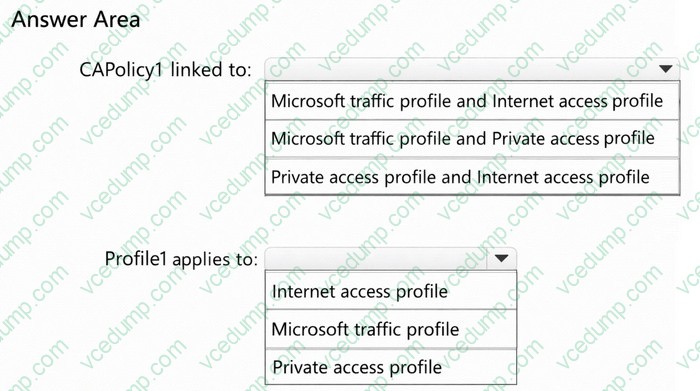
Name:CApolicy1
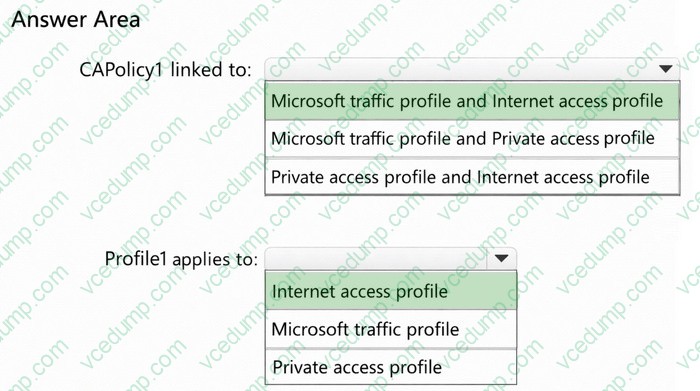
Target resources: All internet resources with Global Secure Access
Name: CApolicy2
Session: Use Global Secure Access security profile: Profile1
To which Global Secure Access traffic forwarding profile is CApolicy1 linked, and to which traffic forwarding profile does Profile1 apply?
To answer, select the appropriate options in the answer area.
NOTE: Each correct selection is worth one point.
-
Question 278:
You have an Azure subscription that contains the resources shown in the following table.
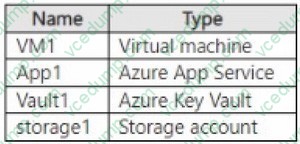
You need to grant permissions to the resources by using attribute-based access control (ABAC).
To which resource can you grant permissions?
A. Vault1
B. VM1
C. App1
D. storage 1 -
Question 279:
You have on-premises Linux devices.
You have a Microsoft 365 E5 subscription.
You plan to configure Global Secure Access Internet Access.
You need to ensure that the devices can connect to Global Secure Access.
What should you do?
A. Configure the Adaptive Access settings.
B. Install the Azure Connected Machine agent on the devices.
C. Create a remote network.
D. Deploy a private network connector. -
Question 280:
HOTSPOT
You have an Azure Active Directory (Azure AD) tenant that has the default App registrations settings. The tenant contains the users shown in the following table.
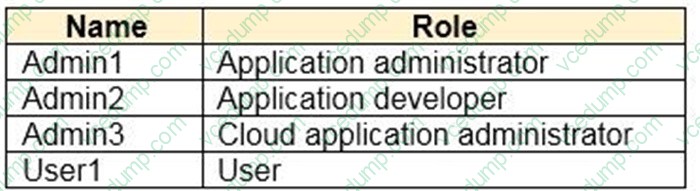
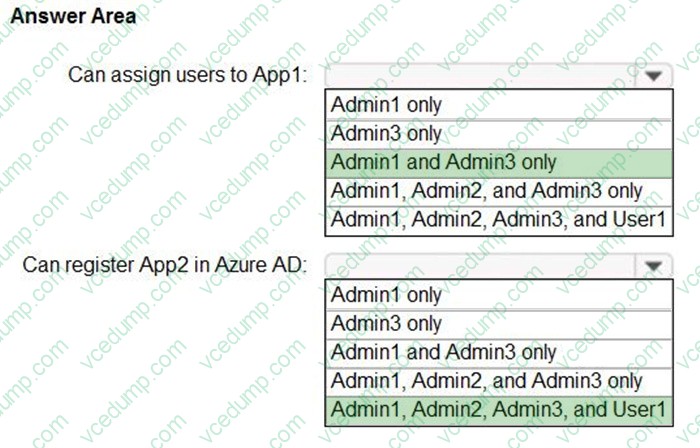
You purchase two cloud apps named App1 and App2. The global administrator registers App1 in Azure AD.
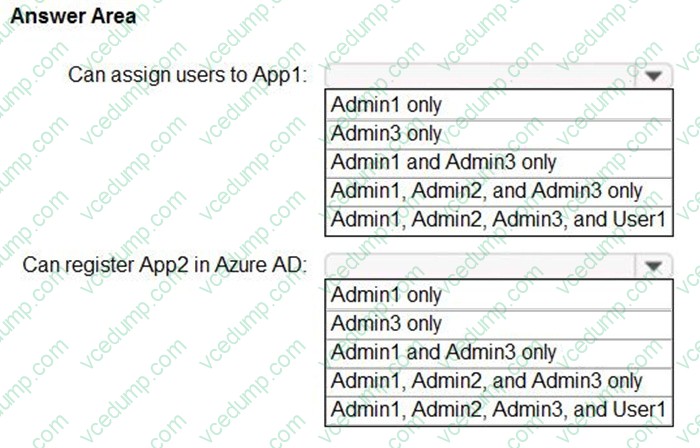
You need to identify who can assign users to App1, and who can register App2 in Azure AD.
What should you identify? To answer, select the appropriate options in the answer area.
NOTE: Each correct selection is worth one point.
Related Exams:
-
62-193
Technology Literacy for Educators -
70-243
Administering and Deploying System Center 2012 Configuration Manager -
70-355
Universal Windows Platform – App Data, Services, and Coding Patterns -
77-420
Excel 2013 -
77-427
Excel 2013 Expert Part One -
77-725
Word 2016 Core Document Creation, Collaboration and Communication -
77-726
Word 2016 Expert Creating Documents for Effective Communication -
77-727
Excel 2016 Core Data Analysis, Manipulation, and Presentation -
77-728
Excel 2016 Expert: Interpreting Data for Insights -
77-731
Outlook 2016 Core Communication, Collaboration and Email Skills
Tips on How to Prepare for the Exams
Nowadays, the certification exams become more and more important and required by more and more enterprises when applying for a job. But how to prepare for the exam effectively? How to prepare for the exam in a short time with less efforts? How to get a ideal result and how to find the most reliable resources? Here on Vcedump.com, you will find all the answers. Vcedump.com provide not only Microsoft exam questions, answers and explanations but also complete assistance on your exam preparation and certification application. If you are confused on your SC-300 exam preparations and Microsoft certification application, do not hesitate to visit our Vcedump.com to find your solutions here.