SC-300 Exam Details
-
Exam Code
:SC-300 -
Exam Name
:Microsoft Identity and Access Administrator -
Certification
:Microsoft Certifications -
Vendor
:Microsoft -
Total Questions
:465 Q&As -
Last Updated
:Jul 17, 2026
Microsoft SC-300 Online Questions & Answers
-
Question 181:
HOTSPOT
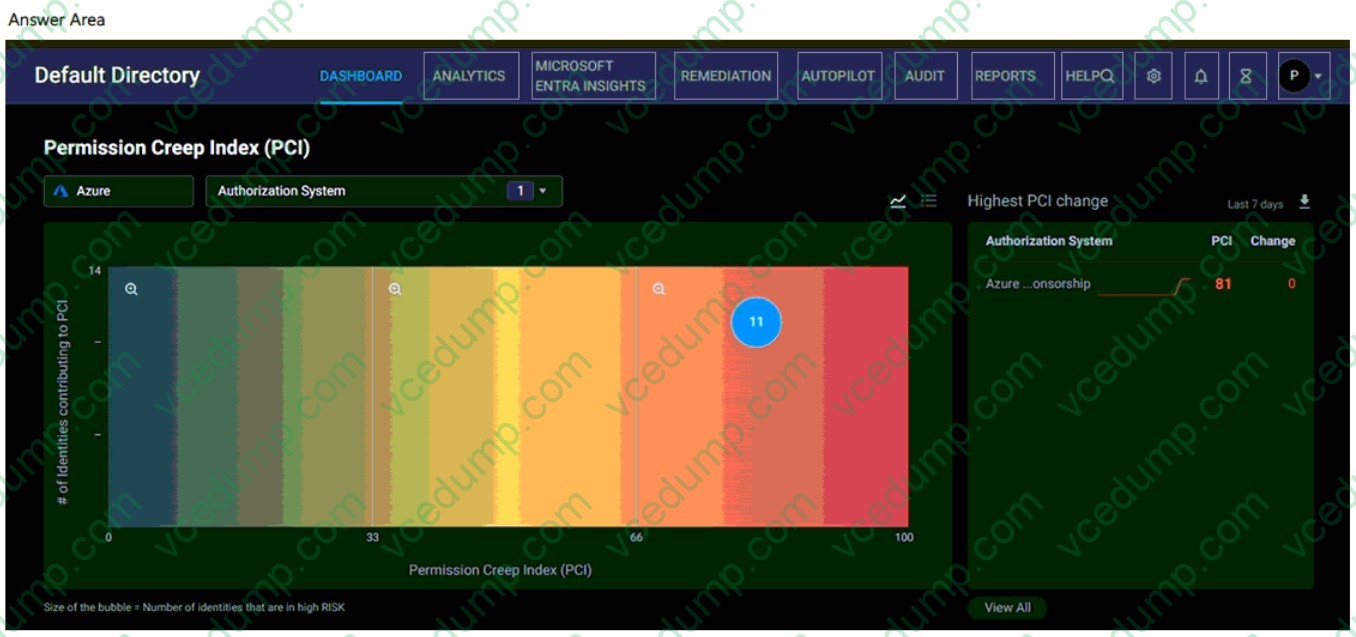
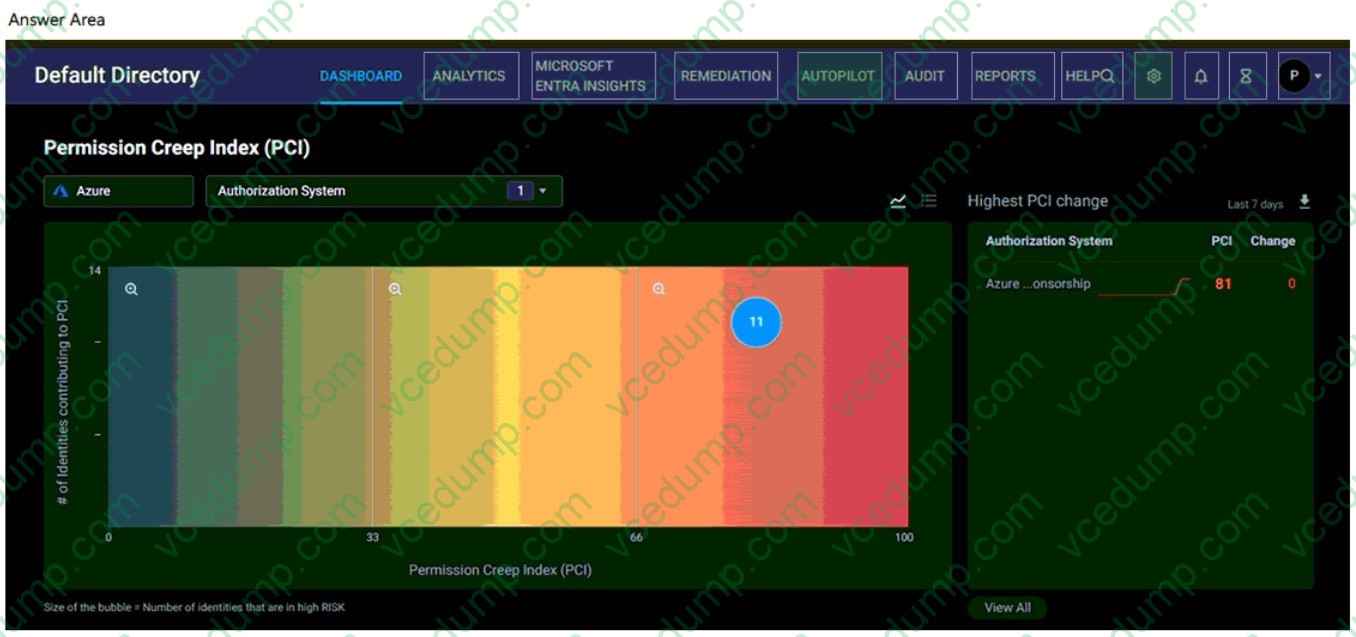
You have an Azure subscription that is onboarded to Microsoft Entra Permissions Management.
You need to perform the following actions:
1. Identify billable Azure resources.
2. Create a rule to remove permissions for unused resources.
Which two options should you use in the Entra Permissions Management portal? To answer, select the appropriate options in the answer area.
NOTE: Each correct selection is worth one point.
-
Question 182:
Note: This question is part of a series of questions that present the same scenario. Each question in the series contains a unique solution that might meet the stated goals. Some question sets might have more than one correct solution, while others might not have a correct solution.
After you answer a question in this section, you will NOT be able to return to it. As a result, these questions will not appear in the review screen.
You have a Microsoft 365 tenant.
You have 100 IT administrators who are organized into 10 departments.
You create the access review shown in the exhibit. (Click the Exhibit tab.)
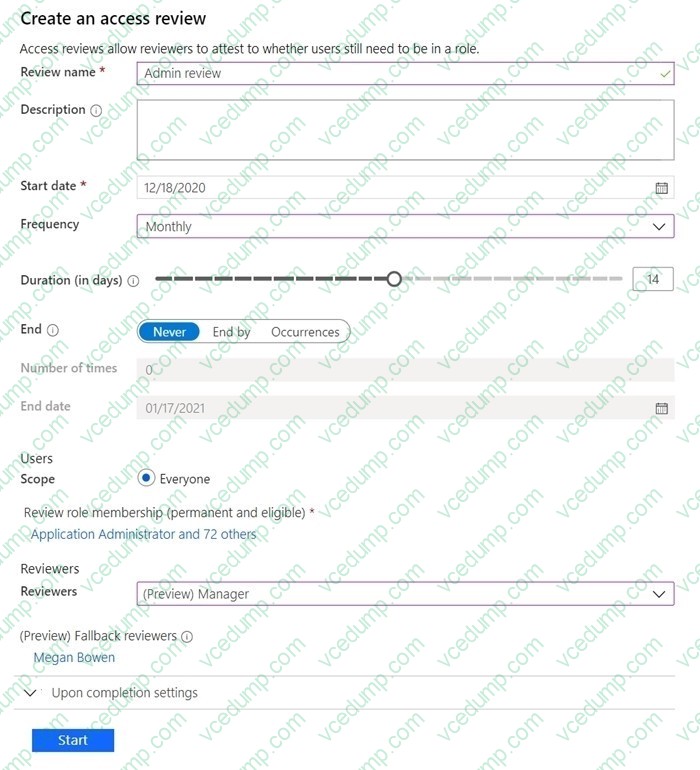
You discover that all access review requests are received by Megan Bowen.
You need to ensure that the manager of each department receives the access reviews of their respective department.
Solution: You create a separate access review for each role.
Does this meet the goal?
A. Yes
B. No -
Question 183:
You have a Microsoft 365 E5 subscription.
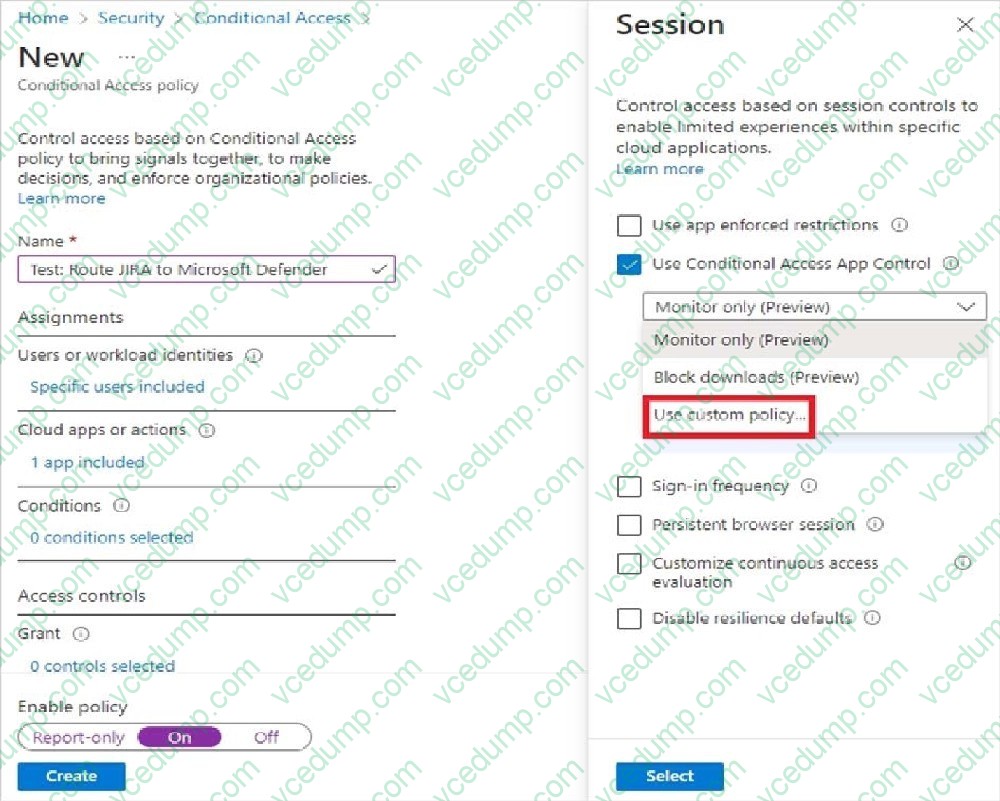
You need to be able to create a Microsoft Defender for Cloud Apps session policy.
What should you do first?
A. From the Microsoft 365 Defender portal, select User monitoring.
B. From the Microsoft 365 Defender portal, select App onboarding/maintenance.
C. From the Microsoft Entra admin center, create a Conditional Access policy.
D. From the Microsoft 365 Defender portal, create a continuous report. -
Question 184:
HOTSPOT
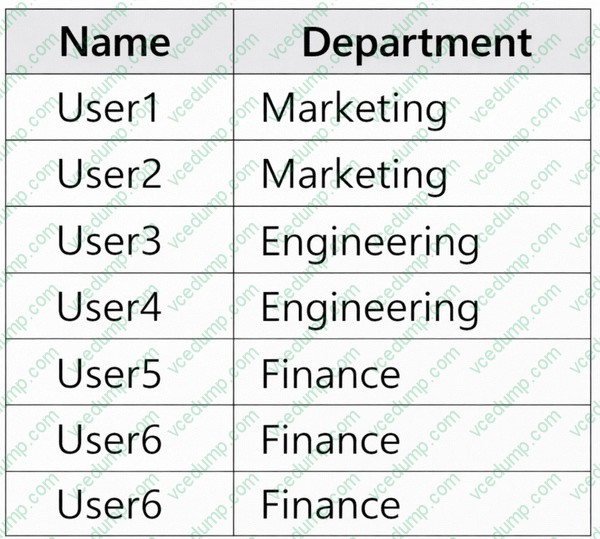
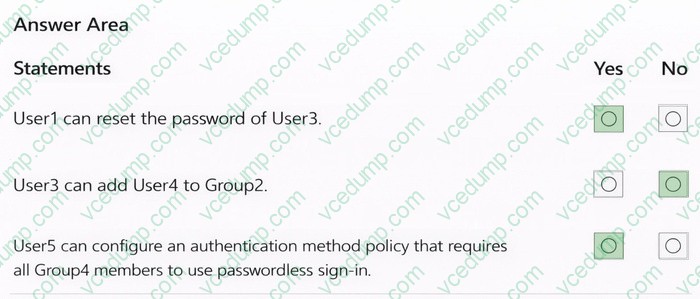
You have a Microsoft Entra tenant that contains the users shown in the following table.
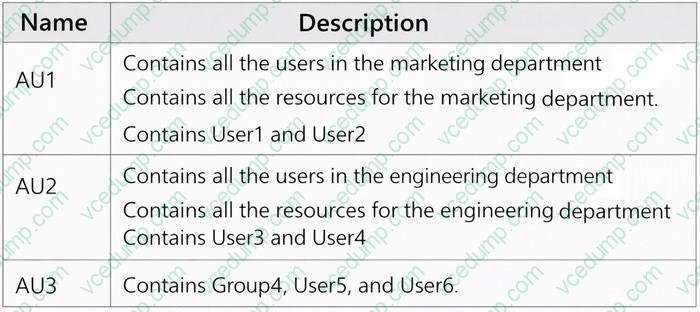
The tenant contains the administrative units shown in the following table.
The tenant contains the groups shown in the following table.
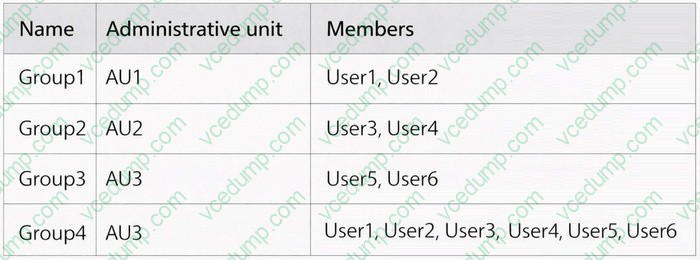
You perform the following actions:
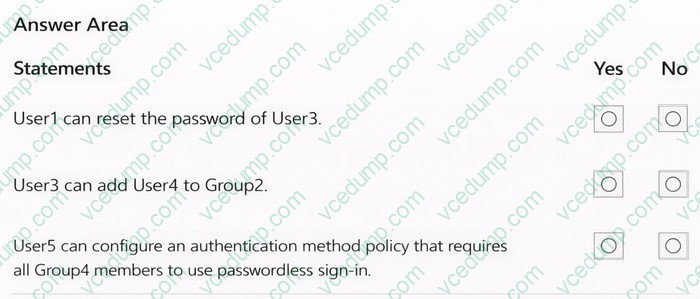
Assign User1 the User Administrator role for AU2. Assign User3 the Groups Administrator role for AU1. Assign User5 the Authentication Administrator role for AU3.
For each of the following statements, select Yes if the statement is true. Otherwise, select No.
NOTE: Each correct selection is worth one point.
-
Question 185:
You have multiple on-premises devices that run either Windows or Linux.
You have a Microsoft 365 E5 subscription.
You configure Microsoft Entra Internet Access.
You need to ensure that all the on-premises devices route internet traffic through Global Secure Access for security policy evaluation.
What should you do in the Microsoft Entra admin center?
A. Deploy the Global Secure Access client.
B. Create a remote network.
C. Create a named location.
D. Create an access package. -
Question 186:
You have a Microsoft 365 E5 subscription that contains the users shown in the following table.
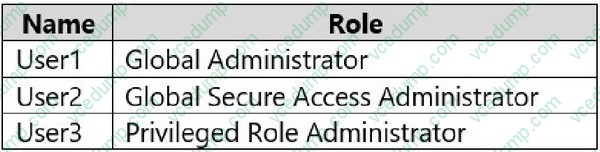
You configure Microsoft Entra Internet Access.
Which users can manage Microsoft Entra Internet Access?
A. User1 only
B. User2 only
C. User3 only
D. User1 and User2 only
E. User1, User2, and User3 -
Question 187:
HOTSPOT
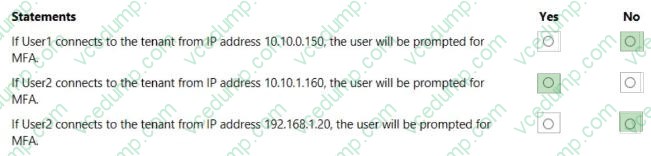
You have an Azure Active Directory (Azure AD) tenant that contains the users shown in the following table.

You have the locations shown in the following table.

The tenant contains a named location that has the following configurations: Name: Location1
Mark as trusted location: Enabled IPv4 range: 10.10.0.0/16
MFA has a trusted IP address range of 193.17.17.0/24.
You have a Conditional Access policy that has the following settings: Name: CAPolicy1
Assignments
- Users or workload identities: Group1
- Cloud apps or actions: All cloud apps
Conditions
Locations: All trusted locations Access controls
Grant
Grant access: Require multi-factor authentication
- Session: 0 controls selected
Enable policy: On
For each of the following statements, select Yes if the statement is true. Otherwise, select No.
NOTE: Each correct selection is worth one point.
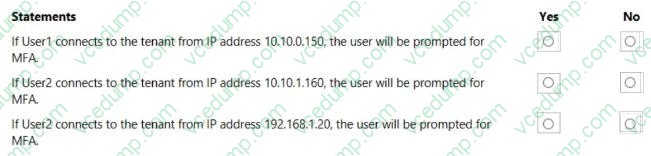
-
Question 188:
You have an Azure Active Directory (Azure AD) tenant that contains the users shown in the following table.
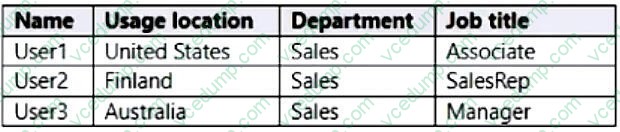
You create a dynamic user group and configure the following rule syntax.
user.usageLocation -in ["US","AU"] -and (user.department -eq "Sales") -and -not (user.jobTitle -eq "Manager") r (user.
jobTitle -eq "SalesRep") Which users will be added to the group?
A. User1 only
B. User2 only
C. User3 only
D. User1 and User2 only
E. User1 and User3 only
F. User1, User2, and User3 -
Question 189:
SIMULATION
Use the following login credentials as needed:
To enter your username, place your cursor in the Sign in box and click the username below.
To enter your password, place your cursor in the Enter password box and click the password below.
Microsoft 365 Username: [email protected]
Microsoft 365 Password: 1122334455667788
If the Microsoft 365 portal does not load successfully in the browser, press CTRL+K to reload the portal in a new browser tab.
The following information is for technical support purposes only:
Lab Instance: 99999999
You need to ensure that when users in the sg-Operations group go to the My Apps portal, a tab named Operations appears that contains only the following applications: LinkedIn Box
To complete this task, sign in to the appropriate admin center.
A. See the explanation below
B. PlaceHolder
C. PlaceHolder
D. PlaceHolder -
Question 190:
You have a Microsoft 365 subscription that contains a user named User1.
You need to ensure that User1 can create access reviews for Azure AD roles. The solution must use the principal of least privilege.
Which role should you assign to User1?
A. Privileged role administrator
B. Identify Governance administrator
C. User administrator
D. User Access Administrate
Related Exams:
-
62-193
Technology Literacy for Educators -
70-243
Administering and Deploying System Center 2012 Configuration Manager -
70-355
Universal Windows Platform – App Data, Services, and Coding Patterns -
77-420
Excel 2013 -
77-427
Excel 2013 Expert Part One -
77-725
Word 2016 Core Document Creation, Collaboration and Communication -
77-726
Word 2016 Expert Creating Documents for Effective Communication -
77-727
Excel 2016 Core Data Analysis, Manipulation, and Presentation -
77-728
Excel 2016 Expert: Interpreting Data for Insights -
77-731
Outlook 2016 Core Communication, Collaboration and Email Skills
Tips on How to Prepare for the Exams
Nowadays, the certification exams become more and more important and required by more and more enterprises when applying for a job. But how to prepare for the exam effectively? How to prepare for the exam in a short time with less efforts? How to get a ideal result and how to find the most reliable resources? Here on Vcedump.com, you will find all the answers. Vcedump.com provide not only Microsoft exam questions, answers and explanations but also complete assistance on your exam preparation and certification application. If you are confused on your SC-300 exam preparations and Microsoft certification application, do not hesitate to visit our Vcedump.com to find your solutions here.