SC-100 Exam Details
-
Exam Code
:SC-100 -
Exam Name
:Microsoft Cybersecurity Architect -
Certification
:Microsoft Certifications -
Vendor
:Microsoft -
Total Questions
:350 Q&As -
Last Updated
:Jul 12, 2026
Microsoft SC-100 Online Questions & Answers
-
Question 251:
You have a Microsoft 365 subscription and an Azure subscription. Microsoft 365 Defender and Microsoft Defender for Cloud are enabled.
The Azure subscription contains 50 virtual machines. Each virtual machine runs different applications on Windows Server 2019.
You need to recommend a solution to ensure that only authorized applications can run on the virtual machines. If an unauthorized application attempts to run or be installed, the application must be blocked automatically until an administrator authorizes the application.
Which security control should you recommend?
A. app discovery anomaly detection policies in Microsoft Defender for Cloud Apps
B. Azure AD Conditional Access App Control policies
C. adaptive application controls in Defender for Cloud
D. app protection policies in Microsoft Endpoint Manager -
Question 252:
Note: This question is part of a series of questions that present the same scenario. Each question in the series contains a unique solution that might meet the stated goals. Some question sets might have more than one correct solution, while others might not have a correct solution.
After you answer a question in this section, you will NOT be able to return to it. As a result, these questions will not appear in the review screen.
Your on-premises network contains an e-commerce web app that was developed in Angular and Node,js. The web app uses a MongoDB database.
You plan to migrate the web app to Azure. The solution architecture team proposes the following architecture as an Azure landing zone.

You need to provide recommendations to secure the connection between the web app and the database. The solution must follow the Zero Trust model.
Solution: You recommend creating private endpoints for the web app and the database layer.
Does this meet the goal?
A. Yes
B. No -
Question 253:
HOTSPOT
You have a Microsoft Entra tenant. The tenant contains a security group named Group1. Group1 contains the members of your company's IT support team.
You have an Azure subscription. The subscription contains 800 Windows devices that are Microsoft Entra joined and 200 Windows devices that are Microsoft Entra registered.
You have 200 standalone macOS devices.
You deploy 10 Windows devices that are Microsoft Entra joined and have the Microsoft Entra ExtensionAttribute1 value set to SecureWorkstation.
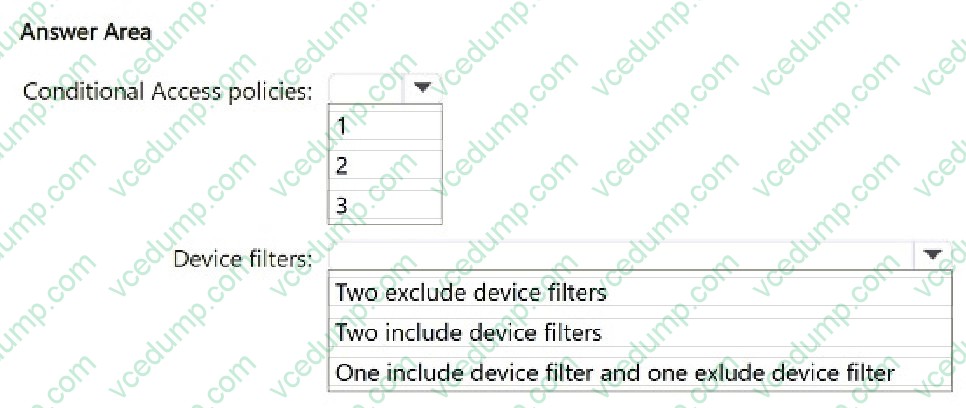
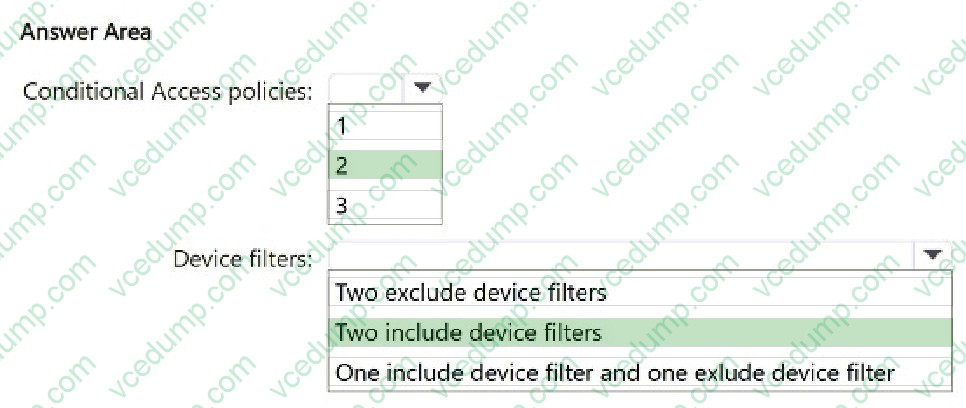
You need to recommend a Conditional Access solution that meets the following requirements:
Only allows access to Microsoft Entra resources from devices that run Windows 10 or Windows 11
Restricts Windows Azure Service Management API access to the following users:
1. The members of Group1.
2. Users that authenticate by using multifactor authentication (MFA)
3. Users that connect from a device that has the SecureWorkstation ExtensionAttribute1.
The solution must minimize the number of required policies and maximize security.
What should include in the recommendation? To answer, select the appropriate options in the answer area.
NOTE: Each correct selection is worth one point.
-
Question 254:
You have on-premises Windows 11 devices with the Global Secure Access client deployed.
Your Microsoft 365 subscription includes Microsoft SharePoint Online and Exchange Online.
You deploy Microsoft Entra Internet Access from your on-premises network to Microsoft 365. This deployment has the Microsoft 365 profile enabled, with the following configuration:
1. Default traffic policies for Microsoft 365 services
2. A linked Conditional Access policy that performs compliant network checks with continuous access evaluation (CAE) applied to all users
3. An assignment to all devices
4. An assignment to a remote network associated with the on-premises network
Which Microsoft 365 resources are protected using continuous access evaluation (CAE)?
A. SharePoint Online only
B. Exchange Online only
C. both SharePoint Online and Exchange Online -
Question 255:
Your network contains an Active Directory Domain Services (AD DS) domain named Domain1. You have a Microsoft Entra tenant. Domain1 syncs with the tenant by using Microsoft Entra Connect. You need to monitor Domain1 for privilege escalation attacks.
What should you use?
A. Microsoft Entra ID Protection
B. Microsoft Defender for Servers
C. Microsoft Defender for Identity
D. Privileged Identity Management (PIM) -
Question 256:
HOTSPOT
You have an Azure subscription that contains a Microsoft Sentinel workspace named WS1.
You need to configure WS1 to meet the following requirements:
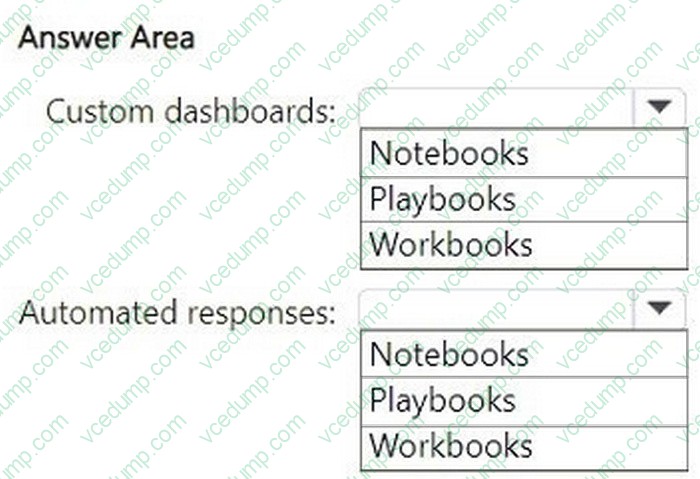
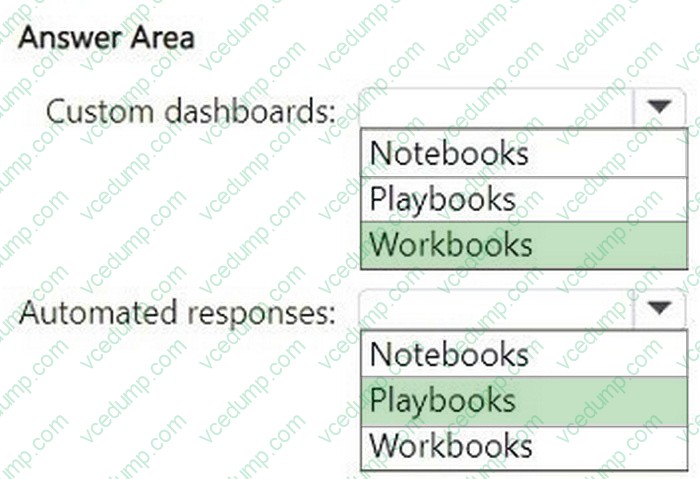
1. Create custom dashboards to visualize the workload of security analysts who use Microsoft Sentinel.
2. Enable automated responses for the security alerts generated by Microsoft Sentinel analytics rules.
What should you use for each requirement?
To answer, select the options in the answer area. Each correct answer is worth one point
-
Question 257:
Your company has on-premises network in Seattle and an Azure subscription. The on-premises network contains a Remote Desktop server.
The company contracts a third-party development firm from France to develop and deploy resources to the virtual machines hosted in the Azure subscription.
Currently, the firm establishes an RDP connection to the Remote Desktop server. From the Remote Desktop connection, the firm can access the virtual machines hosted in Azure by using custom administrative tools installed on the Remote Desktop server. All the traffic to the Remote Desktop server is captured by a firewall, and the firewall only allows specific connections from France to the server.
You need to recommend a modern security solution based on the Zero Trust model. The solution must minimize latency for developers.
Which three actions should you recommend? Each correct answer presents part of the solution.
NOTE: Each correct selection is worth one point.
A. Configure network security groups (NSGs) to allow access from only specific logical groupings of IP address ranges.
B. Deploy a Remote Desktop server to an Azure region located in France.
C. Migrate from the Remote Desktop server to Azure Virtual Desktop.
D. Implement Azure Firewall to restrict host pool outbound access.
E. Configure Azure Active Directory (Azure AD) Conditional Access with multi-factor authentication (MFA) and named locations. -
Question 258:
HOTSPOT
You have four Azure subscriptions: Sub1, Sub2, Sub3, and Sub4. Each subscription is linked to a unique Microsoft Entra tenant and a Microsoft 365 subscription. Sub1 contains a user named User1.
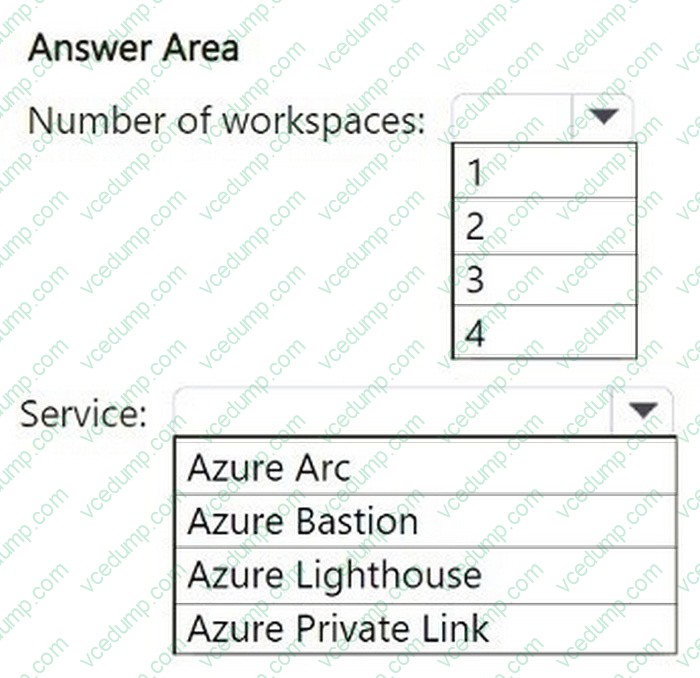
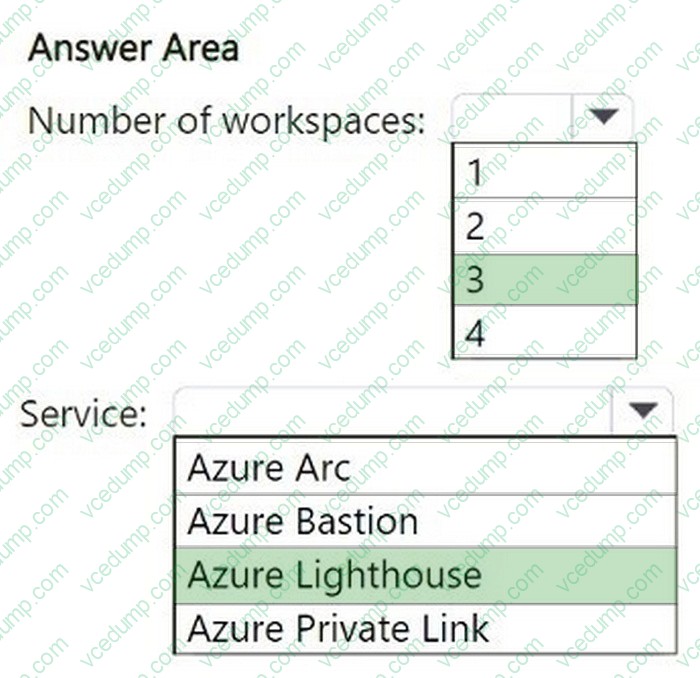
You plan to implement Microsoft Sentinel and need to ensure that User1 can monitor Microsoft Entra ID events and Microsoft 365 events for Sub2, Sub3, and Sub4 using Microsoft Sentinel. The solution must minimize administrative effort.
What is the minimum number of Microsoft Sentinel workspaces you should create, and which Azure service should you use?
To answer, select the appropriate options in the answer area.
-
Question 259:
You receive a security alert in Microsoft Defender for Cloud as shown in the exhibit. (Click the Exhibit tab.)
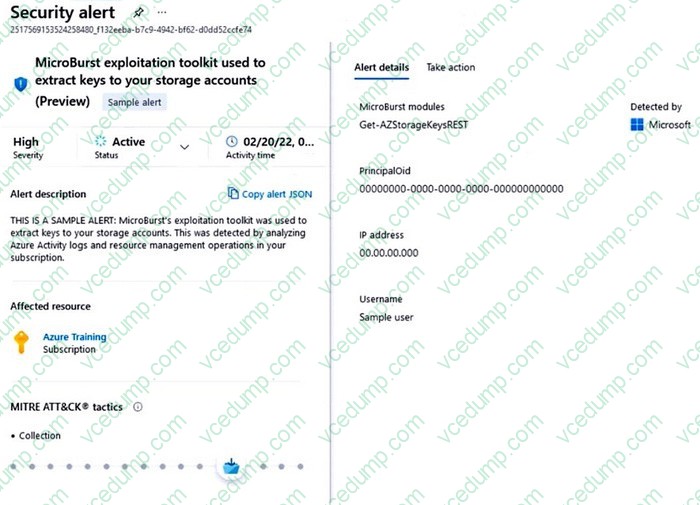
After remediating the threat which policy definition should you assign to prevent the threat from reoccurring?
A. Storage account public access should be disallowed
B. Azure Key Vault Managed HSM should have purge protection enabled
C. Storage accounts should prevent shared key access
D. Storage account keys should not be expired -
Question 260:
Note: This question is part of a series of questions that present the same scenario. Each question in the series contains a unique solution that might meet the stated goals. Some question sets might have more than one correct solution, while others might not have a correct solution.
After you answer a question in this section, you will NOT be able to return to it. As a result, these questions will not appear in the review screen.
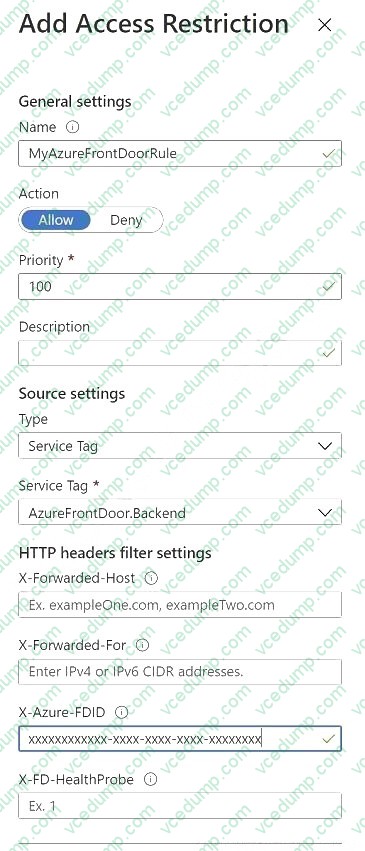
You are designing a security strategy for providing access to Azure App Service web apps through an Azure Front Door instance.
You need to recommend a solution to ensure that the web apps only allow access through the Front Door instance.
Solution: You recommend access restrictions that allow traffic from the Front Door service tags.
Does this meet the goal?
A. Yes
B. No
Related Exams:
-
62-193
Technology Literacy for Educators -
70-243
Administering and Deploying System Center 2012 Configuration Manager -
70-355
Universal Windows Platform – App Data, Services, and Coding Patterns -
77-420
Excel 2013 -
77-427
Excel 2013 Expert Part One -
77-725
Word 2016 Core Document Creation, Collaboration and Communication -
77-726
Word 2016 Expert Creating Documents for Effective Communication -
77-727
Excel 2016 Core Data Analysis, Manipulation, and Presentation -
77-728
Excel 2016 Expert: Interpreting Data for Insights -
77-731
Outlook 2016 Core Communication, Collaboration and Email Skills
Tips on How to Prepare for the Exams
Nowadays, the certification exams become more and more important and required by more and more enterprises when applying for a job. But how to prepare for the exam effectively? How to prepare for the exam in a short time with less efforts? How to get a ideal result and how to find the most reliable resources? Here on Vcedump.com, you will find all the answers. Vcedump.com provide not only Microsoft exam questions, answers and explanations but also complete assistance on your exam preparation and certification application. If you are confused on your SC-100 exam preparations and Microsoft certification application, do not hesitate to visit our Vcedump.com to find your solutions here.