To qualify for an instant loan, an applicant must earn a monthly income of at least GBP2000 and cannot exceed GBP20000 in total liability. How do you enforce these restrictions when requesting an instant loan?
A. Use a Validate rule to call two Edit validate rules: one for income and one for liability. B. Use two Edit Validate rules: one for income and one for liability. C. Use a single Validate rule with two conditions: one for income and one for liability. D. Use Ul controls to validate the entries in the income and liability fields.
C. Use a single Validate rule with two conditions: one for income and one for liability.
Explanation/Reference:
For enforcing restrictions on income and total liability when applying for an instant loan, a single Validate rule containing two conditions (one for the minimum monthly income of GBP 2000 and another for the maximum total liability of GBP 20000) provides a cohesive validation strategy. This configuration minimizes complexity and ensures that both key financial thresholds are evaluated at the same time, making the validation process more efficient and less prone to errors.
Question 152:
A restaurant has a case type that allows customers to book the dining room for events. Customers provide basic information including party size and indicate whether they want the restaurant to cater the event.
If catering is not required, customers are given a rental rate quote.
If customers indicate that they want the restaurant to cater the event, they must provide menu preference and schedule and appointment to do menu testing before they are given a quote. Which two options do you use to configure the case
type to achieve the requested behavior? (Choose Two.)
A. Create a check box for customers to indicate whether they want the restaurant to cater the event. Add a decision shape that evaluates whether the customer checks the box. B. Create a check box for customers to indicate whether they want the restaurant to cater the event. Configure the menu preferences and appointment date fields with a visibility condition. C. Create a process for providing menu preference and scheduling the menu tasting appointment. Create a parallel process for providing the customer with the rental rate quote. D. Create a process for customers to indicate menu preference and schedule the menu tasting appointment. Add the process as a case-wide optional action.
A. Create a check box for customers to indicate whether they want the restaurant to cater the event. Add a decision shape that evaluates whether the customer checks the box. B. Create a check box for customers to indicate whether they want the restaurant to cater the event. Configure the menu preferences and appointment date fields with a visibility condition.
Explanation/Reference:
For a case type that facilitates booking the dining room for events, with additional steps required if the customer opts for catering, structuring the case flow to adapt to customer choices is essential. A . Create a check box for customers to indicate catering preference. Add a decision shape: This setup allows the case flow to branch based on whether catering is required. If the check box is selected, the flow can proceed to steps for selecting menu preferences and scheduling a menu tasting appointment; if not, it can move directly to providing a rental rate quote.
B . Configure menu preferences and appointment date fields with a visibility condition: This ensures that these fields are only displayed when catering is chosen, maintaining a streamlined and relevant user experience. Visibility conditions based on the catering check box selection dynamically adjust the form to match customer requirements. Creating parallel processes for menu selection and rental rate quoting (C) might imply simultaneous progression, which does not align with the conditional nature of these steps. Making the menu selection and tasting appointment process a case-wide optional action (D) could allow it to be bypassed, potentially conflicting with the specified requirement for catering requests. Pega's case management and UI design principles guide the configuration of cases to dynamically adjust based on user input, utilizing decision shapes and visibility conditions to create adaptive and user-centric processes.
Question 153:
How do you propagate data to a new child case in Pega Express?
A. Configure a data page to copy specified properties. B. Configure a case calculation to copy specified properties. C. Configure the Update Case shape to copy specified properties. D. Configure the Create Case shape to copy specified properties.
D. Configure the Create Case shape to copy specified properties.
Explanation/Reference:
In Pega Express, when creating a new child case, the "Create Case" shape in the case designer is used to configure the propagation of data from a parent case to a child case. This shape can be configured to copy specified properties to the new child case, ensuring that necessary data is automatically carried forward. This configuration is essential for maintaining data consistency and relevance across related cases, facilitating seamless case management and data integrity.
Question 154:
For which use case do you create a new rule in a Pega Platform application?
A. A designer reuses a UI section every time the same behavior is needed in the application. B. A developer makes changes to an email message that is configured in the case life cycle. C. A designer uses Design mode at runtime to modify a view to use a two column template. D. A developer creates a parallel process to audit the changes that a service agent makes.
D. A developer creates a parallel process to audit the changes that a service agent makes.
Explanation/Reference:
Creating a new rule in Pega Platform is appropriate when a specific behavior or functionality not provided by out-of-the-box features is needed. In this case, a developer creating a parallel process to audit changes made by a service agent requires a new rule. This rule will handle the logic and flow for tracking and documenting changes in a separate process, ensuring that the audit trail is maintained without affecting the primary case processing, aligning with best practices for maintaining system integrity and traceability.
Question 155:
A list report includes columns for purchase requests and regional cost centers. A manager wants there report to show the total number of purchase requests for each of the regional cost centers. How do you configure the report definition?
A. Use the purchase requests column to group the cost centers. B. Filter the results so that the report includes only cost center and purchase requests. C. Summarize the purchase requests column by count. D. Summarize the regional cost centers by count.
C. Summarize the purchase requests column by count.
Explanation/Reference:
For a list report that includes columns for purchase requests and regional cost centers, and with a requirement to show the total number of purchase requests for each regional cost center, the correct approach is to summarize the relevant data in a way that aligns with the manager's needs. C . Summarize the purchase requests column by count: This configuration aggregates the purchase requests data, providing a count of purchase requests per cost center. It effectively meets the manager's requirement by offering a clear and concise summary of the total number of purchase requests for each regional cost center, facilitating easy analysis and decision-making. Using the purchase requests column to group the cost centers (A) might organize the data differently than required, focusing on purchase requests rather than summarizing them by count for each cost center. Filtering the results to include only cost center and purchase requests (B) simplifies the report but does not aggregate the data as
Question 156:
A requirement states: When a business guest checks out of a hotel, the guest must complete a hotel review to receive a corporate discount. Select the case type relationship that satisfies the requirement.
A. Configure hotel review as a spin-off case of the checkout request. B. Configure checkout request as a child case of hotel review. C. Configure both checkout request and hotel review as top-level cases. D. Configure hotel review as a child case of the checkout request.
D. Configure hotel review as a child case of the checkout request.
Explanation/Reference:
To satisfy the requirement that a business guest must complete a hotel review to receive a corporate discount at checkout, the relationship between the checkout process and the hotel review process must be appropriately configured.
D . Configure hotel review as a child case of the checkout request: This configuration establishes the hotel review
Question 157:
Which two options are process reports? (Choose two.)
A. The number of customer support request cases created for each week. B. Average duration and timeliness for each assignment. C. Total customer inquiry cases for each state for each product line. D. Top 10 merchants with highest percentage of fraud cases.
A. The number of customer support request cases created for each week. B. Average duration and timeliness for each assignment.
Explanation/Reference:
Process reports typically involve metrics related to case processing and workflows:
A . The number of customer support request cases created for each week. This type of report provides insights into case volume over time, which is a key process metric. B . Average duration and timeliness for each assignment. This report provides analysis of the efficiency and effectiveness of case processing, focusing on performance metrics for assignments, which is a fundamental aspect of process reporting.
Question 158:
Hospital staff members enter appointment details including relevant patient information, diagnoses, lab orders, and prescribed medication. This information is aggregated in the Patient visit summary view. The patient receives a copy of this view through email. Which two configurations, when applied in combination, achieve this behavior? (Choose Two)
A. Add a Create PDF automation that references the Patient visit summary view. B. Add a Send Email step and enable the option to include attachments. C. Add a Send Email step and compose the message to reference the relevant properties. D. Enable email notifications on the case type.
A. Add a Create PDF automation that references the Patient visit summary view. B. Add a Send Email step and enable the option to include attachments.
Explanation/Reference:
To ensure that hospital staff can efficiently provide patients with a summary of their visit, the system needs to generate a document (PDF) and then email it. Configuring a "Create PDF" automation that references the detailed Patient visit summary view allows for the automatic generation of a comprehensive document containing all relevant visit details. Following this, adding a "Send Email" step with the capability to include attachments enables the system to attach the newly created PDF to the email sent to the patient. This combination ensures a streamlined process for distributing important healthcare information securely and efficiently.
Question 159:
DRAG DROP
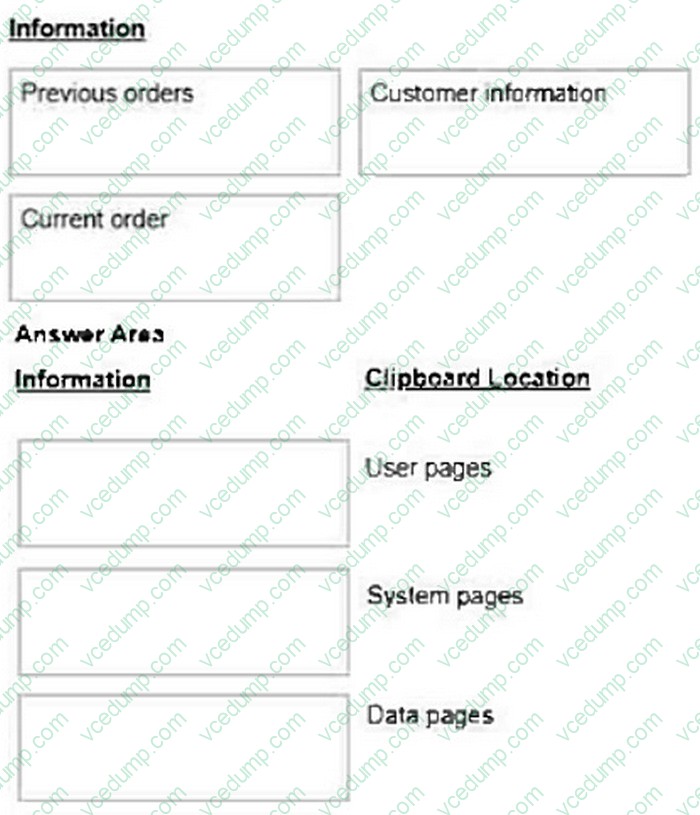
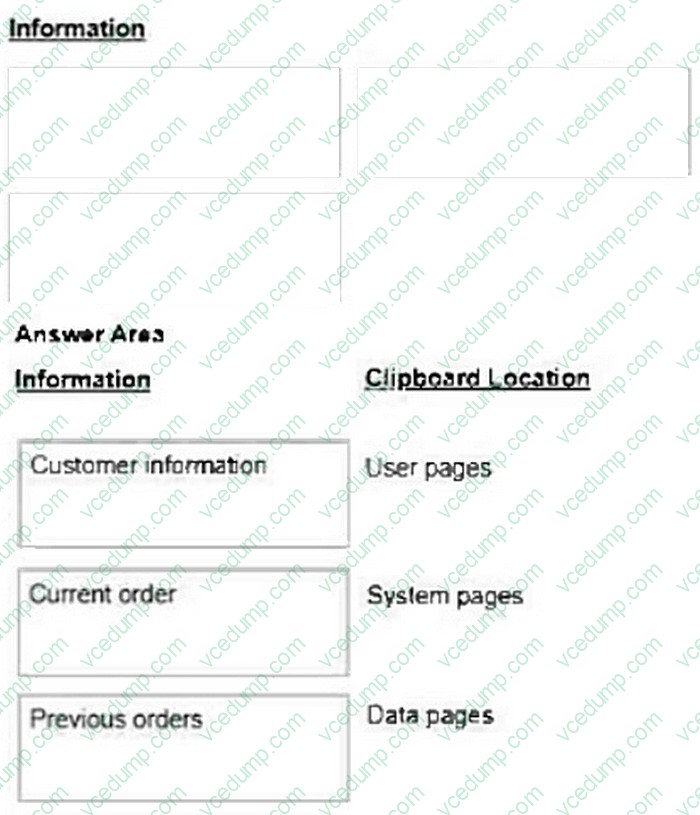
An organization requests the following behavior for a case type that allows customers to place orders for fulfillment.
1. The application identifies customer information, such as user ID and locale, upon login.
2. Cases list the last 10 orders placed by the customer, including the order status.
3. Customers can select one of the previous 10 orders as the basis for the current order.
Select each piece of Information on the left and drag it to the appropriate Clipboard Location.
Select and Place:
Explanation/Reference:
Customer information: This usually pertains to session-specific data that is relevant to the current user, such as user ID and locale. In Pega, this type of information is typically stored in user pages, which are clipboard pages that contain data related to the current user of the application. User pages are created for each session and include data that pertains to that particular user. Previous orders: These are typically a list of orders that are not specific to a session but need to be readily accessible and possibly shared across multiple sessions or users. In Pega, this kind of information is best stored in data pages. Data pages are used to hold data that is loaded once and can be used by multiple users, cases, or processes. They are efficient for data that doesn't change often and is required to be accessed frequently, such as a list of previous orders. Current order: This refers to the specific details of the order the customer is currently placing. It is specific to the user's current session and the case they are working on. Therefore, it should be stored in user pages, which are specific to an individual user session and can manage data related to the work they are currently performing. Pega's official documentation on Clipboard and Clipboard pages explains how data is categorized and managed within the application. Training materials from Pega Academy, which go into detail on the types of clipboard pages and their uses within a Pega application.
Question 160:
In the first step in a case type, the user compares data on a form to the data on a customer account. If the data matches, the case is resolved. If the data does not match, the user advances the case to update the account. Management only wants a record of the cases that update an account. What two configuration options do you use to implement this requirement ? (Choose Two)
A. Add a persist case shape after the first step. B. Configure the starting flow to instantiate the case type as a temporary case. C. Apply a when condition to the first step to persist only cases requiring updates. D. Configure the first step to instantiate the case type as a temporary case.
B. Configure the starting flow to instantiate the case type as a temporary case. C. Apply a when condition to the first step to persist only cases requiring updates.
Explanation/Reference:
To meet management's requirement to only record cases that update an account, configuring the case type to start as a temporary case is essential. This configuration prevents the case from being permanently stored unless specific conditions are met. Additionally, applying a when condition after the first step to check if the case requires updating and then persisting it only if true ensures that only relevant cases are saved. This approach maximizes efficiency and data relevance by only retaining records of cases that lead to account modifications.
Nowadays, the certification exams become more and more important and required by more and more
enterprises when applying for a job. But how to prepare for the exam effectively? How to prepare
for the exam in a short time with less efforts? How to get a ideal result and how to find the
most reliable resources? Here on Vcedump.com, you will find all the answers.
Vcedump.com provide not only Pegasystems exam questions,
answers and explanations but also complete assistance on your exam preparation and certification
application. If you are confused on your PEGACPSA23V1 exam preparations
and Pegasystems certification application, do not hesitate to visit our
Vcedump.com to find your solutions here.