NSE5_FMG-6.2 Exam Details
-
Exam Code
:NSE5_FMG-6.2 -
Exam Name
:Fortinet NSE 5 - FortiManager 6.2 -
Certification
:Fortinet Certifications -
Vendor
:Fortinet -
Total Questions
:58 Q&As -
Last Updated
:Oct 04, 2025
Fortinet NSE5_FMG-6.2 Online Questions & Answers
-
Question 51:
View the following exhibit.
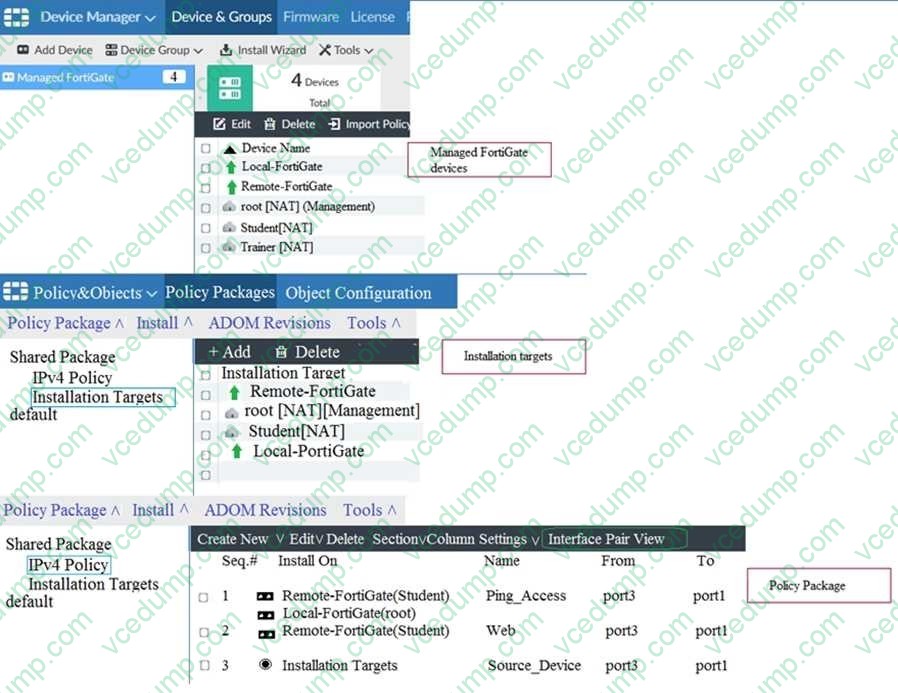
Which one of the following statements is true regarding installation targets in use Install On column?
A. The Install On column value represents successful installation on the managed devices
B. Policy seq=3 will be installed on all managed devices and VDOMs that are listed under Installation Targets
C. Policy seq=3 will be installed on the Trainer[NAT] VDOM only
D. Policy seq=3 will be not installed on any managed device -
Question 52:
Which two statements about Security Fabric integration with FortiManager are true? (Choose two.)
A. The Security Fabric license, group name and password are required for the FortiManager Security Fabric integration
B. The Fabric View module enables you to generate the Security Fabric ratings for Security Fabric devices
C. The Security Fabric settings are part of the device level settings
D. The Fabric View module enables you to view the Security Fabric ratings for Security Fabric devices -
Question 53:
Refer to the exhibit.
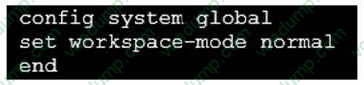
Given the configuration shown in the exhibit, which two statements are true? (Choose two.)
A. It allows two or more administrators to make configuration changes at the same time, in the same ADOM.
B. It disables concurrent read-write access to an ADOM.
C. It allows the same administrator to lock more than one ADOM at the same time.
D. It is used to validate administrator login attempts through external servers. -
Question 54:
Refer to the exhibit.

Which two statements about the output are true? (Choose two.)
A. The latest revision history for the managed FortiGate does match with the FortiGate running configuration
B. Configuration changes have been installed to FortiGate and represents FortiGate configuration has been changed
C. The latest history for the managed FortiGate does not match with the device-level database
D. Configuration changes directly made on the FortiGate have been automatically updated to device- level database -
Question 55:
An administrator's PC crashes before the administrator can submit a workflow session for approval. After the PC is restarted, the administrator notices that the ADOM was locked from the session before the crash. How can the administrator unlock the ADOM?
A. Restore the configuration from a previous backup.
B. Log in as Super_User in order to unlock the ADOM.
C. Log in using the same administrator account to unlock the ADOM.
D. Delete the previous admin session manually through the FortiManager GUI or CLI. -
Question 56:
An administrator has enabled Service Access on FortiManager. What is the purpose of Service Access on the FortiManager interface?
A. Allows FortiManager to download IPS packages
B. Allows FortiManager to respond to request for FortiGuard services from FortiGate devices
C. Allows FortiManager to run real-time debugs on the managed devices
D. Allows FortiManager to automatically configure a default route -
Question 57:
Refer to the exhibit.
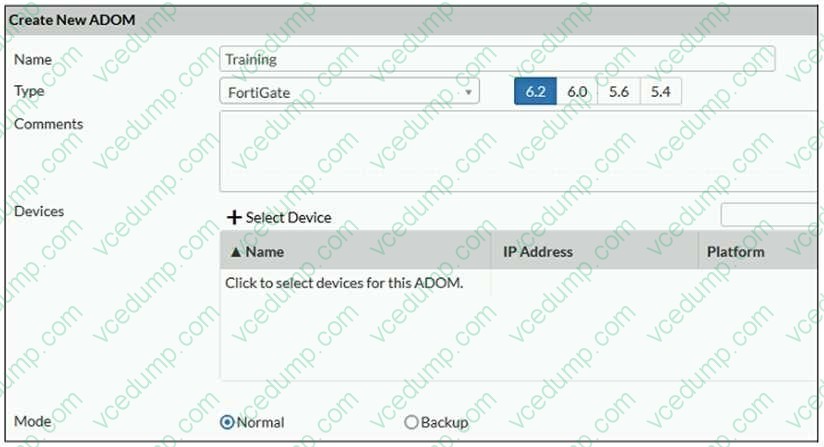
Which two statements about an ADOM set in Normal mode on FortiManager are true? (Choose two.)
A. It supports the FortiManager script feature
B. It allows making configuration changes for managed devices on FortiManager panes
C. FortiManager automatically installs the configuration difference in revisions on the managed FortiGate
D. You cannot assign the same ADOM to multiple administrators -
Question 58:
View the following exhibit.
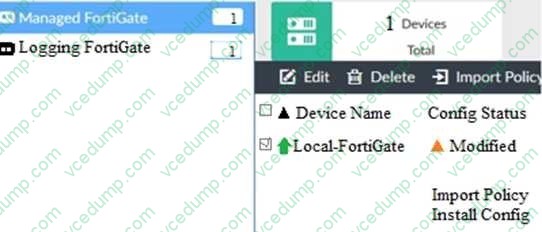
When using Install Config option to install configuration changes to managed FortiGate, which of the following statements are true? (Choose two.)
A. Once initiated, the install process cannot be canceled and changes will be installed on the managed device
B. Will not create new revision in the revision history
C. Installs device-level changes to FortiGate without launching the Install Wizard
D. Provides the option to preview configuration changes prior to installing them
Related Exams:
-
EMEA-ADVANCED-SUPPORT
Fortinet EMEA Advanced Support -
FCP_FAC_AD-6.5
FCP - FortiAuthenticator 6.5 Administrator -
FCP_FAZ_AD-7.4
FCP - FortiAnalyzer 7.4 Administrator -
FCP_FAZ_AN-7.4
FCP - FortiAnalyzer 7.4 Analyst -
FCP_FAZ_AN-7.6
Fortinet NSE 5 - FortiAnalyzer 7.6 Analyst -
FCP_FCT_AD-7.2
FCP - Forti Client EMS 7.2 Administrator -
FCP_FCT_AD-7.4
Fortinet NSE 6 - FortiClient EMS 7.4 Administrator -
FCP_FGT_AD-7.4
FCP - FortiGate 7.4 Administrator -
FCP_FGT_AD-7.6
FortiGate 7.6 Administrator FCP_FGT_AD-7.6 -
FCP_FMG_AD-7.4
FCP - FortiManager 7.4 Administrator
Tips on How to Prepare for the Exams
Nowadays, the certification exams become more and more important and required by more and more enterprises when applying for a job. But how to prepare for the exam effectively? How to prepare for the exam in a short time with less efforts? How to get a ideal result and how to find the most reliable resources? Here on Vcedump.com, you will find all the answers. Vcedump.com provide not only Fortinet exam questions, answers and explanations but also complete assistance on your exam preparation and certification application. If you are confused on your NSE5_FMG-6.2 exam preparations and Fortinet certification application, do not hesitate to visit our Vcedump.com to find your solutions here.