NSE5_FAZ-7.0 Exam Details
-
Exam Code
:NSE5_FAZ-7.0 -
Exam Name
:Fortinet NSE 5 - FortiAnalyzer 7.0 -
Certification
:Fortinet Certifications -
Vendor
:Fortinet -
Total Questions
:114 Q&As -
Last Updated
:Jul 09, 2026
Fortinet NSE5_FAZ-7.0 Online Questions & Answers
-
Question 51:
An administrator has configured the following settings:
config system fortiview settings set resolve-ip enable end
What is the significance of executing this command?
A. Use this command only if the source IP addresses are not resolved on FortiGate.
B. It resolves the source and destination IP addresses to a hostname in FortiView on FortiAnalyzer.
C. You must configure local DNS servers on FortiGate for this command to resolve IP addresses on Forti Analyzer.
D. It resolves the destination IP address to a hostname in FortiView on FortiAnalyzer. -
Question 52:
What is the best approach to handle a hard disk failure on a FortiAnalyzer that supports hardware RAID?
A. Hot swap the disk.
B. There is no need to do anything because the disk will self-recover.
C. Run execute format disk to format and restart the FortiAnalyzer device.
D. Shut down FortiAnalyzer and replace the disk -
Question 53:
An administrator fortinet, is able to view logs and perform device management tasks, such as adding and removing registered devices. However, administrator fortinet is not able to create a mall server that can be used to send email. What could be the problem?
A. Fortinet is assigned the Standard_ User administrator profile.
B. A trusted host is configured.
C. ADOM mode is configured with Advanced mode.
D. Fortinet is assigned the Restricted_ User administrator profile. -
Question 54:
Refer to the exhibits.
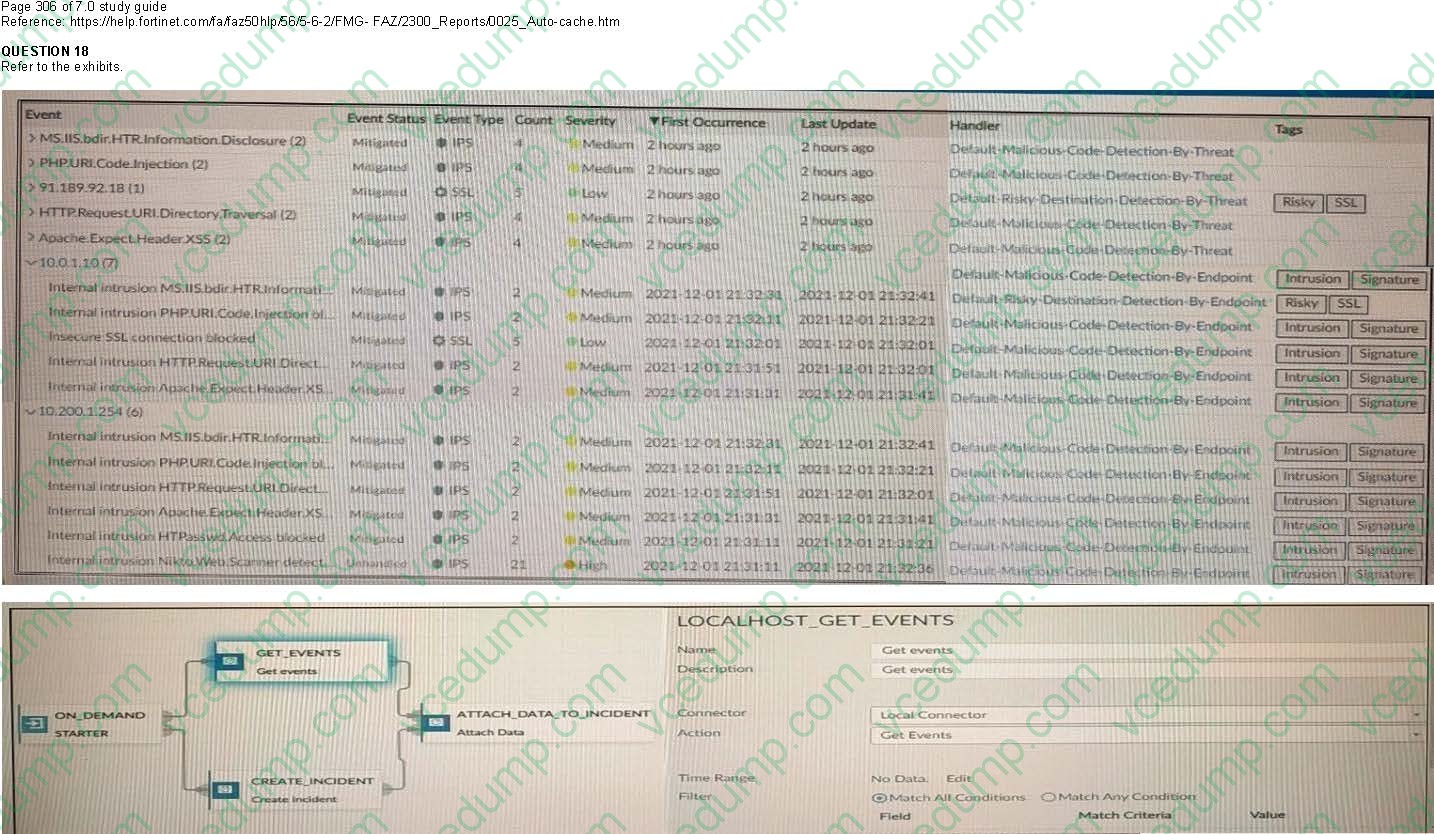
Page 306 of 7.0 study guide Reference: https://help.fortinet.com/fa/faz50hlp/56/5-6-2/FMG- FAZ/2300_Reports/0025_Auto-cache.htm
How many events will be added to the incident created after running this playbook?
A. Ten events will be added.
B. No events will be added.
C. Five events will be added.
D. Thirteen events will be added. -
Question 55:
Which tabs do not appear when FortiAnalyzer is operating in Collector mode?
A. FortiView
B. Event Management
C. Device Manger
D. Reporting -
Question 56:
Which two purposes does the auto cache setting on reports serve? (Choose two.)
A. It automatically updates the hcache when new logs arrive.
B. It provides diagnostics on report generation time.
C. It reduces the log insert lag rate.
D. It reduces report generation time. -
Question 57:
Which two statements are true regarding log fetching on FortiAnalyzer? (Choose two.)
A. Log fetching allows the administrator to fetch analytics logs from another FortiAnalyzer for redundancy.
B. A FortiAnalyzer device can perform either the fetch server or client role, and it can perform two roles at the same time with the same FortiAnalyzer devices at the other end.
C. Log fetching can be done only on two FortiAnalyzer devices that are running the same firmware version.
D. Log fetching allows the administrator to run queries and reports against historical data by retrieving archived logs from one FortiAnalyzer device and sending them to another FortiAnalyzer device. -
Question 58:
You crested a playbook on FortiAnalyzer that uses a FortiOS connector
When configuring the FortiGate side, which type of trigger must be used so that the actions in an automation stitch are available in the FortiOS connector?
A. FortiAnalyzer Event Handler
B. Incoming webhook
C. FortiOS Event Log
D. Fabric Connector event -
Question 59:
Which two methods can you use to send event notifications when an event occurs that matches a configured event handler? (Choose two.)
A. SMS
B. Email
C. SNMP
D. IM -
Question 60:
A rogue administrator was accessing FortiAnalyzer without permission, and you are tasked to see what activity was performed by that rogue administrator on FortiAnalyzer. What can you do on FortiAnalyzer to accomplish this?
A. Click FortiView and generate a report for that administrator.
B. Click Task Monitor and view the tasks performed by that administrator.
C. Click Log View and generate a report for that administrator.
D. View the tasks performed by the rogue administrator in Fabric View.
Related Exams:
-
EMEA-ADVANCED-SUPPORT
Fortinet EMEA Advanced Support -
FCP_FAC_AD-6.5
FCP - FortiAuthenticator 6.5 Administrator -
FCP_FAZ_AD-7.4
FCP - FortiAnalyzer 7.4 Administrator -
FCP_FAZ_AN-7.4
FCP - FortiAnalyzer 7.4 Analyst -
FCP_FAZ_AN-7.6
Fortinet NSE 5 - FortiAnalyzer 7.6 Analyst -
FCP_FCT_AD-7.2
FCP - Forti Client EMS 7.2 Administrator -
FCP_FCT_AD-7.4
Fortinet NSE 6 - FortiClient EMS 7.4 Administrator -
FCP_FGT_AD-7.4
FCP - FortiGate 7.4 Administrator -
FCP_FGT_AD-7.6
FortiGate 7.6 Administrator FCP_FGT_AD-7.6 -
FCP_FMG_AD-7.4
FCP - FortiManager 7.4 Administrator
Tips on How to Prepare for the Exams
Nowadays, the certification exams become more and more important and required by more and more enterprises when applying for a job. But how to prepare for the exam effectively? How to prepare for the exam in a short time with less efforts? How to get a ideal result and how to find the most reliable resources? Here on Vcedump.com, you will find all the answers. Vcedump.com provide not only Fortinet exam questions, answers and explanations but also complete assistance on your exam preparation and certification application. If you are confused on your NSE5_FAZ-7.0 exam preparations and Fortinet certification application, do not hesitate to visit our Vcedump.com to find your solutions here.