MS-900 Exam Details
-
Exam Code
:MS-900 -
Exam Name
:Microsoft 365 Fundamentals -
Certification
:Microsoft Certifications -
Vendor
:Microsoft -
Total Questions
:560 Q&As -
Last Updated
:May 31, 2026
Microsoft MS-900 Online Questions & Answers
-
Question 361:
HOTSPOT
A company is evaluating Microsoft 365.
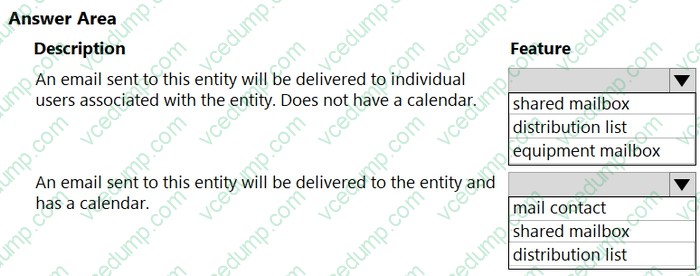
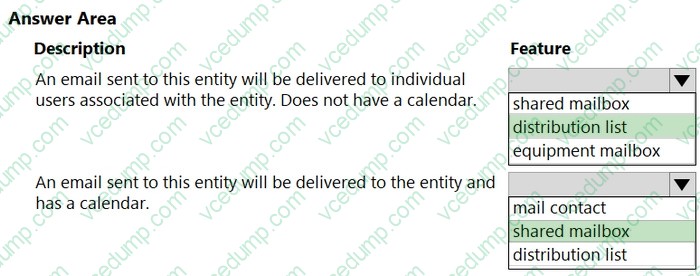
You need to identify the capabilities of Microsoft Exchange.
Which feature should you identify? To answer, select the appropriate options in the answer area.
NOTE: Each correct selection is worth one point.
-
Question 362:
A company plans to migrate to Microsoft 365.
Firstline employees need to be able to collaborate by using Microsoft Yammer, SharePoint Online, and Teams. You must minimize costs.
Which subscription type should you use?
A. E3
B. ProPlus
C. F3
D. Personal -
Question 363:
A company implements Microsoft 365.
The company needs to deploy Microsoft 365 Apps for enterprise to their client computers from the cloud.
You need to identify the solution that meets the requirement.
Which solution should you select?
A. Office Deployment Tool
B. Windows Update
C. Microsoft Remote Connectivity Analyzer
D. Microsoft FastTrack -
Question 364:
DRAG DROP
An organization is moving to Microsoft Azure and Microsoft 365.
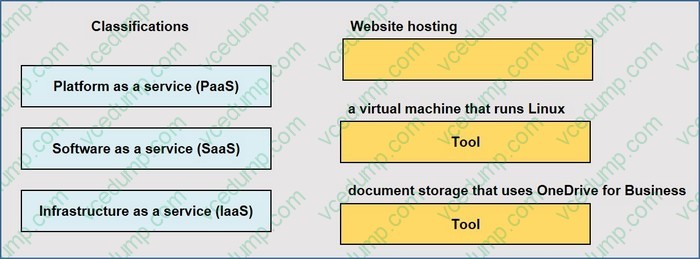
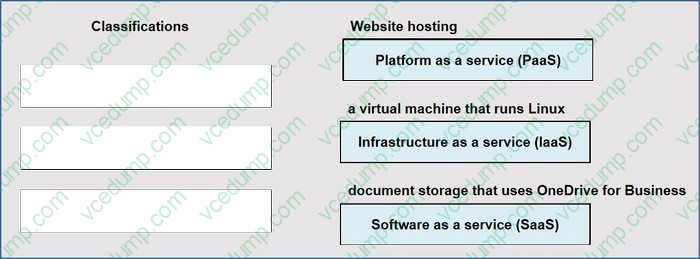
You need to classify the following components:
1. website hosting
2. a virtual machine that runs Linux
3. document storage that uses OneDrive for Business
Match each component to its classification. To answer, drag the appropriate components from the column on the left to its classifications on the right. Each component may be used once, more than once, or not at all.
NOTE: Each correct selection is worth one point.
Select and Place:
-
Question 365:
HOTSPOT
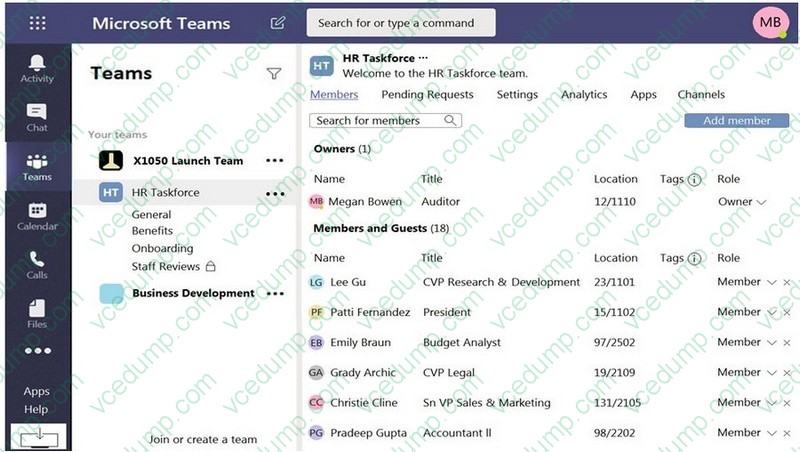
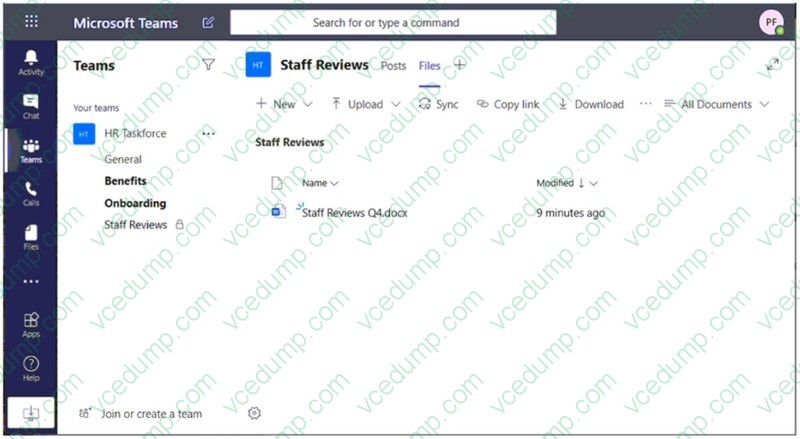
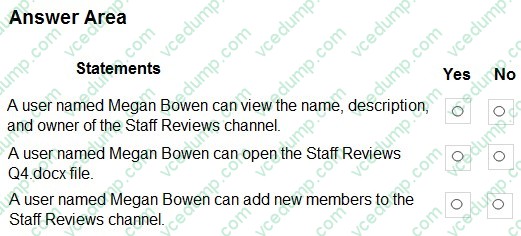
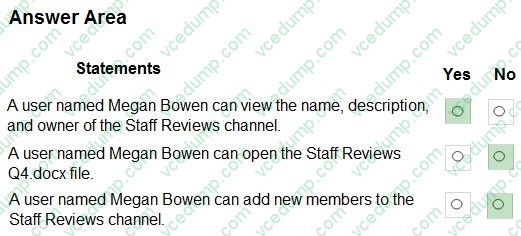
Your company has a Microsoft Teams deployment that contains a team named HR Taskforce. The members of HR Taskforce are shown in the HR Taskforce exhibit. (Click the HR Taskforce tab.)
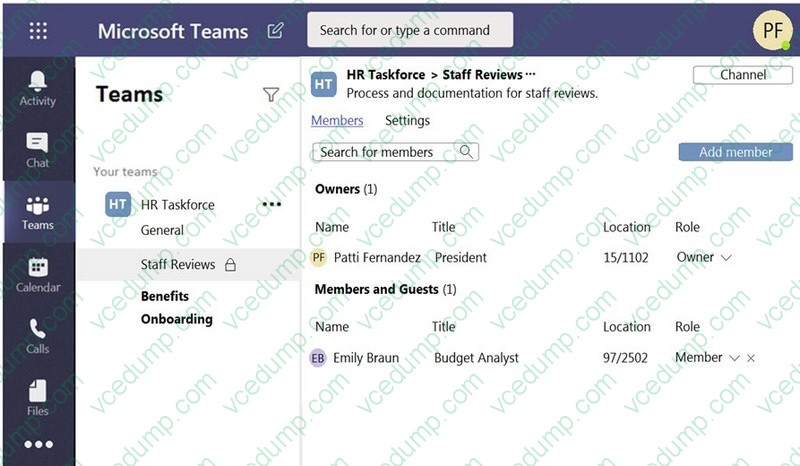
The members of a private channel named Staff Reviews are shown in the Members exhibit. (Click the Members tab.)
The files in the Staff Reviews channel are shown in the Files exhibit. (Click the Files tab.)
NOTE: Each correct selection is worth one point.
-
Question 366:
You are the Office 365 administrator for a company.
You encounter a problem in your tenant. You launch the Microsoft 365 admin center and select Create a new service request.
You need to get help resolving your problem through the admin center.
Which three actions can you perform from the admin center? Each correct answer presents a complete solution.
NOTE: Each correct selection is worth one point.
A. Receive a Microsoft technical support phone number to speak with a Microsoft support technician.
B. Request a Microsoft service technician to contact you by using email.
C. Use the query text box to type information about your problem and receive links to help documentation.
D. Schedule a time for a Microsoft service technician to call you.
E. Chat with a live Microsoft service engineer. -
Question 367:
HOTSPOT
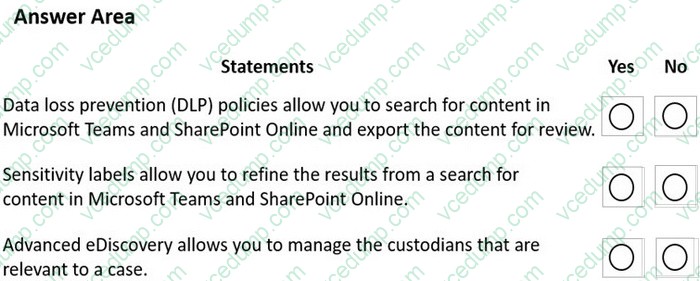
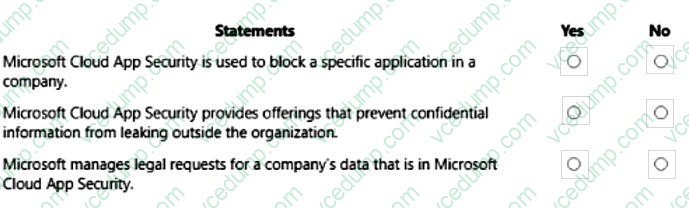
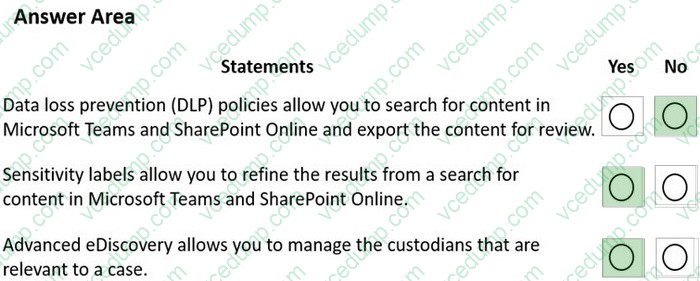
For each of the following statements, select Yes if the statement is true. Otherwise, select No.
NOTE: Each correct selection is worth one point.
-
Question 368:
An organization plans to deploy Microsoft Office 2019 or Office 365 ProPlus.
What are two advantages of Office 365 ProPlus? (Choose two.)
A. Features remain constant through the lifetime of the applications.
B. Office 365 ProPlus includes downgrade rights.
C. A single license may be deployed to multiple devices.
D. Fully functional Office mobile apps are free to install and use. -
Question 369:
DRAG DROP
A company uses Microsoft 365 and Windows 10.
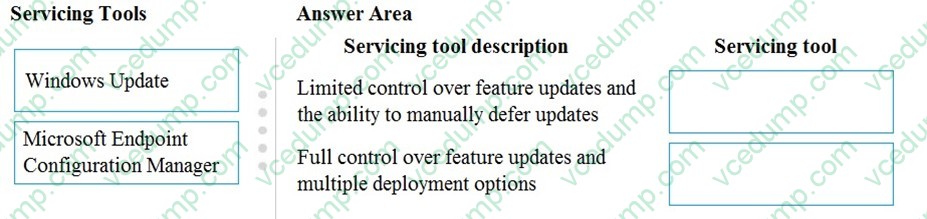
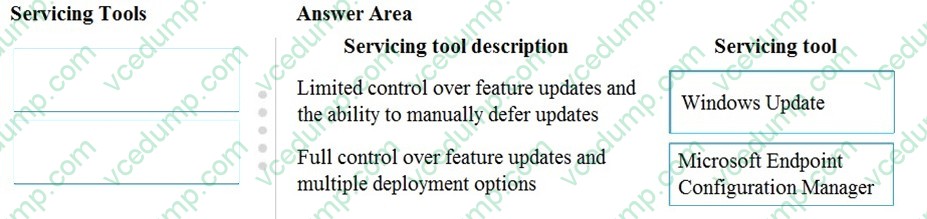
You need to identify which servicing tools the company should use for Windows 10.
Which servicing tool should you choose for each description? To answer, drag the appropriate servicing tools to the correct servicing tool descriptions. Each servicing tool may be used once, more than once, or not at all. You may need to drag the split bar between panes or scroll to view content.
NOTE: Each correct selection is worth one point.
Select and Place:
-
Question 370:
HOTSPOT
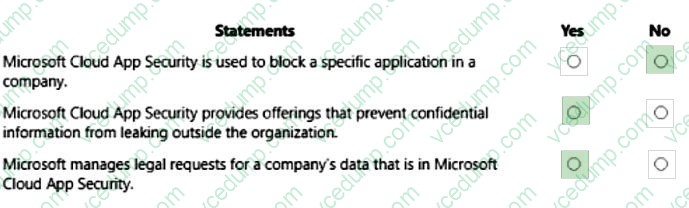
For each of the following statements, select Yes if the statement is true. Otherwise, select No.
NOTE: Each correct selection is worth one point.
Related Exams:
-
62-193
Technology Literacy for Educators -
70-243
Administering and Deploying System Center 2012 Configuration Manager -
70-355
Universal Windows Platform – App Data, Services, and Coding Patterns -
77-420
Excel 2013 -
77-427
Excel 2013 Expert Part One -
77-725
Word 2016 Core Document Creation, Collaboration and Communication -
77-726
Word 2016 Expert Creating Documents for Effective Communication -
77-727
Excel 2016 Core Data Analysis, Manipulation, and Presentation -
77-728
Excel 2016 Expert: Interpreting Data for Insights -
77-731
Outlook 2016 Core Communication, Collaboration and Email Skills
Tips on How to Prepare for the Exams
Nowadays, the certification exams become more and more important and required by more and more enterprises when applying for a job. But how to prepare for the exam effectively? How to prepare for the exam in a short time with less efforts? How to get a ideal result and how to find the most reliable resources? Here on Vcedump.com, you will find all the answers. Vcedump.com provide not only Microsoft exam questions, answers and explanations but also complete assistance on your exam preparation and certification application. If you are confused on your MS-900 exam preparations and Microsoft certification application, do not hesitate to visit our Vcedump.com to find your solutions here.