MS-700 Exam Details
-
Exam Code
:MS-700 -
Exam Name
:Managing Microsoft Teams -
Certification
:Microsoft Certifications -
Vendor
:Microsoft -
Total Questions
:553 Q&As -
Last Updated
:Jul 12, 2026
Microsoft MS-700 Online Questions & Answers
-
Question 511:
You have a Microsoft 365 E3 subscription.
You have a conference room that contains a Teams Rooms device named Device1.
Device1 is assigned a Teams Rooms Basic license.
You need to ensure that you can restart Device1 from a remote location.
What should you do?
A. Assign Device1 a Teams Rooms Pro license.
B. Assign Device1 a Microsoft 365 E5 license.
C. Enroll Device1 in Microsoft Intune.
D. Join Device1 to Microsoft Entra. -
Question 512:
SIMULATION
Please wait while the virtual machine loads. Once loaded, you may proceed to the lab section. This may take a few minutes, and the wait time will not be deducted from your overall test time.
When the Next button is available, click it to access the lab section. In this section, you will perform a set of tasks in a live environment. While most functionality will be available to you as it would be in a live environment, some functionality (e.g. copy and paste, ability to navigate to external websites) will not be possible by design.
Scoring is based on the outcome of performing the tasks stated in the lab. In other words, it doesn't matter how you accomplish the task, if you successfully perform it, you will earn credit for that task.
Labs are not timed separately, and this exam may have more than one lab that you must complete. You can use as much time as you would like to complete each lab. But you should manage your time appropriately to ensure that you are able to complete the lab(s) and all other sections of the exam in the time provided.
Please not that once you submit your work by clicking the Next button within a lab, you will NOT be able to return to the lab.
You may now click next to proceed to the lab.
Username and password.
Use the following login credentials as needed:
To enter your username, place your cursor in the Sign in box and click on the username below.
To enter your password, place your cursor in the Enter password box and click on the password below.
Microsoft 365 Username:
[email protected] Microsoft 365 Password: XXXXXXXXXXXX
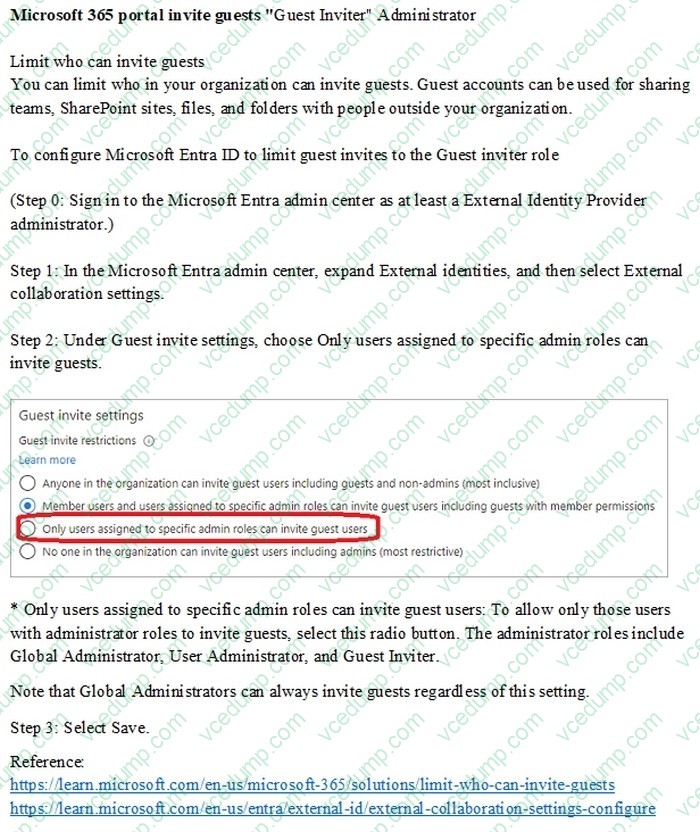
You need to ensure that only users that are assigned the Global Administrator, User Administrator, or Guest Inviter roles can invite guest users to your company's tenant.
To complete this task, sign in to the Microsoft 365 portal.
A. Check the answer in explanation.
B. PlaceHolder
C. PlaceHolder
D. PlaceHolder -
Question 513:
HOTSPOT
You have a Microsoft 365 E5 subscription.
You purchase a new Teams Rooms device.
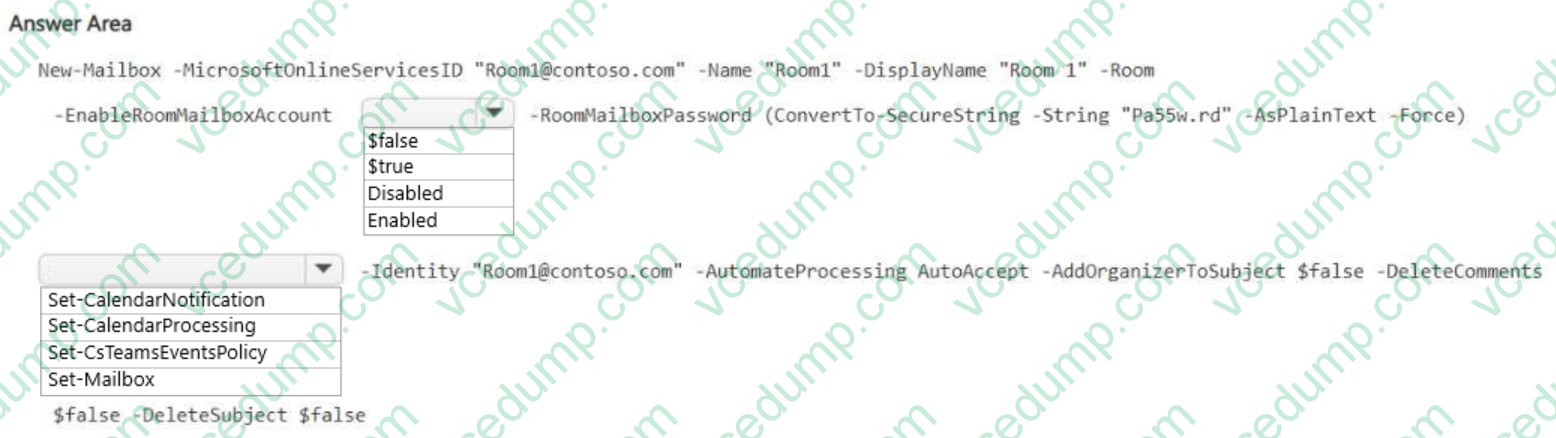
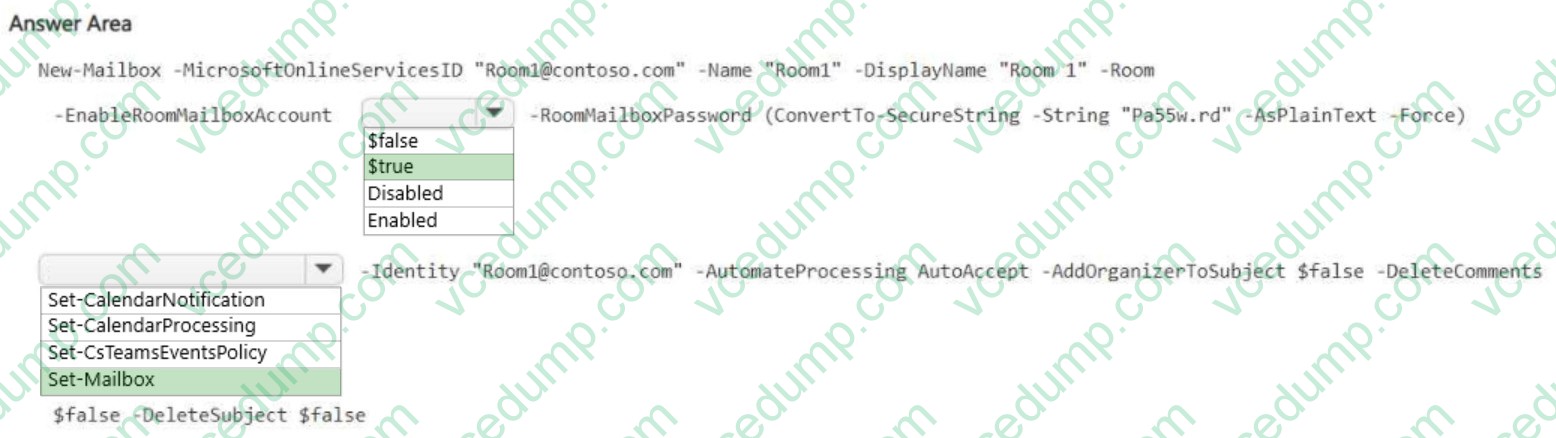
You need to create a Microsoft 365 resource account named Room1 for the device. The solution must ensure that Room1 automatically accepts meeting invitations.
How should you complete the PowerShell command? To answer, select the appropriate options in the answer area.
NOTE: Each correct selection is worth one point.
-
Question 514:
You need to configure the environment to meet the device requirements for the Microsoft Teams phones.
What should you do from the Microsoft Teams admin center?
A. Create a configuration profile
B. Modify the Teams settings
C. Create a meeting policy
D. Create a calling policy -
Question 515:
What should you create to meet the meeting requirements for the R&D department?
A. a meeting policy
B. a team policy
C. a data loss prevention (DLP) policy
D. an app setup policy -
Question 516:
You have a Microsoft 365 subscription that uses Microsoft Teams.
You feed 10 identify which teams were inactive during the past 90 days.
What should you use?
A. Teams advisor
B. the Office 365 Groups activity report
C. the Teams user activity report
D. the Teams usage report -
Question 517:
Note: This question is part of a series of questions that present the same scenario. Each question in the series contains a unique solution that might meet the stated goals. Some question sets might have more than one correct solution, while others might not have a correct solution.
After you answer a question in this section, you will NOT be able to return to it. As a result, these questions will not appear in the review screen.
Your company has a Microsoft 365 subscription.
You plan to configure the environment to allow external users to collaborate in Microsoft Teams by using guest access.
The company implements a new security policy that has the following requirements:
1. Only guest users from specific domains must be allowed to connect to collaborate by using Microsoft Teams.
2. Guest users must be prevented from inviting other guests.
You need to recommend a solution to meet the security policy requirements.
Solution: From PowerShell, you run the New-CSExternalAccessPolicy and Set-CSExternalAccessPolicy cmdlets.
Does this meet the goal?
A. Yes
B. No -
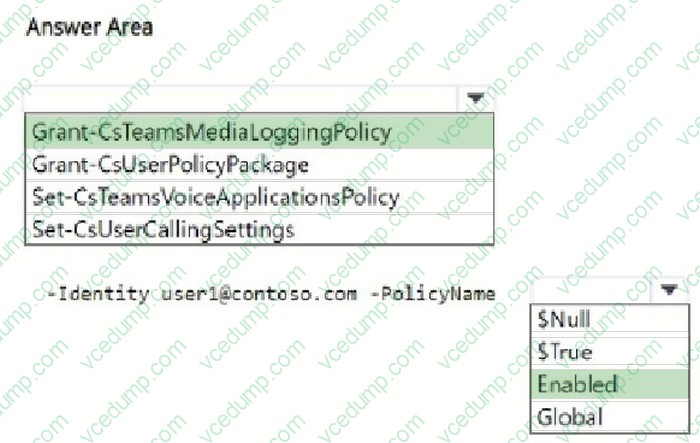
Question 518:
HOTSPOT
You have a Microsoft 365 E5 subscription and use Microsoft Teams.
A user named User1 reports that when they use a new headset during meetings, the audio cuts in and out.
You instruct User1 to collect support files from their Teams client.
You discover that the audio debugging files are missing from the support files.
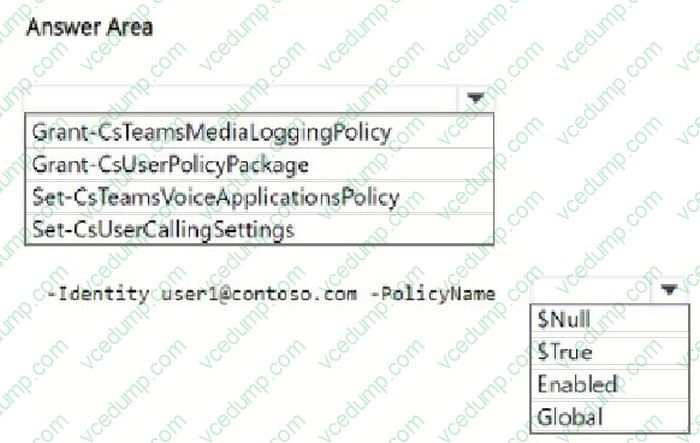
You need to ensure that User1 can collect the correct support files.
How should you complete the PowerShell command? To answer, select the appropriate options in the answer area. NOTE: Each correct selection is worth one point.
-
Question 519:
You need to ensure that file sharing during Teams chats meets the technical requirements of the marketing department.
What should you do?
A. Create a retention policy for the SharePoint sites location.
B. Enable Customer Lockbox.
C. Create a retention policy for Teams chats.
D. Create a data loss prevention (DLP) policy for Teams chat and channel messages.
E. Create a retention policy for the OneDrive accounts location. -
Question 520:
You have a Teams deployment.
From Microsoft Call Quality Dashboard, you discover that internal calls are marked as outside.
You need to ensure that inside and outside calls are reported correctly.
What should you configure?
A. Tenant Data Upload
B. Roaming policies under Network topology
C. Network sites under Network topology
D. Trusted IPs under Network topology
E. Voice routing policies
Related Exams:
-
62-193
Technology Literacy for Educators -
70-243
Administering and Deploying System Center 2012 Configuration Manager -
70-355
Universal Windows Platform – App Data, Services, and Coding Patterns -
77-420
Excel 2013 -
77-427
Excel 2013 Expert Part One -
77-725
Word 2016 Core Document Creation, Collaboration and Communication -
77-726
Word 2016 Expert Creating Documents for Effective Communication -
77-727
Excel 2016 Core Data Analysis, Manipulation, and Presentation -
77-728
Excel 2016 Expert: Interpreting Data for Insights -
77-731
Outlook 2016 Core Communication, Collaboration and Email Skills
Tips on How to Prepare for the Exams
Nowadays, the certification exams become more and more important and required by more and more enterprises when applying for a job. But how to prepare for the exam effectively? How to prepare for the exam in a short time with less efforts? How to get a ideal result and how to find the most reliable resources? Here on Vcedump.com, you will find all the answers. Vcedump.com provide not only Microsoft exam questions, answers and explanations but also complete assistance on your exam preparation and certification application. If you are confused on your MS-700 exam preparations and Microsoft certification application, do not hesitate to visit our Vcedump.com to find your solutions here.