MS-203 Real Exam Questions

Microsoft 365 Messaging

467 questions available · Page 1 of 47

Updated Exam DumpsVerified AnswersPass Guarantee

Get Complete Exam Dumps
Case Study 4

Overview

Company Information

ADatum Corporation is a consulting company that has a main office in Montreal.

ADatum has a Microsoft 365 E5 tenant named adatum.com and uses Microsoft Exchange Online for messaging services.

Existing Environment

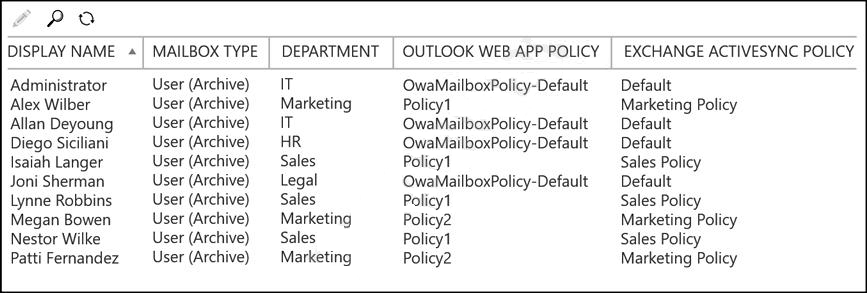
Mailboxes
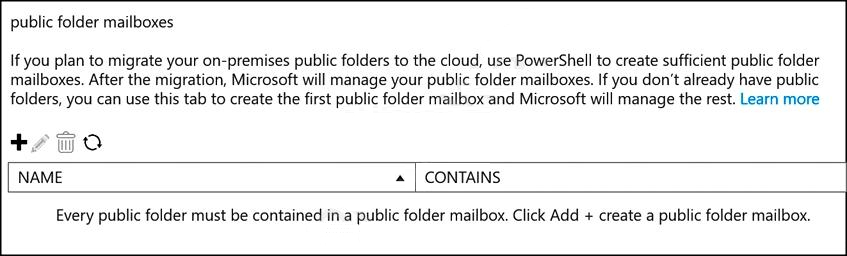
Public Folder Mailboxes
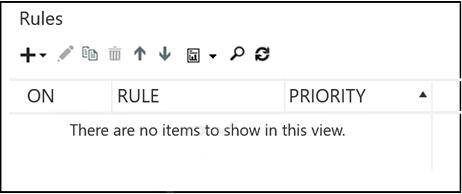
Rules
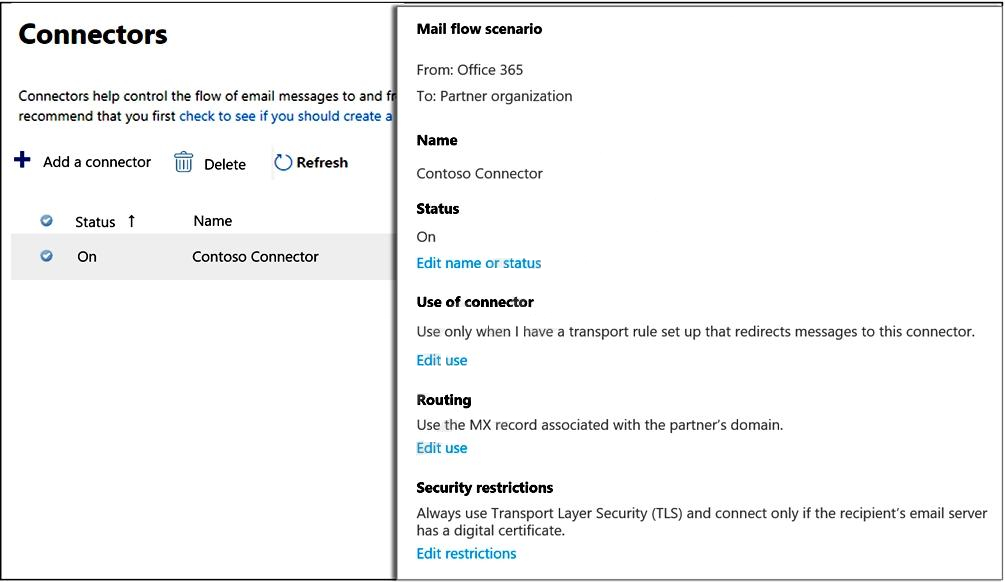
Connectors
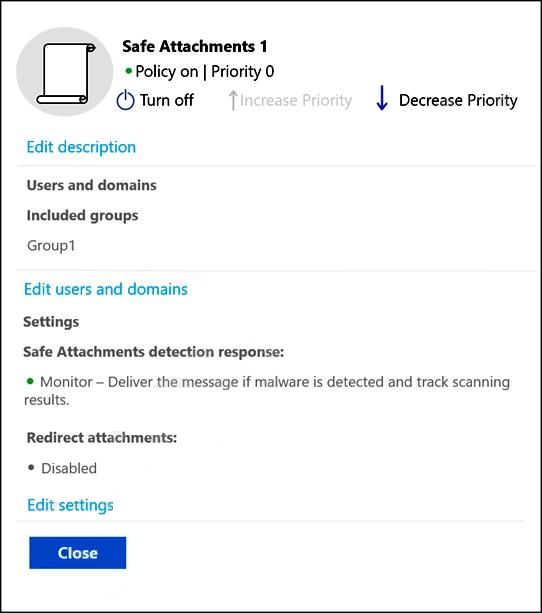
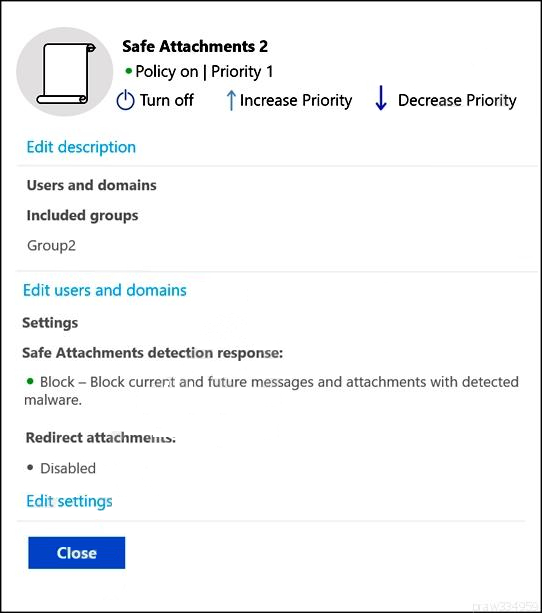
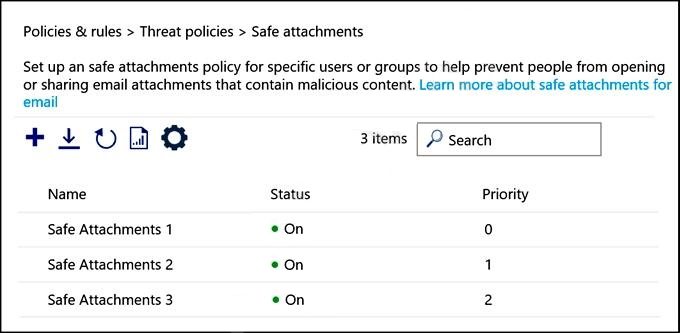
Safe Attachments Policies
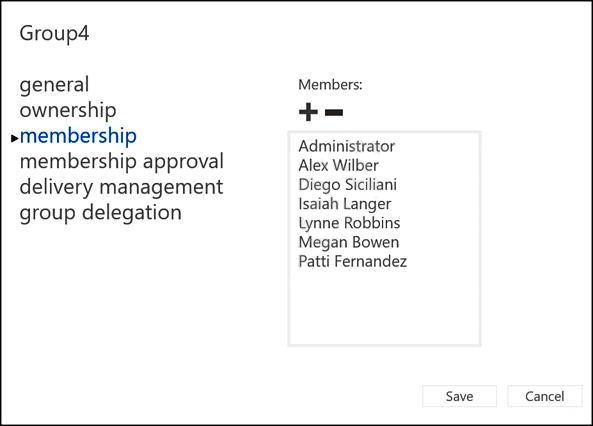
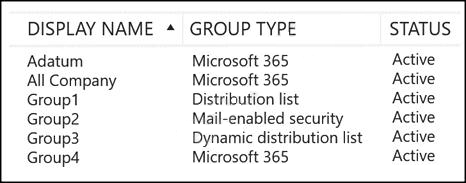
Groups
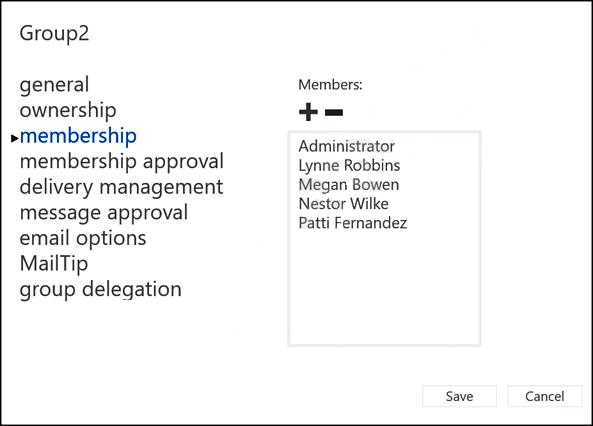
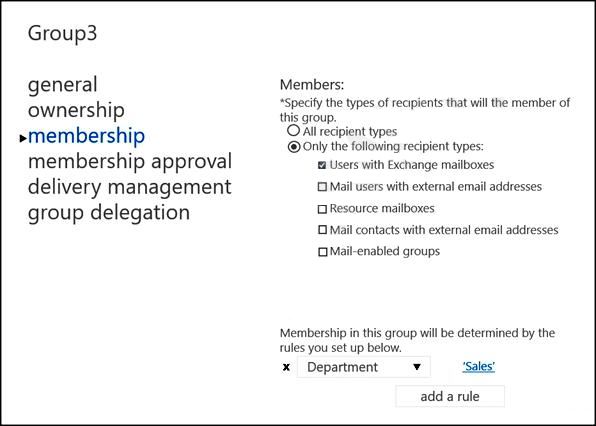
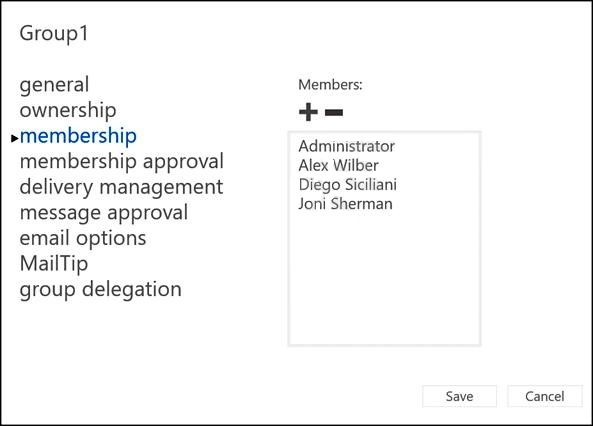
Group Membership
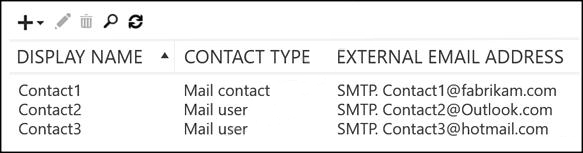
Contacts
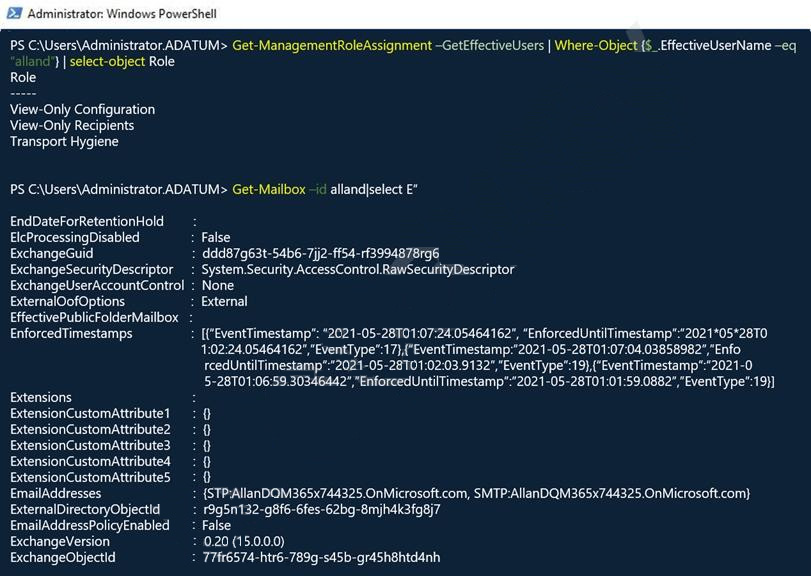
Allan Deyoung Role Assignments and Mailbox Details
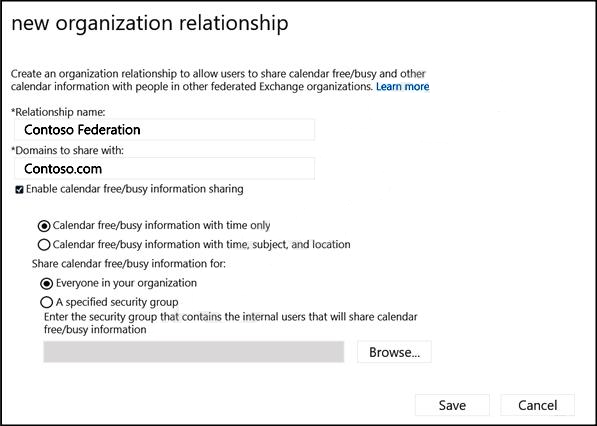
Organization Sharing
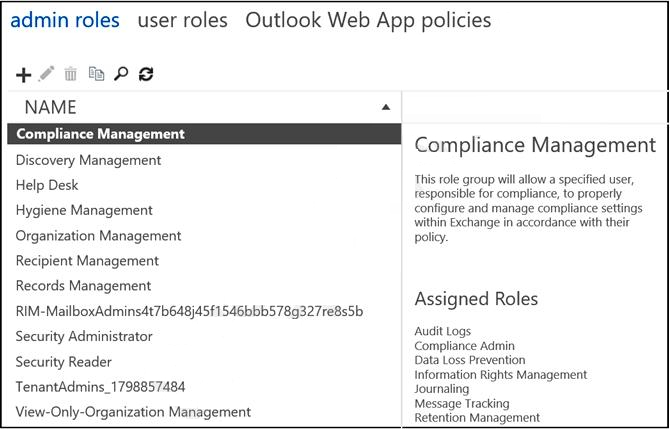
Roles
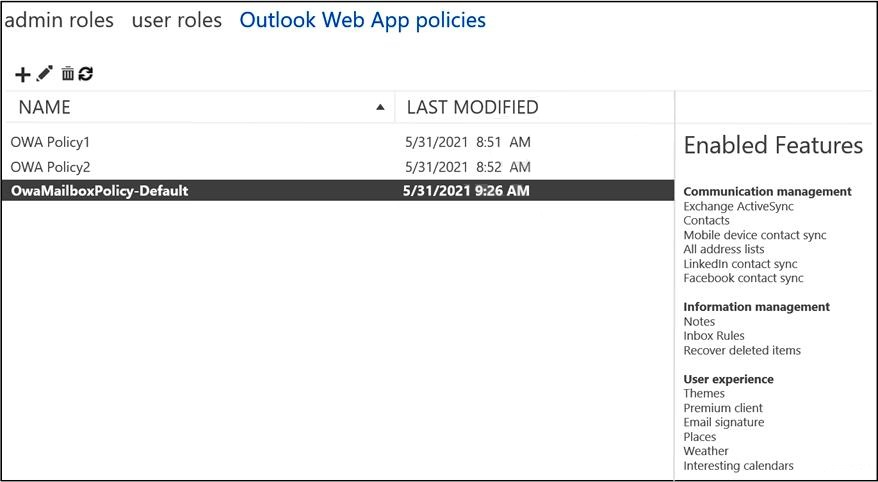
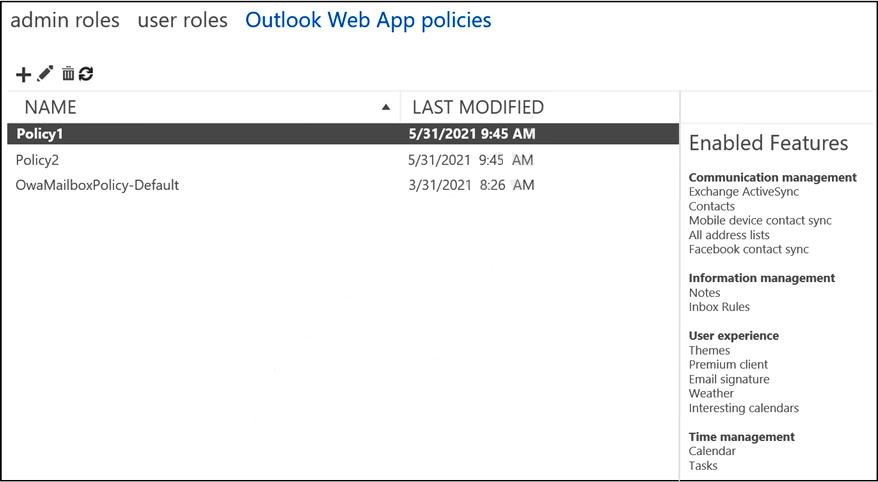
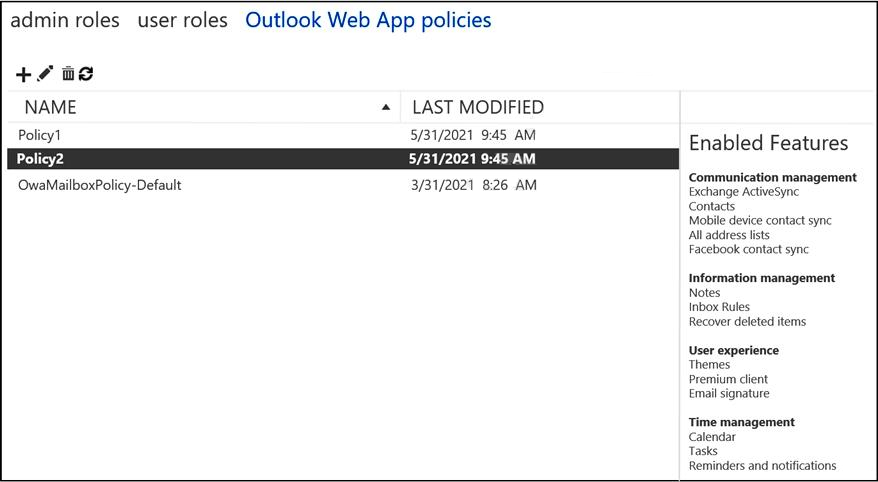
Outlook Web App Policies
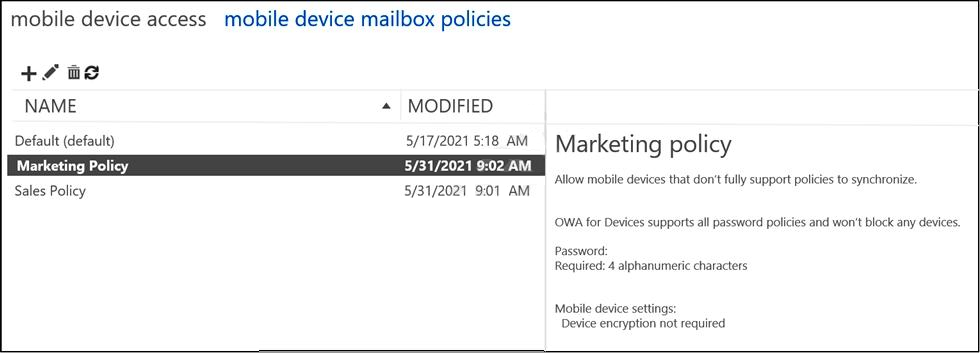
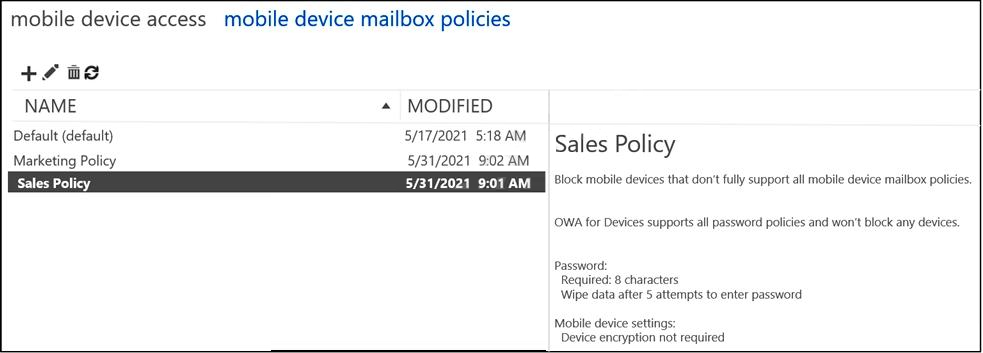
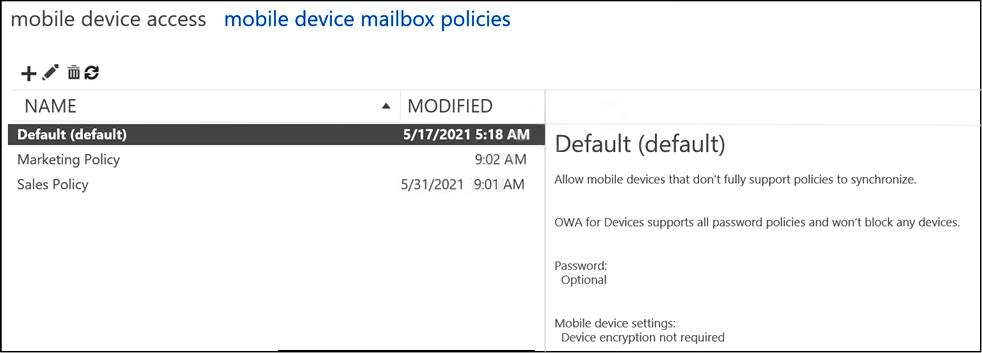
Mobile Device Mailbox Policies
Question 1 Single choice

You have a Microsoft 365 subscription that contains a sensitivity label named Confidential and a data loss prevention (DLP) policy named Policy1. Policy1 contains a rule named Rule1. Policy1 is applied to the Exchange email location. Rule1 is configured as shown in the following table.
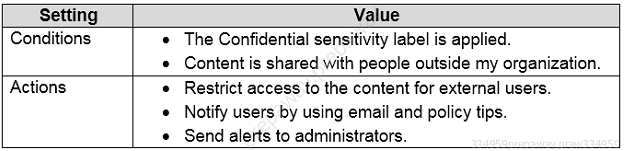
You need to ensure that when a user applies the Confidential sensitivity label to an email and sends the email to an external recipient, the message is forwarded to the user's manager for approval.

What should you do?

  1. A

    Modify the protection settings of the Confidential sensitivity label.

  2. B

    Add a user override to Rule1.

  3. C

    Add an action to Rule1.

  4. D

    Modify the policy settings of the Confidential sensitivity label policy.

Show answer and explanation

Correct answer: C

Explanation

Data loss prevention (DLP) helps you prevent the unintentional or accidental sharing of sensitive information.

DLP examines email messages and files for sensitive information, like a credit card number. Using DLP you can detect sensitive information, and take action.

When editing a rule within a DLP policy, you can change:
1. The actions that are taken, such as restricting access to the content.
2. Etc.

Actions included in the DLP policy tips: Forward the message for approval to sender's manager.

References:
https://docs.microsoft.com/en-us/microsoft-365/compliance/dlp-policy-reference
https://docs.microsoft.com/en-us/microsoft-365/compliance/dlp-policy-tips-reference
Question 2 Hotspot

HOTSPOT

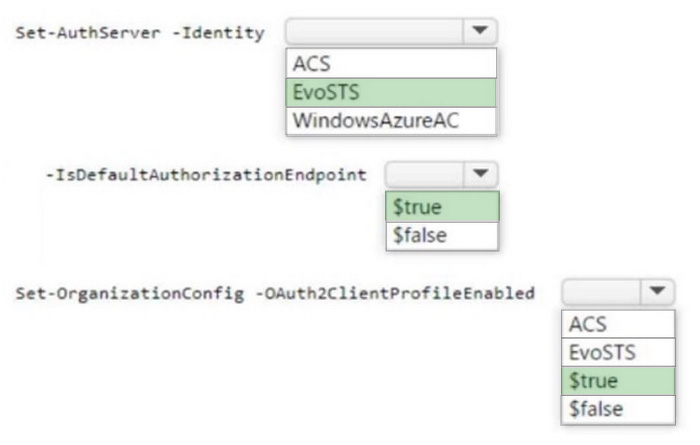
You have a Microsoft Exchange Server 2019 hybrid deployment.

You need to configure Hybrid Modern Authentication (HMA).

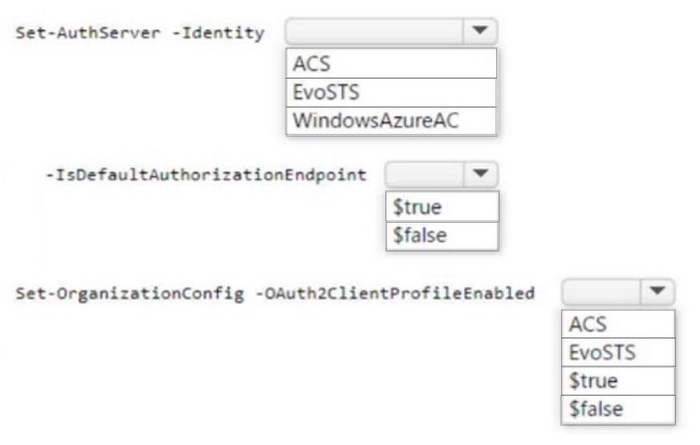
How should you complete the PowerShell commands? To answer, select the appropriate options in the answer area.

NOTE: Each correct selection is worth one point.

Question diagram
Show answer and explanation
Correct answer diagram
Explanation

Box 1: EvoSTS
Enable HMA
Run the following command in the Exchange Management Shell, on-premises, replacing <GUID> in the command line with the string in your environment:

Set-AuthServer -Identity "EvoSTS - <GUID>" -IsDefaultAuthorizationEndpoint $true
Set-OrganizationConfig -OAuth2ClientProfileEnabled $true

Box 2: $true

Box 3: $true

References:
https://docs.microsoft.com/en-us/microsoft-365/enterprise/configure-exchange-server-for-hybrid-modern-authentication?view=o365-worldwide

Question 3 Single choice

You recently migrated all the on-premises mailboxes from Microsoft Exchange Server 2019 to Exchange Online.

You decommission the on-premises Exchange Server 2019 servers.

The finance department at your company reports that email delivery from several printers fails after Exchange Server 2019 is decommissioned.

You need to ensure that the printers can deliver email successfully to the users in the finance department.

What should you do?

  1. A

    Create a resource mailbox for each printer.

  2. B

    Create an Inbound connector that has certificate validation disabled.

  3. C

    Create an Inbound connector that is configured to allow SMTP relay.

  4. D

    Create an Office 365 group for each printer.

Show answer and explanation

Correct answer: C

Explanation

References:
https://docs.microsoft.com/en-us/exchange/mail-flow-best-practices/use-connectors-to-configure-mail-flow/
use-connectors-to-configure-mail-flow

Question 4 Single choice

You manage a Microsoft Exchange Server 2019 organization that contains several thousand users.

All the users connect to their mailbox by using a mobile device and Exchange ActiveSync.

You need to prevent the users from syncing email messages that are older than 14 days to the mobile devices.

What should you use?

  1. A

    an Outlook Web App mailbox policy

  2. B

    a mobile device mailbox policy

  3. C

    an ActiveSync device access rule

  4. D

    a conditional access policy

Show answer and explanation

Correct answer: B

Explanation

References:
https://docs.microsoft.com/en-us/exchange/clients/exchange-activesync/mobile-device-mailbox-policies?view=exchserver-2019

Question 5 Single choice

You have a Microsoft Exchange Online tenant that contains a public folder named CustomerSupport.

You need to access CustomerSupport by using Outlook on the web.

Which section in Outlook on the web should you add CustomerSupport?

  1. A

    Favorites

  2. B

    Folders

  3. C

    Groups

Show answer and explanation

Correct answer: B

Explanation

To access the CustomerSupport public folder in Outlook on the web, you should go to the Folders section in Outlook on the web. The public folders are stored in the Folders section, along with the user's other mailbox folders. You can expand the Public Folders section to view the available public folders, and then select the CustomerSupport public folder to access it.

Question 6 Single choice

You have a Microsoft Exchange Online tenant that uses an email domain named contoso.com.

Your company has a partnership with another company named fabrikam.com.

You need to ensure that all email messages sent to and received by the users at fabrikam.com are encrypted by using TLS.

What should you create in the Exchange admin center?

  1. A

    one connector and one remote domain

  2. B

    one remote domain and one accepted domain

  3. C

    one connector and one accepted domain

  4. D

    two connectors

Show answer and explanation

Correct answer: D

Explanation

References:
https://docs.microsoft.com/en-us/exchange/mail-flow-best-practices/use-connectors-to-configure-mail-flow/
setup-connectors-for-secure-mail-flow-with-a-partner

Question 7 Single choice

Your company has an Exchange Server 2019 organization that has servers deployed in two Active Directory forests named adatum.com and contoso.com The organization contains five Mailbox servers and two Edge Transport servers. You deploy Microsoft 365 and configure Exchange Online.

You plan to configure hybrid mail transport.

You need to identify the number of third-party CA certificates that must be used in the deployment.

What is the minimum number of certificates?

  1. A

    1

  2. B

    2

  3. C

    4

  4. D

    5

Show answer and explanation

Correct answer: A

Question 8 Single choice

Lynne Robbins and the users in the sales department plan to collaborate on a project with a partner company named Contoso, Ltd. that has an email domain named contoso.com.

You need to ensure that only the sales department users can share all their calendar free/busy information with the users in contoso.com.

How should you configure the organization relationship?

  1. A

    Select Calendar free/busy information with time only and enter Group1.

  2. B

    Select Calendar free/busy information with time, subject, and location and enter Group2.

  3. C

    Select Calendar free/busy information with time, subject, and location and enter Group3.

  4. D

    Select Calendar free/busy information with time only and enter Group3.

  5. E

    Select Calendar free/busy information with time only and enter Group2.

Show answer and explanation

Correct answer: C

Explanation

References:
https://docs.microsoft.com/en-us/exchange/sharing/organization-relationships/create-an-organization-relationship

Question 9 Hotspot

HOTSPOT

You have a Microsoft Exchange Online tenant named contoso.com that contains a resource mailbox

named Room1.

You need to configure Room1 to send the following automatic response message: "Thanks for the meeting invite."

How should you complete the command? To answer, select the appropriate options in the answer area.

NOTE: Each correct selection is worth one point.

Question diagram
Show answer and explanation
Correct answer diagram
Explanation

Box 1: Set-CalendarProcessing

Set-CalendarProcessing Applies to:
Exchange Server 2010, Exchange Server 2013, Exchange Server 2016, Exchange Server 2019, Exchange Online, Exchange Online Protection

This cmdlet is available in on-premises Exchange and in the cloud-based service. Some parameters and settings may be exclusive to one environment or the other.

Use the Set-CalendarProcessing cmdlet to modify calendar processing options for resource mailboxes, which include the Calendar Attendant, resource booking assistant, and calendar configuration. Note that this cmdlet is effective only on resource mailboxes.

Box 2: -AddAdditionalResponse
Parameters
-AddAdditionalResponse
The AddAdditionalResponse parameter specifies whether additional information (the value of the AdditionalResponse parameter) is added to meeting request responses. Valid values are:

$true: Text from the AdditionalResponse parameter is added to meeting request responses.
$false: No additional text is added to meeting request responses (any text in the AddAdditionalResponse parameter isn't used). This is the default value.

The following example sets the properties for the ConferenceRoom01 resource account:

Set-CalendarProcessing -Identity "ConferenceRoom01" -AutomateProcessing AutoAccept -
AddOrganizerToSubject $false -DeleteComments $false -DeleteSubject $false -
ProcessExternalMeetingMessages $true -RemovePrivateProperty $false -AddAdditionalResponse $true -
AdditionalResponse "This is a Microsoft Teams Meeting room!

References:
https://learn.microsoft.com/en-us/powershell/module/exchange/set-calendarprocessing
https://learn.microsoft.com/en-us/microsoftteams/hybrid-meetings-device-config-mailbox

Question 10 Single choice

You have a Microsoft Exchange Online tenant that contains a user named User1.

You need to ensure that User1 can manage global address lists (GALs) in Exchange Online. The solution must minimize administrative effort.

What should you do?

  1. A

    Copy the Help Desk role group and add the Organization Configuration role group and User1 to the copy of the group.

  2. B

    Create a new role assignment policy and assign the policy to User1.

  3. C

    Create a custom role group, modify the permissions of the role group, and add User1 to the group.

  4. D

    Add User1 to the Organization Management role group.

Show answer and explanation

Correct answer: D

Explanation

Organization Management Role Group
Members have administrative access to the entire Exchange Online organization and can perform almost any task in Exchange Online.
By default, the following management roles are not assigned to any role group, including Organization Management:

Address Lists
Mailbox Import Export

Etc.

Note: Permissions in Exchange Online Exchange Online in Microsoft 365 and Office 365 includes a large set of predefined permissions, based on the Role Based Access Control (RBAC) permissions model, which you can use right away to easily grant permissions to your administrators and users. You can use the permissions features in Exchange Online so that you can get your new organization up and running quickly.

Incorrect:
Not A:
Help Desk role group
Members can view and manage the configuration for individual recipients and view recipients in an Exchange organization. Members of this role group can only manage the configuration each user can manage on their own mailbox.

Reset Password
User Options
View-Only Recipients

References:
https://learn.microsoft.com/en-us/exchange/permissions-exo/permissions-exo