JN0-643 Exam Details

  • Exam Code
    :JN0-643
  • Exam Name
    :Enterprise Routing and Switching, Professional (JNCIP-ENT)
  • Certification
    :Juniper Certifications
  • Vendor
    :Juniper
  • Total Questions
    :287 Q&As
  • Last Updated
    :Jul 11, 2026

Juniper JN0-643 Online Questions & Answers

  • Question 1:

    -- Exhibit -MSTP information Context identifier : 0 Region name : Juniper Revision : 1 Configuration digest : 0xfdbe318c0ae799ae6dfdae4c882c67ee

    MSTI Member VLANs 0 0,4-4094 1 1-3 -- Exhibit -

    Click the Exhibit button.

    A network engineer has configured MSTP on several switches for loop protection. You must verify the work and ensure that the appropriate parameters match on all switches.

    Which operational command provides the required output shown in the exhibit?

    A. show spanning-tree interface
    B. show spanning-tree mstp configuration
    C. show spanning-tree bridge
    D. show ethernet-switching interfaces

  • Question 2:

    -- Exhibit

    -- Exhibit -

    Click the Exhibit button.

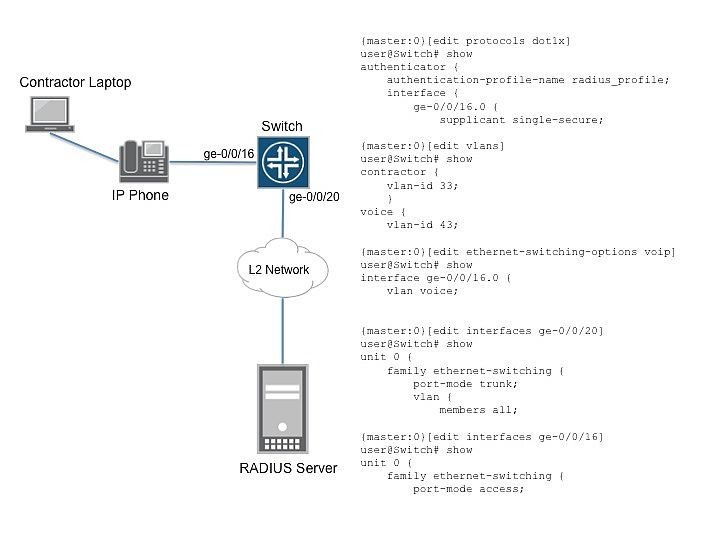
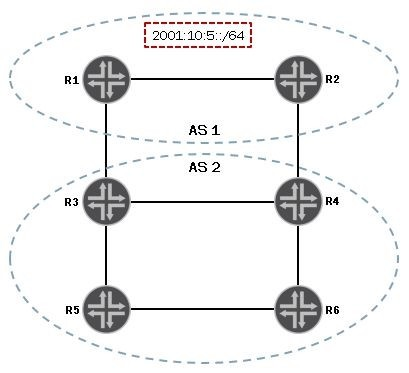
    A customer is trying to configure a router to peer using EBGP to a neighbor. As shown in the exhibit, two links are being used for this configuration. The goal of this configuration is to load- balance traffic across both EBGP links.

    Which configuration accomplishes this goal?

    A. {master:0}[edit] user@router# show protocols bgp group External { multihop; local-address 192.168.2.1; peer-as 65532; neighbor 10.10.2.2; neighbor 10.20.2.2; } {master:0}[edit] user@router# show routing-options static { route 192.168.5.1/32 next-hop 192.168.2.1; } autonomous-system 65432;
    B. {master:0}[edit] user@router# show protocols bgp group External { multihop; local-address 192.168.2.1; peer-as 65532; neighbor 192.168.5.1; } {master:0}[edit] user@router# show routing-options static { route 192.168.5.1/32 next-hop [ 10.10.2.2 10.20.2.2 ]; } autonomous-system 65432; forwarding-table { export load-balance; } {master:0}[edit] user@router# show policy-options policy-statement load-balance term balance { then { load-balance per-packet; accept; } }
    C. {master:0}[edit] user@router# show protocols bgp group External { multi-path; local-address 192.168.2.1; peer-as 65532; neighbor 192.168.5.1; } {master:0}[edit] user@router# show routing-options static { route 192.168.5.1/32 next-hop [ 10.10.2.2 10.20.2.2 ]; } autonomous-system 65432;
    D. {master:0}[edit] user@router# show protocols bgp group External { multipath; local-address 192.168.2.1; peer-as 65532; neighbor 10.10.2.2; neighbor 10.20.2.2; } {master:0}[edit] user@router# show routing-options static { route 192.168.5.1/32 next-hop 192.168.2.1; } autonomous-system 65432;

  • Question 3:

    You are troubleshooting an LLDP neighbor and cannot see the IP address of the neighboring EX Series switch. What is causing the problem?

    A. A VLAN interface must be configured under the [edit vlans] hierarchy.
    B. IP addresses are not sent in any LLDP TLVs.
    C. A management address must be configured under the [edit protocols lldp] hierarchy.
    D. You must enable LLDP-MED.

  • Question 4:

    You are configuring port ge-0/0/0 on an EX Series switch connected to an IP phone that does not support LLDP-MED. Which three configuration statements do you need to accomplish this task? (Choose three.)

    A. set interfaces ge-0/0/0 unit 0 family ethernet-switching native-vlan-id voice-vlan
    B. set interfaces ge-0/0/0 unit 0 family ethernet-switching vlan members voice-vlan
    C. set interfaces ge-0/0/0 unit 0 family ethernet-switching vlan members data-vlan
    D. set interfaces ge-0/0/0 unit 0 family ethernet-switching native-vlan-id data-vlan
    E. set interfaces ge-0/0/0 unit 0 family ethernet-switching port-mode trunk

  • Question 5:

    -- Exhibit -user@SwitchA# show protocols mstp

    configuration-name region1;

    bridge-priority 16k;

    msti 1 {

    bridge-priority 16k;

    vlan [10 20];

    }

    msti 2 {

    bridge-priority 8k;

    vlan [30 40];

    }

    user@SwitchB# show protocols mstp

    configuration-name region1;

    bridge-priority 8k;

    msti 1 {

    bridge-priority 16k;

    vlan [10 20];

    }

    msti 2 {

    bridge-priority 8k;

    vlan [30 40];

    }

    user@SwitchA>monitor traffic interface xe-0/0/0 no-resolve extensive

    10:36:00.594220 Out STP 802.1s, Rapid STP, CIST Flags [Forward, Agreement], CIST bridge-id 4000.5c:5e:ab:72:da:41.8215, length 118

    message-age 0.00s, max-age 20.00s, hello-time 2.00s, forwarding-delay 15.00s CIST root-id 4000.5c:5e:ab:72:da:41, ext-pathcost 0 int-pathcost 0, port-role Designated CIST regional-root-id 4000.5c:5e:ab:72:da:41

    MSTP Configuration Name regio-2, revision 0, digest ca136a235706b316c8db8f921067a68f CIST remaining-hops 20

    MSTI 1, Flags [Proposal, Forward, Agreement], port-role Designated MSTI regional-root-id 4001.5c:5e:ab:72:da:41, pathcost 0 MSTI bridge-prio 4, port-prio 8, hops 2010:36:00.594220

    10:36:00.594223 Out 802.1s, Rapid STP, CIST Flags [Forward, Agreement], CIST bridge-id 4000.5c:5e:ab:72:da:41.8215, length 118

    message-age 0.00s, max-age 20.00s, hello-time 2.00s, forwarding-delay 15.00s CIST root-id 4000.5c:5e:ab:72:da:41, ext-pathcost 0 int-pathcost 0, port-role Designated CIST regional-root-id 4000.5c:5e:ab:72:da:41

    MSTP Configuration Name regio-2, revision 0, digest ca136a235706b316c8db8f921067a68f CIST remaining-hops 20

    MSTI 1, Flags [Proposal, Forward, Agreement], port-role Designated MSTI regional-root-id 4001.5c:5e:ab:72:da:41, pathcost 0 MSTI bridge-prio 4, port-prio 8, hops 20 -- Exhibit -

    Click the Exhibit button.

    Referring to the exhibit, a customer notices that MSTP is not converging on MSTI 2. To troubleshoot the problem, the customer captured traffic on the link (xe-0/0/0) of SwitchA connecting to SwitchB.

    Which two situations would cause the problem? (Choose two.)

    A. MSTI 1 and MSTI 2 are part of the same MSTP region.
    B. The bridge priority value of the MSTI 2 is the same on SwitchA and SwitchB.
    C. VLAN 30 and VLAN 40 are not configured on SwitchA.
    D. VLAN 30 and VLAN 40 are not members of trunk link xe-0/0/0 on SwitchA.

  • Question 6:

    You are asked to implement CoS on an EX Series switch. You attempt to configure the priority for the voice and data queue schedulers to medium-high and medium-low priority, respectively. However, you notice that the only parameters available for the priority is strict high and low.

    Why are strict high and low the only available parameters for configuration?

    A. The loss priority for the queues must first be set to medium-low and medium-high, respectively.
    B. The switch only supports the strict high and low queue priorities.
    C. The shared buffer feature must be configured prior to configuring scheduler priority.
    D. The scheduler must be applied to an interface prior to configuring scheduler priority.

  • Question 7:

    You are asked to set up 802.1X port authentication for all access ports on your EX Series switch. You have a device that does not support 802.1X supplicants and you must ensure this device is authenticated. You must also ensure that no unnecessary delay occurs when authenticating this device.

    Which statement is correct?

    A. You should enable MAC RADIUS on the interface and use 802.1X multiple mode.
    B. You should enable MAC RADIUS on the interface and statically add the MAC address to the 802.1x configuration.
    C. You should enable MAC RADIUS on the interface and include the restrict parameter.
    D. You should enable MAC RADIUS on the interface and include the disable parameter.

  • Question 8:

    -- Exhibit -{master:0}[edit]

    user@switch# show vlans

    v1 {

    vlan-id 1;

    interface {

    ge-0/0/1.0;

    }

    }

    v2 {

    vlan-id 2;

    interface {

    ge-0/0/2.0;

    }

    }

    v3 {

    vlan-id 3;

    interface {

    ge-0/0/1.0 {

    }

    {master:0}[edit]

    user@switch# show interfaces ge-0/0/3

    unit 0 {

    family ethernet-switching {

    port-mode trunk;

    }

    }

    {master:0}[edit]

    user@switch# run show vlans

    Name Tag Interfaces

    default

    None

    v1 1

    ge-0/0/1.0*, ge-0/0/3.0*

    v2 2

    ge-0/0/2.0*, ge-0/0/3.0*

    v3 3

    ge-0/0/1.0*, ge-0/0/3.0*

    -- Exhibit -

    Click the Exhibit button.

    Referring to the exhibit, what would explain interface ge-0/0/3.0 being active in VLANs v1, v2, and v3?

    A. You have enabled RSTP for interface ge-0/0/3.0.
    B. You have enabled MVRP for interface ge-0/0/3.0.
    C. You have enabled MSTP for interface ge-0/0/3.0.
    D. You have enabled L2PT for interface ge-0/0/3.0.

  • Question 9:

    You must prioritize VoIP packets on your network. Which feature will accomplish this goal?

    A. RSVP
    B. Multicast Routing
    C. VPLS
    D. Class of Service

  • Question 10:

    In your 802.1X-enabled network, a RADIUS server fails to respond or authenticate a device. On an EX Series switch, what are three supported actions? (Choose three.)

    A. Traffic can be allowed.
    B. Traffic can be denied.
    C. Traffic can be redirected to another subnet.
    D. Traffic can be redirected to another VLAN.
    E. Traffic can be redirected to another port.

Tips on How to Prepare for the Exams

Nowadays, the certification exams become more and more important and required by more and more enterprises when applying for a job. But how to prepare for the exam effectively? How to prepare for the exam in a short time with less efforts? How to get a ideal result and how to find the most reliable resources? Here on Vcedump.com, you will find all the answers. Vcedump.com provide not only Juniper exam questions, answers and explanations but also complete assistance on your exam preparation and certification application. If you are confused on your JN0-643 exam preparations and Juniper certification application, do not hesitate to visit our Vcedump.com to find your solutions here.