HPE7-A08 Real Exam Questions

Advanced HPE Storage Integrator Solutions Written

88 questions available · Page 1 of 9

Updated Exam DumpsVerified AnswersPass Guarantee

Get Complete Exam Dumps
Question 1 Single choice

You recently enabled ARP protection on your CX switches, but many users now complain that they can no

longer access the network.

What do you need to configure to resolve the issue?

  1. A

    Dynamic IP lockdown

  2. B

    IGMP snooping

  3. C

    DHCP snooping

  4. D

    DHCP reservations

Show answer and explanation

Correct answer: C

Explanation

After enabling ARP protection, many users lose network access because ARP protection relies on DHCP snooping to build IP-to-MAC binding tables. Without DHCP snooping enabled and correctly configured, ARP inspection cannot verify ARP packets, causing legitimate traffic to be dropped.
Enabling DHCP snooping allows ARP inspection to validate ARP requests and responses.
Other options like dynamic IP lockdown, IGMP snooping, or DHCP reservations are unrelated or secondary.

References:
ArubaOS-CX ARP Inspection and DHCP Snooping Configuration Guide
HPE Aruba Network Security Best Practices
Aruba Troubleshooting ARP Protection Issues
Question 2 Single choice

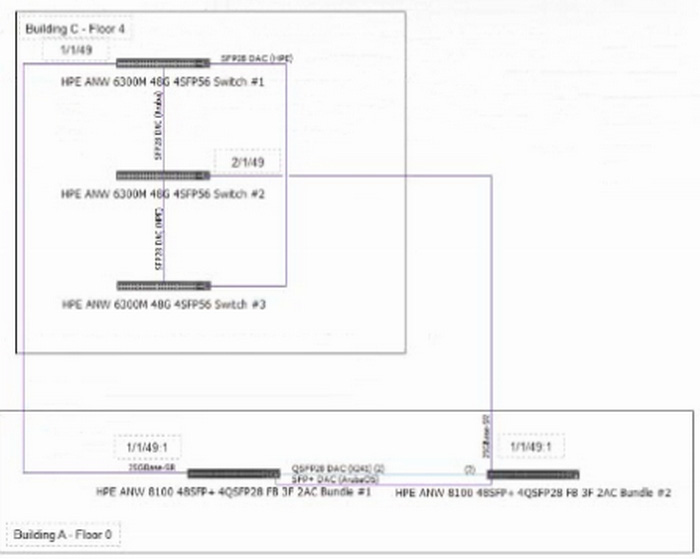
Refer to the exhibit:

A senior network architect has created the configuration above. You are implementing the setup in Building
A and C. The actual fiber distance between the building locations is 200m / 656ft utilizing OM4 cabling.

What needs to be changed in the configuration based on the actual environmental conditions to complete the installation and 7 other CX 6300 VSF stack connections in the future?

  1. A

    Replace the 25GR optics with 10SR

  2. B

    Replace the 25GR optics with 25LR

  3. C

    Replace the 25GR optics with 10LR

  4. D

    Replace the 25GR optics with 25SR

Show answer and explanation

Correct answer: D

Explanation

The configuration involves connecting two buildings over fiber using OM4 cabling with a distance of 200 meters. The current optics in use are 25GR (25 Gigabit Rate) optics.
For multimode fiber such as OM4, SR (Short Reach) optics are suitable for distances up to 300 meters. In contrast, LR (Long Reach) optics are typically designed for single-mode fiber and longer distances.
Therefore, to properly support the 200m OM4 fiber link, 25SR optics should be used instead of 25GR (which are often long-reach optics). 10SR and 10LR refer to 10Gbps optics, which do not meet the 25Gbps requirement. 25LR optics are for single-mode fiber and longer distances, not multimode.

References:
Aruba CX Optics Compatibility Matrix
HPE Aruba Fiber Optic Cabling Guidelines
OM4 Fiber Specification and Supported Transceiver Types

Question 3 Single choice

While troubleshooting a scenario in which the customer has added two new line cards on an HPE Aruba Networking CX 6400 switch, the LEDs on the line card do not show light on the first card.

Which troubleshooting methodology should you use to isolate the problem?

  1. A

    Spot the difference by comparing the switch configurations.

  2. B

    Divide and conquer by swapping the line cards in their slot.

  3. C

    Follow the path and check the connectivity from the access switch to the CX 6400.

  4. D

    Replace the configuration using the previous checkpoint on the switch.

Show answer and explanation

Correct answer: B

Explanation

When line card LEDs do not light up, and the cards are newly installed, the best troubleshooting methodology is Divide and conquer by swapping the line cards. This method isolates the problem by testing hardware in different slots or known working units.
Spot the difference involves comparing configurations, which does not directly isolate hardware failure.
Follow the path is more suited for connectivity issues.
Replace configuration relates to software or config problems.
Hardware issues are best isolated by physically swapping components.

References:
Aruba Hardware Troubleshooting Guides
HPE Aruba Best Practices for Line Card Troubleshooting Aruba CX Switch Maintenance and Diagnostics

Question 4 Single choice

You are attempting to configure an interface, but you are seeing the error message below. What could explain this?

Access-1(config)# interface 1/1/1

Invalid input: interface

  1. A

    The switch is in password recovery mode

  2. B

    The command must be run from the manager context

  3. C

    The switch is being managed by HPE Aruba Networking Central

  4. D

    Authorization is enabled for CLI commands

Show answer and explanation

Correct answer: C

Explanation

The error message "Invalid input: interface" typically appears if the switch is managed by HPE Aruba Central, which restricts CLI interface configuration to prevent configuration drift. When managed externally, certain commands are disabled or locked.
Password recovery mode or authorization enabled would not cause this error.
Manager context is not a concept in Aruba CX CLI.

References:
Aruba Central Management Mode Documentation
HPE Aruba Switch CLI Behavior.
When Centrally Managed ArubaOS-CX CLI Access Control Guide

Question 5 Single choice

Which statement is valid when enabling ARP protection features on HPE Aruba Networking CX switches?

  1. A

    Once you enable DHCP snooping, you can enable ARP protection, and you will have full information to mitigate security risks.

  2. B

    In an active network, you should generally wait at least a week after enabling DHCP snooping to enable ARP protection.

  3. C

    Client lease time on the DHCP server should be at least 3600s before enabling ARP protection.

  4. D

    DHCP server utilization is required for IP to MAC binding to enable ARP protection.

Show answer and explanation

Correct answer: B

Explanation

When enabling ARP protection, it is best practice to wait at least a week after enabling DHCP snooping before enabling ARP protection in a live network. This allows the DHCP snooping binding table to stabilize, ensuring ARP protection has accurate IP-MAC bindings, reducing false positives.
Immediate ARP protection may cause legitimate traffic to be dropped.
Lease times and DHCP server utilization are less critical.
This staged approach minimizes disruption.

References:
ArubaOS-CX Security Features Best Practices
HPE Aruba ARP Protection Configuration Guide
Aruba Network Security Deployment Guidelines

Question 6 Single choice

An administrator is configuring UBT on an Aruba CX switch. After applying the config, some HTTPS sites fail to load.

What adjustment is needed?

  1. A

    Enable Path MTU Discovery

  2. B

    Reduce CoS value to 3

  3. C

    Enable IP Fragmentation

  4. D

    Apply Jumbo Frames

Show answer and explanation

Correct answer: C

Explanation

When using UBT, enabling IP fragmentation allows tunneled traffic like HTTPS to pass without being dropped due to exceeding MTU.

Question 7 Single choice

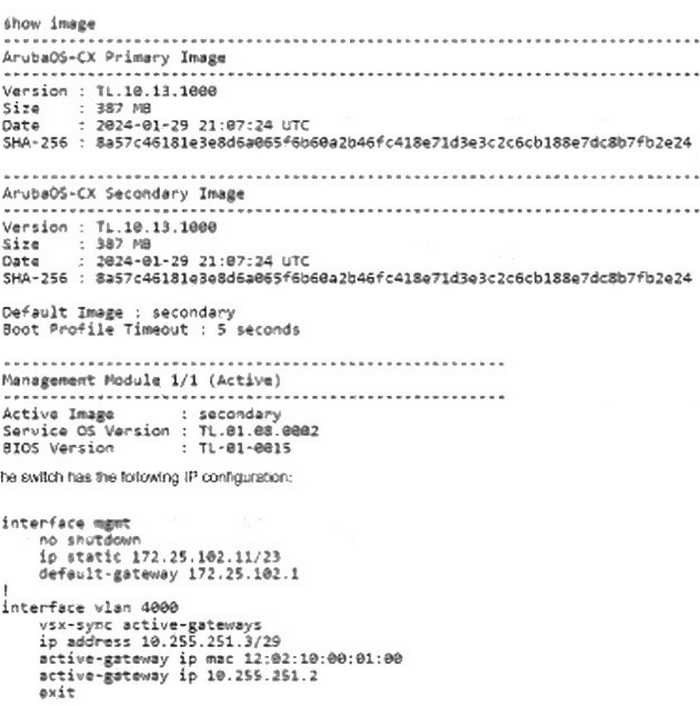
The HPE Aruba Networking CX 8320 VSX configuration is running the current software:

How do you upgrade the VSX cluster with the least amount of downtime from a remote server 172.25.101.10 reachable from 172.25.102.11?

  1. A

    vsx update-software scp://172.25.101.10/image vrf mgmt

  2. B

    vsx update-software scp://172.25.101.10/image primary

  3. C

    vsx update-software tftp://172.25.101.10/image vrf mgmt

  4. D

    vsx update-software tftp://172.25.101.10/image primary

Show answer and explanation

Correct answer: A

Explanation

To upgrade an HPE Aruba Networking CX 8320 VSX cluster with minimal downtime from a remote server, the correct command is:

vsx update-software scp://172.25.101.10/image vrf mgmt
Using SCP (Secure Copy Protocol) ensures secure transfer.
Specifying vrf mgmt ensures the update uses the management VRF for connectivity.
Using TFTP is less secure and not recommended for production upgrades.
The primary keyword is not valid for the vsx update-software command.
This method allows an in-service software upgrade (ISSU) with least disruption.

References:
Aruba VSX Software Upgrade Guide
HPE Aruba CX Upgrade Best Practices
ArubaOS-CX CLI Reference for VSX Commands

Question 8 Single choice

You are configuring a CX 8325 switch and need to ensure that user traffic does not bypass access policies even during a VSX synchronization delay.

Which feature should be enabled?

  1. A

    VSX Graceful Restart

  2. B

    VSX Shutdown-on-split

  3. C

    VSX Keepalive Boost

  4. D

    VSX MAC-pinning

Show answer and explanation

Correct answer: B

Explanation

Enabling shutdown-on-split ensures the primary VSX switch disables interfaces during a split-brain condition to prevent unintended traffic forwarding.

Question 9 Single choice

You are troubleshooting a complex routing issue after a recent change. Your customer has just called and reported that the issue now impacts all users.

What should you do next?

  1. A

    Restore the last-known working configuration.

  2. B

    Ask the customer to send logs from each user.

  3. C

    Explain to the customer what the issue is.

  4. D

    Collect a show tech and log a case with TAC.

Show answer and explanation

Correct answer: A

Explanation

When a recent routing change causes an outage affecting all users, the recommended immediate action is to restore the last-known working configuration to quickly return the network to a stable state. This is critical to minimize downtime and impact.
Asking customers to send logs or explaining the issue takes time and delays remediation.
Collecting show tech and opening TAC cases can be done after restoring service.
Hence, the quickest way to mitigate the impact is to restore the last known good configuration.

References:
HPE Aruba Network Troubleshooting Methodologies
ArubaOS-CX Configuration Rollback Procedures
Best Practices for Network Incident Response

Question 10 Single choice

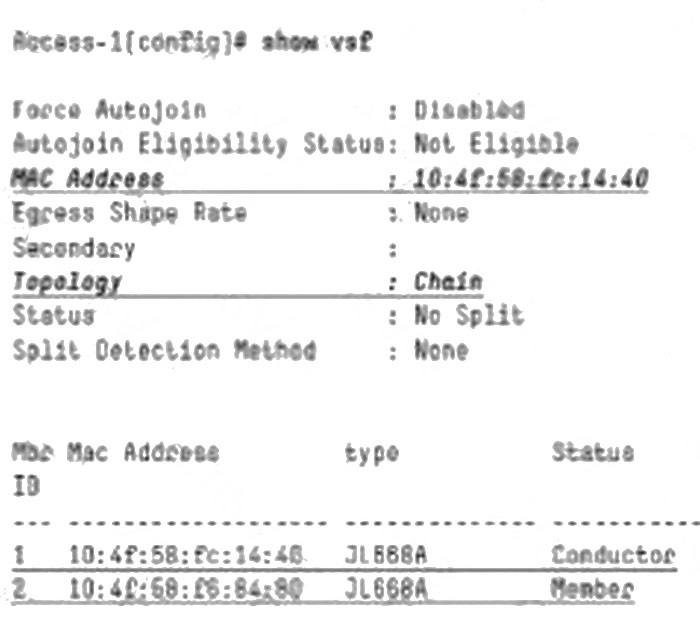
Refer to the exhibit for an HPE Aruba Networking CX 6300M VSF:

What VSF configuration is required for the stack configuration to work and avoid split-brain?

  1. A

    vsf start-auto-stacking

  2. B

    vsf secondary-member 2

  3. C

    vsf conductor-member 2

  4. D

    vsl split-detect mgrep

Show answer and explanation

Correct answer: D

Explanation

To avoid split-brain scenarios in VSF stacks, the VSL split-detect mgrep command is used to enable multicast group detection over the Virtual Switching Link (VSL). This helps detect when the stack links are down or partitioned, triggering appropriate failover or shutdown mechanisms.
Options like vsf start-auto-stacking, vsf secondary-member 2, or vsf conductor-member 2 are related to stack initialization and member roles but do not address split-brain detection directly.
Hence, enabling split-detect with mgrep is the best practice for VSF stack stability.

References:
Aruba VSF Stack Configuration and Troubleshooting Guide
HPE Aruba VSF High Availability Documentation
ArubaOS-CX Stack and VSF Best Practices